
Photo d'hommage commémoratif
Honorez vos proches avec une photo d'hommage magnifiquement sublimée. Ce modèle restaure délicatement les photos anciennes, ravive la netteté et les couleurs des originaux passés, supprime les arrière-plans gênants et produit un portrait digne, prêt à imprimer, adapté aux cérémonies commémoratives, aux avis de décès et aux présentations de souvenir durables.
Essayer ce modèle gratuitementPersonal template preview
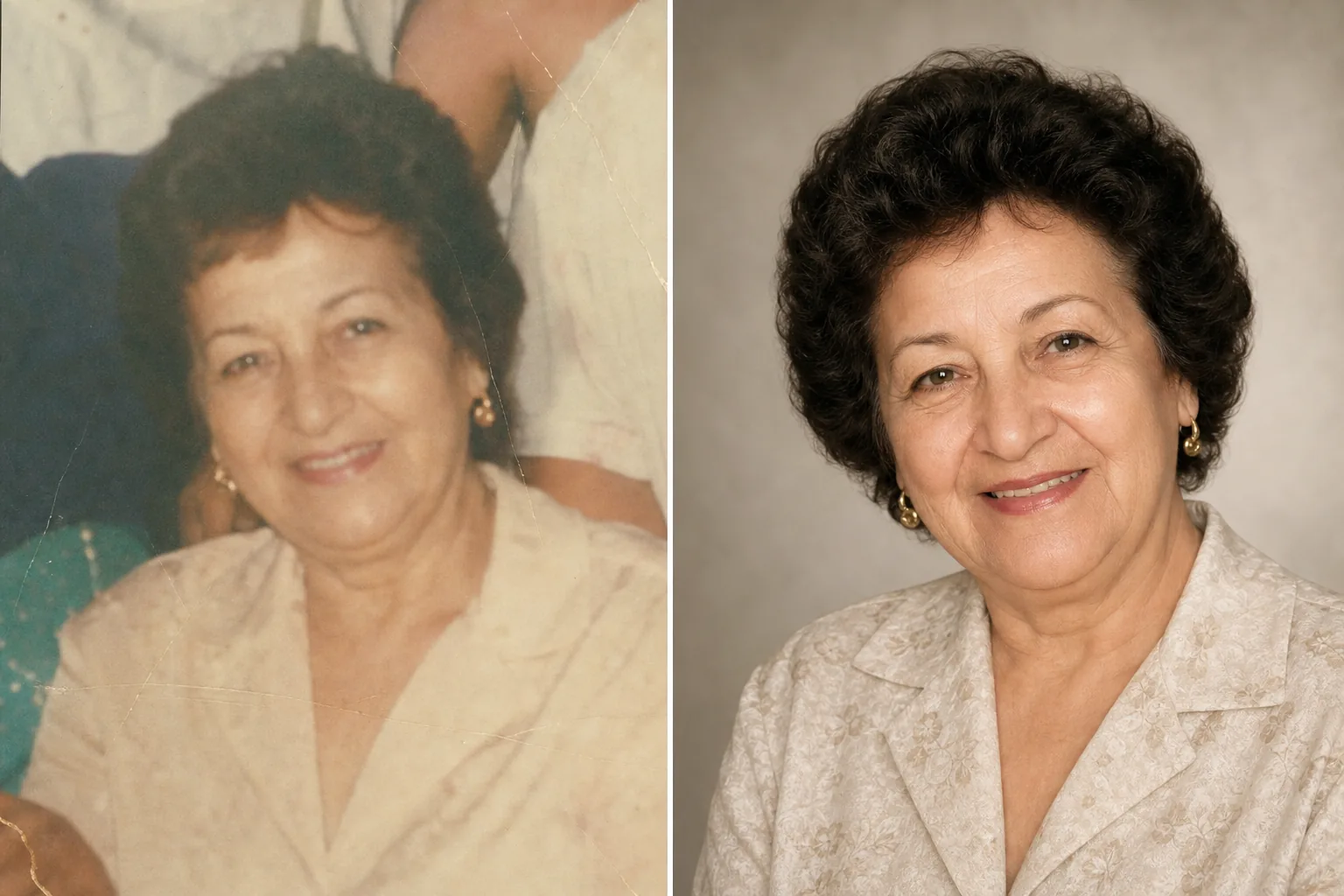
Ce que fait ce modèle
Prépare des portraits pour les cérémonies commémoratives, les avis de décès, les programmes d'obsèques, les présentations de souvenir et les montages d'hommage, avec le soin et le respect qu'exige l'occasion. Bien souvent, la meilleure photo disponible d'un être cher a été prise il y a des années — il peut s'agir d'un instantané pris sur le vif, d'une photo de groupe dont il faut l'isoler, ou d'un tirage passé qui a été numérisé. AI Enhance restaure la couleur et la netteté des photos anciennes ou décolorées, éclaircit les images sous-exposées et atténue délicatement les petites imperfections tout en préservant la ressemblance authentique de la personne. Magic Eraser supprime les distractions de l'arrière-plan et peut isoler une personne d'une photo de groupe. La tonalité d'ensemble est chaleureuse, digne et respectueuse — jamais surtraitée.
Paramètres du modèle
| Restauration de photo | Récupérer la couleur et les détails des photos passées ou anciennes |
| Arrière-plan | Dégradé neutre et doux, couleur unie ou original simplifié |
| Étalonnage des couleurs | Chaleureux et digne (tons de peau naturels, chaleur douce) |
| Niveau d'amélioration | Subtil et respectueux (préserve la ressemblance authentique) |
| Dimensions de sortie | 8×10 po à 300 DPI (portrait commémoratif standard) ou personnalisé |
Comment utiliser ce modèle
Téléverser le portrait
Téléversez la meilleure photo disponible de la personne — un portrait dédié, un recadrage d'une photo de groupe ou la numérisation d'une photo imprimée. Le modèle gère les photos de toute époque et de tout état, y compris les vieux tirages présentant une décoloration, des plis et de légers dommages.
Restaurer et améliorer
AI Enhance ravive les couleurs passées, accentue la netteté des détails adoucis et corrige la dominante jaune ou bleue qui se développe dans les photos vieillissantes. Pour les photos numérisées à partir de tirages, les artefacts de numérisation et la texture du papier sont atténués. L'amélioration est volontairement subtile — l'objectif est de présenter la personne telle qu'elle était, avec netteté et chaleur, sans modifier son apparence.
Arrière-plan et cadrage
L'arrière-plan est remplacé par une option douce et neutre — un dégradé délicat, une couleur unie atténuée ou une version adoucie du décor d'origine. Si la photo est tirée d'un groupe, la personne est isolée et cadrée comme un portrait autonome. La composition est ajustée aux proportions standard d'un portrait commémoratif.
Exporter pour les cérémonies et l'affichage
Téléchargez en 8×10 pouces à 300 DPI pour l'impression en pompes funèbres et lors des cérémonies commémoratives, ou en dimensions personnalisées pour les publications d'avis de décès, les cartes de souvenir et les affichages d'hommage numériques. Le résultat convient à l'impression en couleur comme en noir et blanc.
Conseils de pro pour de meilleurs résultats
- ✓Choisissez une photo où l'expression et la personnalité de la personne transparaissent, même si la qualité technique n'est pas parfaite. Le modèle peut améliorer sensiblement la qualité de l'image, mais le lien émotionnel avec la photo compte davantage que la résolution.
- ✓Lorsque vous numérisez des photos imprimées, utilisez le DPI le plus élevé pris en charge par votre scanner (600 DPI minimum) et numérisez sur une surface propre et plane. Les numérisations en haute résolution offrent au modèle davantage de données pour restaurer les détails et corriger la décoloration.
- ✓S'il n'existe pas de portrait individuel, le modèle peut isoler une personne d'une photo de groupe. Choisissez une photo de groupe où le visage de la personne est clairement visible, dégagé et tourné vers l'objectif pour un meilleur résultat d'isolement.
- ✓Envisagez de réaliser à la fois une version couleur et une version noir et blanc. Les portraits commémoratifs en noir et blanc possèdent une qualité intemporelle et digne, et conviennent bien lorsque la photo couleur d'origine présente une décoloration importante ou des dommages de couleur impossibles à restaurer entièrement.
Outils
Questions fréquentes
Peut-il restaurer des photos fortement endommagées ?
+
Le modèle gère les dommages modérés — décoloration, dérives de couleur, légers plis et flou dû à l'âge. Les dommages importants comme les grandes déchirures, les fortes taches d'eau ou les parties manquantes considérables nécessitent une restauration manuelle par un retoucheur professionnel. Le modèle est le plus efficace lorsque le visage et les traits essentiels sont visibles et intacts dans l'original.
La photo améliorée aura-t-elle l'air naturelle ?
+
Oui. L'amélioration est calibrée pour rester subtile et respectueuse. La personne se ressemblera — ni plus jeune, ni plus âgée, ni différente. L'objectif est de présenter la photo comme si elle avait été prise avec un meilleur éclairage, un meilleur appareil et un meilleur jour, tout en préservant chaque aspect de ce qu'était la personne.
Puis-je l'utiliser pour un diaporama vidéo d'hommage ?
+
Oui. Traitez chaque photo avec le modèle en conservant des réglages d'arrière-plan et de couleur cohérents pour un diaporama harmonieux. Ce traitement uniforme relie les photos de différentes époques et sources en un hommage visuel unifié.
Une photo d'hommage aussi belle que les souvenirs
Téléversez n'importe quelle photo d'un être cher et recevez un portrait délicatement restauré, chaleureusement sublimé, prêt pour les cérémonies commémoratives et le souvenir durable.
Essayer gratuitementRelated templates
More personal templates for your workflow.
Créez des photos d'identité conformes pour les visas, les permis de conduire et les pièces d'identité nationales avec des exigences appropriées en matière de couleur d'arrière-plan, de taille de tête et d'expression faciale.
Améliorez les photos de remise de diplômes avec le nettoyage de l'arrière-plan, la casquette et la toge Color correction, la suppression des imperfections et la netteté des cadres et des annonces prêts à l'impression.
Améliorez les photos de concerts et d'événements grâce à la réduction du bruit en faible luminosité, à l'éclairage de scène correction des couleurs, à la suppression des distractions de la foule et à la récupération des détails des prises de vue dans des lieux sombres.
Créez de superbes photos de faire-part de nouveau-né avec des arrière-plans doux, un étalonnage doux des couleurs, l'élimination de l'encombrement de l'hôpital et des dimensions prêtes à imprimer pour l'envoi.
Préparez des photos de famille et des portraits pour des cartes de vœux de Noël avec des arrière-plans festifs, un étalonnage de couleurs chaudes, des effets de neige et des dimensions de carte standard pour l'impression.
Transformez les photos d'animaux de refuge et de sauvetage avec le remplacement de l'arrière-plan, la correction de l'éclairage et l'amélioration des détails de la fourrure pour aider les animaux à trouver leur foyer plus rapidement.