
Photo d'adoption d'animal
Aidez les animaux de refuge à trouver un foyer pour toujours grâce à des photos qui révèlent leur personnalité plutôt qu'un box en béton. Ce modèle supprime les barreaux de cage, les sols de chenil et les arrière-plans de refuge, et les remplace par des environnements chaleureux et accueillants comme à la maison ou par des fonds unis et nets. La correction de l'éclairage éclaircit les photos sombres de refuge, et l'amélioration des détails de la fourrure révèle la couleur et la texture réelles du pelage de chaque animal.
Essayer ce modèle gratuitementPersonal template preview
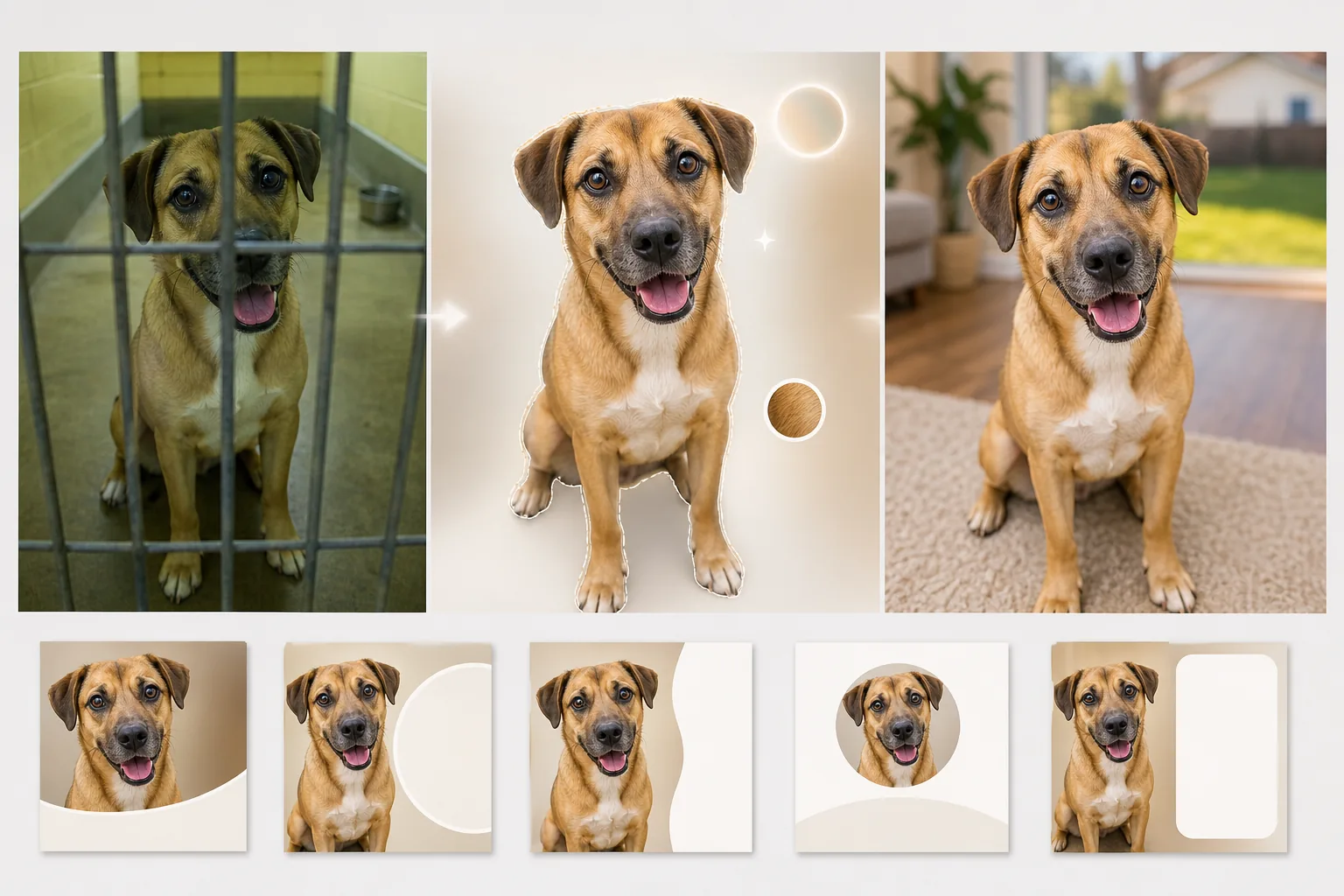
Ce que fait ce modèle
Répond aux défis spécifiques de la photographie en refuge, où l'éclairage est médiocre, les arrière-plans institutionnels et les animaux souvent photographiés à travers des barreaux de cage ou dans d'étroits couloirs en béton. Background Eraser supprime les barreaux de chenil, les clôtures grillagées et les environnements de refuge, et les remplace par des arrière-plans chaleureux et accueillants — une cour herbeuse, un sol douillet de salon ou une couleur unie et nette qui concentre toute l'attention sur l'animal. AI Enhance corrige la sous-exposition fréquente en photographie de refuge (éclairage fluorescent au plafond, absence de fenêtres), éclaircit les yeux souvent perdus dans l'ombre et fait ressortir la couleur et la texture réelles du pelage, des plumes ou des écailles, afin que les adoptants potentiels puissent voir à quoi ressemble réellement l'animal en lumière naturelle.
Paramètres du modèle
| Arrière-plan | Cour herbeuse, sol de salon, pastel uni ou transparent |
| Suppression des barreaux de cage | Détection et suppression automatiques des barreaux de chenil, du grillage et des clôtures métalliques |
| Correction de l'éclairage | Éclaircit les photos de refuge sous-exposées à l'équivalent d'une lumière du jour naturelle |
| Amélioration des yeux | Éclaircit et accentue les yeux pour révéler la personnalité et la vivacité |
| Détail de la fourrure | Améliore la texture du pelage et corrige la dominante de couleur due à l'éclairage fluorescent |
| Résolution de sortie | 2000×2000px (carré pour Petfinder, Adopt-a-Pet et les réseaux sociaux) |
Comment utiliser ce modèle
Téléchargez la photo du refuge
Téléchargez une photo de l'animal prise au refuge, en famille d'accueil ou lors d'un événement en plein air. Les photos prises à travers les barreaux de cage, dans des chenils sombres et sur des sols en béton sont toutes prises en charge. Le modèle convient aux chiens, chats, lapins, oiseaux et autres animaux de refuge.
Supprimez l'environnement du refuge
Background Eraser supprime le chenil, les barreaux de cage, les sols en béton et l'arrière-plan institutionnel du refuge. L'animal est isolé grâce à une détection des contours qui préserve le tracé naturel de la fourrure, des moustaches et des oreilles — y compris les bords vaporeux des races à poils longs.
Améliorez l'éclairage et les détails
AI Enhance éclaircit l'image pour simuler une lumière du jour naturelle, corrige la dominante vert-jaune des éclairages fluorescents de refuge et accentue la texture de la fourrure et les détails des yeux. La couleur et le motif réels du pelage de l'animal deviennent visibles, et ses yeux retrouvent le regard vif et attentif qui attire les adoptants.
Exportez pour les annonces d'adoption
Téléchargez en 2000×2000px au format carré optimisé pour Petfinder, Adopt-a-Pet et les sites des organisations de sauvetage. Ce format fonctionne aussi directement pour les publications d'adoption sur Instagram et Facebook, sans recadrage supplémentaire.
Conseils de pro pour de meilleurs résultats
- ✓Mettez-vous à hauteur des yeux de l'animal pour le photographier. Les prises de vue en plongée font paraître les animaux plus petits et moins attachants. Les photos à hauteur des yeux créent un lien entre le spectateur et l'animal, ce qui suscite les demandes d'adoption.
- ✓Tenez une friandise ou un jouet juste au-dessus de l'appareil photo pour capter une expression alerte, oreilles dressées vers l'avant. L'IA peut éclaircir des yeux ternes et améliorer la fourrure, mais elle ne peut pas transformer une expression indifférente en une expression engageante.
- ✓Pour les chiens et chats noirs — dont les traits disparaissent souvent sur les photos de refuge — veillez à ce qu'un peu de lumière éclaire le visage de face. Même une lampe de téléphone tenue sur le côté crée assez de relief pour que l'IA récupère les détails du visage et la définition des yeux.
Questions fréquentes
Cela peut-il supprimer les barreaux de cage devant l'animal ?
+
Oui. L'IA détecte le motif régulier des barreaux de chenil et des clôtures grillagées qui recouvrent l'animal et les supprime, en reconstituant le motif de la fourrure et les traits du visage derrière les barreaux. Des barreaux épais couvrant une grande partie du visage peuvent laisser de légers artefacts nécessitant une petite retouche manuelle.
La photo donnera-t-elle une image trompeuse de l'apparence de l'animal ?
+
Non. Le modèle corrige le mauvais éclairage du refuge et supprime l'environnement institutionnel, mais il ne modifie pas les caractéristiques physiques de l'animal, son motif de pelage, sa taille ou sa coloration. L'objectif est de montrer à quoi ressemble réellement l'animal sous une bonne lumière et dans un cadre normal.
Les refuges peuvent-ils l'utiliser gratuitement ?
+
L'offre gratuite inclut un volume de traitement suffisant pour les bénévoles de familles d'accueil et les petits sauvetages. Les refuges à fort volume peuvent nous contacter pour obtenir un tarif à but non lucratif sur le traitement par lots.
Aidez chaque animal de refuge à se présenter sous son meilleur jour
Téléchargez les photos de refuge et obtenez des images d'adoption chaleureuses et accueillantes qui révèlent la véritable personnalité de chaque animal.
Essayer gratuitementRelated templates
More personal templates for your workflow.
Créez des photos d'identité conformes pour les visas, les permis de conduire et les pièces d'identité nationales avec des exigences appropriées en matière de couleur d'arrière-plan, de taille de tête et d'expression faciale.
Améliorez les photos de remise de diplômes avec le nettoyage de l'arrière-plan, la casquette et la toge Color correction, la suppression des imperfections et la netteté des cadres et des annonces prêts à l'impression.
Améliorez les photos de concerts et d'événements grâce à la réduction du bruit en faible luminosité, à l'éclairage de scène correction des couleurs, à la suppression des distractions de la foule et à la récupération des détails des prises de vue dans des lieux sombres.
Créez de superbes photos de faire-part de nouveau-né avec des arrière-plans doux, un étalonnage doux des couleurs, l'élimination de l'encombrement de l'hôpital et des dimensions prêtes à imprimer pour l'envoi.
Préparez des photos de famille et des portraits pour des cartes de vœux de Noël avec des arrière-plans festifs, un étalonnage de couleurs chaudes, des effets de neige et des dimensions de carte standard pour l'impression.
Restaurez et améliorez les photos d'hommage commémoratif avec des retouches douces, une simplification de l'arrière-plan, un étalonnage des couleurs chaleureux et respectueux et des dimensions prêtes à imprimer pour les services.