
Photo de collecte de fonds à but non lucratif
Transformez les instantanés d'événements et les photos de documentation de programmes en images convaincantes pour les appels aux donateurs, les rapports annuels et les demandes de subvention. Ce modèle corrige l'éclairage difficile des salles de banquet, des événements en plein air et des sites de programme, supprime le désordre visuel et applique un étalonnage des couleurs chaud qui communique l'énergie et l'impact du travail de votre organisation.
Essayez ce modèle gratuitementBusiness template preview
Ce que fait ce modèle
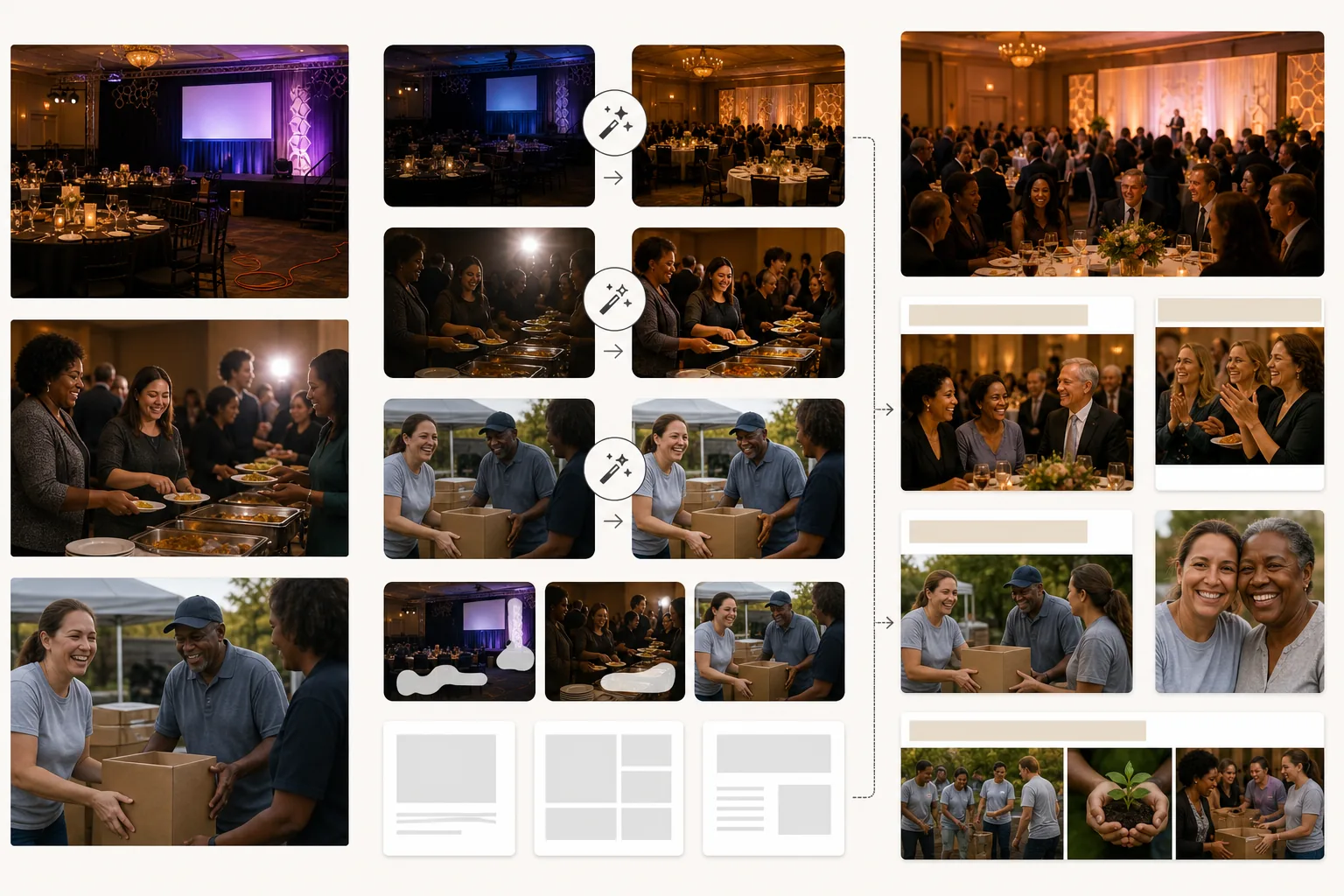
Rehausse la qualité visuelle des communications des organisations à but non lucratif sans nécessiter de budget de photographie professionnelle. La plupart des photos d'organisations à but non lucratif sont prises par des bénévoles ou des membres du personnel avec leur téléphone personnel dans des environnements difficiles — salles de banquet sombres, événements en plein air animés, sites de programme bondés. AI Enhance corrige la sous-exposition, normalise l'éclairage mixte des lustres, des projecteurs de scène et des bougies de table, et récupère les détails des visages perdus dans l'ombre ou surexposés par le flash. Magic Eraser supprime les éléments perturbateurs qui nuisent à la qualité professionnelle des supports de collecte de fonds — câbles et rallonges visibles lors des galas, déchets et assiettes en carton lors des événements en plein air, équipements de chantier sur les sites de construction, et la signalétique de marque des sponsors d'entreprise qui ne devrait pas apparaître dans certaines communications. L'étalonnage chaud transmet le lien humain et l'impact positif, ce que la recherche en communication caritative montre comme moteur de la réponse des donateurs.
Paramètres du modèle
| Correction de l'éclairage | Préréglages pour salle de banquet, événement en plein air et site de programme en intérieur |
| Correction du flash | Réduit les points chauds durs du flash et les yeux rouges tout en préservant la chaleur ambiante |
| Nettoyage de l'arrière-plan | Supprime les câbles, la signalétique temporaire et le désordre de l'événement |
| Étalonnage des couleurs | Communauté chaleureuse (met en valeur le lien humain et l'énergie positive) |
| Résolution de sortie | 3000×2000px (3:2 pour les rapports annuels, les bulletins et le web) |
Comment utiliser ce modèle
Importez les photos d'événements ou de programmes
Importez des photos de galas de collecte de fonds, d'événements de bénévolat, d'activités de programme, d'actions de proximité et de toute activité organisationnelle. Les photos de téléphone, les instantanés de compacts et les images de reflex numériques fonctionnent tous. Le modèle gère la large gamme de conditions d'éclairage que rencontrent les organisations à but non lucratif.
Corrigez l'éclairage et l'exposition
AI Enhance éclaircit les photos sous-exposées de salles de banquet et d'événements en soirée, corrige les dominantes de couleur mixtes des lustres et de l'éclairage de scène, et réduit les artefacts de flash durs. Les visages dans la foule qui étaient trop sombres ou trop clairs sont équilibrés pour un rendu naturel et chaleureux.
Supprimez les distractions
Magic Eraser supprime le désordre visuel qui nuit à la qualité professionnelle de vos communications — rallonges, matériel de traiteur, banderoles de sponsors (lorsque c'est inapproprié) et matériel de montage de l'événement. L'IA reconstruit le sol, les murs et l'arrière-plan derrière les éléments supprimés.
Exportez pour les communications aux donateurs
Téléchargez en 3000×2000px pour les rapports annuels et les demandes de subvention, ou à des tailles optimisées pour le web pour les campagnes par e-mail, les réseaux sociaux et le site web de l'organisation. La qualité chaleureuse et professionnelle signale aux donateurs que leurs contributions financent des programmes bien gérés.
Conseils de pro pour de meilleurs résultats
- ✓Capturez des moments d'interaction authentique — un bénévole et un participant riant ensemble, un donateur serrant la main d'un responsable de programme, des enfants absorbés par une activité. Ce sont ces moments de connexion authentique qui touchent les donateurs, et l'amélioration par l'IA les fait briller même lorsqu'ils sont capturés dans des conditions sombres et imparfaites.
- ✓Désignez une personne à chaque événement pour être le photographe. Même un membre du personnel équipé d'un téléphone produit de meilleurs résultats que de s'en remettre à des instantanés aléatoires, car un cadrage et un timing intentionnels capturent les moments qui racontent l'histoire de votre organisation.
- ✓Traitez toutes les photos d'un même événement avec les mêmes réglages. Une correction de l'éclairage et un étalonnage des couleurs cohérents sur un ensemble de photos créent une histoire visuelle homogène pour le rapport annuel ou la page de campagne, plutôt qu'une collection disparate d'instantanés aléatoires.
Outils
Questions fréquentes
Puis-je supprimer les logos des sponsors des photos d'événements ?
+
Oui. Magic Eraser peut supprimer les banderoles de marque, les affichages de logos et la signalétique des sponsors des photos d'événements. C'est utile lorsque les photos d'un événement sponsorisé sont utilisées dans des contextes où mettre en avant ce sponsor précis est inapproprié — comme des demandes de subvention auprès de bailleurs de fonds concurrents ou le marketing général de l'organisation.
Cela fonctionne-t-il pour les événements de construction et de bénévolat en plein air ?
+
Oui. Les événements de bénévolat en plein air — chantiers d'habitat, nettoyages de parcs, jardins communautaires — ont leurs propres défis, notamment le soleil dur, l'ombre mixte et les arrière-plans encombrés de matériaux de construction. Le modèle corrige ces conditions et supprime les équipements et matériaux distrayants du cadre.
Puis-je l'utiliser pour les photos de demande de subvention ?
+
Absolument. Les demandes de subvention accompagnées de photos de programme de qualité professionnelle démontrent la compétence organisationnelle et la mise en œuvre efficace du programme. Le modèle produit des images qui répondent au standard visuel que les bailleurs de fonds attendent des organisations établies.
Montrez aux donateurs l'impact de chaque don
Importez des photos d'événements et de programmes et obtenez des images soignées qui renforcent les appels aux donateurs, les rapports annuels et les demandes de subvention.
Essayez gratuitementRelated templates
More business templates for your workflow.
Améliorez les photos de l'équipe d'entreprise avec des arrière-plans cohérents, une correction d'éclairage professionnelle, un étalonnage des couleurs adapté à la marque et une qualité d'image uniforme dans toute l'équipe.
Améliorez les photos de salle de sport et de fitness grâce à l'amélioration de la définition musculaire, à la correction dynamique de l'éclairage, au nettoyage de l'arrière-plan et à l'étalonnage des couleurs athlétiques à contraste élevé.
Améliorez les photos de votre portfolio de tatouage avec l'éclat des couleurs de l'encre, la netteté des détails des lignes, la réduction des rougeurs de la peau et des arrière-plans propres pour les portfolios d'artistes et Instagram.
Créez une photo de CV soignée avec remplacement de l'arrière-plan, lissage de la peau et correction de l'éclairage. Idéal pour les CV, les portails d'emploi et les annuaires d'entreprise.
Créez des photos d'équipe professionnelle et de joueurs individuels avec remplacement de l'arrière-plan, amélioration de la couleur du maillot et arrière-plans de stade ou de studio pour les équipes et les programmes.
Créez des photos promotionnelles professionnelles de groupes et de musiciens avec remplacement de l'arrière-plan, amélioration spectaculaire de l'éclairage et sorties prêtes à imprimer pour les dossiers de presse et les soumissions de salles.