
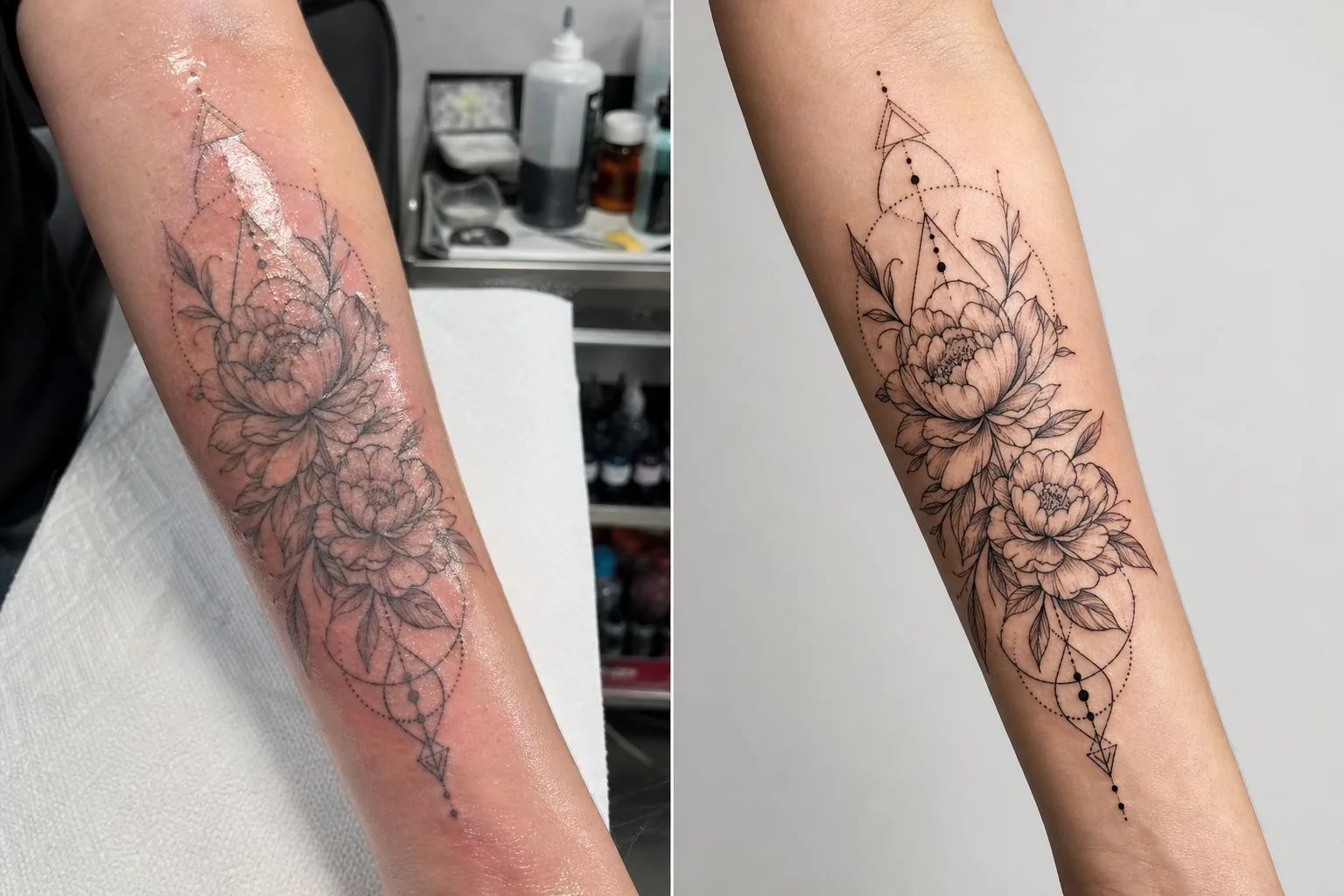
Photo de portfolio de tatouage
Présentez votre travail de tatouage avec le niveau de détail et la justesse des couleurs qui attirent de nouveaux clients. Ce modèle renforce la saturation de l'encre et la netteté des lignes, réduit les rougeurs et le gonflement de la peau après la séance, corrige l'éclairage du studio pour des couleurs d'encre fidèles et crée des présentations de portfolio épurées qui laissent l'œuvre parler d'elle-même.
Essayer ce modèle gratuitementBusiness template preview
Ce que fait ce modèle
Répond aux défis photographiques particuliers que rencontrent les tatoueurs lorsqu'ils documentent leur travail. Les tatouages fraîchement réalisés sont photographiés en studio sous un éclairage mixte, et la peau autour de l'encre neuve est rouge, gonflée et recouverte d'excès d'encre et de pommade — rien de tout cela ne reflète le résultat final cicatrisé. Ce modèle utilise AI Enhance pour corriger l'éclairage afin que les couleurs de l'encre apparaissent telles qu'elles seront une fois cicatrisées, affine les lignes fines et les détails du dotwork, et réduit les rougeurs et le gonflement autour des tatouages récents. Magic Eraser supprime le désordre en arrière-plan du poste de tatouage, y compris les flacons d'encre, les essuie-tout, les gants et le matériel, créant un fond épuré qui concentre toute l'attention sur l'œuvre.
Paramètres du modèle
| Renforcement de l'encre | Boost de saturation des couleurs pour les styles de tatouage noir, couleur et aquarelle |
| Netteté des lignes | Renforcement des micro-détails des lignes fines et du dotwork |
| Correction de la peau | Réduit les rougeurs, le gonflement et l'éclat de la pommade autour des tatouages récents |
| Correction de l'éclairage | Corrige l'éclairage de studio mixte en lumière du jour neutre pour des couleurs d'encre fidèles |
| Arrière-plan | Fond uni ou flou épuré (suppression du désordre du poste) |
| Dimensions de sortie | 2000 × 2000 px (format carré Instagram) ou 4000px pour l'impression du portfolio |
Comment utiliser ce modèle
Téléchargez votre photo de tatouage
Téléchargez une photo du tatouage terminé — frais ou cicatrisé. Photographiez le tatouage de face pour minimiser la distorsion de perspective. Le modèle gère les gros plans détaillés, les vues d'ensemble de la pièce complète et les compositions enveloppantes sur les surfaces corporelles courbes comme les bras, les jambes et les côtes.
Renforcement de l'encre et des lignes
AI Enhance augmente la saturation de l'encre pour que les tatouages noirs paraissent profonds et intenses tandis que les tatouages en couleur révèlent toute leur vivacité. Les lignes fines, le dotwork et les motifs géométriques sont affinés pour montrer la précision de votre travail à l'aiguille. Le renforcement respecte les différents styles de tatouage — traditionnel marqué, ligne fine, aquarelle et blackwork reçoivent chacun un traitement approprié.
Correction de la peau et de l'arrière-plan
Pour les tatouages récents, les rougeurs et le gonflement autour de l'encre sont réduits pour se rapprocher de l'aspect cicatrisé. L'éclat de la pommade et l'excès d'encre sur la peau environnante sont atténués. Magic Eraser supprime l'arrière-plan du poste de tatouage — godets d'encre, essuie-tout, gants et matériel — pour le remplacer par un fond épuré.
Exporter pour le portfolio et les réseaux sociaux
Téléchargez au format carré 2000 × 2000 px pour les publications de portfolio Instagram, ou à 4000px sur le grand côté pour les portfolios de site web et les lookbooks imprimés. Le profil colorimétrique préserve toute la gamme des couleurs d'encre de tatouage, y compris les subtiles variations de teinte des styles aquarelle et néo-traditionnel.
Conseils de pro pour de meilleurs résultats
- ✓Photographiez le tatouage sous une lumière équilibrée lumière du jour (5000–5500K) à un angle constant. Cela fournit au modèle les données de couleur les plus précises à traiter. Les lumières tungstène chaudes font paraître l'encre plus jaune-orangé, et la correction, bien qu'efficace, donne de meilleurs résultats à partir d'un éclairage neutre.
- ✓Essuyez l'excès d'encre et de pommade de la surface de la peau avant de photographier. Le modèle réduit l'éclat de la pommade, mais une surface propre et tamponnée à sec montre le travail d'encre plus clairement et produit un meilleur résultat amélioré.
- ✓Photographiez les versions fraîche et cicatrisée du même tatouage lorsque c'est possible. La photo fraîche traitée par le modèle vous donne un contenu de portfolio immédiat, et la photo cicatrisée confirme le résultat réel stabilisé. Les deux versions dans votre portfolio démontrent votre professionnalisme.
- ✓Pour les grandes pièces qui s'enroulent autour des membres, prenez plusieurs gros plans détaillés qui se chevauchent en plus de la vue d'ensemble de la pièce. Le modèle affine les détails qui se perdent dans les vues d'ensemble larges, et les gros plans des éléments marquants font des publications de portfolio individuelles percutantes.
Outils
Questions fréquentes
Cela peut-il faire paraître un tatouage récent comme cicatrisé ?
+
Le modèle réduit les rougeurs et le gonflement pour se rapprocher de l'aspect cicatrisé, mais le résultat est une amélioration, et non une prédiction parfaite de la cicatrisation. La cicatrisation varie d'une personne à l'autre selon le type de peau, le type d'encre et l'emplacement sur le corps. La photo fraîche améliorée paraîtra proche de la cicatrisation mais peut ne pas être identique au résultat cicatrisé réel.
Cela fonctionne-t-il pour tous les styles de tatouage ?
+
Oui. Le modèle reconnaît et améliore de manière appropriée les styles traditionnel marqué, japonais, ligne fine, dotwork, géométrique, aquarelle, néo-traditionnel, blackwork et portrait réaliste. Chaque style reçoit un affinage et un traitement des couleurs différents, calibrés pour rendre au mieux cette esthétique.
Qu'en est-il des tatouages de recouvrement ?
+
Les tatouages de recouvrement sont traités comme n'importe quel autre tatouage. Le modèle améliore l'encre visible, c'est-à-dire le motif de recouvrement. Si vous souhaitez montrer l'avant-après (original contre recouvrement), traitez chaque photo séparément pour la présentation de portfolio la plus cohérente.
Un portfolio qui remplit votre agenda
Téléchargez vos photos de tatouage et obtenez des images de portfolio nettes dans les détails et fidèles en couleur qui mettent en valeur votre art et attirent de nouveaux clients.
Essayer gratuitementRelated templates
More business templates for your workflow.
Améliorez les photos de l'équipe d'entreprise avec des arrière-plans cohérents, une correction d'éclairage professionnelle, un étalonnage des couleurs adapté à la marque et une qualité d'image uniforme dans toute l'équipe.
Améliorez les photos de salle de sport et de fitness grâce à l'amélioration de la définition musculaire, à la correction dynamique de l'éclairage, au nettoyage de l'arrière-plan et à l'étalonnage des couleurs athlétiques à contraste élevé.
Créez une photo de CV soignée avec remplacement de l'arrière-plan, lissage de la peau et correction de l'éclairage. Idéal pour les CV, les portails d'emploi et les annuaires d'entreprise.
Créez des photos d'équipe professionnelle et de joueurs individuels avec remplacement de l'arrière-plan, amélioration de la couleur du maillot et arrière-plans de stade ou de studio pour les équipes et les programmes.
Créez des photos promotionnelles professionnelles de groupes et de musiciens avec remplacement de l'arrière-plan, amélioration spectaculaire de l'éclairage et sorties prêtes à imprimer pour les dossiers de presse et les soumissions de salles.
Présentez le nail art avec une amélioration des détails au niveau macro, une véritable précision des couleurs des gels et des vernis et un positionnement propre des mains pour les portefeuilles Instagram et les pages de réservation.