
Photo promo de groupe
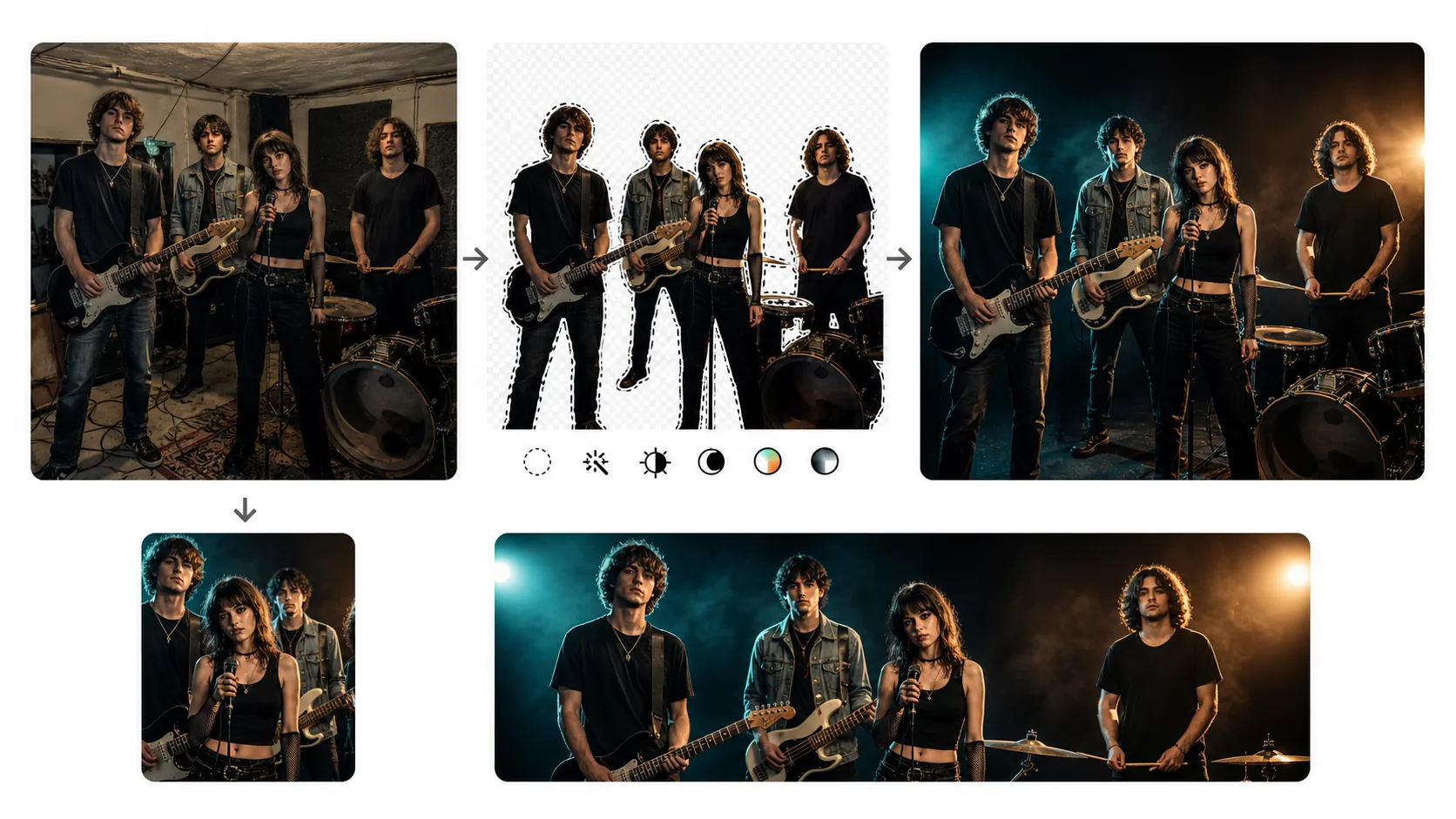
Transformez les clichés pris en salle de répétition et les instantanés improvisés en photos promotionnelles de qualité kit de presse pour votre groupe ou votre projet solo. Ce modèle supprime les arrière-plans encombrés — garages, sous-sols, loges en désordre — et les remplace par des décors spectaculaires ou épurés. AI Enhance ajoute des effets d'éclairage de style concert, accentue les détails des instruments et produit des images prêtes pour les profils d'artistes Spotify, les soumissions de salles et les pages de presse EPK.
Essayer ce modèle gratuitementBusiness template preview
Ce que fait ce modèle
Donne aux musiciens et groupes indépendants la qualité visuelle que les labels offrent aux artistes signés. Background Eraser supprime les environnements distrayants où la plupart des photos de groupe sont réellement prises — salles de répétition aux câblages apparents, coins de bar mal éclairés pendant les balances, salon encombré de quelqu'un. L'arrière-plan est remplacé par des options allant d'un rendu studio épuré (pour les EPK et les soumissions de salles) à des environnements spectaculaires de style concert avec un éclairage atmosphérique et des effets de fumée. AI Enhance ajuste l'éclairage pour le rendre plus spectaculaire — en approfondissant les ombres, en ajoutant une lumière de contour subtile pour détacher les membres du groupe de l'arrière-plan et en réchauffant les tons de peau pour un rendu flatteur et éditorial. Les instruments sont accentués afin que guitares, batteries et microphones soient aussi détaillés que les musiciens qui les tiennent.
Paramètres du modèle
| Arrière-plan | Noir studio, scène de concert, mur de briques, ruelle urbaine ou dégradé |
| Style d'éclairage | Spectaculaire (ombres profondes, lumière de contour) ou studio épuré (uniforme, lumineux) |
| Tons de peau | Éditorial chaleureux avec une atténuation naturelle des ombres sur les traits du visage |
| Détail des instruments | Accentuer les manches de guitare, le matériel de batterie et les grilles de microphone |
| Étalonnage des couleurs | Concert atmosphérique (tons fractionnés sarcelle/orange) ou éditorial épuré (neutre) |
| Résolution de sortie | 4000×2667px (paysage 3:2 pour les kits de presse et les en-têtes web) |
Comment utiliser ce modèle
Téléchargez votre photo de groupe
Téléchargez une photo de groupe ou d'un membre individuel. Les clichés en salle de répétition, les captures de performances live, les photos décontractées en extérieur et les selfies pris au téléphone fonctionnent tous. Le modèle gère les compositions de groupe, du duo aux groupes complets de six membres ou plus.
Supprimer l'arrière-plan
Background Eraser isole tous les membres du groupe et leurs instruments de l'environnement d'origine. La détection des contours préserve les têtes de guitare, les bords des cymbales, les pointes de baguettes et les pieds de microphone — les détails fins qui donnent son énergie à la photographie musicale.
Appliquer l'éclairage et l'étalonnage des couleurs
Choisissez entre un éclairage spectaculaire de style concert (avec des ombres profondes et des lumières de contour colorées) ou un éclairage studio épuré pour les kits de presse formels. Les options d'étalonnage vont des tons fractionnés sarcelle-et-orange atmosphériques populaires en photographie de concert aux tons éditoriaux neutres préférés des publications et des promoteurs de salles.
Exporter pour la presse et la promo
Téléchargez en 4000×2667px pour les kits de presse imprimés et un usage web haute résolution. Des exports supplémentaires en 1500×1500px (carré pour le profil d'artiste Spotify), 1500×500px (en-tête Twitter/X) et 820×312px (couverture de page Facebook) sont disponibles en un seul lot.
Conseils de pro pour de meilleurs résultats
- ✓Faites porter à tous les membres du groupe des vêtements dans une gamme tonale similaire — tous sombres, tous neutres ou tous audacieux. Les garde-robes mixtes où une personne porte du néon et une autre du noir créent un déséquilibre visuel que même le meilleur éclairage ne peut unifier.
- ✓Incluez les instruments dans le cadre. Un groupe tenant ses instruments communique le genre et l'énergie avant même qu'une seule note ne soit entendue. L'accentuation des instruments du modèle garantit que guitares, baguettes et microphones paraissent nets et détaillés.
- ✓Pour l'effet d'éclairage de concert spectaculaire, commencez avec une photo présentant un certain contraste — pas un cliché plat et uniformément éclairé. L'IA s'appuie sur la direction de la lumière existante. Une photo avec un éclairage latéral naturel provenant d'une fenêtre produit l'amélioration spectaculaire la plus convaincante.
Questions fréquentes
Puis-je utiliser une photo de concert live comme point de départ ?
+
Oui. Les clichés live avec un fort éclairage de scène, des gélatines de couleur et un flou de mouvement peuvent être utilisés. Background Eraser supprime la foule et la salle, en préservant l'éclairage de scène sur les musiciens. Le modèle améliore l'éclairage de concert existant plutôt que de le remplacer, conservant l'énergie authentique du live.
Cela fonctionne-t-il pour un artiste solo ou un DJ ?
+
Oui. Le modèle gère les photos d'une seule personne aussi efficacement que les photos de groupe. Pour les DJ, la platine ou le contrôleur peut être inclus dans le cadre et sera préservé lors de la suppression de l'arrière-plan, avec une accentuation des détails sur les boutons et les faders.
Quel format les salles et les médias préfèrent-ils ?
+
La plupart des salles et des médias demandent une orientation paysage à 300 DPI ou plus, au format JPEG, avec le groupe centré dans le cadre. La sortie paysage 4000×2667px au ratio 3:2 répond à cette norme. Certains médias demandent également un PNG haute résolution pour l'impression — les deux formats sont disponibles.
Ayez l'air d'un artiste signé sans le budget d'un label
Téléchargez n'importe quelle photo de groupe et obtenez des images promo de qualité kit de presse prêtes pour Spotify, les salles et les médias.
Essayer gratuitementRelated templates
More business templates for your workflow.
Améliorez les photos de l'équipe d'entreprise avec des arrière-plans cohérents, une correction d'éclairage professionnelle, un étalonnage des couleurs adapté à la marque et une qualité d'image uniforme dans toute l'équipe.
Améliorez les photos de salle de sport et de fitness grâce à l'amélioration de la définition musculaire, à la correction dynamique de l'éclairage, au nettoyage de l'arrière-plan et à l'étalonnage des couleurs athlétiques à contraste élevé.
Améliorez les photos de votre portfolio de tatouage avec l'éclat des couleurs de l'encre, la netteté des détails des lignes, la réduction des rougeurs de la peau et des arrière-plans propres pour les portfolios d'artistes et Instagram.
Créez une photo de CV soignée avec remplacement de l'arrière-plan, lissage de la peau et correction de l'éclairage. Idéal pour les CV, les portails d'emploi et les annuaires d'entreprise.
Créez des photos d'équipe professionnelle et de joueurs individuels avec remplacement de l'arrière-plan, amélioration de la couleur du maillot et arrière-plans de stade ou de studio pour les équipes et les programmes.
Présentez le nail art avec une amélioration des détails au niveau macro, une véritable précision des couleurs des gels et des vernis et un positionnement propre des mains pour les portefeuilles Instagram et les pages de réservation.