
Photo d'équipe sportive
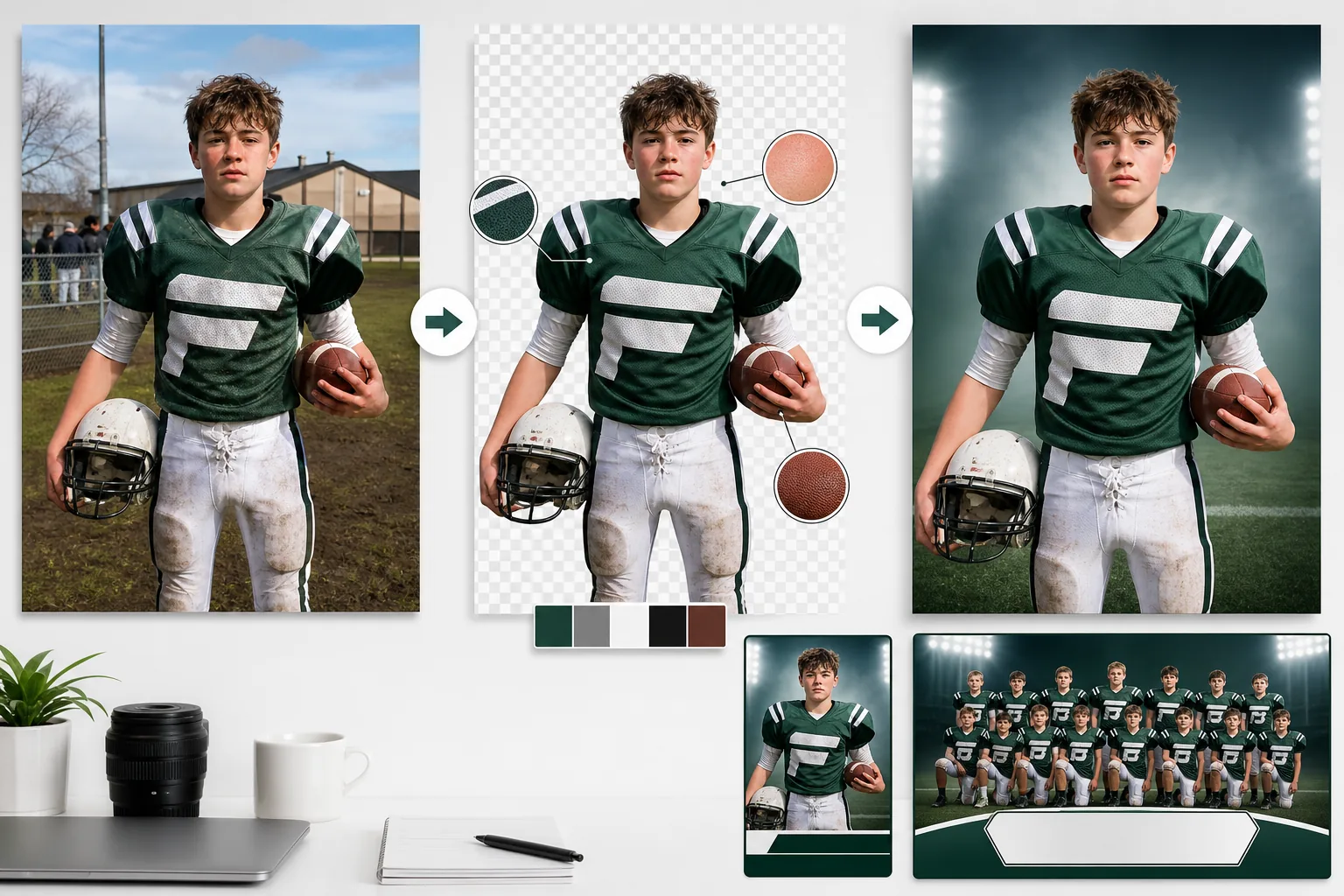
Produisez des photos d'effectif professionnelles, des programmes de jour de match et des bannières d'équipe à partir de photos prises sur n'importe quel terrain, court ou gymnase. Ce modèle supprime les arrière-plans encombrés et les remplace par des couleurs aux teintes de l'équipe, des environnements de stade ou des fonds de studio. Les couleurs des uniformes sont améliorées pour correspondre aux véritables couleurs de l'équipe, et l'AI sharpening fait ressortir les numéros de maillot, les logos d'équipe et les détails de l'équipement.
Essayer ce modèle gratuitementBusiness template preview
Ce que fait ce modèle
Résout le problème courant de la photographie d'équipe où l'encombrement de l'arrière-plan, l'éclairage inégal du terrain et les séances de photo précipitées produisent des images qui paraissent amateurs sur les effectifs et les programmes. Background Eraser isole les joueurs individuels ou l'équipe entière des parkings, des gradins de gymnase et des terrains d'entraînement boueux. AI Enhance corrige les variations d'exposition des prises de vue en extérieur — la moitié de l'équipe au soleil, l'autre à l'ombre — et normalise les couleurs des uniformes pour que chaque maillot affiche la même teinte éclatante de la couleur de l'équipe. Les numéros de maillot, les plaques nominatives et les logos d'équipe sont accentués pour une meilleure lisibilité. Le résultat est un ensemble de photos d'effectif professionnelles et cohérentes qui répondent au standard visuel des programmes universitaires et professionnels.
Paramètres du modèle
| Arrière-plan | Couleur d'équipe unie, dégradé, environnement de stade ou gris studio |
| Amélioration de l'uniforme | Normalisation des couleurs vers les véritables couleurs de l'équipe dans toutes les conditions de lumière |
| Accentuation des détails | Numéros de maillot, plaques nominatives et logos d'équipe accentués pour la lisibilité |
| Normalisation de l'exposition | Équilibrer les variations soleil/ombre sur les photos de groupe et individuelles |
| Options de recadrage | Recadrage en pied, trois-quarts ou portrait pour les cartes d'effectif |
| Résolution de sortie | 2400×3200px (portrait 3:4 pour les pages d'effectif et les programmes) |
Comment utiliser ce modèle
Importez les photos d'équipe ou de joueurs
Importez des photos de joueurs individuels ou des photos de groupe de toute l'équipe. Les photos prises en extérieur sur les terrains, en intérieur dans les gymnases, ou même sur les parkings avant les matchs fonctionnent toutes. Le modèle gère l'éclairage extérieur inégal et les situations mêlant lumière intérieure et naturelle.
Supprimez l'arrière-plan et isolez
Background Eraser sépare les joueurs de leur environnement. Pour les photos de groupe, toute l'équipe est isolée comme une seule unité. Pour les photos individuelles, chaque joueur est détouré grâce à une détection de contours qui préserve la forme des casques, le contour des épaulières et les équipements comme les battes, les raquettes et les crosses.
Améliorez les uniformes et les détails
AI Enhance normalise les couleurs des maillots sur toutes les photos afin qu'elles correspondent à la véritable couleur de l'équipe, que la prise de vue ait été faite en plein soleil, à l'ombre ou sous les néons d'un gymnase. Les numéros de maillot et les plaques nominatives sont accentués. L'exposition des visages est équilibrée pour qu'aucun joueur ne paraisse sous-exposé ou délavé.
Exportez pour l'effectif et les programmes
Téléchargez les images de joueurs individuels pour les cartes d'effectif, le montage de toute l'équipe pour les couvertures de programme et des versions optimisées pour le web du site de l'équipe. Toutes les images partagent les mêmes réglages d'arrière-plan et d'amélioration pour une identité visuelle cohérente sur tout l'effectif.
Conseils de pro pour de meilleurs résultats
- ✓Photographiez les joueurs dans la même configuration d'uniforme — maillot rentré ou sorti, chaussettes hautes ou basses, équipement tenu de la même manière. L'IA normalise l'éclairage et la couleur mais ne peut pas uniformiser la façon dont l'équipement est porté.
- ✓Pour les photos d'effectif individuelles, faites tenir chaque joueur au même endroit avec la même pose. Une position du corps constante, combinée à l'arrière-plan et à l'amélioration cohérents du modèle, crée une page d'effectif professionnelle qui ressemble à une seule séance coordonnée.
- ✓Photographiez par temps couvert si possible. Le soleil vif crée des ombres dures sous les visières de casque qui masquent les visages. La lumière d'un ciel couvert est plate et uniforme, donnant à l'IA le maximum de détails du visage à exploiter lors de l'amélioration des images finales.
Questions fréquentes
Puis-je traiter tout un effectif d'équipe en une seule fois ?
+
Oui. Importez toutes les photos de joueurs individuels par lot et le modèle applique le même arrière-plan, la même normalisation des couleurs et la même amélioration à chacune. Le résultat est un ensemble visuellement cohérent prêt pour les pages d'effectif, les programmes et le site de l'équipe.
Les ombres de casque sur les visages seront-elles corrigées ?
+
AI Enhance fait ressortir les détails dans les ombres sous les visières de casque et de casquette. Pour les ombres modérées, les traits du visage sont entièrement récupérés. Pour les ombres très profondes où les yeux sont complètement sombres, l'amélioration accroît nettement la visibilité mais peut ne pas égaler la qualité d'un original bien éclairé.
Cela fonctionne-t-il pour les ligues de jeunes et les équipes de loisir ?
+
Absolument. Le modèle est le plus précieux pour les ligues de jeunes, les équipes de loisir et les programmes scolaires qui ne disposent pas de budget pour une photographie professionnelle. N'importe quel parent ou bénévole muni d'un smartphone peut prendre les photos d'origine, et ce modèle produit des résultats comparables à ceux des services de photographie sportive professionnelle.
Offrez à votre équipe l'effectif professionnel qu'elle mérite
Importez des photos de joueurs prises sur n'importe quel terrain ou gymnase et obtenez des images d'effectif cohérentes et soignées, prêtes pour les programmes et les sites web.
Essayer gratuitementRelated templates
More business templates for your workflow.
Améliorez les photos de l'équipe d'entreprise avec des arrière-plans cohérents, une correction d'éclairage professionnelle, un étalonnage des couleurs adapté à la marque et une qualité d'image uniforme dans toute l'équipe.
Améliorez les photos de salle de sport et de fitness grâce à l'amélioration de la définition musculaire, à la correction dynamique de l'éclairage, au nettoyage de l'arrière-plan et à l'étalonnage des couleurs athlétiques à contraste élevé.
Améliorez les photos de votre portfolio de tatouage avec l'éclat des couleurs de l'encre, la netteté des détails des lignes, la réduction des rougeurs de la peau et des arrière-plans propres pour les portfolios d'artistes et Instagram.
Créez une photo de CV soignée avec remplacement de l'arrière-plan, lissage de la peau et correction de l'éclairage. Idéal pour les CV, les portails d'emploi et les annuaires d'entreprise.
Créez des photos promotionnelles professionnelles de groupes et de musiciens avec remplacement de l'arrière-plan, amélioration spectaculaire de l'éclairage et sorties prêtes à imprimer pour les dossiers de presse et les soumissions de salles.
Présentez le nail art avec une amélioration des détails au niveau macro, une véritable précision des couleurs des gels et des vernis et un positionnement propre des mains pour les portefeuilles Instagram et les pages de réservation.