
Photo d'équipe d'entreprise
Donnez à votre page d'équipe une allure professionnelle et homogène sans recourir à un photographe coûteux. Ce modèle uniformise les arrière-plans de chaque portrait individuel, corrige l'éclairage mixte des bureaux pour obtenir des tons professionnels neutres, applique un lissage subtil de la peau et garantit que la photo de chaque membre présente le même style et la même qualité.
Essayer ce modèle gratuitementBusiness template preview
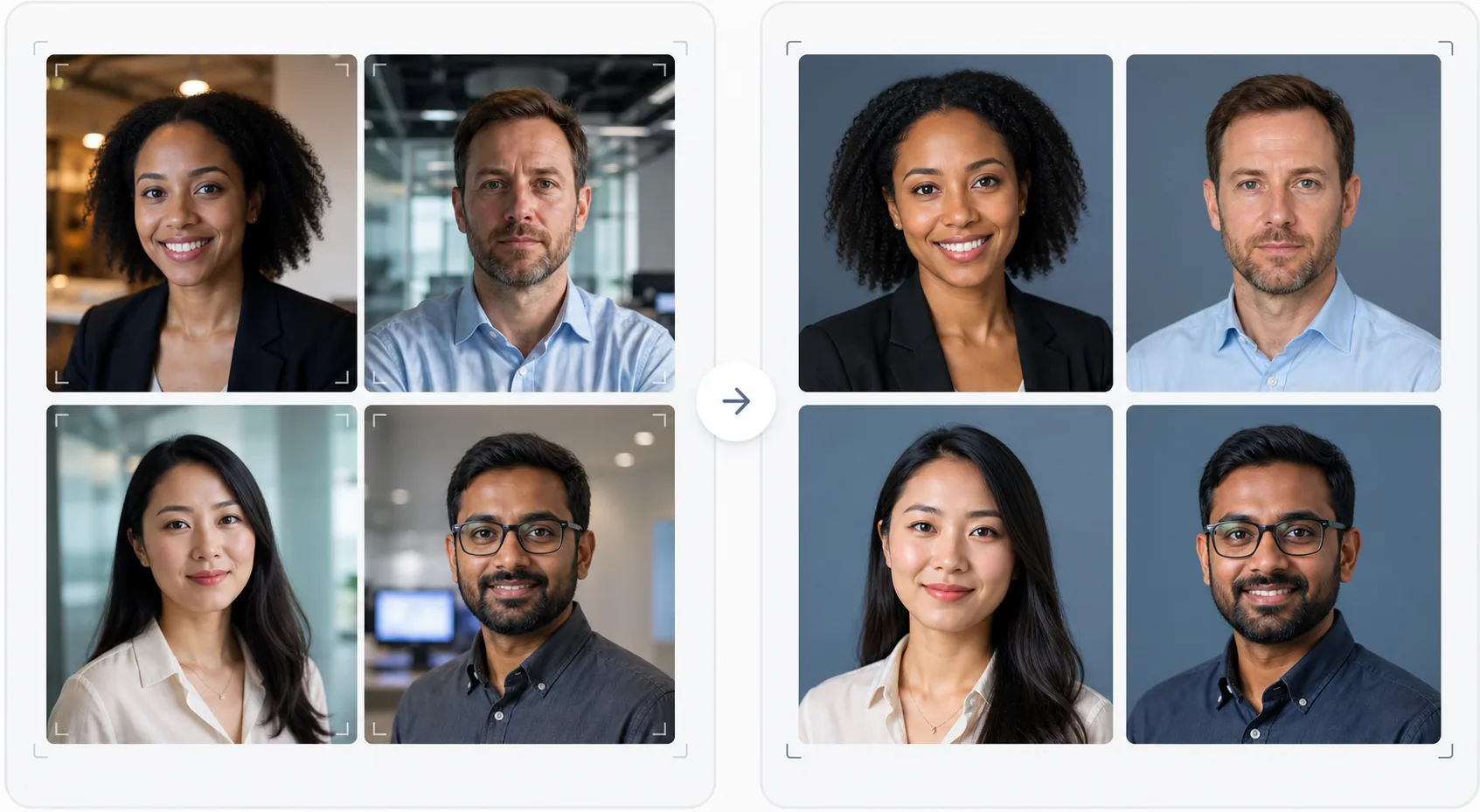
Ce que fait ce modèle
Crée des photos d'équipe visuellement homogènes pour les sites web d'entreprise, les pages d'entreprise LinkedIn et les supports marketing. Lorsque les portraits d'équipe sont pris à des moments différents, par des personnes différentes, avec des appareils différents, le résultat est une page d'équipe hétérogène qui paraît peu professionnelle. Ce modèle résout ce problème en uniformisant les arrière-plans, la température de couleur, le style d'éclairage et le cadrage sur tous les portraits. Background Eraser supprime les arrière-plans de bureau variés et les remplace par un arrière-plan uni ou en dégradé homogène dans la couleur de votre marque. AI Enhance normalise l'exposition, corrige la teinte verte des éclairages fluorescents de bureau et applique un lissage subtil de la peau pour que chaque membre de l'équipe paraisse soigné et professionnel.
Paramètres du modèle
| Arrière-plan | Couleur unie, dégradé ou flou de bureau homogène (configurable selon la marque) |
| Cadrage | Tête et épaules, centré, homogène sur toutes les photos d'équipe |
| Normalisation de l'éclairage | Professionnel neutre (corrige le mélange de fluorescent, LED et lumière de fenêtre) |
| Amélioration de la peau | Réduction subtile des imperfections et correction des cernes |
| Dimensions de sortie | 800 × 800 px (page d'équipe web) et 400 × 400 px (annuaire) |
Comment utiliser ce modèle
Importez les photos des membres de l'équipe
Importez les portraits des membres de l'équipe — ils peuvent provenir d'appareils, de lieux et de périodes différents. Le modèle gère tout, des portraits professionnels aux selfies pris au smartphone à un bureau. Importez toute l'équipe en lot pour un traitement efficace.
Uniformisez les arrière-plans
Background Eraser supprime l'arrière-plan d'origine de chaque photo et le remplace par une option homogène pour tous les membres de l'équipe. Choisissez parmi des couleurs de marque unies, des dégradés professionnels ou un effet de flou de bureau standardisé. Toutes les photos reçoivent le même traitement d'arrière-plan pour une uniformité visuelle.
Normalisez l'éclairage et améliorez
AI Enhance corrige l'éclairage de chaque photo pour obtenir un ton professionnel neutre et homogène. Les dominantes vertes fluorescentes, les dominantes chaudes incandescentes et les éclairages mixtes sont tous corrigés. Un lissage subtil de la peau réduit les imperfections et les cernes. Les yeux sont délicatement éclaircis pour créer une apparence engageante et accessible.
Exportez pour le web et l'annuaire
Téléchargez l'ensemble complet en 800 × 800 px pour les pages d'équipe de sites web et en 400 × 400 px pour les annuaires internes et les signatures d'e-mail. Toutes les images sont exportées avec le même profil colorimétrique, la même compression et la même convention de nommage des fichiers pour faciliter l'import en lot dans votre CMS.
Conseils de pro pour de meilleurs résultats
- ✓Envoyez aux membres de l'équipe un brief photo simple : regarder directement l'objectif, porter un haut de couleur unie qui contraste avec l'arrière-plan, veiller à un bon éclairage du visage (se placer face à une fenêtre si possible) et garder une expression naturelle avec un léger sourire. De meilleures photos sources nécessitent moins de corrections par l'IA.
- ✓Choisissez une couleur d'arrière-plan figurant dans votre charte graphique — généralement un gris neutre, un bleu marine ou la couleur secondaire de votre marque. Cela transforme la page d'équipe en atout de marque plutôt qu'en simple collection de photos.
- ✓Traitez les nouveaux membres de l'équipe via le modèle dès leur arrivée, en utilisant les mêmes paramètres. Cela maintient la cohérence visuelle dans le temps, même à mesure que l'équipe grandit et évolue.
- ✓Pour la direction et les cadres dirigeants, envisagez un cadrage légèrement différent (cadrage plus serré, ton légèrement plus chaud) afin de distinguer visuellement la direction de l'équipe au sens large tout en conservant le même arrière-plan et le même style.
Questions fréquentes
Puis-je traiter toute l'équipe en une seule fois ?
+
Oui. Importez toutes les photos des membres de l'équipe en un seul lot. Le modèle applique le même arrière-plan, la même correction d'éclairage et le même cadrage à chaque image, garantissant une cohérence parfaite. Les photos sont renvoyées avec des dimensions, une compression et des profils colorimétriques identiques.
Que faire si les membres de l'équipe ont des photos de qualité très différente ?
+
Le modèle normalise les différences de qualité entre les selfies pris au smartphone et les portraits au reflex DSLR en ajustant la netteté, la réduction du bruit et la compression. Bien qu'une source DSLR produise toujours un résultat légèrement plus net, les sorties traitées sont suffisamment homogènes visuellement pour que les différences de qualité ne soient pas évidentes sur une grille de site web.
Cela peut-il fonctionner pour des équipes à distance ?
+
C'est le cas d'usage idéal pour les équipes à distance où une séance photo en présentiel n'est pas envisageable. Chaque membre de l'équipe prend un selfie ou fait prendre sa photo chez lui, et le modèle les uniformise toutes pour qu'elles semblent avoir été prises lors de la même séance en studio.
Une page d'équipe professionnelle sans séance photo
Importez des portraits individuels de n'importe quelle source et obtenez un ensemble de photos d'équipe visuellement homogène et aligné sur votre marque, prêt pour votre site web.
Essayer gratuitementRelated templates
More business templates for your workflow.
Améliorez les photos de salle de sport et de fitness grâce à l'amélioration de la définition musculaire, à la correction dynamique de l'éclairage, au nettoyage de l'arrière-plan et à l'étalonnage des couleurs athlétiques à contraste élevé.
Améliorez les photos de votre portfolio de tatouage avec l'éclat des couleurs de l'encre, la netteté des détails des lignes, la réduction des rougeurs de la peau et des arrière-plans propres pour les portfolios d'artistes et Instagram.
Créez une photo de CV soignée avec remplacement de l'arrière-plan, lissage de la peau et correction de l'éclairage. Idéal pour les CV, les portails d'emploi et les annuaires d'entreprise.
Créez des photos d'équipe professionnelle et de joueurs individuels avec remplacement de l'arrière-plan, amélioration de la couleur du maillot et arrière-plans de stade ou de studio pour les équipes et les programmes.
Créez des photos promotionnelles professionnelles de groupes et de musiciens avec remplacement de l'arrière-plan, amélioration spectaculaire de l'éclairage et sorties prêtes à imprimer pour les dossiers de presse et les soumissions de salles.
Présentez le nail art avec une amélioration des détails au niveau macro, une véritable précision des couleurs des gels et des vernis et un positionnement propre des mains pour les portefeuilles Instagram et les pages de réservation.