
Portrait de CV
Transformez n'importe quelle photo décontractée en portrait prêt pour l'embauche, destiné aux CV, aux profils LinkedIn et aux portails de candidature. Ce modèle supprime les arrière-plans distrayants, les remplace par un fond uni ou en dégradé épuré, applique des retouches naturelles de la peau et corrige l'éclairage inégal afin que vous paraissiez confiant et accessible dans chaque candidature.
Essayer ce modèle gratuitementBusiness template preview
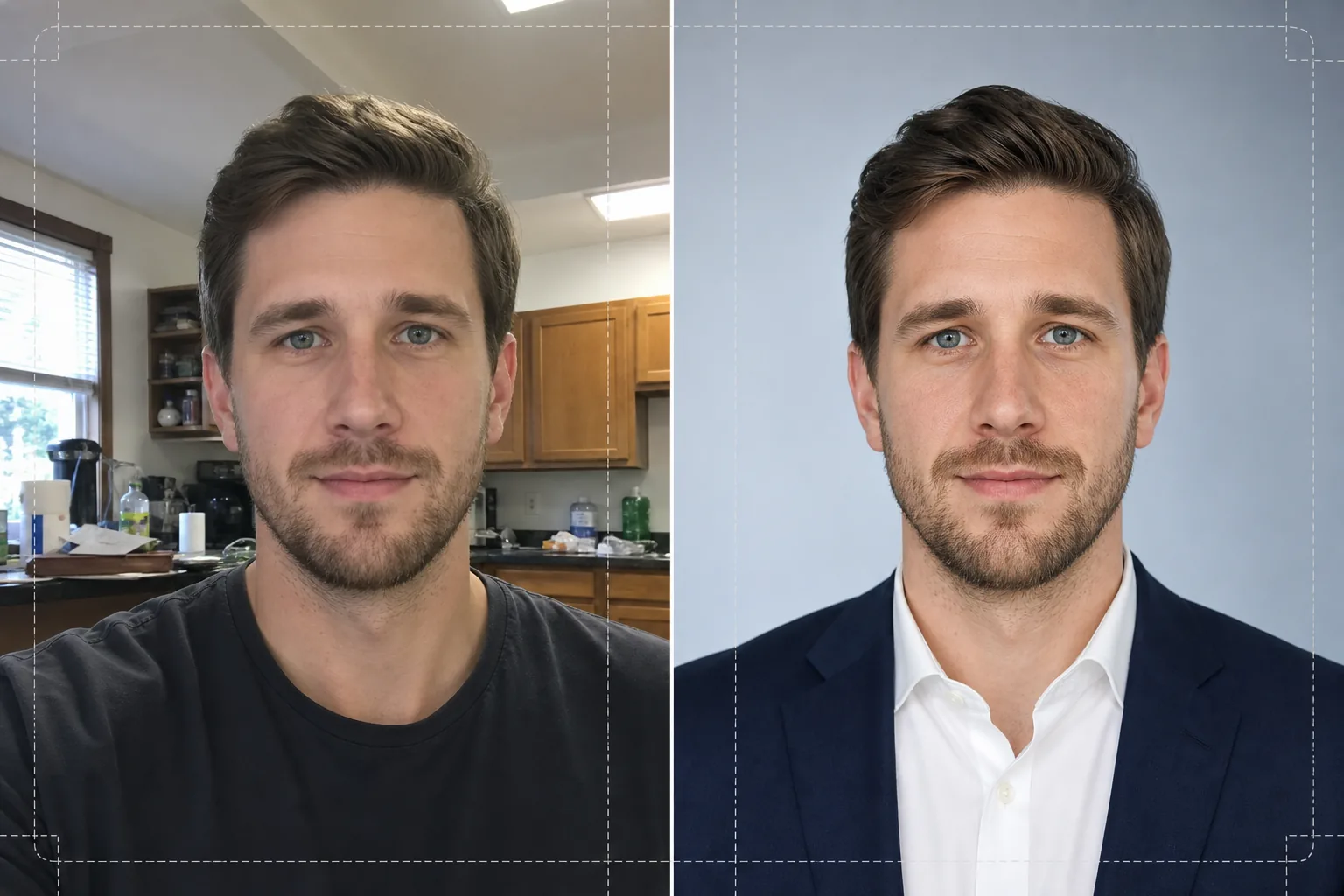
Ce que fait ce modèle
Transforme les selfies, les photos prises au téléphone et les portraits informels en portraits soignés, adaptés aux CV et aux profils professionnels. Background Eraser isole votre tête et vos épaules de n'importe quel environnement — cuisine, parc, bureau en open space — et le remplace par un fond blanc uni, gris clair ou en dégradé bleu doux conforme aux usages des entreprises. AI Enhance corrige ensuite les déséquilibres d'exposition dus aux néons au plafond ou à une lumière de fenêtre crue, lisse la texture de la peau tout en préservant le grain naturel des pores, et accentue le regard pour que l'attention se porte sur votre visage. Le résultat est un portrait à l'éclairage homogène, sans distraction, qui s'imprime nettement au format 2x2 pouces sur un CV ou s'affiche avec netteté en avatar 400x400 sur les sites d'emploi.
Paramètres du modèle
| Arrière-plan | Blanc uni, gris clair (#F0F0F0) ou dégradé bleu doux |
| Retouche de la peau | Lissage naturel (réduit les imperfections, préserve la texture des pores) |
| Correction de l'éclairage | Lumière frontale uniforme avec une légère étincelle dans les yeux |
| Ratio de recadrage | Portrait 3:4 (proportion standard d'un portrait de CV) |
| Résolution de sortie | 1200x1600px (impression à 300 DPI jusqu'à 4x5.3 pouces) |
Comment utiliser ce modèle
Importez votre photo
Importez n'importe quelle photo où votre visage et vos épaules sont clairement visibles. Selfies, clichés de webcam et photos de groupe recadrées conviennent tous. Le modèle prend en charge les images de tout appareil et compense la distorsion d'objectif fréquente sur les caméras frontales des téléphones.
Supprimer et remplacer l'arrière-plan
Background Eraser détecte automatiquement votre tête et vos épaules et supprime tout ce qui se trouve derrière vous. Choisissez un fond blanc uni, gris neutre ou en dégradé bleu subtil. La détection des contours préserve les mèches rebelles et les détails du col pour un détourage naturel.
Améliorer et retoucher
AI Enhance équilibre l'éclairage sur l'ensemble de votre visage, réduisant les ombres marquées sous le menton et le nez. La retouche de la peau élimine les imperfections temporaires et uniformise le teint sans donner un aspect plastique. L'accentuation du regard ajoute une légère étincelle qui rend le portrait vivant et attentif.
Télécharger et utiliser
Exportez le portrait fini en 1200x1600px. Le fichier est optimisé à la fois pour l'impression (insertion dans un CV à 300 DPI) et le numérique (photos de profil LinkedIn, Indeed, Glassdoor). Les formats JPEG et PNG sont disponibles — utilisez le PNG si vous avez besoin que l'arrière-plan reste transparent pour des mises en page personnalisées.
Conseils de pro pour de meilleurs résultats
- ✓Utilisez une photo où vous faites face à l'objectif avec les épaules légèrement de biais. Une légère rotation de trois quarts apporte du relief et paraît plus naturelle qu'une pose parfaitement de face.
- ✓Évitez les photos à fort contre-jour — se tenir devant une fenêtre lumineuse met votre visage en ombre chinoise et limite la capacité de l'IA à récupérer les détails dans les zones sombres.
- ✓Portez un haut de couleur unie qui contraste avec l'arrière-plan que vous comptez utiliser. Une chemise blanche sur un fond blanc se confond au niveau des épaules et fait perdre le contour de votre silhouette.
Questions fréquentes
Puis-je utiliser un selfie pris avec mon téléphone ?
+
Oui. Le modèle corrige la légère distorsion en barillet des caméras frontales qui fait paraître le nez plus large qu'il ne l'est. Il gère aussi la faible profondeur de champ typique des téléphones, afin que vos oreilles et vos épaules restent nettes.
La retouche se verra-t-elle ?
+
Non. La retouche de la peau préserve la texture naturelle des pores et n'élimine que les imperfections temporaires comme les boutons et les rougeurs. Le résultat vous ressemble, comme un bon jour sous un bon éclairage, sans effet aérographe.
Quelle couleur d'arrière-plan choisir pour un CV d'entreprise ?
+
Le blanc uni est le choix le plus sûr pour les CV imprimés. Le gris clair convient bien aux profils consultés à l'écran, car il évite le contraste agressif du blanc pur sur un écran rétroéclairé. Le dégradé bleu est approprié pour les secteurs de la tech et de la création.
Décrochez votre prochain entretien avec un portrait professionnel
Importez n'importe quelle photo et obtenez en quelques secondes un portrait soigné, prêt pour l'embauche, pour votre CV, LinkedIn et les portails d'emploi.
Essayer gratuitementRelated templates
More business templates for your workflow.
Améliorez les photos de l'équipe d'entreprise avec des arrière-plans cohérents, une correction d'éclairage professionnelle, un étalonnage des couleurs adapté à la marque et une qualité d'image uniforme dans toute l'équipe.
Améliorez les photos de salle de sport et de fitness grâce à l'amélioration de la définition musculaire, à la correction dynamique de l'éclairage, au nettoyage de l'arrière-plan et à l'étalonnage des couleurs athlétiques à contraste élevé.
Améliorez les photos de votre portfolio de tatouage avec l'éclat des couleurs de l'encre, la netteté des détails des lignes, la réduction des rougeurs de la peau et des arrière-plans propres pour les portfolios d'artistes et Instagram.
Créez des photos d'équipe professionnelle et de joueurs individuels avec remplacement de l'arrière-plan, amélioration de la couleur du maillot et arrière-plans de stade ou de studio pour les équipes et les programmes.
Créez des photos promotionnelles professionnelles de groupes et de musiciens avec remplacement de l'arrière-plan, amélioration spectaculaire de l'éclairage et sorties prêtes à imprimer pour les dossiers de presse et les soumissions de salles.
Présentez le nail art avec une amélioration des détails au niveau macro, une véritable précision des couleurs des gels et des vernis et un positionnement propre des mains pour les portefeuilles Instagram et les pages de réservation.