
Supprimer le tatouage de la photo
Effacez les tatouages visibles des portraits, des photos de mannequins, des images de casting et des portraits professionnels. Magic Eraser élimine l'encre du tatouage et reconstruit le teint et la texture naturels de la peau en dessous, produisant un résultat net sans artefacts d'édition visibles.
Dernière mise à jour
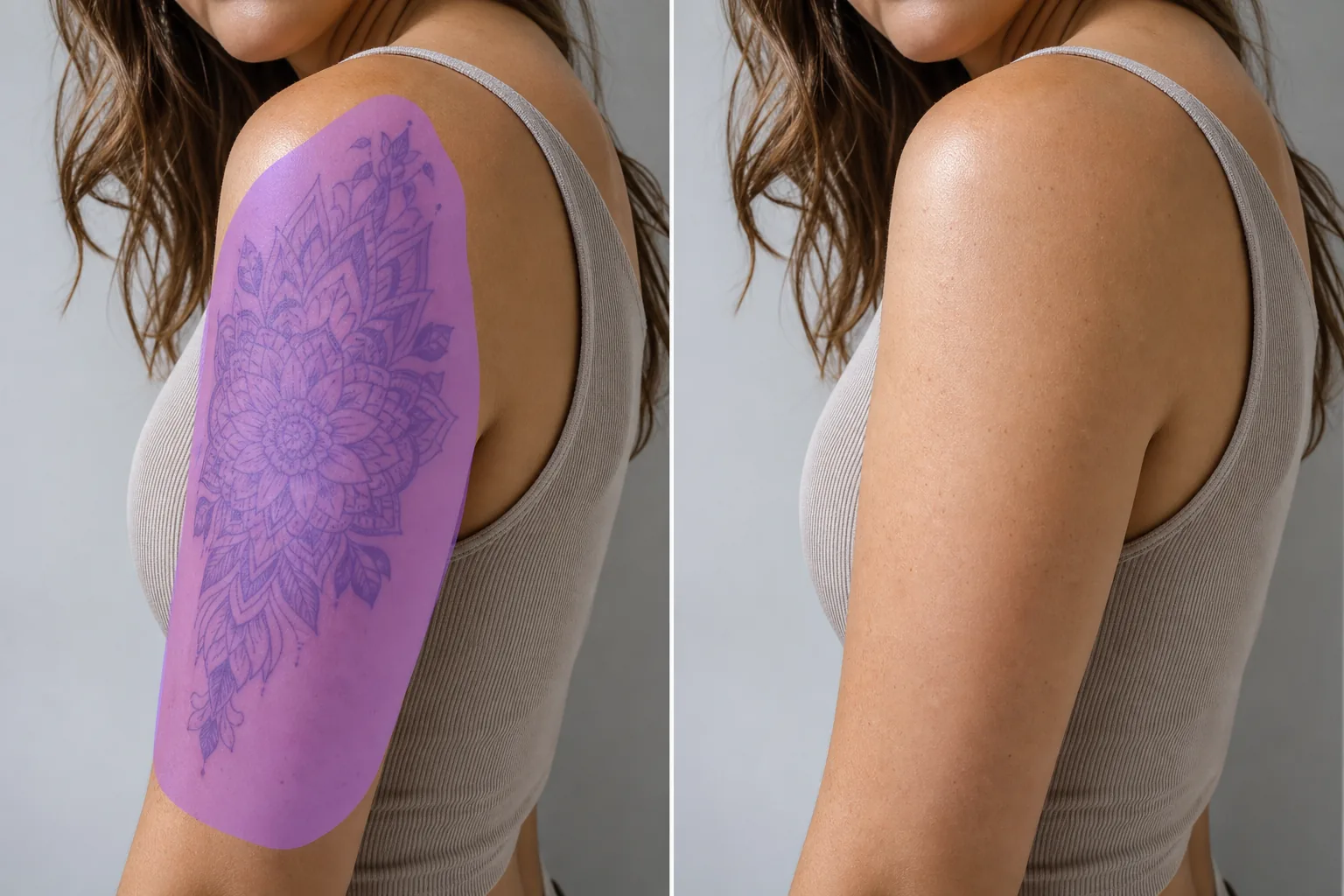
Comment effacer un tatouage sur une photo
Pour effacer un tatouage sur une photo, ouvrez Magic Eraser sur le web, iOS ou Android, importez le portrait, passez le pinceau sur la zone tatouée et laissez l'IA la remplacer par une peau qui s'accorde à la teinte et à la texture environnantes. C'est gratuit, sans inscription. Cela ne modifie que la photo : ça change l'apparence de la peau dans l'image, sans rien faire à votre véritable tatouage, et ce n'est pas un aperçu d'un retrait au laser ou par chirurgie. Le résultat est meilleur sur les zones plutôt planes, comme un bras ou une épaule entourés d'une peau uniforme ; un grand tatouage, ou un tatouage situé sur une zone courbée et détaillée, est reconstitué comme un rendu plausible plutôt que récupéré à l'identique. Modifiez des photos de vous-même ou des images que vous avez le droit de retoucher, et passez le pinceau par sections pour obtenir le résultat le plus net. Les acteurs ont besoin de portraits à la peau propre pour les rôles où les tatouages ne correspondent pas au personnage. Les modèles soumettent des versions tatouées et propres de photos de portfolio à différentes agences. Les portraits d'entreprise destinés aux industries conservatrices peuvent nécessiter la suppression des tatouages visibles. Les photographes de mariage reçoivent parfois des demandes pour nettoyer le tatouage du bras d'une demoiselle d'honneur pour des portraits formels. Dans tous ces cas, le tatouage doit disparaître de manière convaincante – pas seulement flou ou taché, mais remplacé par une peau d’apparence naturelle qui correspond à la zone environnante. Magic Eraser analyse l'emplacement du tatouage, le teint et la texture de la peau environnante, ainsi que les conditions d'éclairage, puis reconstruit une peau propre sur la zone tatouée. Le résultat préserve la texture de la peau, les détails des pores et la variation naturelle des couleurs plutôt que de produire un aspect plat et aérographe.
Supprimer un tatouage en trois étapes
- 1
Téléchargez votre photo
Ouvrez Magic Eraser sur le Web, iOS ou Android et téléchargez le portrait, la photo de la tête ou la photo de tout le corps contenant le tatouage que vous souhaitez supprimer.
- 2
Brossez le tatouage
Peignez sur tout le tatouage, y compris les bords décolorés ou les saignements de couleur. Incluez une petite marge de peau propre autour du tatouage afin que l’IA dispose d’un matériel de référence pour la correspondance des tons et des textures. Pour les grands tatouages, couvrir toute la zone en une seule sélection produit des résultats plus cohérents que de travailler par sections.
- 3
Effacer et vérifier
Appuyez sur Effacer et l'IA remplace le tatouage par une peau naturelle qui correspond à la zone environnante en termes de ton, de texture et d'éclairage. Zoomez pour vérifier que la peau reconstruite semble naturelle dans les conditions d'éclairage de la photo. Exportez pour des portfolios, des portraits ou des soumissions.
Idéal pour
- Portraits d'acteurs où le rôle nécessite une apparence de peau propre
- Portefeuilles de modélisation nécessitant à la fois des versions tatouées et épurées
- Portraits d'entreprise pour les secteurs aux codes vestimentaires conservateurs
- Photos de mariage et d'événements où les tatouages sont une distraction
- Soumissions de casting ne précisant aucun tatouage visible
- Photos de profil sur les réseaux sociaux pour le réseautage professionnel
- Photos d'école et d'équipe où le code vestimentaire s'applique
- Modélisation de produits là où la marque souhaite une peau propre dans le cadre
Conseils pour un détatouage d’apparence naturelle
Le détatouage fonctionne mieux lorsque la peau environnante est visible et bien éclairée. L’IA utilise la peau proche comme référence pour le ton, la texture et la couleur : plus la peau est propre et visible autour du tatouage, plus la reconstruction est naturelle. Les tatouages sombres et très saturés (noir, bleu foncé) sont généralement plus faciles à enlever que les tatouages de couleur claire ou à l'encre blanche car le contraste entre l'encre et la peau est plus clair. Pour les tatouages sur manches couvrant une grande surface, procédez par sections et vérifiez que le teint reste cohérent d’une section à l’autre. Si le tatouage s'enroule autour d'une articulation (coude, poignet, cheville), l'IA prend en compte le changement de texture de la peau et l'éclairage sur la surface incurvée. Les photos avec un éclairage direct sur la zone tatouée produisent les résultats les plus nets car l’IA possède le plus d’informations sur la texture de la peau. Les tatouages rétroéclairés ou ombrés peuvent nécessiter un deuxième passage pour être complètement retirés.
Questions fréquemment posées
- Peut-il enlever un tatouage sur toute la manche ?
- Oui. Brossez toute la zone des manches et l'IA reconstruit la peau naturelle. Pour les très grands tatouages, le traitement par sections qui se chevauchent peut produire des résultats plus cohérents. Vérifiez que le teint correspond à toutes les sections.
- Le résultat semble-t-il naturel ou aérographié ?
- Magic Eraser préserve la texture de la peau, les détails des pores et la variation naturelle des couleurs. La zone reconstruite correspond à la peau environnante plutôt que de produire une zone plate et floue. Les résultats semblent naturels dans des conditions de visualisation normales.
- Puis-je supprimer les tatouages des photos de groupe ?
- Oui. Passez le tatouage sur la personne spécifique et l'IA le supprime sans affecter les autres personnes dans le cadre. Le retrait est localisé sur la zone sur laquelle vous peignez.
- Est-ce gratuit ?
- Oui. Le niveau gratuit de Magic Eraser couvre le détatouage. Les forfaits payants offrent des exportations à plus haute résolution et un traitement illimité pour le travail de portfolio professionnel et de portraits.