
Comment supprimer les superpositions de texte des photos avec AI — Magic Eraser
Supprimez les horodatages, filigranes, légendes et superpositions de texte des photos à l'aide de la suppression d'objets AI-powered. Guide étape par étape couvrant le repérage du texte, la technique du pinceau, la reconstruction de l'arrière-plan et les considérations éthiques.
SEO & Growth
Vérifié par Magic Eraser Editorial ·
Sommaire
- Comprendre les différents types de superpositions de texte et leurs défis de suppression
- Technique de pinceau pour un marquage propre et complet du texte
- Gestion des cas difficiles : arrière-plans à motifs et superpositions semi-transparentes
- Considérations éthiques et juridiques pour la suppression de texte et de filigranes
- Amélioration après suppression et vérification de la qualité
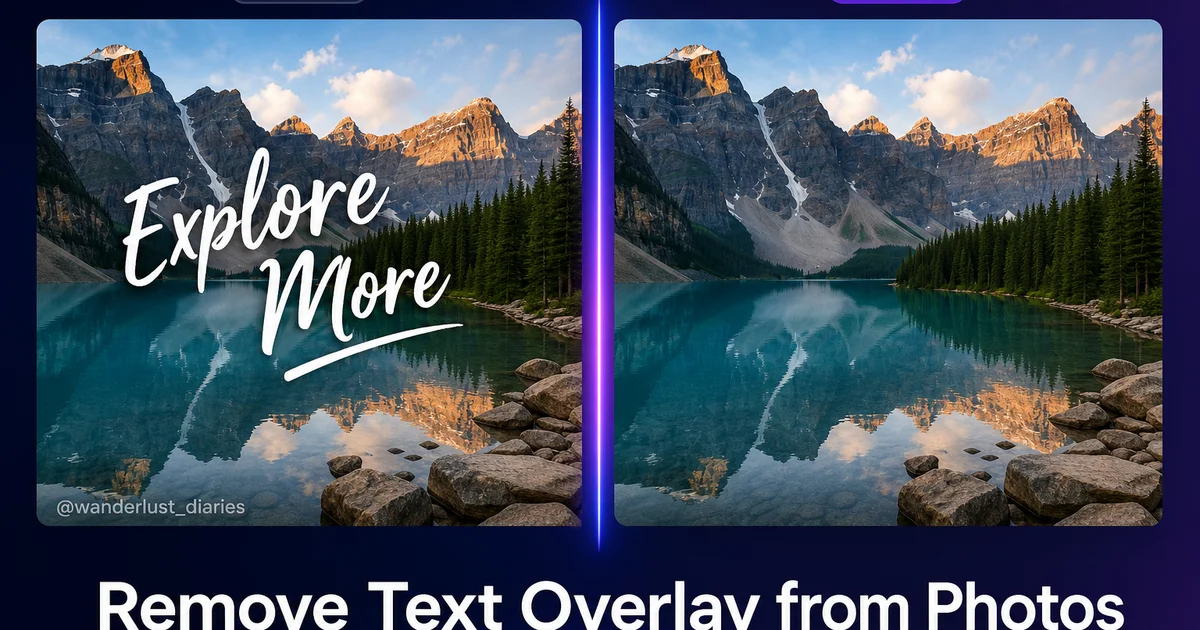
Les superpositions de texte font partie des éléments indésirables les plus courants dans les photographies numériques. Les horodatages incrustés dans les photos de vacances par les paramètres par défaut de l'appareil photo, les filigranes d'échantillonnage sur les images libres de droits que vous avez depuis licenciées, le texte des légendes provenant de captures d'écran de réseaux sociaux, les superpositions promotionnelles sur les photos d'événements. Le texte décoratif qui ne remplit plus son objectif présente tous le même défi : le texte obstrue l'image en dessous, et le supprimer nécessite de reconstruire le contenu caché. La suppression traditionnelle dans Photoshop implique des opérations fastidieuses de tampon de clonage et de remplissage basé sur le contenu qui peuvent prendre 10 à 30 minutes par image, selon la complexité de l'arrière-plan derrière le texte.
La suppression de texte AI-powered a considérablement progressé car les superpositions de texte représentent un problème d'inpainting bien défini. L'AI sait que la région marquée contient du contenu artificiel. Lettres, chiffres, logos — tout cela est visuellement distinct du contenu naturel de l'image en dessous. Sa tâche est de reconstruire ce à quoi l'image originale ressemblerait sans la superposition, en utilisant le contexte environnant comme référence. Les modèles d'inpainting modernes gèrent cela avec une précision remarquable sur une large gamme d'arrière-plans, allant des ciels et murs uniformes aux textures complexes comme les motifs de briques et les tissages, même les traits du visage partiellement obscurcis par du texte.
Ce guide vous accompagne à travers le flux de travail complet pour supprimer les superpositions de texte des photos à l'aide de Magic Eraser, couvrant tout, de l'identification des types de superposition et du choix de la bonne approche à la gestion des cas difficiles où le texte traverse des arrière-plans détaillés. Nous abordons également les importantes considérations éthiques et juridiques autour de la suppression de texte. Plus précisément, la distinction entre la suppression de texte de vos propres photos ou d'images correctement licenciées et la suppression de filigranes pour contourner la licence, ce qui viole les droits d'auteur et les conditions d'utilisation de toutes les plateformes de photographie libre de droits.
- L'inpainting AI-powered reconstruit le contenu de l'image caché derrière le texte en analysant le contexte environnant et en générant une texture, une couleur et un motif correspondants.
- Les superpositions de texte totalement opaques sont plus simples à supprimer que les filigranes semi-transparents, qui se fondent avec l'image sous-jacente et nécessitent une séparation.
- Travailler une ligne à la fois de haut en bas vous permet de vérifier chaque passage de suppression avant de passer à la section de texte suivante.
- AI Fill génère un contenu contextuellement approprié pour les zones où la suppression standard laisse des artefacts sur des textures ou motifs complexes.
- Vérifiez toujours que la suppression de texte est éthiquement et juridiquement appropriée — supprimer des filigranes pour contourner la licence viole les droits d'auteur.
Comprendre les différents types de superpositions de texte et leurs défis de suppression
Les superpositions de texte varient considérablement en difficulté de suppression selon trois facteurs : l'opacité, la complexité de l'arrière-plan et la taille de la superposition. Le texte totalement opaque — comme les horodatages, les légendes pleines, les logos non transparents — recouvre complètement l'image en dessous, ce qui signifie que l'AI doit générer un nouveau contenu pour la zone couverte sans aucune donnée pixel originale de référence. Malgré cela, le texte opaque est en réalité plus facile à supprimer proprement car il n'y a aucune ambiguïté de fusion : chaque pixel de la région marquée a besoin d'être reconstruit. L'AI peut se concentrer pleinement sur la correspondance avec le contexte environnant sans avoir à séparer la superposition du contenu original.
Les filigranes semi-transparents sont les plus difficiles à supprimer car ils se fondent avec l'image sous-jacente à une opacité fractionnaire. Chaque pixel de la région filigranée contient un mélange des données de l'image originale et du contenu du filigrane. L'AI doit estimer à quoi ressemblait le pixel original avant que le filigrane ne soit composité. Cela nécessite de comprendre à la fois le motif du filigrane et le contenu de l'image sous-jacente simultanément. Les filigranes en mosaïque qui se répètent sur toute l'image sont principalement difficiles car ils ne laissent aucune zone de référence complètement non affectée pour que l'AI puisse s'y aligner.
La complexité de l'arrière-plan derrière le texte détermine à quel point la reconstruction sera convaincante. Le texte sur un ciel bleu uniforme ou un mur blanc est trivialement simple — l'AI remplit la région avec une couleur unie correspondante et la suppression est invisible. Le texte sur un dégradé comme un coucher de soleil nécessite que l'AI continue le dégradé en douceur à travers la zone reconstruite. Le texte sur un motif complexe comme un mur de briques, un grain de bois ou un tissu à carreaux nécessite que l'AI comprenne et continue le motif avec un alignement, une échelle et une variation corrects. Le texte sur un visage humain est le cas le plus exigeant car les spectateurs sont très sensibles aux anomalies faciales — toute imperfection dans la peau, les yeux ou les cheveux reconstruits est immédiatement perceptible.
- Les superpositions totalement opaques nécessitent une génération complète de contenu mais n'ont aucune ambiguïté de fusion — chaque pixel marqué a besoin d'une reconstruction à partir du contexte.
- Les filigranes semi-transparents se fondent avec l'image à une opacité fractionnaire, obligeant l'AI à séparer et estimer les valeurs de pixels originales.
- Les arrière-plans uniformes comme le ciel ou les murs produisent des suppressions invisibles ; les arrière-plans à motifs comme la brique ou le tissu nécessitent une continuation du motif.
- Le texte sur les visages est le cas le plus exigeant car la perception humaine est très sensible à toute imperfection dans les traits du visage reconstruits.
Technique de pinceau pour un marquage propre et complet du texte
Une suppression efficace du texte commence par un marquage minutieux. L'erreur la plus courante est d'utiliser un pinceau trop petit et de manquer les bords des caractères, les ombres et les effets de lueur. Cela laisse de faibles vestiges de la superposition visibles dans l'image finale — un contour fin d'une lettre, un fragment d'ombre portée, le bord d'une lueur. Utilisez un pinceau qui s'étend de 2 à 3 pixels au-delà du bord visible du texte de tous les côtés. Cela garantit que les bords anti-aliasés, les artefacts de rendu sous-pixel et tous les effets subtils entourant le texte sont entièrement capturés dans la région marquée.
Pour les grands blocs de texte, travaillez systématiquement plutôt que de griffonner sur toute la zone à la fois. Marquez une ligne de texte, traitez la suppression, inspectez le résultat à 100 pour cent de zoom, puis passez à la ligne suivante. Cette approche détecte les problèmes tôt — si l'AI rencontre des difficultés avec une section particulière, vous pouvez ajuster votre technique ou essayer une taille de pinceau différente avant de vous engager sur le bloc entier. Elle produit également de meilleurs résultats car l'AI a plus de contexte non affecté auquel se référer lors de la reconstruction de régions plus petites par rapport à une zone marquée massive qui supprime trop de l'image environnante.
Lorsque le texte traverse différentes régions d'arrière-plan — par exemple, un filigrane qui s'étend sur le ciel, un bâtiment et le sol — marquez et supprimez chaque région séparément. L'AI donne les meilleurs résultats lorsque la zone marquée a un contexte environnant cohérent. Une seule région marquée qui s'étend d'un ciel lumineux d'un côté à une ombre sombre de l'autre force l'AI à reconstruire deux contextes très différents à la fois, ce qui peut produire des coutures visibles ou des artefacts de moyenne de couleur à la transition. Traiter chaque région d'arrière-plan séparément, puis nettoyer les transitions produit des résultats plus propres.
- Utilisez un pinceau 2 à 3 pixels plus large que le texte pour capturer les bords anti-aliasés, les ombres portées, les effets de lueur et les artefacts de rendu sous-pixel.
- Marquez et traitez une ligne à la fois pour détecter les problèmes tôt et donner à l'AI plus de contexte non affecté pour la reconstruction.
- Lorsque le texte traverse différents arrière-plans, traitez chaque région séparément pour éviter les coutures et les moyennes de couleur aux transitions de contexte.
- Inspectez les résultats à 100 pour cent de zoom après chaque passage — les fragments résiduels sont souvent invisibles à un grossissement inférieur.
Gestion des cas difficiles : arrière-plans à motifs et superpositions semi-transparentes
Les arrière-plans à motifs nécessitent une attention particulière car l'AI doit reconstruire non seulement les bonnes couleurs mais aussi le motif correct avec un alignement et une répétition appropriés. Pour les motifs réguliers comme les murs de briques, les carrelages et les tissages, l'AI fonctionne remarquablement bien car elle peut identifier l'unité de répétition du motif à partir du contexte environnant et la continuer à travers la zone reconstruite. La clé est de s'assurer qu'une partie suffisante du motif est visible autour du texte pour donner à l'AI une référence claire. Si le texte couvre la majeure partie de la zone à motif, envisagez de supprimer le texte en petites sections afin qu'une plus grande partie du motif reste visible comme contexte pour chaque passage.
Les filigranes semi-transparents nécessitent une approche différente. Au lieu de brosser l'ensemble du filigrane en une seule fois, essayez d'abord d'utiliser AI Enhance pour voir si le passage de renforcement réduit la visibilité du filigrane en ajustant le contraste et la couleur dans les zones affectées. Pour les marques semi-transparentes persistantes, brossez sur les sections où le filigrane est le plus visible — souvent là où il traverse les zones claires de l'image — et traitez-les en premier. L'outil AI Fill est particulièrement efficace pour les suppressions semi-transparentes car il peut générer un contenu qui correspond à la fois à la texture et aux valeurs tonales de la zone environnante non couverte, fusionnant la reconstruction de manière transparente.
Pour les horodatages dans le coin des photos — l'une des demandes de suppression de texte les plus courantes — l'approche est simple car les horodatages sont souvent petits, opaques et positionnés sur une zone relativement uniforme de l'image. Brossez l'ensemble de l'horodatage en un seul passage, en étendant quelques pixels au-delà du texte visible. L'AI reconstruit la zone du coin en quelques secondes. Si l'horodatage se trouve sur un coin complexe — comme le bord d'un bâtiment rencontrant le ciel — traitez les parties du ciel et du bâtiment séparément pour la reconstruction la plus propre. Même les photos scannées datant de plusieurs décennies avec des horodatages incrustés répondent bien à cette technique.
- Les motifs réguliers comme la brique, le carrelage et le tissu se reconstruisent bien car l'AI identifie l'unité de répétition à partir du contexte environnant.
- Pour les grands filigranes sur des zones à motifs, supprimez le texte en petites sections pour préserver plus de motif visible comme référence pour chaque passage.
- AI Fill est particulièrement efficace pour la suppression des filigranes semi-transparents car il génère un contenu correspondant à la fois à la texture et aux valeurs tonales.
- Les horodatages dans les coins sont le cas le plus simple — petits, opaques et généralement sur des arrière-plans uniformes qui se reconstruisent en un seul passage.
Considérations éthiques et juridiques pour la suppression de texte et de filigranes
La capacité de supprimer du texte des images comporte d'importantes responsabilités éthiques et juridiques que chaque utilisateur devrait comprendre. Supprimer un horodatage de votre propre photo de vacances, nettoyer une légende d'une capture d'écran que vous avez prise, ou retirer un texte de superposition promotionnel de photos d'événements que vous avez reçues de l'organisateur sont tous des utilisations légitimes qui ne nuisent à personne. Supprimer le filigrane d'un photographe ou d'une agence d'une image pour éviter de payer une licence est une violation des droits d'auteur. C'est illégal dans la plupart des juridictions et viole les conditions d'utilisation de toutes les plateformes de photographie libre de droits et de tous les marchés d'images.
Les filigranes existent spécifiquement comme indicateur visuel qu'une image n'a pas été licenciée. Les agences de photographie libre de droits comme Getty Images, Shutterstock, Adobe Stock et iStock intègrent des filigranes sur les images de prévisualisation pour permettre aux acheteurs potentiels d'évaluer l'image avant l'achat. Le filigrane est supprimé lorsqu'une licence légitime est achetée. Supprimer le filigrane sans acheter la licence équivaut à du vol — vous prenez le travail du photographe sans compensation. Les outils AI rendent la suppression des filigranes techniquement plus facile, mais les interdictions juridiques et éthiques restent inchangées.
Une directive utile : ne supprimez du texte que des images pour lesquelles vous avez des droits clairs sur l'image sous-jacente. Vos propres photographies, les images que vous avez licenciées et dont vous possédez des versions propres mais aussi des copies de prévisualisation filigranées plus anciennes dans vos fichiers, les images explicitement publiées sous licence Creative Commons ou dans le domaine public, les images pour lesquelles vous avez une autorisation écrite du détenteur des droits — tout cela est acceptable. Si vous n'êtes pas sûr du statut des droits d'une image, ne supprimez pas le texte. Achetez une licence appropriée ou trouvez une image alternative. Le coût d'une licence de photo libre de droits est toujours inférieur aux conséquences juridiques et réputationnelles d'une violation des droits d'auteur.
- Supprimer les horodatages, légendes et textes de superposition de vos propres photos ou d'images correctement licenciées est un cas d'utilisation légitime et courant.
- Supprimer les filigranes pour contourner la licence de photographie libre de droits est une violation des droits d'auteur, illégale dans la plupart des juridictions et viole les conditions d'utilisation des plateformes.
- Ne supprimez du texte que des images pour lesquelles vous avez des droits clairs — vos photos, images licenciées, œuvres Creative Commons ou images avec autorisation écrite.
- Le coût d'une licence de photo libre de droits est toujours inférieur aux conséquences juridiques et réputationnelles d'une suppression de filigrane non autorisée.
Amélioration après suppression et vérification de la qualité
Après avoir supprimé le texte, les zones reconstruites peuvent montrer des différences subtiles par rapport à l'image environnante — une texture légèrement plus douce, une température de couleur marginalement différente, ou des coutures à peine visibles à la frontière entre le contenu original et le contenu généré. Un passage final AI Enhance résout ces problèmes en appliquant une netteté cohérente et une normalisation des couleurs sur l'ensemble de l'image, fusionnant les zones reconstruites avec le contenu original de manière si transparente que la suppression devient indétectable même sous un examen attentif.
Vérifiez la qualité de votre suppression de texte à plusieurs niveaux de grossissement et dans différents contextes. Zoomez à 100 pour cent et examinez chaque zone reconstruite pour la cohérence de la texture, la précision des couleurs et l'alignement du motif. Ensuite, dézoomez pour voir l'image entière et évaluez si les zones supprimées attirent l'œil. Parfois, des imperfections invisibles en plein zoom deviennent perceptibles à distance de visualisation en raison de différences tonales que l'œil perçoit comme une tache. Si une zone attire l'attention, appliquez un second passage ciblé avec un petit pinceau pour affiner uniquement cette section.
Pour la suppression de texte par lots — traitement de plusieurs images avec des superpositions similaires — développez un flux de travail cohérent : identifiez le type de texte et la taille de pinceau optimale, traitez toutes les images avec la même technique, puis passez toutes les images nettoyées dans AI Enhance par lots pour une qualité cohérente. Cette approche est particulièrement efficace pour supprimer les horodatages d'un ensemble de photos de famille scannées, nettoyer les superpositions promotionnelles d'un lot d'images d'événements, ou retirer le texte d'échantillonnage d'une série de maquettes de design. La cohérence du lot garantit que toutes les images traitées répondent au même standard de qualité.
- AI Enhance après suppression applique une netteté cohérente et une normalisation des couleurs qui fusionne les zones reconstruites avec le contenu original.
- Vérifiez à 100 pour cent de zoom pour la précision de la texture et du motif, puis en vue complète pour détecter les taches tonales visibles uniquement à distance de visualisation.
- Les flux de travail par lots avec une taille de pinceau et des paramètres d'amélioration cohérents garantissent une qualité uniforme sur plusieurs images avec des superpositions similaires.
- Pour les photos de famille scannées, la suppression par lots des horodatages suivie d'une amélioration par lots est l'approche la plus efficace.
How to do it
- 1
Identify the type of text overlay and assess removal complexity
Examine the text overlay to determine its traits: Is it a date stamp, watermark, caption, logo, or decorative text? Evaluate the background behind the text. Uniform backgrounds like sky or solid walls are easiest to reconstruct, while text over detailed textures like fabric patterns or facial features requires more sophisticated inpainting. Note the opacity of the text: fully opaque overlays are simpler because the AI only needs to reconstruct the covered area. Semi-transparent watermarks blend with the underlying image and require separating the overlay from the original content.
- 2
Open the image in Magic Eraser and select the brush tool
Upload your photo to Magic Eraser and select the brush tool. Adjust the brush size to match the text. Use a brush slightly wider than the text stroke width so you cover each character completely in one pass. For small text like date stamps, a fine brush with precision mode enabled gives you the control to trace individual characters. For large overlay text or logos, a wider brush lets you paint over the entire text block in a few strokes.
- 3
Paint over the text overlay carefully to mark it for removal
Brush over every part of the text overlay, including any drop shadows, outlines, or glow effects that surround the characters. For multi-line text, work one line at a time from top to bottom so you can verify each removal before moving to the next. If the text includes both thick and thin strokes. As many watermark logos do — use a brush size that covers the thickest stroke and accept that you will slightly over-mark the thin areas. The AI handles the excess marked area by reconstructing the background seamlessly.
- 4
Review the reconstruction and refine any imperfect areas
After the AI processes the removal, zoom to 100 percent and inspect the areas where the text was densest and where it crossed complex backgrounds. Look for softness, color mismatches, or pattern discontinuities. If any section looks imperfect, use a smaller brush to re-mark just that area for a second removal pass. AI Fill can also help by generating content that matches the surrounding context when the standard eraser leaves artifacts over textured or patterned areas.
- 5
Enhance the final image and export at full quality
Run the cleaned image through AI Enhance to restore sharpness and ensure consistent quality across the areas where text was removed and the untouched portions of the image. Export as PNG for maximum quality or high-quality JPEG at 90-95 percent compression. If you are preparing the image for print, export at 300 DPI in TIFF format. Verify the final image at multiple zoom levels to confirm the text removal is invisible.
Sources
- Digital Image Inpainting: A Survey of Techniques and Applications — arXiv
- Understanding Watermarks, Overlays, and Image Rights — U.S. Copyright Office
- Best Practices for Stock Photography and Licensing — iStock by Getty Images