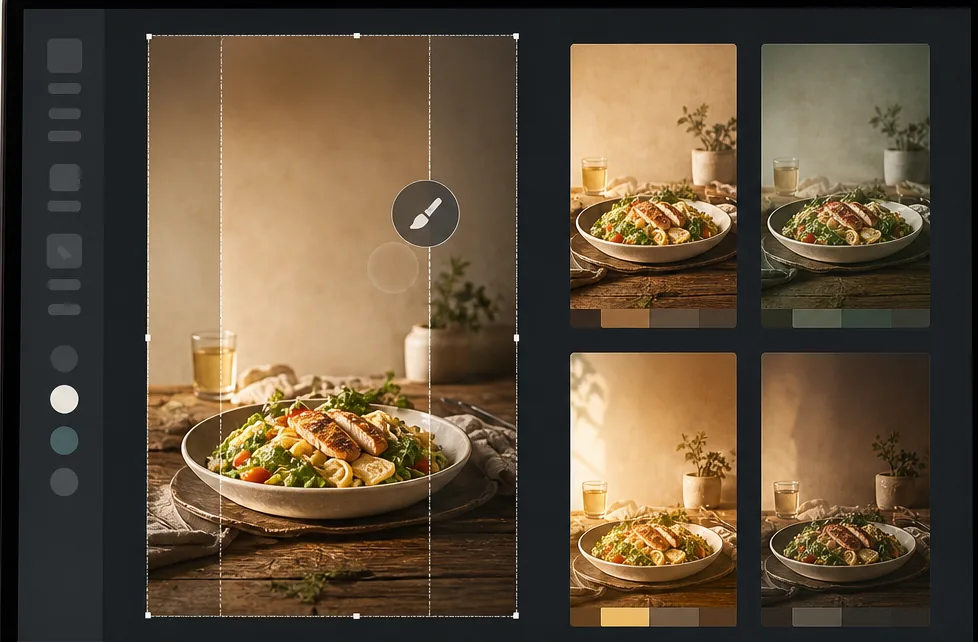
Pinterest Pin Design for Bloggers, Creators, and Small Brands
Pinterest is a visual search engine, not a social feed — pins keep earning impressions for 6-18 months on evergreens and 2-5 years on seasonal evergreens like holiday recipes and gift guides. That long-tail traffic only compounds if every pin is built for the 2:3 vertical canvas at 1000×1500 displayed at ~320px on mobile (85%+ of Pinterest traffic). Magic Eraser's AI tools turn a landscape source photo library into pin-ready vertical compositions in 2-3 minutes per pin instead of 20-40 minutes in Photoshop.
Essayer maintenantMost source photos are landscape, but Pinterest needs 2:3 vertical
Phone cameras default to vertical, but blog hero images, recipe finished-shots, DIY in-progress photos, and stock libraries are overwhelmingly landscape (3:2, 4:3, or 16:9). Pinterest's standard pin format is 1000×1500 (2:3), and pins that letterbox or stretch a landscape source perform 30-60% worse in the algorithm because they look unprofessional in the home-feed scroll. The traditional fix — cropping a landscape source to 2:3 — throws away 50%+ of the original composition.
Pinterest headline structure is different from YouTube or Instagram
Pinterest viewers spend 4-8 seconds per pin in search results (versus 1-2 seconds on a YouTube thumbnail or 0.5-1 second on an Instagram grid post). That longer dwell time means Pinterest headlines need to be informative, not teasing — 8-12 words that describe the value ("30-Minute Sheet-Pan Salmon with Lemon and Capers") rather than 3-5 word YouTube-style teasers ("This Salmon Changed Everything"). Headlines also need 60-80 point sans-serif typography to be readable on mobile at 320px display width.
One pin per blog post is leaving 60-80% of traffic on the table
Pinterest's algorithm rewards variant production — 3-5 different pins per blog post tested across color, headline, and crop axes typically produce 3-8x the total traffic of a single pin. The variant pipeline is what separates Pinterest-as-traffic-channel from Pinterest-as-archive. But producing 3-5 unique pins from one source photo manually takes 60-120 minutes; pin creators stop at one because the cost-per-additional-pin is too high.
Seasonal pins need annual republish to compound across years
Pinterest's seasonal evergreens (Christmas cookies, Easter brunch, back-to-school crafts, Halloween costumes) earn 70-90% of their lifetime impressions during a 6-8 week window each year. Republishing the same pin with a refreshed color grade and updated headline reset is what triggers the algorithm to surface it again in the new season. Without an efficient refresh workflow, seasonal pins get buried after their first year instead of compounding into 5-10 year evergreens.
Comment ça marche
Pick a vertical-friendly source photo from the existing blog library
Before opening any tool, pick a source photo where the vertical 2:3 crop will work without losing critical content. Top-down food shots and flat-lays work best because the food fills the bottom 60-70% and the empty surface above accepts a headline. Finished-result DIY photos (cushion cover, painted shelf, organized drawer) work when the subject is centered. Portrait subjects with eyes in the middle-third of the frame work for personality-driven niches. Landscape group shots and cluttered scenes typically don't outpaint cleanly.
Outpaint landscape source photos to 2:3 vertical with AI Fill
For landscape source photos, run AI Fill in outpaint mode to extend the scene above and below the original frame until the composition is 2:3 (1000×1500). The AI generates additional ceiling, sky, foreground, table surface, or wall texture that matches the original photo's lighting, color palette, and surface materials. The result is a vertical composition that preserves the original subject framing instead of a tight crop that throws away half the source. Total time: 60-90 seconds per source photo.
Clean backgrounds and remove distractions with Background Eraser and Magic Eraser
Pinterest pins read best on mobile when the background is calm — distracting clutter, kitchen counter edges, electrical cords, and stray watermarks all compete with the headline. Run Background Eraser for full background swaps (warm wood texture, painted concrete, marble surface) when the source background is busy or off-brand. Run Magic Eraser to brush over individual distractions (stray utensils, unfinished edges of the surface, distant background objects) for lighter cleanup. The cleaner background also gives the headline 30-40% of the canvas to sit on legibly.
Apply category-aware color grading with AI Filter
Pinterest categories have different visual conventions and the algorithm matches color signature to category — warm golden tones for food and lifestyle pins, muted earthy palettes for home decor, vibrant saturated colors for fashion and DIY craft, soft pastels for parenting and wedding. Pick the AI Filter preset that matches your blog's category, apply it consistently across all pins so your boards look like a cohesive brand, and adjust the strength based on platform feedback (Pinterest analytics surfaces which pin styles drive saves and clicks). Consistent color grading is a top-3 ranking signal in the Pinterest algorithm.
Add headline typography at 60-80 point sans-serif
Add the headline text in 60-80 point sans-serif (Roboto, Inter, Montserrat, Poppins) for legibility at 320px mobile display. Use 8-12 words that describe the value clearly: "15-Minute Sheet-Pan Salmon with Lemon and Capers" beats "Easy Weeknight Dinner." Headline placement should be top-third or bottom-third of the pin, on top of the cleaned background area where it has 80%+ contrast against the surface. Add a 1-2 line subhead in 30-40 point for context ("Gluten-free · Dairy-free · 4 ingredients") and an unobtrusive brand mark in the bottom corner.
Produce 3-5 variants from one master across color, headline, and crop axes
From a single master pin, produce 3-5 variants by rotating one axis at a time. Variant A: different headline ("30-Minute Sheet-Pan Salmon" vs "The Easiest Salmon Dinner"). Variant B: different color grade (warm vs cool AI Filter preset on the same composition). Variant C: different crop (full top-down vs zoomed-in close-up of the finished plate). Variant D: different headline placement (top vs bottom). Variant E: different background (marble vs wood). Each variant takes 5-8 minutes versus 60-90 minutes for an original pin, and the 3-8x traffic multiplier from variant testing is the main lever between a Pinterest archive and a Pinterest traffic channel.
Schedule across 30-45 days and republish seasonal pins annually
Schedule the 3-5 variants 30-45 days apart in a Pinterest scheduler (Tailwind, Pinterest native scheduler) so the algorithm has time to read engagement signals on each variant before the next one publishes. For seasonal evergreens, mark the pin for annual republish with a refreshed AI Filter color grade and updated headline — the republish triggers the algorithm to re-surface it during the new season, compounding the pin into a multi-year evergreen instead of a one-year flash. Keep a simple spreadsheet of which variants have shipped and which are scheduled to ship.
Questions fréquentes
Does Pinterest still drive meaningful blog traffic in 2026?+
Yes, especially for content niches Pinterest historically dominates: recipes, home decor, DIY and crafts, wedding planning, parenting, fashion lookbooks, and small-business storefronts (Etsy, Shopify). Pinterest's distinctive value is its compound traffic model — pins keep earning impressions for 6-18 months on evergreens and 2-5 years on seasonal evergreens, versus Instagram's 24-72 hour decay window or TikTok's 7-14 day window. For blogs that publish anything Pinterest-eligible, the platform typically delivers 15-40% of total monthly traffic with a 2-3 hour-per-week production investment.
What's the ideal pin size and aspect ratio in 2026?+
Standard pin format is 1000×1500 (2:3) — that's Pinterest's recommended and best-performing format for both static images and idea pins. Story pins / idea pins use 9:16 (1080×1920) which is also acceptable. Avoid square 1:1 pins (they get cropped to 2:3 in the feed) and avoid pins taller than 2:3 (Pinterest cropped down to 2:3 in 2023 and never reverted). The 2:3 ratio at 1000×1500 displayed at ~320px on mobile means typography needs to be 60-80 point to read clearly — pins designed at the wrong typography size are the #1 reason pins fail in the algorithm.
How is Pinterest headline style different from YouTube or TikTok?+
Pinterest viewers spend 4-8 seconds per pin in search and feed (versus 1-2 seconds on YouTube thumbnails and 0.5-1 second on TikTok). That longer dwell time means Pinterest headlines should be informative rather than teasing. "30-Minute Sheet-Pan Salmon with Lemon and Capers" outperforms "This Salmon Changed Everything." Use 8-12 words that describe the actual value, include searchable keywords ("sheet-pan," "30-minute," "gluten-free"), and add a 1-2 line subhead with constraints ("4 ingredients · 1 pan · ready in 30 min"). Pinterest's search algorithm reads pin titles and descriptions, so descriptive headlines double as SEO.
How do I produce 3-5 variants efficiently?+
The variant pipeline starts from a single master pin and rotates one axis per variant. Save the master as a layered file (in your design tool) so each variant only changes one thing — different headline text, different AI Filter color grade, different crop, different background, different headline placement. Each variant should take 5-8 minutes once the master is built. The trap to avoid is starting each variant from scratch (which puts production cost at 60-90 minutes per variant and kills the math). With Magic Eraser's AI tools, the color-grade and background-swap variants are 30-60 seconds each.
What does the seasonal annual republish workflow look like?+
For seasonal evergreens (Christmas cookies, Easter brunch, back-to-school crafts, Halloween costumes, Father's Day gifts), keep the same composition and source photo but refresh the AI Filter color grade and update the headline year-over-year. Pinterest's algorithm reads the republish as a new pin and surfaces it again during the relevant season, compounding the pin's lifetime traffic across multiple years. A seasonal pin republished annually for 5 years typically produces 8-15x the lifetime traffic of the same pin published once. Mark seasonal pins in your tracker with a republish date (60-90 days before peak season) and an AI Filter color update note ("warmer for autumn," "cooler for winter").
Can I use Magic Eraser for idea pins (the vertical video format)?+
Yes — idea pins are essentially short vertical video at 1080×1920 (9:16). For the static image components of an idea pin (cover frame, section dividers, ending CTA frame), the same Magic Eraser / Background Eraser / AI Filter workflow applies. For the video segments between static frames, you'll still need a video editor (CapCut, InShot, Premiere Rush) — Magic Eraser handles still images, not video frames. The hybrid workflow is: produce static frames in Magic Eraser, produce video segments in a video editor, assemble in Pinterest's native idea-pin builder. Cover frames matter most because they decide whether the pin gets opened at all.
How does Pinterest pin design fit with the broader blog content workflow?+
For most blogs, the workflow is: write the blog post first, identify 2-3 source photos from the post that work as vertical compositions, produce a master pin per source photo, then produce 3-5 variants per master. Total Pinterest production per blog post: 60-90 minutes for 6-15 pins. Schedule those pins 30-45 days apart in Tailwind or Pinterest's native scheduler so the algorithm has time to read engagement on each variant. For seasonal blog posts, mark the pins for annual republish with refreshed color grade. The result is a Pinterest channel that compounds in parallel with the blog instead of being a separate full-time job.
Cas d'utilisation associés
Découvrez comment les professionnels utilisent ces outils dans des workflows réels.
Des photos d'annonce encombrées d'effets personnels, de voitures garées ou de matériel de chantier font fuir les acheteurs. Magic Eraser nettoie vos photos de biens en un instant grâce à l'IA — aucune compétence Photoshop requise.
Des photos produits mal cadrées avec des arrière-plans encombrés vous font perdre des ventes chaque jour. Magic Eraser vous permet de créer des images produits professionnelles en quelques secondes — sans compétences Photoshop. Importez, effacez les distractions, et publiez en toute confiance.
Des inconnus qui gâchent vos photos de voyage ? Un arrière-plan en désordre qui ruine vos selfies ? Arrêtez de perdre des heures sur Photoshop. Magic Eraser supprime les distractions, nettoie vos clichés et adapte vos photos à tous les formats — en un clic.
Les préfectures et consulats rejettent des milliers de photos d'identité chaque jour pour des fonds non conformes. Magic Eraser supprime le fond et le remplace par la couleur exacte requise en quelques secondes.
Vous avez des captures d'écran encombrées de légendes, de vieilles photos marquées de dates ou des images couvertes de texte ? L'outil de suppression de texte IA de Magic Eraser efface tout texte indésirable et reconstruit l'arrière-plan naturellement pour des photos propres et professionnelles.
Vous avez besoin de collages accrocheurs, de bannières et de flyers — mais vous n'avez ni le budget pour un designer ni le temps d'apprendre Photoshop. Magic Eraser vous offre des outils de mise en page, des arrière-plans générés par IA et des détourages en un clic pour créer des visuels marketing percutants en quelques minutes.
Marre des mêmes photos de banques d'images que vos concurrents utilisent ? Arrêtez de payer des designers des centaines d'euros par publication. AI Create génère des illustrations, des visuels et des œuvres originales à partir de simples prompts — puis AI Filter et AI Enhance les peaufinent. Du contenu unique et fidèle à votre marque, chaque jour, sur chaque plateforme.
Wedding photos deserve perfection, but manual retouching takes hours. Magic Eraser helps photographers and couples remove distracting elements, clean backgrounds, and enhance details so every shot looks its best.
Yearbook photos need consistent backgrounds, even lighting, and clean portraits. Magic Eraser helps schools, studios, and parents get professional-looking results without expensive retouching workflows.
Vehicle listings with clean, professional photos sell faster. Magic Eraser helps dealers, private sellers, and automotive marketers remove background clutter, fix reflections, and enhance car images without a photo studio.
Great food photos drive orders and engagement, but messy tables, utensils, and background clutter ruin the shot. Magic Eraser helps restaurants, food bloggers, and delivery platforms clean up food images fast.
A clean, professional headshot matters for LinkedIn profiles, team pages, and corporate directories. Magic Eraser helps individuals and companies produce polished portraits without a studio reshoot.
Pet photos rarely come out the way you want. The dog moves, the cat is half in shadow, the background is full of clutter. Magic Eraser handles all of that in seconds — background swaps, leash removal, blur cleanup, sharper fur — without manual masking or expensive software.
Empty listings sit on the market longer because buyers struggle to visualize the space. Virtual staging with AI fills the rooms with furniture in the style your buyer wants — modern, transitional, coastal, traditional — in minutes per room instead of days. Magic Eraser handles the pre-staging cleanup (paint touch-ups, painter's tape, debris) and the post-staging polish (lighting refinement, edge cleanup).
Dish photos move delivery and dine-in revenue more than menu copy ever will. Magic Eraser turns phone-shot food photos into delivery-platform-ready images: clean the cluttered table, enhance the dish, swap to a brand-consistent background, and export to DoorDash, Uber Eats, Yelp, and Instagram specs without a food photographer.
YouTube thumbnails decide 50-70% of the click decision in the first 1-2 seconds of feed exposure. Magic Eraser handles the workflow that lets creators ship higher-CTR thumbnails in 25-40 minutes per video: subject isolation via Background Eraser, dark-mode-feed color contrast via AI Filter, clean text-overlay surfaces via AI Fill, and 2-3 distinct variants ready for YouTube's native Test & Compare in under 30 minutes.
Travel photos are the most-edited and most-shared images on most cameras — and the hardest to fix manually. Crowds at every landmark, harsh midday sun, lens glare from phone cameras pressed against bus windows, dim interiors, and decades-old film scans that finally need restoration. Magic Eraser handles every common travel-photo failure mode in seconds, on the same phone you took the photo with.
Online course businesses live or die by their visual production quality. The sales-page hero photo, the instructor headshot in the bio section, the in-lesson screenshots, the social-promo carousels driving traffic to the sales page, and the email-newsletter inline imagery in the launch sequence — every one of those surfaces directly affects conversion, completion, and refund rates. Magic Eraser handles the full course-creator image workflow without a designer on staff, on the same laptop or phone you record courses with.
Podcasting is a uniquely visual-poor medium that lives or dies by its visual surfaces. The cover art is the most-viewed surface of every podcast brand, displayed at 56-100px in feed where new listeners decide whether to tap in under a second. The supporting graphic set per episode (Instagram squares, Stories, TikTok, YouTube audiogram covers, email-newsletter inline imagery) is where the show's growth happens between episodes. Magic Eraser handles the full podcaster visual stack — 3000×3000 cover art, host-portrait libraries, per-episode guest graphics, per-season AI refreshes, supporting graphic sets — without a designer on staff, on the laptop or phone you record episodes with.
Indie authors compete with traditional publishing on Amazon's discovery surface where the same algorithms, the same readers, and the same 100-150px mobile-thumbnail decision window apply equally to both. The difference is the production budget — traditional publishers have in-house art departments and marketing teams; indie authors have to handle covers, author headshots, BookTok and Instagram promo, A+ Content modules, and series-consistent visual identity themselves. Magic Eraser preps the full self-published author visual stack — book covers that survive the thumbnail render, author headshots for back covers and bios, social-promo across BookTok / Instagram / Pinterest, Amazon A+ Content modules, and series-consistent presets across 3-12 books — in minutes per asset instead of $400-1500 of designer time per book.
Newsletter writing in 2026 is platform-fragmented across Substack (35M+ subscribers), beehiiv, ConvertKit, Ghost, and Beehiiv-adjacent indie tools — and the visual surfaces have multiplied with each platform's discovery features (Substack Notes, beehiiv Boost, Ghost's recommendation network). Newsletter writers need post hero images that survive every platform's render pipeline, author photos that work across bylines and email signatures, microblog imagery for the discovery-driving feed surfaces, and email-newsletter inline graphics that render across Gmail / Apple Mail / Outlook. Magic Eraser preps the full newsletter visual stack — phone-to-publish in minutes per asset — without a designer on staff.
Dental practices rely on visual proof more than almost any other healthcare vertical — prospective patients evaluate smile transformations, office environment, and team professionalism before ever calling the front desk. The challenge is that clinical photography happens under operatory lighting with clamps, bibs, cheek retractors, and background clutter that undermines the professional impression the photo needs to convey. Magic Eraser cleans up clinical before-and-after shots, standardizes team headshots against consistent backgrounds, and prepares office interior photos for Google Business Profile, social media, and website use — all while keeping the dental team focused on patient care rather than photo production.
Insurance claims live and die on photographic evidence — adjusters, underwriters, and claims examiners make coverage and settlement decisions based on photos that were often taken in poor lighting, at awkward angles, with smartphones, by stressed policyholders moments after a loss event. The gap between what the damage actually looks like and what the claims photo conveys is a direct source of disputes, delays, and underpayments. Magic Eraser and AI Enhance bridge that gap by improving photo clarity, removing irrelevant visual distractions, and ensuring damage details are visible enough to support accurate assessment without altering the evidentiary content of the image.
Cultural institutions worldwide are racing to digitize fragile photograph collections before physical deterioration makes them unrecoverable — but raw scans of century-old prints arrive with fading, foxing, tears, stains, scratches, and color shifts that make them unsuitable for public-facing digital collections, educational materials, or exhibition displays. The traditional restoration workflow requires a trained conservator spending 30-90 minutes per image in Photoshop, which makes large-scale digitization projects cost-prohibitive. AI Enhance and Magic Eraser reduce per-image restoration time to 2-5 minutes, making it practical to process collections of thousands of photographs within realistic institutional budgets and timelines.
Fashion influencers operate in a visual-first economy where feed consistency, photo quality, and content volume directly determine brand-partnership rates, follower growth, and affiliate revenue. The production reality is that most outfit shoots happen in bedrooms, parking lots, coffee shops, and hotel lobbies — not studios — and the gap between where the photo was taken and where it needs to look like it was taken is the core editing challenge. Background Eraser, AI Filter, and AI Enhance transform location-constrained outfit photos into feed-consistent, brand-ready content at the volume Instagram's algorithm and brand partners demand.
An interior designer's portfolio is the primary sales tool for landing new clients — prospective homeowners and commercial clients evaluate design sensibility, style range, and attention to detail entirely through project photography. The challenge is that completed projects are photographed in occupied spaces where client belongings, everyday clutter, power cords, and personal items compete with the design work for visual attention. Magic Eraser removes the distractions that undermine design photography, AI Enhance corrects the mixed-lighting conditions endemic to interior spaces, and AI Fill extends tight compositions to show the full spatial context of the design.
School yearbook production means processing 300-2,000+ student portraits, 200-500 event and activity photos, and dozens of candid shots into a cohesive publication — typically managed by a yearbook advisor and a student committee working on a compressed timeline with limited editing skills and no professional photo-production budget. The biggest visual challenge is consistency: portrait photos arrive from picture day with varying background quality, event photos are shot by student photographers in gymnasium lighting, and candids include background clutter that distracts from the moment being captured. Background Eraser, AI Enhance, and Magic Eraser make it possible to produce a professionally consistent yearbook without professional editing skills or budget.
Nonprofits compete for donor attention in the same visual channels as brands with six-figure marketing budgets — Instagram, email, direct mail, and event presentations. The photos that drive donations are the ones that show impact clearly and emotionally: the community garden thriving, the after-school program in action, the families served by the food bank. But most nonprofits capture these moments with volunteers' smartphones in unglamorous settings, and the resulting photos need significant cleanup before they're suitable for donor-facing communications. Background Eraser, AI Enhance, and design tools bridge the gap between volunteer-captured reality and donor-ready visual storytelling without requiring a graphic designer on staff.
Transformation photos are the single most persuasive marketing asset a personal trainer or fitness coach has — prospective clients make enrollment decisions based on visual proof that the training program delivers real results for real people. The challenge is that before photos are typically taken with a smartphone in a gym locker room or home bathroom with poor lighting, cluttered backgrounds, and no attention to composition, while after photos are taken weeks or months later in a different location with different lighting. The inconsistency between before and after conditions makes it harder for viewers to evaluate the actual physical transformation. AI Enhance and Magic Eraser standardize lighting, backgrounds, and clarity so the before-and-after comparison communicates the real results without visual noise.
A tattoo artist's portfolio is the primary factor clients use when choosing an artist — prospective clients scroll through Instagram feeds and portfolio websites evaluating line quality, color saturation, shading technique, and style fit before they ever contact the shop. The gap between the tattoo's actual quality and what the portfolio photo conveys costs artists bookings every day. Studio lighting creates glare on fresh ink and skin, smartphone cameras soften the fine line detail that distinguishes skilled work, and studio backgrounds with equipment, ink bottles, and supply clutter distract from the artwork. AI Enhance and Magic Eraser close this gap so the portfolio photo represents the tattoo's actual quality.
Documenting a classic car restoration from disassembly through completion serves three critical purposes: proving the scope and quality of work to the owner or future buyer, building the build-thread content that attracts new restoration commissions, and satisfying the photographic-evidence requirements for concours judging and marque-club certifications. The challenge is that restoration shops are optimized for metalwork and paint, not photography — the lighting is industrial, the backgrounds are cluttered with parts, tools, and other projects, and the person capturing the photos is usually the restorer between work steps rather than a photographer. AI Enhance and Magic Eraser transform shop-floor documentation captures into presentation-quality photos that serve all three purposes.
Construction progress photography serves multiple critical functions simultaneously — client update reports, lender draw-request documentation, subcontractor coordination records, dispute resolution evidence, code-inspection support, and the firm's portfolio marketing. The photos are captured by project managers and superintendents on smartphones during site walks, in conditions optimized for building rather than photography: dust, scaffolding, temporary lighting, weather exposure, and the constant visual clutter of an active construction site. Magic Eraser and AI Enhance transform these site-walk captures into documentation that communicates clearly to every audience — clients, lenders, inspectors, attorneys, and prospective customers — without requiring a photographer on the project budget.
Jewelry is one of the most photographically demanding product categories — customers purchasing a $200 ring or a $5,000 necklace online are making the decision almost entirely from photos, and they expect to see the precise color of the gemstone, the quality of the metalwork, the clasp mechanism, and the scale on a human hand or neck. The technical challenge is that jewelry is small, reflective, and transparent in ways that confuse smartphone cameras and even entry-level DSLRs: gemstones refract light unpredictably, polished metal reflects everything in the environment, and the scale demands macro-level sharpness that consumer cameras struggle to deliver. Background Eraser, AI Enhance, and Magic Eraser solve the three core jewelry-photography problems — background consistency, detail sharpness, and reflection cleanup — so independent jewelers and Etsy sellers can produce catalog-quality product photos without a dedicated studio.
Online plant sales have grown into a multi-billion-dollar category, and nurseries competing for orders on their own e-commerce sites, Etsy, Amazon, and wholesale platforms need product photos that accurately represent foliage color, plant health, and specimen size — the three attributes customers evaluate when deciding whether to pay $12 for a 4-inch pot or $85 for a specimen-size plant. The photography challenge is that plants are photographed in greenhouse environments with filtered light, surrounded by hundreds of other plants competing for visual attention, and the foliage color that defines a cultivar's appeal shifts dramatically under different light temperatures. Background Eraser and AI Enhance produce the clean, color-accurate catalog photography that drives online plant sales without requiring a photo studio separate from the growing operation.
Family photographs are often the most emotionally significant artifacts in a genealogy research project — they put faces to the names on census records, give physical context to the immigration stories, and connect living family members to ancestors they never met. But the physical photographs that carry this connection are deteriorating in shoeboxes, albums with acid-adhesive pages, and envelopes passed between relatives over decades. Fading, water damage, foxing, torn edges, and surface scratches make many of these photos difficult to share in their current condition. AI Enhance and Magic Eraser restore scanned family photos to a quality that can be shared with relatives, published in family history books, displayed at reunions, and preserved digitally for generations that will never see the physical originals.
Event photographers face a unique production bottleneck: hundreds to thousands of images captured in a single session under mixed lighting, crowded venues, and unpredictable conditions — all due for delivery within 24-72 hours. The margin between a profitable event photography business and an unsustainable one lives in post-production speed. Magic Eraser handles the repetitive cleanup work — removing photobombers, exit signs, stray cables, and branded clutter from venue backgrounds — so you can focus on color grading and creative selects instead of pixel-level retouching.
Property managers are not photographers — but they photograph more frequently than most professionals. Every unit turn requires listing photos, every move-in and move-out needs inspection documentation, every maintenance issue demands visual evidence, and every owner report benefits from property-condition imagery. Across a portfolio of 20-200 units, that is thousands of photos per year captured on phone cameras under fluorescent lighting in occupied or half-turned units. Magic Eraser transforms phone-camera property photos into listing-ready imagery and clear maintenance documentation without hiring photographers for routine work.
Selling prints is the most accessible recurring-revenue stream for visual artists — but the gap between a painting on the wall and a print-ready digital file is wider than most artists expect. Phone and DSLR captures of physical artwork introduce color shifts, glare, uneven lighting, and resolution limits that degrade reproduction quality at print sizes above 8x10 inches. AI Enhance recovers detail and upscales artwork captures to large-format print resolution, while AI Expand extends the canvas for aspect ratios that differ from the original — letting artists sell a single painting as a 24x36 poster, a 16x20 matted print, and a 1:1 square canvas wrap without cropping or distorting the composition.
Sports photography demands technical precision under the worst possible conditions — fast-moving subjects under stadium mixed lighting, shooting through chain-link fences and safety netting, capturing peak action moments at 1/1000s+ shutter speeds that force high ISO and thin depth of field. The captures that survive the cull often need significant post-production: fence removal, noise reduction from high-ISO shooting, distraction cleanup from sideline clutter, and enhancement to recover detail the camera sacrificed for shutter speed. Magic Eraser and AI Enhance handle these sports-specific post-production challenges so the final images match the intensity of the moment captured.
Veterinary practices live and die by trust — pet owners choose their vet based on perceived warmth, competence, and genuine care for animals. The visual communication of that trust happens through the practice's website, social media, and Google Business Profile, where photos of happy patients, caring staff, and a clean welcoming facility signal everything words cannot. The problem is that veterinary clinics are clinical environments: stainless steel tables, medical equipment, fluorescent overhead lighting, and animals that are often anxious or restrained. Magic Eraser's Background Eraser and AI Enhance transform clinical snapshots into the warm, approachable imagery that builds the trust pet owners are looking for.
Antique dealers move inventory constantly — acquiring at estate sales, auctions, and picker networks, then listing across multiple platforms (eBay, Ruby Lane, Etsy, 1stDibs, Chairish, LiveAuctioneers, their own website) with photos that must communicate condition, provenance quality, and value. The photography challenge is unique: items are photographed in cluttered booths, packed storage units, and show floors where isolating a single item visually is nearly impossible without a dedicated studio setup most dealers do not have. Magic Eraser's toolset handles the antique dealer's specific photo challenges — isolating items from cluttered backgrounds, enhancing detail in patina and maker's marks, and removing price tags and display clutter for clean catalog presentation.
Daycare centers and preschools take more photos than almost any other small business — daily activity documentation for parents, enrollment marketing for their website and social media, seasonal event documentation, and milestone celebrations. The challenge is that classrooms are visually chaotic environments: primary-colored furniture, cluttered art stations, snack remnants, cubbies overflowing with backpacks, and other children who may not have photo release permission in the background. Background Eraser creates clean, warm compositions that focus on the activity and the child, while AI Enhance corrects the fluorescent classroom lighting that makes every phone photo look institutional.
For hair stylists and colorists, the portfolio is the primary client-acquisition tool. New clients choose their stylist based on Instagram galleries, Google Business Profile photos, and the salon's website portfolio. The quality of these photos directly determines whether a potential client books a $150-$400 color appointment or scrolls past. The problem is that salon environments — mirrors reflecting the photographer, mixed warm and cool lighting that shifts color perception, cluttered station backgrounds, and other clients in frame — fight against accurate color representation at every turn. Magic Eraser's toolset solves the specific visual challenges that prevent salon photos from showcasing the actual quality of the work.
Landscape contractors sell their next project based on photos of their last one. Homeowners evaluating contractors compare portfolio images side by side — the contractor whose patio installation, retaining wall, or planting design looks cleanest and most professional in photos wins the bid, often regardless of price difference. The challenge is that landscape work is photographed on active job sites and in real neighborhoods where construction debris, neighbor clutter, parked cars, trash cans, garden hoses, and utility boxes all compete for attention in the frame. Magic Eraser removes the real-world distractions that undermine portfolio presentation, while AI Enhance compensates for overcast skies and harsh midday shadows that flatten the dimensionality of hardscape and planting work.
On dating apps, the profile photo is evaluated in 1-3 seconds during a swipe. The lighting, sharpness, composition, and background quality of the photo influence the swipe decision as much as physical attractiveness — a well-lit, clear photo with a clean background consistently outperforms a better-looking person photographed poorly. The problem is that most people do not have a library of high-quality solo photos with clean backgrounds and flattering lighting. They have group shots where they need to be isolated, photos with exes who need to be removed, and dimly-lit bar or restaurant photos that are their only recent full-body shots. Magic Eraser's toolset handles these specific dating-photo challenges without creating misleading or catfish-level alterations.
When a family is preparing for a funeral or memorial service, the search for the right photos happens under the worst possible emotional and time conditions. The ideal portrait — the one that captures the person as their family wants to remember them — is often a decades-old print, a faded snapshot from a family gathering, or the only good photo from a period when the person was healthy and vibrant. These source photos frequently need significant restoration: fading, color shifts, physical damage, and low resolution from the era they were captured. AI Enhance restores memorial photos with the dignity and care the moment requires, while Magic Eraser removes unwanted elements to create the portrait the family envisions.
Resale is a volume business — successful Poshmark, Depop, Mercari, and eBay clothing sellers list 20-100+ items per week, each requiring 4-8 photos that compete against both other resellers and brand-direct retail listings. The visual gap between a reseller's bedroom flat-lay and a brand's studio product shot is the gap between a quick scroll-past and a sale. Background Eraser and Magic Eraser close that gap at the speed and scale resale economics demand, turning phone photos of thrift-sourced inventory into marketplace-competitive product listings without a studio, a lightbox, or per-item editing time that would destroy the margin on a $15 shirt.
Handmade sellers compete against mass-produced alternatives on visual presentation — and the price premium of handcrafted work only holds when the product photos communicate the material quality, craftsmanship detail, and tactile appeal that distinguish a $45 handmade ceramic mug from a $12 factory version. Most makers photograph their work on kitchen tables, workshop benches, or craft-fair booth surfaces using phone cameras that flatten texture and lose the material detail that justifies the price. Background Eraser creates clean, professional product presentations, while AI Enhance reveals the wood grain, fiber texture, glaze variation, and handmade character that makes the work worth the premium.
Musicians and bands need a constant supply of visual assets — electronic press kit photos for venue and festival submissions, social media content to maintain audience engagement between releases, gig posters and flyers for upcoming shows, and merchandise designs for an increasingly important revenue stream. Professional photo shoots cost $300-$1,500 per session, and the results age quickly as lineups change, looks evolve, and the visual identity needs refreshing for each release cycle. Background Eraser isolates band and artist photos from venue and rehearsal-space clutter. AI Filter applies stylized treatments that establish visual identity. AI Enhance recovers detail from low-light live performance captures. Together, they maintain a professional visual presence on the budget reality of working musicians.
Comparaisons associées
Découvrez comment Magic Eraser se compare à des outils similaires.
TouchRetouch est une application mobile payante populaire pour supprimer objets et imperfections. Magic Eraser propose l'édition IA gratuite sur tout appareil sans installation. Comparez les fonctionnalités, prix et facilité d'utilisation.
Cleanup.pictures est un outil web gratuit pour supprimer rapidement des objets. Magic Eraser propose 8 outils d'édition IA, des applications mobiles et un traitement avancé. Découvrez la comparaison.
remove.bg est le leader du marché pour la suppression d'arrière-plan, avec une API puissante et des intégrations Photoshop et Figma. Magic Eraser va plus loin avec huit outils IA — suppression d'objets, remplissage génératif, amélioration IA et design — réunis dans un seul éditeur.
Deux puissants éditeurs photo IA avec des forces différentes. Magic Eraser propose un ensemble plus large d'outils IA génératifs, tandis que Photoroom excelle en photographie e-commerce et traitement par lots. Découvrez lequel vous convient.
Guides associés
Découvrez d'autres guides et contenus éditoriaux liés à ce workflow.
Apprenez à utiliser Magic Eraser pour supprimer plus vite et plus proprement les éléments indésirables d'une photo.
Apprenez à supprimer des personnes de vos photos avec l'IA en quelques secondes. Guide pour photos de voyage, immobilier et produits.
Guide pour supprimer les filigranes de vos propres photos avec l'IA. Quand c'est approprié, techniques et utilisation de Magic Eraser.