
Comment Supprimer les Reflets des Photos de Verre — Magic Eraser
Supprimez les reflets indésirables du verre, des fenêtres, des miroirs et des surfaces brillantes dans vos photos grâce à l'IA. Guide étape par étape pour nettoyer les reflets gênants en photographie d'architecture, de musée et de produit.

Product Marketing
Vérifié par Magic Eraser Editorial ·
Sommaire
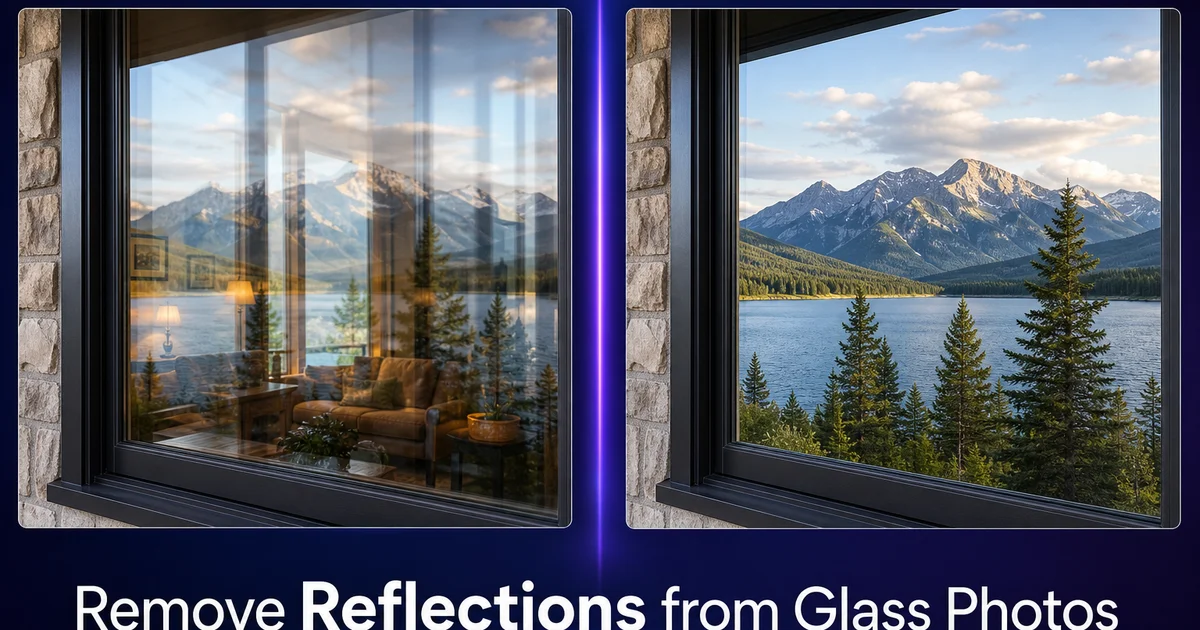
Les reflets dans le verre sont l'une des frustrations les plus persistantes en photographie. Que vous photographiiez à travers une fenêtre, une peinture encadrée, des produits dans une vitrine ou que vous documentiiez une architecture avec de grandes façades vitrées, les reflets indésirables du photographe, de la pièce, des lumières au plafond ou de l'environnement se superposent au sujet et dégradent l'image. Même avec une sélection minutieuse de l'angle et un contrôle de l'éclairage, les surfaces vitrées reflètent tout ce qui leur fait face. Et cela inclut souvent vous et votre appareil photo.
Les solutions traditionnelles lors de la prise de vue — filtres polarisants, angles de prise de vue spécifiques, éclairage contrôlé — aident à réduire les reflets mais les éliminent rarement complètement. Les polariseurs ne fonctionnent que sur les reflets à certains angles (l'angle de Brewster, environ 53 degrés pour le verre). Se repositionner n'est pas toujours possible lorsqu'on photographie à travers des vitrines de musée, des vitrines de magasin ou du verre de véhicule. En post-traitement, la suppression manuelle des reflets nécessite un travail minutieux de clonage et de correction car le reflet se superpose et se mélange à la scène qui se trouve derrière, rendant l'effacement simple irrégulier et peu naturel.
La suppression des reflets par IA fonctionne fondamentalement différemment des techniques manuelles. Au lieu de cloner des pixels voisins sur la zone réfléchie, l'IA comprend à quoi la scène derrière le verre devrait ressembler. En se basant sur les parties visibles de l'intérieur, de l'œuvre d'art, du produit ou du paysage — et reconstruit les zones obscurcies avec les bons détails, couleurs et textures. Ce guide couvre les techniques pour supprimer les reflets des fenêtres, des vitrines, des œuvres encadrées, des miroirs et des surfaces brillantes.
- La reconstruction par IA génère la scène réelle derrière le verre plutôt que de cloner les pixels voisins, produisant des résultats naturels même sur de grandes zones de reflets.
- Fonctionne sur tous les types de reflets : reflets spéculaires des lumières ponctuelles, reflets larges du photographe et de la pièce, et superpositions partielles sur les surfaces transparentes.
- Gère la nature mélangée et semi-transparente des reflets sur le verre où le reflet et le sujet derrière le verre sont mélangés.
- Efficace sur les fenêtres, les vitrines de musée, les œuvres encadrées, le verre de véhicule, les photographies de vitrines et les surfaces brillantes.
- AI Enhance en tant qu'étape finale restaure les gradients naturels de la surface vitrée et l'assombrissement des bords que les reflets interrompent.
Pourquoi les reflets sur le verre sont particulièrement difficiles à supprimer
Les reflets sur le verre diffèrent des autres obstructions photographiques car ce sont des superpositions semi-transparentes, et non des objets opaques. Lorsque vous supprimez une ligne électrique dans un ciel, le ciel derrière elle est entièrement caché par le fil opaque et doit être généré de toutes pièces. Lorsque vous supprimez un reflet sur du verre, la scène derrière le verre est partiellement visible à travers le reflet. Le sujet et le reflet sont mélangés à des opacités variables sur toute la surface du verre. Cela signifie que l'IA doit séparer deux images superposées et ne conserver que celle derrière le verre.
L'intensité et le caractère du reflet varient sur la surface du verre en fonction de l'angle de vue et de la courbure du verre, ainsi que de la distance de la source lumineuse qui crée le reflet. Un reflet peut être presque opaque à un endroit (où une source lumineuse brillante frappe le verre selon un angle direct) et presque invisible quelques centimètres plus loin. Ce gradient signifie qu'un seul paramètre de suppression ne fonctionne pas uniformément sur toute la zone touchée. L'IA doit adapter son approche pixel par pixel en fonction de la quantité de reflet par rapport à la scène sous-jacente présente à chaque point.
La contamination des couleurs ajoute une autre couche de complexité. Le reflet ne se contente pas de se superposer à la scène — il modifie les couleurs en dessous. Un reflet chaud d'une pièce sur un paysage aux tons froids à l'extérieur de la fenêtre déplace les couleurs visibles du paysage vers des tons chauds dans la zone réfléchie. Supprimer le reflet et restaurer la couleur précise en dessous nécessite que l'IA non seulement régénère les détails manquants mais aussi corrige le décalage chromatique que le reflet mélangé a provoqué dans les zones partiellement visibles.
- Les reflets sur le verre sont des superpositions semi-transparentes où le sujet et le reflet se mélangent à des opacités variables — et non de simples obstructions opaques.
- L'intensité des reflets varie sur la surface du verre en fonction de l'angle de vue, de la courbure du verre et de la distance de la source lumineuse, nécessitant un traitement adaptatif pixel par pixel.
- La contamination des couleurs par la scène réfléchie modifie les couleurs du sujet derrière le verre, nécessitant une correction au-delà d'une simple suppression.
- Ces facteurs font de la suppression des reflets sur le verre l'une des tâches de restauration d'image les plus complexes, idéalement adaptée à l'IA plutôt qu'aux techniques manuelles.
Supprimer les reflets des fenêtres et du verre architectural
La photographie d'architecture et d'immobilier implique fréquemment de photographier à travers ou vers de grandes surfaces vitrées — façades d'immeubles de bureaux, vitrines de magasins, fenêtres résidentielles montrant l'intérieur aménagé et atriums vitrés. Les reflets sur ces surfaces sont souvent larges, couvrant tout le plan de la fenêtre. Ils incluent le photographe, son équipement, les bâtiments environnants, le ciel et l'activité au niveau de la rue. L'image réfléchie peut être aussi détaillée que la scène derrière le verre, créant un effet de double exposition déroutant.
Pour les fenêtres où vous souhaitez montrer l'intérieur (une maison aménagée vue de l'extérieur, un intérieur de restaurant photographié depuis le trottoir), sélectionnez toute la zone de la fenêtre y compris les bords du cadre. Magic Eraser reconstruira la scène intérieure en référençant les parties visibles et en comprenant le contenu intérieur typique comme les meubles, les murs et l'éclairage. Pour les grandes fenêtres où l'intérieur est partiellement visible à travers le reflet, l'IA mélange son contenu généré avec les parties visibles existantes pour créer une vue homogène et sans reflet.
Pour les façades de bâtiments vitrées où le verre doit apparaître comme une surface architecturale solide plutôt qu'une fenêtre, l'approche diffère. Ici, vous voulez que le verre ressemble à une architecture propre et réfléchissante — pas voir à travers. Supprimez les reflets indésirables spécifiques (votre trépied, une grue de chantier, un camion de passage) tout en conservant les reflets intentionnels du ciel et des nuages qui donnent à la façade son aspect caractéristique. Utilisez une sélection ciblée au pinceau sur les seuls éléments indésirables plutôt que de sélectionner toute la surface vitrée.
- Sélectionnez les zones de fenêtre entières, y compris les bords du cadre, lors de la suppression des reflets pour révéler les scènes intérieures derrière le verre résidentiel ou commercial.
- L'IA référence les parties intérieures visibles à travers le reflet pour reconstruire une vue homogène et sans reflet de l'espace derrière le verre.
- Pour les façades architecturales, supprimez sélectivement uniquement les reflets indésirables tout en préservant les reflets intentionnels du ciel et des nuages qui définissent le caractère du bâtiment.
- Utilisez des sélections ciblées au pinceau sur les reflets spécifiques plutôt qu'une sélection de toute la surface lorsque le verre fait partie de l'esthétique architecturale.
Nettoyer les photographies de musée, de galerie et de vitrine
La photographie de musée et de galerie présente certains des défis de reflets les plus frustrants car le verre est là spécifiquement pour protéger le sujet et vous ne pouvez pas le retirer physiquement. Les vitrines, le verre des tableaux et les vitrines de protection produisent tous des reflets de l'éclairage zénithal de la galerie, des autres visiteurs, du cadre de la pièce et du photographe. Les musées interdisent souvent l'utilisation du flash, vous ne pouvez donc pas surmonter les reflets avec votre propre éclairage. Le résultat est que de nombreuses photos de musée montrent une superposition fantomatique de l'espace de la galerie sur l'œuvre d'art ou l'artefact.
Pour les peintures et photographies encadrées derrière du verre, le reflet apparaît généralement sous forme de taches lumineuses provenant des lumières du plafond et d'une superposition diffuse de la pièce. Sélectionnez toute la surface du verre et laissez AI Fill reconstruire l'œuvre en dessous. L'IA peut référencer les parties visibles de la peinture — les zones où le reflet est le plus faible — pour comprendre le style, la palette de couleurs et le contenu, puis générer les parties manquantes que le reflet obscurcit. Cela fonctionne remarquablement bien pour les œuvres au style cohérent, comme les peintures à l'huile, les aquarelles et les photographies.
Les vitrines contenant des objets tridimensionnels nécessitent une sélection plus minutieuse. Le reflet peut ne recouvrir qu'une partie de l'objet. La surface vitrée existe à un plan focal différent de celui de l'objet. Sélectionnez uniquement les zones réfléchies qui chevauchent l'artefact, en laissant les parties propres intactes. Travaillez par sections si le reflet couvre une grande zone. Traitez d'abord la moitié supérieure, puis la moitié inférieure — pour donner à l'IA la meilleure référence possible à partir des zones adjacentes propres. Après la suppression, AI Enhance unifie l'éclairage et la couleur sur toute la vitrine pour éliminer tout aspect disparate.
- Les conditions muséales — pas de flash, verre de protection, éclairage zénithal — rendent les reflets inévitables dans la photographie de galerie et d'artefacts.
- AI Fill reconstruit l'œuvre cachée sous les reflets de la galerie en référençant le style visible, la palette et le contenu de la peinture à partir des zones non réfléchies.
- Les objets tridimensionnels dans les vitrines bénéficient d'une suppression sélective et par sections des reflets plutôt que d'un traitement de toute la surface.
- AI Enhance après la suppression unifie l'éclairage et la couleur sur toute la surface vitrée nettoyée pour éliminer les disparités entre les zones traitées et non traitées.
Gérer les reflets sur les miroirs, les produits brillants et le verre de véhicule
Les miroirs présentent un défi philosophique : le but même d'un miroir est de refléter. Supprimer le reflet signifie générer la scène que le miroir montrerait s'il n'y avait pas de photographe devant. Pour la photographie d'intérieur et d'immobilier, cela signifie généralement générer une continuation de la pièce de l'autre côté. AI Fill peut créer une continuation plausible de la pièce — correspondant à la couleur du mur, au matériau du sol et au style du mobilier — qui remplace votre reflet avec appareil photo par une vue intérieure propre. Le résultat n'a pas besoin d'être architecturalement précis ; il doit paraître naturel sur la photographie.
La photographie de produits brillants — appareils électroniques, lunettes de soleil, montres, céramique, métal poli — génère des reflets de l'environnement de prise de vue sur les surfaces courbes. Ces reflets sont souvent de petits reflets localisés plutôt que des superpositions de scène entière, ce qui les rend bien adaptés au pinceau ciblé de Magic Eraser. Pour une montre avec un reflet de la lumière du studio dans son verre, ou des lunettes de soleil reflétant le photographe dans leurs verres, peignez simplement sur l'élément réfléchi avec un pinceau serré. L'IA remplira avec la bonne texture de surface — clarté du verre, gradient du verre de lunettes, éclat métallique — à partir de la surface du produit environnante.
Le verre de véhicule — pare-brise, vitres latérales et toits ouvrants — combine les défis du verre plat avec les surfaces courbes. Les reflets du tableau de bord dans le pare-brise, les reflets du photographe dans les vitres latérales d'une voiture en annonce, le reflet du ciel sur les toits ouvrants interfèrent tous avec une photographie automobile nette. Traitez le verre de véhicule de la même manière que le verre architectural : sélectionnez la zone de reflet, laissez l'IA reconstruire ce qui se trouve derrière ou sur la surface vitrée. Utilisez AI Enhance pour unifier le résultat. Pour les photos d'intérieur de voiture prises de l'extérieur, l'IA reconstruit le tableau de bord, les sièges et l'intérieur visibles à travers le verre sans reflet.
- Les reflets de miroir en photographie d'intérieur peuvent être remplacés par des continuations de pièce générées par IA qui correspondent à la couleur du mur, au matériau du sol et au style du mobilier.
- Les reflets de produits brillants sont généralement de petits reflets localisés, bien adaptés à la suppression ciblée au pinceau de Magic Eraser.
- Le verre de véhicule combine les défis des reflets plats et courbes — traitez les pare-brise, les vitres latérales et les toits ouvrants comme du verre architectural avec reconstruction par IA.
- AI Enhance en tant que passage final unifie l'apparence de la surface sur les zones nettoyées, restaurant les gradients naturels du verre et les propriétés réfléchissantes.
How to do it
- 1
Identify the type and extent of the reflection
Assess whether the reflection is a bright specular highlight (a point-source light bounce), a broad diffuse reflection (your own image or the room reflected in the glass), or a partial transparency where you can see through the glass but a reflection overlays it. Each type requires a slightly different removal approach.
- 2
Select the reflection area in Magic Eraser
Use the brush tool to paint over the reflected area. For specular highlights, a small precise selection works well. For broad reflections covering large areas of glass, select the entire affected zone. Include the full extent of the reflection including its faded edges, not just the brightest center. Leaving partial reflection edges looks worse than the original.
- 3
Let the AI reconstruct what lies behind the glass
Magic Eraser analyzes the visible portions of the scene behind the glass and generates what the reflection is obscuring. For windows, it reconstructs the interior room or exterior view. For display cases, it fills in the object details hidden by the reflection. For framed artwork, it regenerates the painting or photograph surface beneath the glare.
- 4
Use AI Fill for large reflections over detailed subjects
When a reflection covers a major portion of a detailed subject, such as your reflection in a museum display case obscuring half a painting, switch to AI Fill. It uses broader scene context and content understanding to reconstruct complex details like artwork, text, product displays, and architectural elements that Magic Eraser alone may not fully resolve.
- 5
Enhance the final image to unify tones across the cleaned glass
Run AI Enhance to smooth any tonal inconsistencies where the reflection was removed. Glass surfaces have subtle color gradients and edge darkening that the reflection may have interrupted. A global boost pass restores these transitions so the glass surface reads as a single, steady plane.
Sources
- Optical Physics of Reflection and Refraction in Photography — B&H Photo
- Architectural Photography Techniques for Glass and Reflective Surfaces — American Institute of Architects
- Museum and Gallery Photography: Handling Reflective Cases and Framed Works — American Alliance of Museums