
Comment corriger la balance des blancs en éclairage mixte — Magic Eraser
Corrigez les problèmes de balance des blancs dans les photos avec des sources d'éclairage mixte comme tungsten plus lumière du jour, fluorescent plus lumière naturelle, et contamination colorimétrique LED. Correction AI-powered pour des résultats naturels.

Product Marketing
Vérifié par Magic Eraser Editorial ·
Sommaire
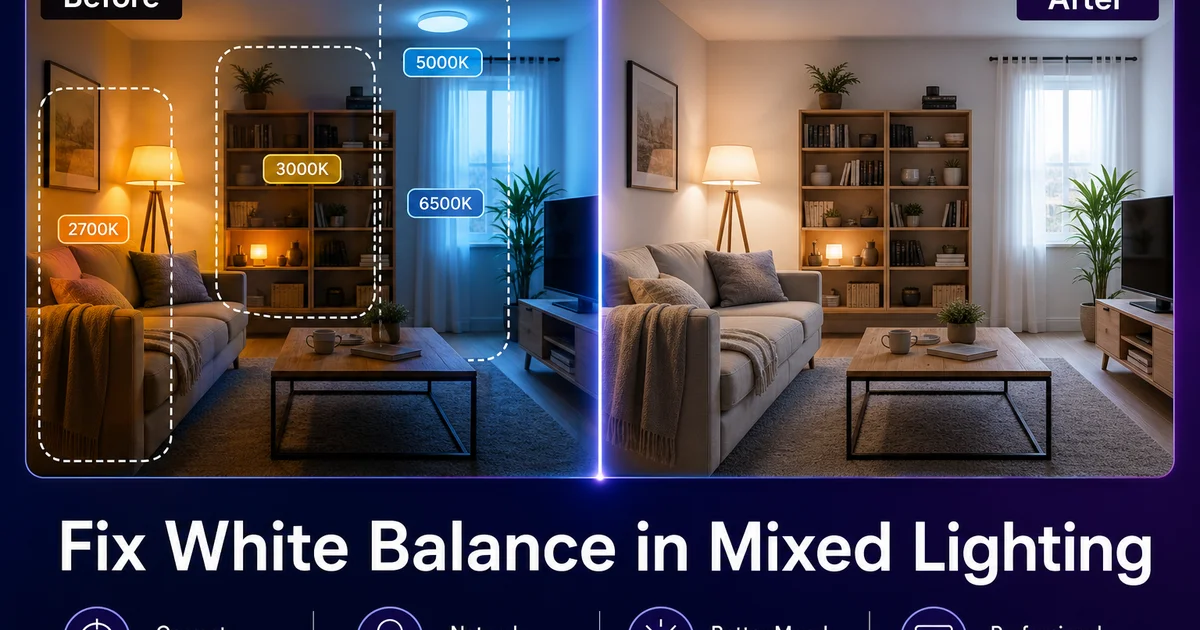
L'éclairage mixte est le problème de balance des blancs le plus courant en photographie, et celui que les réglages traditionnels de l'appareil photo gèrent le moins bien. Lorsqu'une pièce est éclairée à la fois par une lampe de table tungsten chaude et par la lumière du jour fraîche qui entre par une fenêtre, l'appareil photo ne peut définir qu'une seule balance des blancs pour l'ensemble du cadre. Réglez-la pour tungsten et les zones éclairées par la lumière du jour deviennent bleues. Réglez-la pour la lumière du jour et les zones tungsten deviennent oranges. Chaque prise de vue est un compromis qui laisse au moins une partie de l'image avec une dominante de couleur évidente.
Le problème s'aggrave avec l'éclairage moderne. Panneaux LED, tubes fluorescent, lampadaires à vapeur de sodium. Les ampoules fluorescentes compactes ont chacune des caractéristiques spectrales différentes qui ne correspondent pas à de simples ajustements de température de couleur. L'éclairage fluorescent présente un pic vert que la balance des blancs tungsten ne peut pas corriger. Les panneaux LED bon marché produisent des teintes magenta ou vertes qui changent de manière imprévisible avec les réglages du variateur. Une seule pièce peut avoir trois ou quatre sources lumineuses différentes, chacune contaminant une zone différente de la photographie avec une dominante de couleur différente.
La correction AI white balance résout la limitation fondamentale de la correction traditionnelle en traitant différentes zones de l'image individuellement. Au lieu d'appliquer un seul changement global de température de couleur, l'AI identifie les zones éclairées par différentes sources et applique la correction appropriée à chaque zone séparément. Un sujet éclairé par tungsten à gauche et par la lumière du jour à droite reçoit des corrections côté chaud et côté froid qui se rejoignent naturellement au milieu, produisant l'éclairage neutre unifié qu'un seul réglage de balance des blancs ne pourrait jamais atteindre.
- L'IA applique des corrections de balance des blancs spécifiques à chaque zone plutôt qu'un seul changement global de température de couleur qui laisserait certaines zones avec une dominante incorrecte.
- Reconnaît et corrige le pic vert de l'éclairage fluorescent, la teinte magenta de certains panneaux LED, l'orange profond des sources à vapeur de sodium que les simples curseurs de température de couleur ne peuvent pas traiter.
- Normalise les tons de peau contaminés par différentes sources lumineuses sur différents côtés du visage, produisant des résultats naturels et unifiés.
- Préserve l'ambiance lumineuse intentionnellement chaude ou froide tout en supprimant les dominantes de couleur non naturelles créées par les sources mixtes.
- Fonctionne sur les photos de tout appareil photo, y compris les smartphones où le contrôle manuel de la balance des blancs est limité ou indisponible.
Pourquoi l'éclairage mixte défie le réglage unique de la balance des blancs
La température de couleur est une simplification. La balance des blancs de l'appareil photo suppose que toute la scène est éclairée par une seule source lumineuse avec une distribution spectrale connue. 5500K pour la lumière du jour, 3200K pour tungsten, 4000K pour fluorescent. Lorsque vous réglez 5500K, l'appareil photo applique un décalage uniforme aux canaux rouge et bleu qui rend les blancs éclairés par la lumière du jour neutres. Mais lorsque la moitié de la scène est éclairée par tungsten à 3200K et l'autre moitié par la lumière du jour à 5500K, aucun décalage unique ne peut corriger les deux. La correction tungsten qui réchauffe le côté lumière du jour réchauffe également davantage le côté tungsten. La correction lumière du jour qui refroidit le côté tungsten refroidit également davantage le côté lumière du jour.
L'éclairage fluorescent et LED aggrave le problème car leur rendement spectral n'est pas une courbe de corps noir lisse. Le tungsten et la lumière du jour produisent des spectres stables qui diffèrent principalement par le rapport des longueurs d'onde chaudes et froides. Les tubes fluorescent produisent des spectres avec des pics prononcés à des longueurs d'onde spécifiques. Principalement un pic vert prononcé autour de 546 nanomètres — qu'aucun ajustement de température de couleur ne peut neutraliser. La correction du pic vert nécessite un décalage de teinte magenta en plus de la correction de température. La quantité varie selon le type et l'âge du tube.
L'éclairage LED moderne introduit encore plus de variabilité. Le rendement spectral d'un panneau LED dépend du mélange de phosphores spécifique utilisé par le fabricant. Les panneaux bon marché ont souvent des lacunes ou des pics dans leur spectre qui produisent des dominantes de couleur visibles uniquement sur les photographies. Deux panneaux LED qui semblent blancs identiques à l'œil nu peuvent produire des dominantes de couleur sensiblement différentes sur les photos car le capteur de l'appareil photo répond à l'ensemble du spectre tandis que la vision humaine s'adapte et compense. C'est pourquoi les photographes d'événements redoutent les lieux qui mélangent LED, fluorescent et tungsten.
- La balance des blancs de l'appareil photo suppose une source lumineuse unique — lorsque deux sources ou plus éclairent différentes zones, aucun réglage unique ne peut corriger l'ensemble du cadre.
- Les tubes fluorescent produisent des pics spectraux (surtout vert à 546nm) que les curseurs de température de couleur ne peuvent pas neutraliser — ils nécessitent une correction de teinte séparée.
- Les panneaux LED varient selon le mélange de phosphores du fabricant, produisant des dominantes de couleur invisibles à l'œil mais capturées par les capteurs des appareils photo qui ne s'adaptent pas comme la vision humaine.
- Les lieux d'événements mélangeant des sources LED, fluorescent et tungsten créent les défis d'éclairage mixte les plus extrêmes en photographie pratique.
Comment l'AI réalise une correction colorimétrique spécifique à chaque zone
La correction AI white balance fonctionne en identifiant des objets aux propriétés de couleur connues dans toute l'image et en les utilisant comme points d'étalonnage distribués. Un carreau de plafond blanc dans la zone éclairée par fluorescent, une chemise blanche dans la zone éclairée par tungsten, une tache de neige blanche visible par la fenêtre — chacun indique à l'AI le décalage de couleur existant dans sa zone. L'IA interpole ensuite entre ces points d'étalonnage pour créer une carte de correction à variation spatiale qui applique le bon ajustement à chaque pixel en fonction de sa position et de l'éclairage qui l'atteint.
L'IA utilise également la compréhension sémantique pour améliorer ses corrections. Elle sait que la peau humaine a une gamme assez étroite de couleurs naturelles quelle que soit l'origine ethnique, que la végétation verte se situe dans des plages de teintes spécifiques, que le ciel ne doit pas être vert ou orange. Ces ancres sémantiques complètent la détection d'objets neutres, fournissant des données de correction même dans les zones où aucun objet blanc ou gris n'existe. Un portrait éclairé par tungsten d'un côté et par la lumière d'une fenêtre de l'autre est corrigé pour obtenir des tons de peau naturels des deux côtés, même si aucun objet de référence neutre n'est à proximité.
Le traitement des bords est le domaine où l'AI surpasse principalement les méthodes manuelles. La zone de transition où deux sources lumineuses se chevauchent — le milieu d'une pièce éclairée par des fenêtres d'un côté et des fluorescentes au-dessus de l'autre — présente un gradient lisse de lumière mixte. L'IA crée des gradients de correction lisses qui correspondent à cette transition d'éclairage, évitant la couture visible que les méthodes de correction manuelle fractionnée produisent souvent. Le résultat est une photographie qui semble naturellement éclairée même lorsque l'éclairage d'origine était profondément problématique.
- La détection d'objets neutres distribués crée des points d'étalonnage dans toute l'image — plafonds blancs, tissus gris, murs neutres — pour une cartographie de correction spécifique à chaque zone.
- La compréhension sémantique des tons de peau, de la végétation et des couleurs du ciel fournit des ancres de correction dans les zones sans objets de référence neutres.
- Les gradients de correction lisses à travers les zones de transition d'éclairage évitent les coutures visibles que les techniques de correction manuelle fractionnée produisent généralement.
- L'IA traite l'image entière simultanément, garantissant que les corrections d'une zone se mélangent naturellement avec les zones adjacentes plutôt que de créer des décalages de couleur en patchwork.
Scénarios pratiques et leurs défis de correction spécifiques
La photographie de bureau et de salle de conférence présente le problème d'éclairage mixte le plus universellement rencontré. Les panneaux fluorescent au-dessus projettent une lumière verdâtre d'en haut tandis que les fenêtres le long d'un mur fournissent une lumière du jour fraîche sur le côté. Les écrans d'affichage ou les moniteurs ajoutent un éclairage bleu aux visages à proximité. Une photo de groupe dans ce cadre montrera des dominantes vertes sur le dessus des têtes, des teintes bleues sur les visages les plus proches de l'écran, et des tons assez neutres uniquement sur les sujets positionnés là où la lumière de la fenêtre domine. La correction AI normalise les trois zones à la fois.
La photographie de restaurant et d'événement traite une ambiance tungsten ou bougie chaleureuse mélangée à la lumière du jour fraîche des fenêtres et occasionnellement à un éclairage d'accentuation LED coloré. Le défi ici est de conserver l'atmosphère chaleureuse intentionnelle que le lieu a conçue tout en supprimant la contamination de couleur non naturelle là où les sources se chevauchent. Les AI white balance tools peuvent faire la distinction entre l'ambiance lumineuse chaleureuse intentionnelle et les dominantes de couleur indésirables, appliquant une correction sélective qui préserve l'ambiance tout en nettoyant les zones de contamination.
La photographie immobilière combine fréquemment des vues de fenêtres lumineuses avec un éclairage intérieur tamisé, créant un éclairage mixte extrême sur un seul cadre grand-angle. La vue à travers la fenêtre est équilibrée pour la lumière du jour tandis que l'intérieur de la pièce est éclairé par les luminaires de plafond existants, souvent un mélange de fluorescent obsolète et de LED chaud. La correction AI équilibre ces zones afin que les couleurs intérieures soient précises et que la vue de la fenêtre ne soit pas surexposée au bleu ou à l'orange, produisant les photos d'annonces propres et lumineuses qui vendent des propriétés.
- La photographie de bureau mélange fluorescent au-dessus, lumière du jour des fenêtres sur le côté, et lumière bleue des moniteurs — créant trois zones de couleur distinctes sur les sujets dans une seule photo de groupe.
- La photographie de restaurant nécessite de préserver l'ambiance chaleureuse intentionnelle tout en corrigeant la contamination de couleur non naturelle là où plusieurs sources se chevauchent.
- Les plans larges en photographie immobilière combinent des vues de fenêtres lumineuses avec des intérieurs à sources mixtes tamisées, nécessitant une correction extrême spécifique à chaque zone.
- La photographie d'événement sous des combinaisons LED et fluorescent produit les dominantes de couleur les plus imprévisibles en raison des mélanges de phosphores LED variables selon les luminaires.
Éviter la surcorrection et préserver l'ambiance naturelle
L'objectif de la correction de la balance des blancs en éclairage mixte n'est pas de faire ressembler l'image entière à une photo prise sous un éclairage de studio parfaitement neutre. Les environnements ont du caractère — la lueur chaleureuse d'un salon, la fraîcheur nette d'un bureau exposé au nord, la lumière dorée de l'heure dorée à travers une fenêtre orientée à l'ouest. Neutraliser agressivement toute variation de température de couleur produit une image plate et stérile qui semble artificiellement traitée. La correction doit supprimer les dominantes de couleur problématiques tout en conservant le caractère d'éclairage naturel de la scène.
Les tons de peau sont le point de contrôle le plus critique pour la précision de la correction. La vision humaine est très sensible à la couleur de la peau — même de petites déviations par rapport à l'aspect naturel semblent immédiatement anormales. Après avoir appliqué la correction AI white balance, examinez les tons de peau avant toute autre chose. Ils doivent paraître sains et naturels sans teintes vertes, magenta ou excessivement oranges. Si la peau semble correcte, le reste de la correction est généralement acceptable même si certaines zones non critiques conservent un léger caractère chaud ou froid.
En cas de doute, penchez-vous vers une légère chaleur plutôt que vers une neutralité parfaite. La vision humaine perçoit la lumière chaude comme naturelle et invitante, tandis que la lumière froide ou parfaitement neutre peut sembler clinique. Une photographie avec une dominante chaude à peine perceptible sera universellement perçue comme meilleure qu'une photographie avec une dominante froide à peine perceptible. La lumière chaude est associée au confort et la lumière froide aux environnements artificiels. Cette asymétrie signifie que sous-corriger légèrement les sources chaudes produit un résultat plus agréable que de les surcorriger légèrement.
- Évitez de neutraliser toute variation de température de couleur — les environnements ont un caractère d'éclairage naturel qui doit être préservé tout en supprimant uniquement les dominantes problématiques des sources mixtes.
- Les tons de peau sont le principal point de contrôle de précision car la vision humaine est extrêmement sensible aux moindres écarts par rapport à la couleur naturelle de la peau.
- Une légère chaleur est préférable à une neutralité parfaite — la lumière chaude est perçue comme naturelle et invitante tandis que les résultats neutres ou froids semblent cliniques et surtraités.
- Vérifiez les corrections sur plusieurs éléments : peau, objets blancs, végétation et ciel pour garantir que l'équilibre semble naturel dans toutes les catégories de couleurs.
How to do it
- 1
Identify the competing light sources in the photograph
Examine the photo for telltale color cast zones. Warm orange areas lit by tungsten or candlelight, cool blue areas lit by daylight or electronic flash, green-tinted areas under fluorescent tubes, and magenta zones under certain LED panels. Identifying which light source dominates each area of the frame determines the correction strategy.
- 2
Use AI Filter to analyze and neutralize the dominant color cast
Apply AI Filter's white balance correction, which identifies neutral-tone objects across the image. White walls, gray clothing, neutral flooring — and calculates the correction needed to make them truly neutral. Unlike single-point white balance that corrects for one light source, AI analysis evaluates the entire frame and applies zone-right corrections.
- 3
Apply AI Enhance to recover accurate skin tones and surface colors
Use AI Enhance to normalize skin tones that have been contaminated by mixed lighting. A subject standing between a window and a tungsten lamp may have blue-tinted skin on one side and orange-tinted skin on the other. The AI recognizes natural skin tone ranges and corrects each area on its own to produce a unified, natural look.
- 4
Remove remaining localized color casts with targeted corrections
After the global white balance correction, some areas may retain stubborn color casts from strongly colored light sources. Green from overhead fluorescents, magenta from grow lights, or sodium-vapor orange from street lighting. Apply AI Filter with targeted selections on these specific zones for secondary corrections that the global pass could not fully resolve.
- 5
Verify correction accuracy against known neutral objects in the scene
Check your corrections by examining objects that should be neutral. White ceilings, gray concrete, stainless steel appliances, or white clothing. If these still show a color tint, apply a final subtle adjustment. Also verify that skin tones look natural and that the scene's overall mood has been preserved rather than sterilized to flat neutral lighting.
Sources
- Understanding Color Temperature and White Balance in Digital Photography — Cambridge in Colour
- Color Science for Mixed Illumination Environments — Society for Imaging Science and Technology
- CIE Standards for Illuminant Spectral Distributions — International Commission on Illumination