
Comment retoucher les photos de food trucks : donner aux plats de rue l'apparence qu'ils méritent
Apprenez à retoucher les photos de food trucks avec des outils AI. Supprimez l'encombrement urbain, corrigez l'éclairage extérieur, rehaussez les couleurs des aliments et créez des images appétissantes pour les applications de livraison, les réseaux sociaux et votre site web.

Product Marketing
Vérifié par Magic Eraser Editorial ·
Sommaire
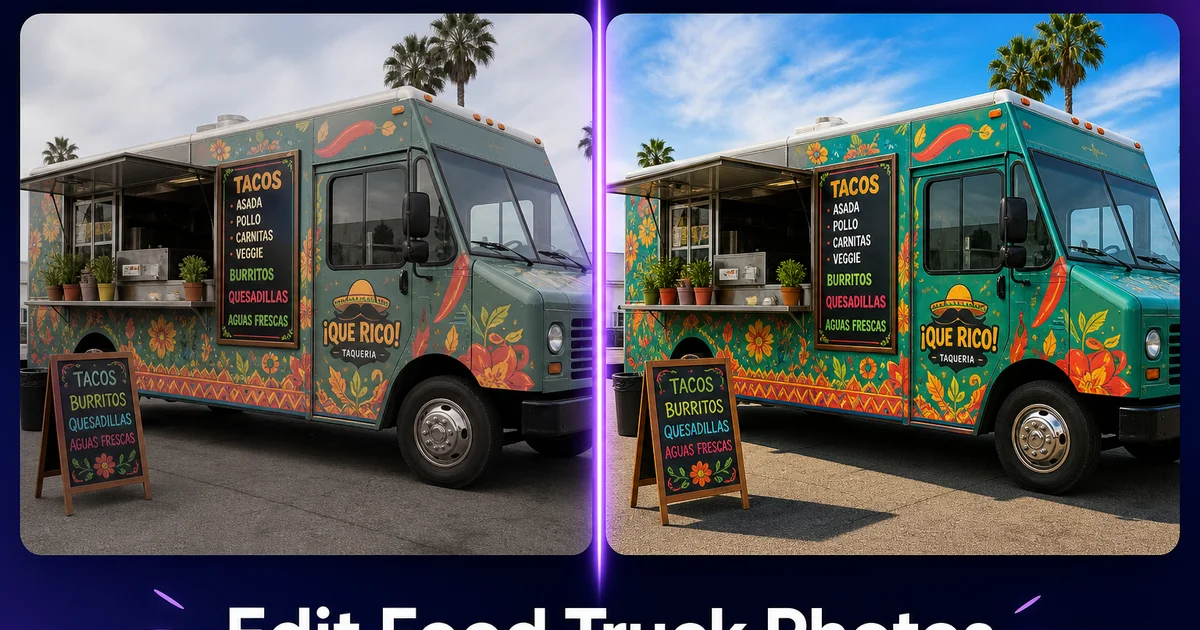
Les food trucks opèrent dans certains des environnements les plus chaotiques visuellement de l'industrie de la restauration. Coins de rue, terrains de festival, parkings et trottoirs adjacents à des chantiers. La nourriture qui sort de la fenêtre de service peut rivaliser avec celle de n'importe quel restaurant, mais les photos racontent une histoire différente. Derrière chaque taco parfaitement assemblé ou chaque plat de frites garnies se cache un décor de voitures garées, de poubelles, de poteaux électriques et de tentes d'autres vendeurs. Le résultat est une photographie culinaire qui ne rend pas justice au produit.
C'est plus important que jamais car les revenus des food trucks proviennent de plus en plus de canaux qui dépendent entièrement des photos. Les applications de livraison comme Uber Eats et DoorDash affichent vos articles de menu sous forme de vignettes. Et ces vignettes sont directement en concurrence avec les photos de restaurant prises dans des conditions de studio contrôlées. Votre fil Instagram est votre portfolio, votre photo Google Business Profile est votre vitrine. L'image hero de votre site web est votre première impression. Quand les photos semblent amateurs, les clients potentiels passent leur chemin.
La retouche photo AI égalise les chances. Vous n'avez pas besoin d'un studio, d'un photographe expert ou d'heures d'expérience sur Photoshop. Avec le bon flux de travail, vous pouvez transformer des photos prises avec un téléphone à un coin de rue animé en images propres et appétissantes qui rivalisent avec les supports marketing de n'importe quel restaurant. Ce guide couvre les défis spécifiques auxquels les opérateurs de food trucks sont confrontés et les techniques de retouche qui les résolvent.
- La suppression d'objets AI élimine l'encombrement urbain — poubelles, parcmètres, autres véhicules — de derrière votre nourriture et votre camion en quelques secondes.
- L'amélioration des couleurs renforce la chaleur et la vitalité naturelles des aliments sans leur donner un aspect artificiellement traité.
- La correction de l'éclairage corrige la teinte bleu-gris des conditions de prise de vue extérieure nuageuses ou ombragées.
- L'accentuation des textures fait ressortir les détails appétissants : marques de grill, brillance des sauces, bords croustillants et garnitures fraîches.
- Une qualité photo cohérente sur Uber Eats, DoorDash, Instagram et votre site web crée une présence de marque professionnelle.
- La retouche prend quelques minutes par photo, ce qui permet de photographier et retoucher chaque élément du menu et chaque spécialité du jour.
Les défis uniques de la photographie de food trucks
La photographie de food truck combine la difficulté de la photographie culinaire avec le cadre incontrôlable de la prise de vue dans la rue. Vous ne pouvez pas choisir votre arrière-plan — c'est tout ce qui se trouve derrière votre camion à l'emplacement du jour. Un stand de déjeuner à côté d'un chantier de construction, un terrain de festival avec des tentes de vendeurs concurrents, ou un parking de brasserie avec des voitures et des bennes à ordures présentent tous des problèmes d'arrière-plan différents qui changent chaque jour.
L'éclairage est tout aussi imprévisible. Contrairement à un restaurant avec un éclairage intérieur constant, les food trucks photographient en plein soleil, à l'ombre profonde, sous un ciel gris et couvert, et dans la lueur dorée des événements en soirée. Parfois tout cela dans la même semaine. Le soleil de midi crée des ombres dures sur les aliments en plat, délavant les couleurs sur le dessus tout en laissant les côtés sombres. Les ciels couverts ajoutent une teinte bleu-gris plate qui donne aux aliments chauds un aspect froid et peu appétissant. L'ombre des bâtiments ou des auvents produit une exposition inégale sur le plat.
La fenêtre de service elle-même ajoute des défis. La vapeur embue la vue, la graisse s'accumule sur le comptoir, la condensation se forme sur les gobelets. L'intérieur derrière la fenêtre est souvent une cuisine encombrée. Quand vous photographiez du point de vue du client, qui est l'angle le plus naturel et le plus attrayant — tout cela est visible dans le cadre.
- Les arrière-plans changent quotidiennement et incluent les infrastructures urbaines, d'autres vendeurs, des véhicules garés et des chantiers.
- L'éclairage extérieur varie du soleil dur de midi au gris couvert et plat, rendant la couleur constante des aliments difficile.
- La fenêtre de service capture la vapeur, la graisse, la condensation et les intérieurs de cuisine encombrés à l'arrière-plan.
- Les food trucks manquent de l'éclairage contrôlé et des surfaces propres que les restaurants utilisent pour la photographie culinaire.
Nettoyer l'environnement autour de votre camion
Le premier passage de retouche devrait se concentrer sur la suppression des distractions environnementales. Ouvrez vos photos hero de votre camion — les photos que vous utilisez pour votre bannière de site web, Google Business Profile, les en-têtes de réseaux sociaux — dans Magic Eraser. Brossez sur les voitures garées, les poubelles, les poteaux électriques, les toilettes portables sur les sites d'événements, la signalétique des vendeurs concurrents et tout autre élément qui encombre le cadre autour de votre camion.
L'AI reconstruit l'arrière-plan avec un trottoir propre, un ciel et un environnement qui semblent naturels. L'objectif n'est pas de créer un décor factice mais de supprimer le bruit visuel pour que l'œil du spectateur se dirige vers votre camion, votre marque et votre nourriture. Pour les gros plans culinaires, la même technique supprime tous les éléments de rue qui apparaissent dans l'arrière-plan flou. Même l'encombrement flou est perçu comme un bruit visuel qui entre en concurrence avec la nourriture.
Pour l'extérieur du camion lui-même, utilisez Magic Eraser pour nettoyer les coulures de graisse sur le comptoir de service, les traces d'eau sur les panneaux extérieurs, les résidus de ruban adhésif de la signalétique temporaire, et toute usure qui donne au camion un aspect moins que parfait. Gardez votre logo, votre carte de menu et vos couleurs de marque intacts. Supprimez uniquement les éléments qu'un nettoyage matinal approfondi traiterait.
Donner aux aliments l'apparence qu'ils méritent
La photographie culinaire réussit quand les spectateurs peuvent presque goûter et sentir le plat à travers l'écran. AI Enhance gère les corrections techniques qui rendent cela possible. Commencez par la température des couleurs : corrigez la teinte bleu-gris des conditions nuageuses ou ombragées pour restaurer la chaleur naturelle des aliments cuits. Les croûtes dorées, les bords caramélisés, le fromage fondu et les protéines grillées doivent sembler chauds et invitants, pas froids et cliniques.
La saturation et la vitalité viennent ensuite. Les ingrédients frais — tomates rouge vif, coriandre vert vif, sauces orange profond — doivent ressortir sans sembler artificiellement traités. AI Enhance équilibre ces ajustements pour que la nourriture ait l'air appétissante et réaliste plutôt que sursaturée. L'outil relève également les détails dans les ombres pour révéler les textures qui font la force de la photographie culinaire : le réseau croustillant d'un enrobage frit, le filage du fromage fondu, le grain de la viande fumée.
Pour les présentations en plat, l'accentuation est la touche finale. Les portions des food trucks sont souvent des articles à manger en main ou des contenants garnis où la texture est la star. Bords croustillants, coulures de sauce, garnitures croquantes. Un léger passage d'accentuation d'AI Enhance fait ressortir ces détails au niveau de qualité qu'exigent les blogueurs culinaires et les images hero des applications de livraison.
- Corrigez les teintes bleu-gris extérieures pour restaurer la chaleur naturelle des aliments cuits.
- Rehaussez la vitalité des ingrédients — rouges, verts, oranges — sans tomber dans la sursaturation artificielle.
- Relevez les ombres pour révéler les textures appétissantes : marques de grill, enrobages croustillants et brillance des sauces.
- Accentuez les détails pour que les articles à manger en main et les contenants garnis montrent tout leur attrait textural.
Optimiser les photos pour les applications de livraison et les réseaux sociaux
Les revenus des food trucks transitent de plus en plus par les applications de livraison, et chaque application a ses propres besoins en matière d'images et son format d'affichage. Uber Eats, DoorDash et Grubhub affichent les photos des articles de menu sous forme de petites vignettes dans une liste défilante. Ce qui signifie que votre nourriture doit être distincte, appétissante et clairement composée même en petite taille. Des arrière-plans propres, des couleurs vives et un recadrage serré sur la nourriture elle-même contribuent tous à une vignette qui sera cliquée.
Pour Instagram, la cohérence compte autant que la qualité individuelle des images. Quand un client potentiel arrive sur votre profil, la grille raconte l'histoire de votre marque. Si chaque photo a une palette de couleurs similaire, un traitement d'arrière-plan similaire, une composition similaire, la grille est perçue comme experte et intentionnelle. Appliquez le même flux de travail de retouche AI à chaque photo : supprimez l'encombrement d'arrière-plan, améliorez les couleurs et l'éclairage, nettoyez les petites distractions. Avec le temps, cette cohérence construit la marque visuelle qui transforme les abonnés en clients qui font la queue.
Google Business Profile est souvent négligé mais crucialement important. Quand quelqu'un cherche des food trucks près de chez lui, les photos de votre fiche GBP sont la première impression visuelle. Téléchargez vos meilleures photos hero retouchées par AI de l'extérieur du camion et de vos articles de menu les plus populaires. Ces images apparaissent dans Maps, Search et les résultats du pack local — des photos de haute qualité ici génèrent directement du trafic piétonnier.
How to do it
- 1
Photograph the food in natural light near the truck
Shoot plated food on or near the serving window rather than inside the truck. Natural daylight provides the best color accuracy for food. Angle the plate so the light comes from the side or slightly behind to create appetizing shadows and highlights on the food's texture.
- 2
Remove street clutter and distracting elements
Open the photo in Magic Eraser and brush over trash cans, parking meters, utility poles, other vehicles, event signage, or any background elements that distract from the food or the truck. The AI fills in the street, sky, or surroundings cleanly.
- 3
Clean up the truck exterior in hero shots
For photos of the truck itself, use Magic Eraser to remove grease spots on the serving counter, drip marks on the exterior, condensation on windows. Any temporary signage or tape that looks unprofessional. Keep the brand elements — logo, menu board, color scheme — and remove everything that detracts from them.
- 4
Enhance food color and detail
Run food close-ups through AI Enhance to boost the warmth and saturation of ingredients. Golden-brown crusts, vibrant salsas, fresh greens — while correcting any blue-gray cast from overcast skies or shade. Sharpen texture detail so viewers can see the char on grilled items and the sheen on sauces.
- 5
Export for delivery apps, social media, and your website
Save high-resolution versions for your website and Google Business Profile. Export cropped square versions for Instagram and delivery app menus. Consistent, appetizing food photography across Uber Eats, DoorDash, Instagram, and your website drives orders from every channel.
Sources
- Food Truck Industry Size and Growth Report — IBISWorld
- The Role of Food Photography in Restaurant Marketing — TouchBistro
- Mobile Food Vendor Regulations and Best Practices — U.S. Small Business Administration