
Comment Creer un Effet d'Art Stencil avec AI — Magic Eraser
Guide etape par etape pour transformer des photos en art stencil multicouche grace a AI. Couvre les effets d'art de rue style Banksy, le maintien des ponts pour des pochoirs decoupables, les textures de peinture aerosol, la separation des couches et la simulation de surface pour une oeuvre stencil authentique.
SEO & Growth
Vérifié par Magic Eraser Editorial ·
Sommaire
- Comment l'AI resout le probleme de reduction tonale pour la conversion stencil
- Preservation des ponts et ingenierie des pochoirs physiquement viables
- Simulation de texture de peinture aerosol et de contexte de surface
- Applications de la reproduction d'art de rue au design de marque et aux projets de pochoirs physiques
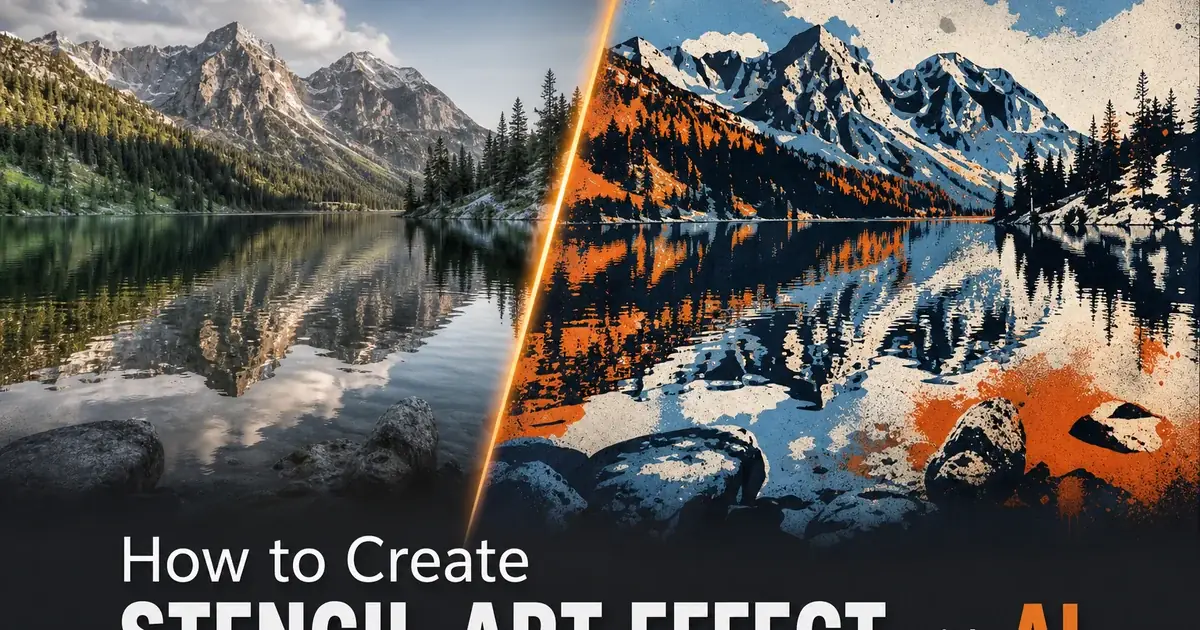
L'art du stencil occupe une place unique dans les arts visuels en tant que medium a la fois ancien et moderne, utilitaire et subversif, simple dans son concept et sophistique dans son execution. La technique consistant a decouper des formes dans un materiau en feuille et a appliquer de la peinture a travers les ouvertures remonte a des milliers d'annees, aux peintures rupestres ou les mains etaient stencilisees sur les parois rocheuses. Au vingtieme siecle, le pochoir etait principalement une technique de marquage industrielle et militaire jusqu'a ce que les artistes de rue — le plus celebre etant Banksy — le transforment en l'une des formes d'art les plus distinctives et culturellement influentes de l'ere moderne. L'impact graphique audacieux de l'art du stencil, sa capacite a reduire des images complexes en formes cles, et son association avec la culture urbaine et le commentaire social ont fait de l'esthetique stencil l'un des effets artistiques les plus demandes dans le traitement d'image numerique.
Creer un art stencil efficace a partir de photos necessite de resoudre un probleme visuel complexe : reduire les gradations tonales continues d'une photographie a un petit nombre de couches planes discretes tout en preservant la reconnaissabilite du sujet et son impact visuel. Ceci est fondamentalement different d'une simple posterisation ou conversion par seuil. Une photographie reduite a deux tons a l'aide d'un simple seuil de luminosite produit des formes chaotiques et non reconnaissables car elle traite chaque pixel individuellement sans comprendre les formes, les bords et les relations spatiales qui rendent l'image lisible. Une conversion stencil efficace necessite de comprendre quels bords definissent le sujet, quelles regions tonales portent les informations visuelles cles et comment repartir ces informations sur un nombre limite de couches pour maintenir a la fois l'audace graphique et la reconnaissance du sujet.
La conversion stencil par AI analyse le contenu de la photographie, identifie les formes et les bords cles, et genere des couches tonales optimisees qui preservent la reconnaissabilite tout en atteignant la simplicite graphique audacieuse qui definit l'art du stencil. L'AI resout egalement le probleme pratique du maintien des ponts, garantissant que chaque forme isolee dans chaque couche reste physiquement connectee afin que le pochoir puisse reellement etre decoupe dans un materiau en feuille et utilise pour la peinture aerosol. Ce guide explique comment utiliser Magic Eraser pour creer un art stencil multicouche avec des controles sur le nombre de couches, le placement des ponts, la texture de la peinture aerosol et la simulation de surface.
- L'art stencil reduit les tons photographiques continus en couches planes discretes — le nombre de couches controle l'equilibre entre la simplicite graphique audacieuse et la reconnaissabilite photographique.
- La preservation des ponts garantit que chaque forme isolee reste connectee au materiau environnant, produisant des pochoirs qui peuvent physiquement etre decoupes et pulverises sans ilots flottants.
- La simulation de texture de peinture aerosol ajoute la douceur caracteristique du depassement de pulverisation, l'accumulation de peinture dans les coins et la texture granuleuse d'aerosol qui distingue l'art stencil des graphiques numeriques plats.
- La simulation de surface place l'art stencil sur des fonds contextuels comme le beton, la brique ou le metal, donnant a l'effet l'impression d'etre physiquement situe plutot que numeriquement genere.
- L'exportation par separation de couches fournit des masques a contraste eleve individuels pour chaque couche tonale, permettant la decoupe physique de pochoirs avec des reperes d'alignement pour le positionnement multicouche.
Comment l'AI resout le probleme de reduction tonale pour la conversion stencil
Le defi technique central de la conversion stencil est de determiner ou placer les frontieres entre les couches tonales afin que l'image plane resultante reste distincte et visuellement forte. Une approche simple par seuil de luminosite traite chaque pixel individuellement : les pixels au-dessus du seuil deviennent blancs, ceux en dessous deviennent noirs — ce qui produit des resultats qui ressemblent a des photocopies a contraste eleve plutot qu'a de l'art stencil. Les formes sont irregulieres, les formes sont fragmente, les relations spatiales entre les elements sont perdues car le seuil n'a aucune comprehension de ce qu'il rend. Les yeux peuvent fusionner avec les sourcils, les ombres peuvent se detacher des visages qui les projettent, et les elements d'arriere-plan peuvent fusionner avec les sujets au premier plan en une masse illisible de formes noires et blanches.
La conversion stencil par AI resout ce probleme en analysant l'image au niveau semantique plutot qu'au niveau des pixels. L'AI identifie les visages, les figures, les objets et les elements d'arriere-plan et traite chacun selon son importance visuelle et ses caracteristiques structurelles. Les visages recoivent une separation tonale plus soignee pour preserver la reconnaissance des traits — le placement specifique des limites d'ombre autour des yeux, du nez et de la bouche qui permet au systeme visuel humain de reconnaitre un visage a partir d'informations minimales. Les elements d'arriere-plan sont simplifies plus agressivement, reduits a de grandes formes simples qui fournissent un contexte sans entrer en competition avec le sujet. L'AI determine quels bords sont essentiels a la reconnaissance du sujet et garantit qu'ils survivent au processus de reduction tonale comme des frontieres propres et deliberees entre les couches.
La conversion stencil multicouche ajoute une complexite supplementaire car chaque couche doit fonctionner a la fois independamment et dans le cadre du composite. Un pochoir a trois couches avec des couches noire, grise et blanche doit produire une image coherente lorsque toutes les couches sont pulverisees en sequence, mais chaque couche individuelle doit egalement etre composee de formes qui ont un sens structurel en tant que pochoir autonome — pas d'ilots flottants, des largeurs de pont raisonnables et une complexite de contour decoupable. L'AI optimise toutes les couches simultanement, ajustant les limites tonales pour garantir que le composite se lise correctement tout en maintenant chaque couche physiquement viable en tant que pochoir separe. Cette optimisation multi-objectifs est quelque chose que les artistes stencil experimentes developpent apres des annees de pratique et que l'AI peut calculer directement a partir de l'analyse d'image.
- La conversion par seuil simple traite les pixels independamment, produisant des formes fragmentees — l'AI analyse le contenu semantique pour preserver les formes et les relations spatiales.
- Les visages recoivent une separation tonale soignee pour maintenir les motifs d'ombre specifiques autour des yeux, du nez et de la bouche permettant la reconnaissance a partir d'informations minimales.
- Les elements d'arriere-plan sont simplifies agressivement en formes plus grandes qui fournissent un contexte sans entrer en competition avec la priorite visuelle du sujet.
- L'optimisation multicouche garantit que chaque couche fonctionne comme un pochoir decoupable autonome tandis que le composite de toutes les couches produit une image coherente et reconnaissable.
Preservation des ponts et ingenierie des pochoirs physiquement viables
Le maintien des ponts est la caracteristique qui separe le veritable art stencil des simples graphiques posterises. Dans la construction physique de pochoirs, le materiau est une feuille continue unique — carton, mylar, acetate ou metal — avec des formes decoupees pour laisser passer la peinture. Toute zone decoupee completement fermee creerait un ilot flottant de materiau qui tomberait du pochoir, laissant un trou non voulu. L'exemple classique est la lettre O : l'ovale interieur doit etre connecte a la feuille de pochoir environnante par au moins deux ponts, sinon il se detache lors de la decoupe. Tout artiste stencil apprend a penser en termes de formes connectees ou chaque element du design doit revenir a la bordure de la feuille par un chemin ininterrompu de materiau.
La detection de ponts par AI identifie chaque ilot flottant potentiel dans chaque couche de pochoir en analysant la topologie des zones decoupees. Pour chaque region isolee — la pupille d'un oeil, un point de surbrillance sur une levre, une ouverture de fenetre dans un sujet architectural, toute zone claire entouree d'une zone plus sombre — l'algorithme determine le nombre minimum de ponts necessaires pour maintenir la connexion structurelle et les place a des positions qui minimisent la perturbation visuelle. Les ponts sont places le long des bords existants lorsque cela est possible, orientes pour suivre la direction naturelle de la forme afin qu'ils soient lus comme des elements de design intentionnels plutot que des compromis structurels. La largeur des ponts est calibree sur la taille globale du pochoir : les grands pochoirs peuvent utiliser des largeurs de pont relatives plus erroites car le materiau physique a suffisamment de resistance aux plus grandes echelles.
L'impact visuel des ponts fait partie de l'esthetique de l'art stencil plutot qu'un defaut a cacher. Dans l'art de rue iconique, les ponts qui connectent les interieurs de lettres, les pupilles et les formes fermees sont des signatures distinctives du medium stencil — ils signalent que l'image a ete creee par un processus physique de decoupe et de pulverisation plutot que par impression ou peinture a main levee. L'AI positionne les ponts pour renforcer cette qualite d'authenticite du medium : suffisamment visibles pour etre reconnus comme une ingenierie stencil deliberee, mais ni trop larges ni trop nombreux pour obscurcir l'image. Les utilisateurs peuvent ajuster la largeur et la densite de placement des ponts pour equilibrer entre des ponts structurels minimaux et les motifs de ponts plus visibles qui soulignent la methode de construction du pochoir.
- Les pochoirs physiques necessitent que chaque zone decoupee soit connectee a la bordure de la feuille — les ilots flottants se detachent lors de la decoupe, laissant des trous non voulus.
- L'AI detecte chaque ilot flottant potentiel et place des ponts a des positions qui maintiennent la connexion structurelle tout en minimisant la perturbation visuelle.
- Les ponts sont orientes le long des bords existants et des directions naturelles des formes afin qu'ils soient lus comme des elements de design intentionnels plutot que des necessites structurelles.
- La visibilite des ponts est ajustable depuis des connexions structurelles minimales jusqu'a des motifs proeminents qui soulignent l'esthetique de construction physique du pochoir.
Simulation de texture de peinture aerosol et de contexte de surface
La distinction visuelle entre l'art stencil et les graphiques numeriques plats reside dans la texture du medium applique. La peinture aerosol provenant d'une bombe ne produit pas un revetement parfaitement uniforme avec des bords tranchants. La peinture frappe la surface sous forme d'un cone de fines gouttelettes qui creent des comportements caracteristiques : le depassement de pulverisation s'etend legerement au-dela du bord du pochoir comme un gradient doux de points disperses, la peinture s'accumule plus lourdement dans les coins ou les pulverisations se chevauchent, les surfaces verticales developpent de fines coulures la ou l'exces de peinture ruisselle, et la surface de peinture elle-meme a une texture granuleuse due aux impacts individuels des gouttelettes plutot que l'uniformite lisse des formes remplies numeriquement. Ces textures sont la signature visuelle du travail au pochoir peint a l'aerosol et leur presence ou absence signale immediatement si une image est un veritable art stencil ou une approximation numerique.
La simulation de peinture aerosol par AI modelise la physique de l'application d'aerosol pour generer ces details de texture authentiques. La douceur du depassement de pulverisation aux bords du pochoir varie en fonction de la distance simulee entre la bombe et la surface : une application rapprochee produit des bords plus nets avec un depassement minimal tandis qu'une application plus distante cree des halos de depassement plus larges. Le calcul d'accumulation de peinture identifie les coins et les canaux erroits ou les passages de pulverisation qui se chevauchent concentrent plus de peinture, produisant l'accumulation legerement surélevee et plus foncee visible dans le travail stencil reel. La simulation de coulure ajoute de fines traînées verticales de peinture a des positions aleatoires le long des bords inferieurs et des points d'accumulation lourde, controlee par un parametre allant de pas de coulure pour une application propre et controlee a des coulures frequentes pour une esthetique d'art de rue brute et haste.
La simulation de surface ancre l'art stencil dans un contexte physique qui complete l'illusion d'une application de peinture aerosol reelle. Un mur en beton montre la peinture reposant sur une surface rugueuse legerement poreuse ou la peinture est plus fine dans les zones encavees et plus opaque sur les points suréleves. Un mur en brique ajoute le motif de ligne de mortier qui interrompt les formes du pochoir a intervalles reguliers, la peinture s'accumulant dans les joints de mortier. Le metal ondule ajoute des motifs de nervures paralleles qui modulent la couverture de peinture. Chaque simulation de surface interagit avec la couche de texture de peinture aerosol : le meme design de pochoir semble different sur la brique que sur le beton car l'interaction peinture-surface differe. Cette interaction entre la peinture et la surface est ce qui fait que les meilleurs effets stencil semblent physiquement situes dans des espaces reels plutot que de flotter comme des abstractions numeriques.
- La simulation de peinture aerosol modelise la douceur du depassement, l'accumulation dans les coins, les coulures et la texture granuleuse qui distinguent l'art stencil physique des graphiques numeriques plats.
- La largeur de depassement varie avec la distance de pulverisation simulee — une application rapprochee produit des bords nets tandis qu'une application distante cree des halos de gradient plus larges aux frontieres du pochoir.
- La simulation de surface place l'art stencil sur des fonds en beton, brique ou metal ou l'interaction peinture-surface cree des reponses materielles physiquement convaincantes.
- Les couches de peinture et de surface interagissent de maniere authentique — le meme design de pochoir semble different sur la brique que sur le beton car les motifs de couverture suivent la texture sous-jacente.
Applications de la reproduction d'art de rue au design de marque et aux projets de pochoirs physiques
Le marketing de style art de rue et le design de marque representent l'application commerciale la plus courante des effets stencil. L'impact graphique audacieux de l'art stencil transmet un realisme urbain, une energie contre-culturelle et une confiance visuelle qui resonne aupres des marques ciblant les jeunes demographics. Les festivals de musique, les marques de vetements de rue, les entreprises de skateboard, les microbrasseries et les marques de style de vie urbain utilisent des images de style stencil pour les affiches, les marchandises, le contenu des reseaux sociaux et l'emballage car cette esthetique porte des associations immediates avec l'independance creative et l'avantage culturel. Un portrait stencil d'un musicien ou d'un athlete transporte plus d'energie visuelle et de resonance culturelle que le meme portrait en photographie conventionnelle, le rendant particulierement efficace pour les materiaux promotionnels et le design de marchandises.
Les applications d'art et de galerie utilisent les effets stencil pour explorer la tension visuelle entre la representation photographique et l'abstraction graphique. La conversion de portraits en couches stencil revele comment le systeme visuel humain reconnait les visages a partir d'informations minimales. Un portrait stencil bien execute a deux couches n'utilise que des formes noires sur fond blanc mais reste immediatement reconnaissable car l'AI a preserve les motifs d'ombre exacts que le cerveau utilise pour la reconnaissance faciale. Ce phenomene perceptuel fait des portraits stencil de puissants sujets de galerie qui invitent les spectateurs a considerer comment la reconnaissance fonctionne a la frontiere entre abstraction et representation. Les impressions stencil grand format sur toile ou panneau creent un art mural dramatique qui combine le poids visuel du design graphique avec l'intimite du portrait.
Les projets de decoupe physique de pochoirs beneficient directement des fonctions de separation de couches et de maintien des ponts. Les artistes, les artisans et les amateurs de bricolage peuvent exporter des couches de pochoir individuelles sous forme de masques a contraste eleve, les imprimer a la taille physique souhaitee, transferer les motifs sur le materiau du pochoir et decouper de veritables pochoirs pour des projets de peinture aerosol, de serigraphie ou de peinture sur tissu. Le maintien des ponts garantit que le pochoir est structurellement viable une fois decoupe, et les reperes d'alignement garantissent que les pochoirs multicouches s'alignent correctement. Cela comble le fosse entre le design numerique et la fabrication physique : l'AI gere l'analyse tonale complexe et l'ingenierie structurelle tandis que l'artiste humain s'occupe de la decoupe et de la peinture physiques qui donnent vie au pochoir sur des surfaces reelles.
- Le marketing d'art de rue porte des associations d'authenticite urbaine et d'independance creative qui resonne aupres des publics de la musique, du streetwear et des marques de style de vie.
- Les portraits stencil de galerie explorent la reconnaissance faciale a partir d'informations minimales — les pochoirs a deux couches revelent comment le cerveau identifie les visages a partir des seuls motifs d'ombre.
- Les projets de decoupe physique de pochoirs utilisent des masques de couches exportes avec preservation des ponts pour creer des pochoirs structurellement viables pour la peinture aerosol et la serigraphie.
- Les reperes d'alignement sur les exportations multicouches garantissent que les pochoirs physiques s'alignent correctement lors de la pulverisation sequentielle, faisant le pont entre le design numerique et l'artisanat physique.
How to do it
- 1
Upload the photo and evaluate its suitability for stencil conversion
Open your image in Magic Eraser and assess whether the photograph will translate well into stencil art. Images with strong contrast between subject and background, clear silhouette outlines. Bold graphic shapes convert most successfully because stencil art relies on distinct tonal separation rather than smooth gradients. Portraits with dramatic lighting, iconic architectural shapes, and bold graphic subjects work excellently. Avoid images with subtle tonal variations, complex overlapping elements, or subjects that depend on fine color gradations for recognition because stencil conversion reduces these to flat tone regions that may lose the subject's identity.
- 2
Select the number of stencil layers and tonal separation thresholds
Configure the number of distinct tonal layers the AI will generate. A two-layer stencil produces the boldest graphic result with just black and white. The classic Banksy-style street art look where every element is reduced to solid black shapes on white ground. Three layers add a mid-tone gray that preserves shadow detail and facial structure. Four to five layers create more photographic fidelity with multiple gray values between black and white. Each extra layer increases the image's tonal complexity and recognizability but reduces the bold graphic simplicity that defines the stencil aesthetic.
- 3
Enable bridge preservation to maintain structural stencil integrity
Activate the bridge keeping algorithm which ensures that every isolated shape within each layer remains physically connected to the surrounding material. In physical stencil cutting, any completely enclosed shape. The inside of the letter O, the pupil of an eye, an island of tone surrounded by a different tone — would fall out of the stencil sheet if not connected by bridges. The AI automatically detects these floating islands and generates thin connecting bridges that maintain structural integrity while minimizing visual disruption, producing stencils that could actually be physically cut and sprayed.
- 4
Apply spray paint texture and surface simulation
Select the surface texture and spray paint behavior that determine the final visual character. The spray paint simulation adds the trait overspray softness at shape edges, the slight paint buildup and drip marks at corners. The granular texture of aerosol paint on rough surfaces. Choose between clean concrete wall, rough brick, corrugated metal, or smooth paper surfaces — each creates different paint interaction patterns. The surface texture shows through the paint in lighter areas, adding the environmental context that makes stencil art feel like it exists in a physical space rather than as a flat digital graphic.
- 5
Export the stencil art with optional layer separation for physical cutting
Export the completed stencil art as a composite image for digital use, or export individual layers as separate files for physical stencil cutting. Each separated layer is a high-contrast black-and-white mask that can be printed at any size and transferred to stencil material for actual spray paint application. The composite export includes the spray paint texture and surface simulation for digital display and print. For physical stencil use, export at the target physical size with registration marks that ensure multi-layer stencils align correctly when sprayed sequentially.
Sources
- The History and Techniques of Stencil Art — Tate Modern
- Image Segmentation and Posterization for Stencil Generation — ACM SIGGRAPH
- Bridge Preservation in Connected Stencil Design — IEEE Computer Graphics