
Comment creer un effet Sgraffite avec l'IA — Magic Eraser
Transformez vos photos en art du sgraffite par grattage grace au transfert de style par IA. Guide etape par etape couvrant la selection des couleurs de couche, la profondeur du grattage, l'epaisseur du trait, la texture des bords. Simulation authentique des materiaux pour cette technique decorative vieille de plusieurs siecles.
SEO & Growth
Vérifié par Magic Eraser Editorial ·
Sommaire
- Comprendre le sgraffite comme forme d'art soustractif et comment l'IA reproduit le processus
- Configuration des couleurs de couche et des textures de materiau pour des styles historiquement precis
- Motifs de grattage, simulation d'outils et marquage directionnel
- Amelioration de la qualite des bords et des details de surface pour l'authenticite physique
- Applications creatives : decoration de poterie, art mural et projets multimateriaux
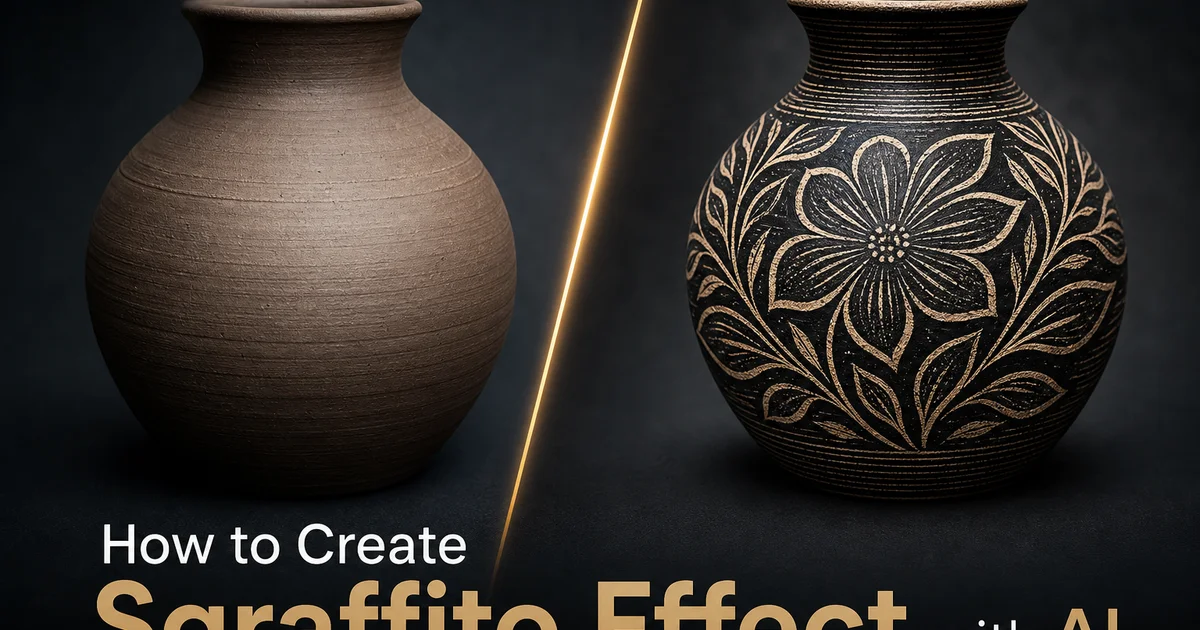
Le sgraffite est l'une des techniques d'art decoratif les plus saisissantes sur le plan visuel et les plus riches historiquement, remontant a la Renaissance italienne lorsque les architectes gravaient des motifs elabores a travers des couches de stuc colore sur les facades des batiments. Le mot lui-meme vient de l'italien sgraffiare, qui signifie gratter. La technique se definit par sa nature soustractive : plutot que d'ajouter des marques a une surface, l'artiste retire de la matiere d'une couche superieure pour reveler une couleur contrastante en dessous. Ce principe fondamental — la creation par le retrait — donne au sgraffite son caractere visuel distinctif. Les lignes grattees ont une presence physique que les traits dessines ou peints ne peuvent reproduire. Chaque marque represente de la matiere qui a ete reellement creusee, laissant des bords avec une vraie profondeur et texture. Les artistes ceramistes ont adopte la technique il y a des siecles pour decorer la poterie. Les artistes contemporains continuent d'explorer le sgraffite a travers divers medias, de la peinture a l'encaustique au collage multimateriaux.
Recrer numeriquement l'effet sgraffite a toujours ete un defi car la technique est intrinsequement tridimensionnelle. Une ligne grattee dans un vrai sgraffite n'est pas une marque sur une surface. C'est un sillon a travers une surface qui en revele une autre en dessous. Les parois du grattage captent la lumiere differemment de la couche plane environnante, creant des ombres subtiles le long des bords de chaque ligne creusee. Les approches numeriques traditionnelles utilisant des masques de calque et des effets de bord peuvent approximer la relation chromatique bicolore mais peinent a simuler la profondeur physique, la rugosite des bords creuses et les differences de texture specifiques aux materiaux entre les couches superieure et inferieure. Le resultat tend a ressembler davantage a un exercice de conception graphique en separation bicolore qu'a une piece d'art decoratif artisanal.
La conversion sgraffite par IA-powered repond a ces limitations en comprenant les proprietes physiques de la technique avant de l'appliquer a une photographie. L'IA identifie la structure tridimensionnelle du sujet et genere des motifs de grattage qui suivent les contours naturels. Creusant le long des traits du visage, suivant les lignes architecturales et creant des motifs rythmiques dans les zones texturees — exactement comme le ferait un artiste sgraffite experimente. Elle imite les proprietes materielles des deux couches, y compris le grain de surface, la rugosite des bords et les legeres irregularites du grattage a la main. Ce guide parcourt le processus complet de transformation de photographies en oeuvres d'art sgraffite convaincantes en utilisant AI Filter et AI Enhance, couvrant la selection de style, le controle des parametres de grattage, la configuration de la palette de couches et les details de finition qui font la difference entre un graphisme bicolore plat et une composition sgraffite credible.
- L'IA analyse la structure du sujet pour generer des motifs de grattage qui suivent les contours naturels. Creusant le long des courbes du visage, des bords architecturaux et des textures organiques — plutot que d'appliquer des marques directionnelles uniformes.
- De multiples prereglages sgraffite simulent des styles historiques et modernes, notamment les facades en stuc de la Renaissance, la decoration ceramique a l'engobe, les sous-couches acryliques modernes et le scratchboard classique noir et blanc.
- Les controles de profondeur de grattage et d'epaisseur de trait reproduisent la difference entre l'incision fine a la pointe d'aiguille et le raclage audacieux au couteau a palette, chacun adapte a differents niveaux de detail du sujet.
- La simulation de rugosite de bord introduit les eclats, les artefacts de changement de direction et la texture de paroi qui distinguent le sgraffite artisanal authentique des superimpositions graphiques bicolores plates.
- Les textures de materiau bicouches garantissent que la couche de finition superieure et la sous-couche revelee presentent toutes deux des qualites de surface distinctes. Grain de stuc, texture de corps argileux ou accroche acrylique — pour une presence physique convaincante.
Comprendre le sgraffite comme forme d'art soustractif et comment l'IA reproduit le processus
Le sgraffite occupe une position unique parmi les techniques artistiques car il est a la base soustractif. L'artiste cree en retirant plutot qu'en ajoutant. En ceramique, le potier applique une couche d'engobe colore sur le corps argileux, le laisse secher partiellement, puis grave a travers l'engobe pour reveler la couleur de l'argile en dessous. En decoration architecturale, un stucateur applique des couches successives de stuc de differentes couleurs, puis gratte a travers les couches superieures pendant qu'elles sont encore travaillables. Dans le scratchboard moderne, l'artiste enduit une planche blanche d'encre noire, puis utilise des outils tranchants pour gratter le noir et reveler des lignes blanches. Dans chaque variante, l'acte creatif est le retrait. L'oeuvre visible est definie par ce qui a ete retire plutot que par ce qui a ete applique.
Cette nature soustractive cree des qualites visuelles que le marquage additif ne peut reproduire. Chaque ligne grattee a une profondeur tridimensionnelle car de la matiere a ete physiquement retiree de la surface. Les parois du sillon projettent de minuscules ombres qui changent avec l'angle de vue et la direction de l'eclairage. Les bords des grattages sont determines par l'outil et la resistance du materiau plutot que par la seule pression de la main de l'artiste. Une aiguille tranchante coupant a travers un engobe seche laisse des bords differents d'un outil en bois emousse gratte a travers du stuc humide. Ces micro-details de qualite de bord, de profondeur d'ombre et d'interaction materielle sont ce qui rend le vrai sgraffite visuellement distinctif et sont exactement les proprietes que le transfert de style par IA doit simuler pour produire des resultats numeriques convaincants.
La conversion sgraffite par IA commence par analyser le contenu de la photographie pour determiner ce qu'un artiste sgraffite experimente gratterait et ce qu'il laisserait intact. Les zones de haut detail et d'importance visuelle — les yeux, les elements architecturaux cles, le texte, les elements decoratifs — recoivent un grattage fin et detaille. Les grandes zones de ton uniforme — ciel, murs, surfaces planes — sont traitees comme de vastes regions de la couche superieure laissees intactes ou retirees en larges mouvements. Les zones transitionnelles — cheveux, feuillage, texture de tissu — recoivent un grattage a motif rythmique qui represente la texture sans tracer laborieusement chaque detail. Cette approche hierarchique de la distribution du grattage reflete la maniere dont les artistes humains realisent le sgraffite et produit des resultats qui semblent intentionnels plutot qu'uniformes algorithmiquement.
- Le sgraffite cree par retrait — creusant a travers une couche superieure pour reveler une couleur contrastante en dessous — donnant a chaque ligne profondeur tridimensionnelle et ombre.
- La qualite des bords dans le vrai sgraffite depend de l'outil et de la resistance du materiau, produisant une rugosite caracteristique que l'IA reproduit par la simulation de texture de bord.
- L'IA distribue les grattages hierarchiquement : details fins dans les zones importantes, surfaces intactes dans les regions uniformes et motifs rythmiques dans les transitions texturales.
- Le processus soustractif signifie que les hautes lumieres sont obtenues en retirant la couche superieure plutot qu'en ajoutant des marques claires, fondamentalement different des techniques de dessin additif.
Configuration des couleurs de couche et des textures de materiau pour des styles historiquement precis
La relation chromatique entre les couches superieure et inferieure definit le caractere de toute piece de sgraffite. Differentes traditions historiques utilisent des palettes tres differentes. Le sgraffite de facade de la Renaissance italienne utilise souvent une couche superieure gris fonce ou charbon sur une base creme clair ou ocre, produisant des compositions aux tons chauds ou le motif gratte semble architectural et digne. Les tons terre adoucis refletent les pigments naturels disponibles dans le stuc a la chaux de la Renaissance. L'oxyde de fer pour la couche sombre, la chaux brute pour la base claire. Le prereglage Renaissance d'AI Filter applique ces tons historiquement precis ainsi que la texture legerement crayeuse et granuleuse du stuc vieilli pour produire des resultats qui ressemblent a des photographies de veritables facades de batiments.
Le sgraffite ceramique introduit une gamme chromatique plus large car les potiers ont acces a diverses couleurs d'engobe et de corps argileux. Une combinaison courante est l'engobe brun fonce ou noir sur du gre blanc, mais l'engobe rouge sur argile jaune, l'engobe blanc sur argile foncee et les glaques colorees sur corps argileux contrastant apparaissent tous dans la tradition ceramique. L'IA ajuste la texture de surface pour correspondre aux proprietes ceramiques. La sous-couche revelee montre la surface lisse, legerement cireuse du corps argileux comprime, tandis que la couche superieure affiche la texture mate, legerement poudreuse de l'engobe seche. Ces textures specifiques aux materiaux sont cruciales car une piece de sgraffite ceramique est completement differente d'une piece en stuc, meme lorsque les couleurs sont identiques.
Les styles de sgraffite modernes rompent entierement avec les palettes historiques. Les artistes multimateriaux travaillant a l'encaustique, l'acrylique ou l'huile utilisent des couleurs de sous-couche vives. Rouges profonds, bleus electriques, ors metalliques — sous des couches de finition neutres ou sombres pour un contraste dramatique maximal lorsque le grattage revele la couleur cachee. Les artistes du scratchboard travaillent exclusivement en noir sur blanc, produisant le contraste le plus eleve possible. Les prereglages modernes d'AI Filter offrent ces options de couleurs plus audacieuses ainsi que des textures de materiau refletant les medias modernes : le lustre lisse du gesso acrylique, l'accumulation cireuse des couches d'encaustique ou la densite mate de l'encre de Chine. La selection de la texture de materiau appropriee pour la palette de couleurs choisie garantit que le resultat final semble fabrique avec des materiaux physiques specifiques plutot que genere comme une couleur numerique plate.
- Le sgraffite de facade Renaissance utilise du gris fonce sur stuc creme avec une texture crayeuse granuleuse, refletant les pigments naturels de chaux et d'oxyde de fer de l'epoque.
- Le sgraffite ceramique associe un engobe colore sur un corps argileux contrastant, avec des textures specifiques au materiau — surface d'engobe mate poudreuse et sous-couche d'argile comprimee lisse cireuse.
- Le sgraffite multimateriaux contemporain utilise des couleurs de sous-couche vives sous des couches de finition neutres, avec des textures de materiau correspondant au gesso acrylique, a la cire d'encaustique ou a l'encre de Chine.
- La selection de la texture de materiau est cruciale car des palettes de couleurs identiques semblent entierement differentes lorsqu'elles sont rendues avec des proprietes de surface de stuc, ceramique ou media moderne.
Motifs de grattage, simulation d'outils et marquage directionnel
Le caractere d'une oeuvre sgraffite est defini non seulement par ce qui est gratte mais par la maniere dont le grattage est execute. La largeur des marques, leur direction, leur espacement et la texture de leurs bords transmettent tous des informations sur l'outil et l'intention de l'artiste. Une aiguille fine produit des lignes fines et precises adaptees au travail figuratif detaille et aux motifs complexes. Un outil a boucle cree des canaux en U plus larges avec des fonds lisses. Une lame plate racle de larges bandes qui retirent de grandes zones de la couche superieure, laissant des formes geometriques de la surface intacte. AI Filter imite chacun de ces types d'outils et les applique contextuellement en fonction du contenu de l'image. Les visages detailles et les motifs fins recoivent des marques de type aiguille, les surfaces larges recoivent un raclage de type lame, et les textures organiques comme les cheveux et le feuillage recoivent des marques d'outil a boucle avec des courbes douces.
La coherence directionnelle des marques de grattage est ce qui separe le sgraffite convaincant de la generation de lignes aleatoires. Les vrais artistes etablissent une direction de grattage dominante basee sur le sujet et ne s'en ecartent qu'avec intention. Hachures croisees pour les ombres plus profondes, suivi de contour pour la description de la forme et expression a main levee pour l'energie et le mouvement. L'IA analyse la structure tridimensionnelle du contenu de la photographie et genere des directions de grattage qui suivent les contours de la surface : les grattages sur une forme cylindrique se courbent autour de la circonference, les grattages sur un plan plat courent en lignes paralleles coherentes, et les grattages decrivant des plis ou du drapage suivent le flux directionnel du tissu. Cette direction de grattage adherente au contour est peut-etre le facteur le plus important pour produire des effets sgraffite qui semblent artisanaux plutot que generes numeriquement.
La densite de grattage — la quantite de couche superieure retiree par rapport a ce qui reste — controle l'equilibre tonal global de la composition et determine si l'image se lit comme principalement sombre avec des details de lignes claires ou principalement claire avec des vestiges de surface sombres. Dans le sgraffite traditionnel, les artistes planifient soigneusement le rapport entre les zones grattees et intactes pour maintenir l'equilibre visuel et garantir la lisibilite du sujet. L'IA gere cette planification en analysant la carte tonale de la photographie et en distribuant les grattages pour preserver les relations clair-obscur de l'image originale. Les zones claires de la photographie deviennent des regions densement grattees ou davantage de sous-couche se revele. Les zones sombres restent largement intactes avec seulement des grattages d'accent pour les details. Cette cartographie tonale garantit que la version sgraffite conserve la reconnaissabilite du sujet photographique malgre le changement stylistique dramatique.
- La simulation d'outils reproduit les types de grattage a l'aiguille, a la boucle et a la lame, chacun applique contextuellement — aiguille fine pour les details, boucle pour la texture organique, lame pour les grandes surfaces.
- La coherence directionnelle du grattage suit les contours tridimensionnels : se courbant autour des cylindres, parallele sur les plans plats et suivant le drapage du tissu pour un aspect artisanal convaincant.
- La densite de grattage controle l'equilibre entre la sous-couche revelee et la couche de finition intacte, maphee aux valeurs tonales de la photographie originale pour preserver la lisibilite du sujet.
- Les hachures croisees et les variations directionnelles sont appliquees intentionnellement dans les zones d'ombre et les zones transitionnelles plutot qu'aleatoirement, refletant la maniere dont les artistes sgraffite formes gerent la profondeur tonale.
Amelioration de la qualite des bords et des details de surface pour l'authenticite physique
Les bords des lignes grattees sont la ou le sgraffite revele sa nature physique le plus clairement. Une simulation precise des bords est ce qui eleve le sgraffite IA d'un effet graphique bicolore a une reproduction artistique convaincante. Lorsqu'un outil gratte a travers une couche sechee d'engobe, de stuc ou de peinture, les bords du sillon ne sont jamais parfaitement lisses. De petits eclats se detachent la ou le materiau est cassant, une legere sous-coupe se produit la ou l'angle de l'outil varie. Le materiau retire laisse parfois une fine barbe surlee le long du bord, similaire a la gravure sur metal. Ces micro-imperfections s'accumulent en la qualite tactile globale que les spectateurs associent au sgraffite artisanal. La sensation qu'une main humaine a guide un outil physique a travers un materiau resistant.
AI Enhance affine ces details de bord apres la conversion sgraffite initiale en analysant chaque limite de grattage et en introduisant une irregularite controlee. Le processus d'amelioration examine le type de materiau selectionne. Les bords du stuc s'eclatent differemment de l'engobe ceramique, et les bords de l'encre se comportent differemment de l'acrylique — et genere des imperfections de bord coherentes avec le medium choisi. Il ajoute egalement des indices de profondeur le long des parois du grattage : des gradients d'ombre subtils sur le bord interieur la ou le sillon capte moins de lumiere, et des lignes de lumieres subtiles sur le bord oppose la ou la paroi du sillon fait face a la source lumineuse. Ces indices de profondeur ne font souvent qu'un ou deux pixels de large mais contribuent substantiellement a la presence physique percue des lignes grattees.
La texture de surface dans les zones entre les grattages complete l'illusion materielle. La couche superieure intacte ne devrait pas apparaitre comme une couleur numerique plate mais devrait afficher les traits de surface de son materiau. La rugosite granuleuse du stuc seche, le lisse mat de l'engobe cuit, le lustre subtil de l'acrylique seche ou la densite mate profonde de l'encre de Chine. De meme, la sous-couche revelee visible a l'interieur des grattages devrait montrer sa propre qualite de surface distincte. AI Filter applique une texture procedurale aux deux couches qui repond a la direction d'eclairage simulee, garantissant que le grain de surface capte les lumieres et projette des micro-ombres comme le ferait une surface de materiau physique. Cette approche a double texture est essentielle car l'interet visuel du sgraffite provient en grande partie du contraste non seulement de couleur mais de qualite de surface materielle entre les deux couches visibles.
- Les imperfections de bord de grattage — eclats, sous-coupes, barbes surlees — sont generees coherentment avec le type de materiau choisi pour un aspect artisanal authentique.
- Les indices de profondeur le long des parois de grattage incluent une ombre subtile sur le bord lointain et une lumiere sur le bord proche, ajoutant une presence physique a chaque ligne creusee.
- La texture de surface dans les zones intactes montre un grain approprie au materiau — rugosite du stuc, lisse de l'engobe ou densite de l'encre — plutot qu'un remplissage de couleur numerique plat.
- Le contraste de texture bicouche entre la couche de finition et la sous-couche revelee cree une richesse visuelle qui distingue le sgraffite convaincant des simples effets graphiques bicolores.
Applications creatives : decoration de poterie, art mural et projets multimateriaux
Le sgraffite numerique sert aux artistes potiers et ceramistes comme outil de planification de conception qui elimine le risque de ruiner une piece physique pendant la phase de decoration. Le sgraffite ceramique est impitoyable — une fois qu'un grattage est grave dans l'engobe cuit, il ne peut pas etre defait sans reappliquer toute la couche d'engobe et attendre qu'elle seche a nouveau. En convertissant d'abord une photographie de reference en simulation sgraffite, les artistes ceramistes peuvent voir exactement a quoi ressemblera leur conception prevue une fois gravee, experimenter avec differentes largeurs d'outil et densites de grattage, et planifier la sequence de coupes avant de toucher la piece reelle. L'apercu numerique fait gagner des heures de preparation de materiau et evite la decourageance des tentatives echouees sur le travail physique.
Les applications architecturales et de design d'interieur utilisent le sgraffite IA pour generer des oeuvres murales, des panneaux decoratifs et des surfaces caracteristiques qui referencent la tradition de la Renaissance dans un contexte moderne. Un designer peut photographier la maison d'un client, la convertir en style sgraffite et la presenter comme une potentielle peinture murale ou un traitement de panneau decoratif qui integre l'imagerie personnelle dans la technique ancienne. Les designers de restaurants et d'hotels utilisent l'imagerie de style sgraffite pour les menus, la signaletique et les graphiques interieurs qui se connectent a un branding mediterraneen ou artisanal. La capacite de l'IA a traiter n'importe quelle photographie par la transformation sgraffite signifie que la technique n'est plus limitee aux artistes qui ont maitrise la competence physique de creuser a travers un materiau seche.
Les artistes multimateriaux combinent le sgraffite numerique avec d'autres effets d'art IA pour creer des compositions en couches. Une photographie convertie en sgraffite dans les elements de premier plan tandis que l'arriere-plan recoit un traitement different — lavis aquarelle, texture de peinture a l'huile ou clarte photographique — cree une hierarchie visuelle qui attire le spectateur a travers la composition. Certains artistes impriment des compositions sgraffite IA puis grattent physiquement dans la surface imprimee, creant des oeuvres hybrides numeriques-physiques qui combinent la precision de la generation de motifs IA avec l'energie imprevisible du grattage manuel reel. Le sgraffite numerique sert de couche de fondation que l'artiste enrichit et personnalise avec un marquage physique, faisant le pont entre une technique vieille de plusieurs siecles et la capacite IA moderne.
- Les artistes ceramistes utilisent les apercus sgraffite numeriques pour planifier les conceptions avant de graver dans l'engobe physique, economisant des materiaux et evitant les erreurs irreversibles sur la poterie reelle.
- Les designers d'interieur generent des oeuvres murales et des panneaux decoratifs de style sgraffite a partir de photographies de clients, connectant l'imagerie personnelle a la tradition decorative de la Renaissance.
- Les compositions multimateriaux combinent des elements de premier plan traites en sgraffite avec d'autres effets IA dans les couches d'arriere-plan, creant une profondeur visuelle grace a des styles de traitement contrastants.
- Les flux de travail hybrides numeriques-physiques impriment le sgraffite IA comme fondation que les artistes enrichissent avec un veritable grattage manuel, combinant la precision algorithmique avec l'energie creatrice humaine.
How to do it
- 1
Upload your photo and assess its suitability for sgraffito-style layered scratch art
Open your image in AI Filter and evaluate whether the subject has strong tonal contrast and clearly defined shapes that will translate well into a scratched-layer composition. Sgraffito is at its core a subtractive process. In the physical technique, an artist coats a surface with one color, applies a contrasting layer on top, then scratches through the upper layer to reveal the color beneath. Photographs with bold silhouettes, dramatic lighting, and well-separated foreground and background elements produce the most convincing sgraffito effects because the AI can clearly determine which areas to treat as the revealed lower layer and which to leave as the scratched upper surface.
- 2
Select the sgraffito style preset and configure your layer color palette
Choose from sgraffito presets that simulate different historical and modern approaches. Renaissance architectural sgraffito with earth-tone plaster layers, ceramic sgraffito with dark slip over light clay body, modern mixed-media sgraffito with vivid acrylic underlayers, or monochrome scratchboard with white lines on black. Define the upper layer color and the revealed lower layer color to establish the palette. Traditional sgraffito uses contrasting earth tones, but modern artists work with any color combination. The AI maps the photograph's tonal values to decide where scratches reveal the underlayer and where the top coat remains intact.
- 3
Adjust scratch depth, line weight, and texture to simulate hand-carved marks
Control the scratch parameters to determine how the simulated carving tool interacts with the layered surface. Scratch depth affects how completely the top layer is removed. Shallow scratches partially reveal the underlayer with visible remnants of the top coat along the edges, while deep scratches expose the underlayer cleanly. Line weight controls the width of the carved marks, from fine needle-point scratching to broad palette knife scraping. The AI generates scratches that follow the contours of the subject. Facial features receive fine detailed scratching, broad background areas get bold sweeping marks, and textural elements like hair or foliage receive rhythmic pattern scratching that echoes how a ceramic artist would handle those forms.
- 4
Refine edge transitions and layer interaction for authentic material appearance
Use AI Enhance to sharpen the boundaries between scratched and unscratched areas, replicating the crisp edges that result from a physical carving tool cutting through dried slip or plaster. Real sgraffito has distinctive edge qualities. The walls of the scratch are slightly rough, small chips appear where the tool changed direction, and the boundary between layers is definitive rather than gradual. Adjust the edge roughness parameter to introduce these subtle imperfections that distinguish authentic-looking sgraffito from a simple two-tone graphic overlay.
- 5
Export the final sgraffito composition and compare against physical sgraffito references
Save the completed image at full resolution and compare it with photographs of actual sgraffito artwork in the style you selected. Check that scratched areas reveal the underlayer convincingly with the right edge texture, that the scratch direction follows subject contours naturally, and that the overall tonal balance between scratched and intact areas creates a readable image. Verify that the surface texture is visible in both layers. The top coat should show the slight grain of dried material, and the revealed underlayer should have its own distinct surface quality rather than appearing as flat digital color.
Sources
- Sgraffito Techniques in Renaissance Architectural Decoration — Getty Conservation Institute
- Neural Style Transfer for Non-Photorealistic Rendering — arXiv — Neural Information Processing Systems
- Layer-Based Image Manipulation and Compositing Techniques — ACM Transactions on Graphics