
Comment Creer un Effet Scagliola avec l'IA : Imitation de Marbre Incruste — Magic Eraser
Tutoriel pas a pas pour creer des effets d'incrustation de stuc scagliola italien avec la retouche photo par IA. Simulez numeriquement les motifs de marbre pietra dura, de lapis-lazuli et de malachite incrustes.
SEO & Growth
Vérifié par Magic Eraser Editorial ·
Sommaire
- Comprendre la scagliola : materiaux, histoire et signatures visuelles a reproduire
- Construire la matrice de fond : choisir et appliquer la texture de marbre de base
- Creer le motif d'incrustation : creuser des canaux et les remplir de pierres contrastees
- Polissage final et finition par periode pour contextes architecturaux et de design
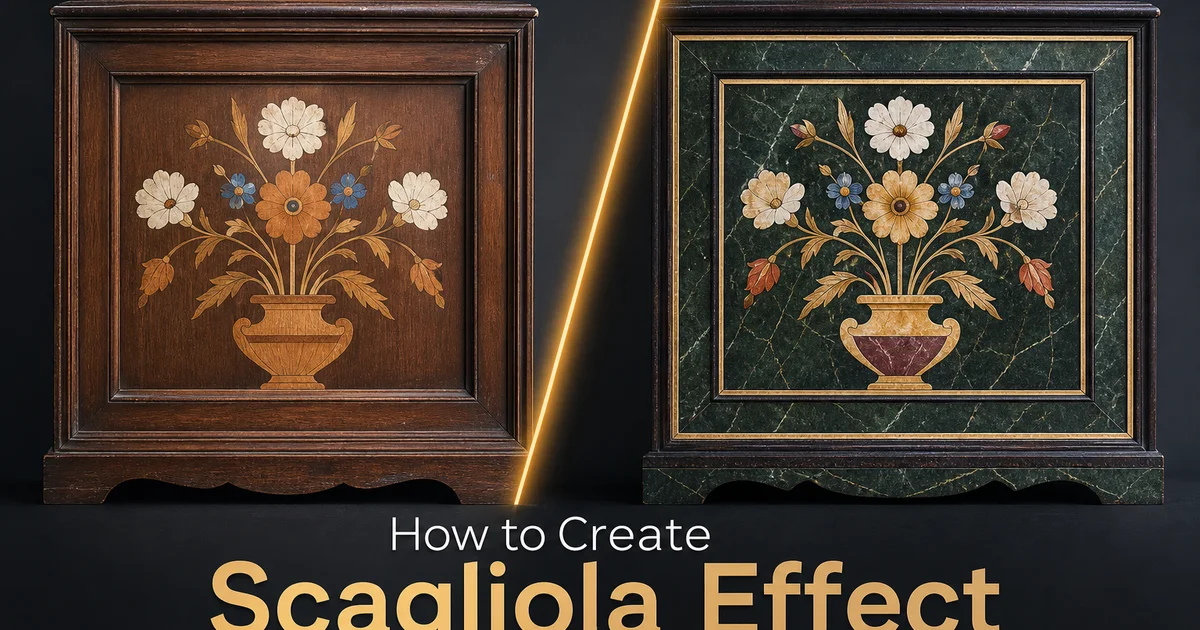
La scagliola est l'une des techniques decoratives les plus epoustouflantes de l'histoire europeenne. Une methode utilisant du stuc teinte pour imiter l'apparence de pierres semi-precieuses et de marbre incrustes, developpee a la perfection dans l'Italie du XVIIe siecle comme alternative moins couteuse au veritable pietra dura. Les meilleures œuvres en scagliola sont si convaincantes qu'elles trompent l'œil a bout de bras, reproduisant les veines du marbre, le bleu profond du lapis-lazuli, le vert tourbillonnant de la malachite. La profondeur rouge sang du porphyre en n'utilisant que du stuc de selenite pigmente poli jusqu'a obtenir une finition miroir. Pour les architectes d'interieur, les historiens de l'architecture, les specialistes en restauration. Les artistes decoratifs travaillant numeriquement, les outils de retouche photo par IA permettent aujourd'hui de simuler cet artisanat plusieurs fois centenaire sur n'importe quelle surface appropriee dans une photographie.
La complexite visuelle de la scagliola provient de sa methode de construction en couches. Un panneau de scagliola traditionnel commence par un fond de stuc sombre qui sert de matrice rocheuse. Imitant souvent le nero portoro, le marbre noir belge ou une autre pierre sombre offrant un contraste spectaculaire avec les elements d'incrustation plus clairs. L'artisan creuse des canaux peu profonds dans ce fond selon le motif du dessin prevu, puis remplit ces canaux avec des pates de stuc de differentes couleurs, chacune melangee pour reproduire une pierre specifique. Apres sechage et polissage intensif avec des abrasifs de plus en plus fins, la surface devient lisse et reflechissante, chaque couleur apparaissant comme une pierre differente incrustee a fleur de la matrice environnante. Cette apparence multicouche et multimatiere est ce qui distingue la scagliola du simple marbre faux peint.
Les outils de retouche photo par IA peuvent reproduire numeriquement cette construction en couches en combinant generation de textures, masquage selectif et manipulation des couleurs. Le renforcement de surface dans un flux de travail qui reflete le processus physique. L'outil AI Filter genere des textures de pierre convaincantes a la fois pour la matrice de fond et les elements d'incrustation individuels. Magic Eraser cree l'equivalent des canaux creuses en supprimant selectivement les zones qui recevront des remplissages contrastes. AI Enhance polit la composition terminee jusqu'a la qualite de surface lisse et lumineuse qui distingue la scagliola fine de la peinture decorative plate. Ce tutoriel parcourt le processus complet de transformation d'une photographie de surface plane en un panneau de scagliola convaincant, couvrant la selection des pierres, la conception des motifs, la technique d'incrustation. La finition pour differentes periodes historiques et styles regionaux.
- AI Filter genere des textures authentiques de marbre et de pierres semi-precieuses pour la matrice de fond et les elements d'incrustation individuels, reproduisant l'apparence multimatiere de la veritable scagliola.
- Magic Eraser cree des formes de canaux d'incrustation precis. Rouleaux d'acanthe, bordures geometriques, arabesques florales — qui recoivent des remplissages de couleur de pierre contrastes selon la methode de construction en couches traditionnelle.
- AI Enhance polit la composition terminee jusqu'a la finition miroir qui distingue la scagliola fine du marbre faux peint, intensifiant la profondeur des couleurs et la qualite reflexive.
- Background Eraser isole les panneaux de scagliola termines pour les placer dans des rendus de visualisation architecturale, des planches d'ambiance de design d'interieur et des portfolios d'art decoratif.
- Les palettes de pierres specifiques aux periodes permettent des designs historiquement precis — contrastes baroques profonds, pastels rococo delicats ou polychromie Renaissance audacieuse selon le contexte vise.
Comprendre la scagliola : materiaux, histoire et signatures visuelles a reproduire
La scagliola est apparue au debut du XVIIe siecle en Baviere et dans le nord de l'Italie en reponse au cout extraordinaire du veritable pietra dura. L'art florentin d'incruster des pierres semi-precieuses taillees dans des panneaux de marbre. Alors que le pietra dura necessitait des lapidaires experimentes pour scier, faconner et polir de fines tranches de veritable lapis-lazuli, malachite, jaspe, agate et marbre, la scagliola obtenait des resultats visuellement similaires en utilisant du stuc de selenite pigmente pour une fraction du cout. La technique s'est rapidement repandue en Italie, principalement en Toscane et en Emilie-Romagne. Au XVIIIe siecle, les ateliers de scagliola a Carpi, Florence et Rome produisaient des plateaux de table, des devants d'autel, des gaines de colonnes et des panneaux muraux qui rivalisaient avec la veritable incrustation de pierre dure en complexite visuelle. La cle d'une scagliola convaincante etait la recette du stuc. Gypse de selenite melange a un liant de colle animale, teinte avec des pigments naturels et poli a l'huile de lin et a la cire pour atteindre la profondeur translucide et l'eclat de surface de la vraie pierre.
Les signatures visuelles qui distinguent la scagliola des autres techniques de faux marbre sont specifiques et importantes a reproduire numeriquement. Premierement, chaque element d'incrustation semble etre d'un materiau different de ses voisins. La zone bleue ressemble au lapis-lazuli avec ses inclusions caracteristiques de pyrite doree, la zone verte imite la malachite avec ses bandes concentriques, et la zone rouge evoque le porphyre avec ses inclusions cristallines. Deuxiemement, tous les elements sont affleurants avec la pierre matrice environnante, creant une surface parfaitement lisse sans bords surleves ni zones creuses. Troisiemement, la surface generale a une qualite polie et legerement translucide qui lui donne de la profondeur. La lumiere semble penetrer legerement sous la surface avant de se reflechir, plutot que de rebondir sur une couche opaque plate. Ces trois qualites — specificite du materiau, surface affleurante et profondeur translucide — sont les cibles de la reproduction numerique.
Les variations regionales et periodiques de la scagliola offrent differentes cibles esthetiques pour la recreation numerique. La scagliola baroque italienne preferait les fonds sombres et dramatiques. Nero portoro ou marbre noir belge — incrustes de motifs polychromes vifs representant des oiseaux, des fleurs, des fruits et des rouleaux d'acanthe aux couleurs audacieuses. Le style Renaissance florentin mettait l'accent sur les sujets botaniques naturalistes avec des degradés subtils qui mettaient en valeur la capacite de l'artisan a melanger les pates de stuc. La scagliola ecclesiastique nord-europeenne utilisait souvent des motifs geometriques et des motifs heraldiques sur des fonds chauds de terre de Sienne ou gris froids. La scagliola de renaissance du XIXe siecle a introduit des motifs plus delicats influences par le design neoclassique, avec des fonds plus clairs et des palettes de couleurs plus retenues. Comprendre quelle periode et quelle region vous souhaitez evoquer determine votre palette de pierres et la complexite des motifs.
- La scagliola utilise du stuc de selenite pigmente poli a l'huile et a la cire pour reproduire l'apparence de l'incrustation de pierre dure pietra dura pour une fraction du cout de la vraie pierre taillee.
- Trois signatures visuelles definissent la scagliola authentique : textures de pierre specifiques au materiau pour chaque element d'incrustation, transitions de surface parfaitement affleurantes et profondeur polie translucide.
- La scagliola baroque italienne privilegie les fonds de matrice sombres et dramatiques avec des incrustations polychromes vives, tandis que le style Renaissance florentin met l'accent sur les motifs botaniques naturalistes avec des melanges de couleurs subtils.
- Les variantes nord-europeennes utilisent des motifs geometriques et heraldiques sur des fonds chauds ou froids, et la renaissance neoclassique du XIXe siecle a introduit des palettes plus claires avec des designs plus retenus.
Construire la matrice de fond : choisir et appliquer la texture de marbre de base
La matrice de fond est la fondation visuelle de toute composition de scagliola. Choisir la bonne texture de pierre de base est la decision initiale la plus importante. Dans la scagliola traditionnelle, le fond est souvent une pierre sombre qui offre un contraste maximal avec les elements d'incrustation plus clairs. Le marbre nero portoro avec ses veines dorees spectaculaires sur fond noir, le marbre noir belge avec son obscurite dense et uniforme, ou la serpentine sombre avec sa profondeur vert-noir subtile. Appliquez la texture de marbre AI Filter sur la surface cible de votre photographie, en ajustant l'equilibre des couleurs vers les noirs dorees chauds du nero portoro italien ou les noirs bleutes froids du marbre belge selon votre periode cible. La texture doit montrer des veines de pierre naturelles a une echelle appropriee pour la surface. Des veines subtiles et serrees pour les petits panneaux et plateaux de table, des veines plus larges et dramatiques pour les grands panneaux muraux et les gaines de colonnes.
Le niveau de polissage de la matrice de fond etablit l'impression de qualite globale de la surface de scagliola. La scagliola traditionnelle etait polie a travers des etapes abrasives de plus en plus fines. De la pierre ponce a la rottenstone en passant par le brulage a l'huile de lin — jusqu'a ce que la surface atteigne une reflectivite miroir revelant la profondeur translucide du stuc de selenite. AI Enhance reproduit numeriquement ce processus de polissage en augmentant la reflectivite de surface et le micro-contraste dans la texture de la pierre. Appliquez le renforcement progressivement, en verifiant que la surface developpe un aspect lisse et legerement vitreux sans perdre le motif de veines sous-jacent. Un renforcement excessif produit une surface plastique qui se lit comme une manipulation numerique plutot que comme de la pierre polie. L'objectif est la reflectivite chaude et profonde du stuc traite a l'huile et a la cire. Plus doux que le verre mais nettement plus poli qu'un etat mat.
Pour les matrices de fond plus claires — terre de Sienne chaude, gris froid ou marbre creme — l'approche differe car le contraste avec les elements d'incrustation provient de la couleur plutot que de la valeur lumineuse. Les fonds terre de Sienne fonctionnent bien avec les incrustations de malachite vert fonce, de lapis bleu et d'albatre blanc. Les fonds gris s'accordent bien avec les incrustations aux tons chauds rouges, dores et verts. Les fonds de marbre creme sont les plus difficiles car ils necessitent des elements d'incrustation avec une saturation chromatique suffisante pour se lire sur le fond clair sans l'avantage du contraste clair-sombre. Lors de la construction d'un fond clair, portez une attention particuliere au motif de veines. Il doit etre suffisamment subtil pour ne pas entrer en competition visuelle avec le dessin d'incrustation mais assez present pour etablir que la surface est de la pierre et non du stuc uni.
- Les matrices de fond sombres comme le nero portoro ou le marbre noir belge offrent un contraste maximal avec les elements d'incrustation plus clairs et sont le choix le plus courant historiquement et le plus indulgent visuellement.
- AI Enhance reproduit le processus de polissage multi-etapes traditionnel, construisant progressivement reflectivite et profondeur sans sur-traitement vers un aspect plastique.
- Les fonds plus clairs (terre de Sienne, gris ou creme) deplacent le mecanisme de contraste de la valeur lumineuse vers la saturation chromatique, necessitant des elements d'incrustation plus vifs pour obtenir une separation visuelle.
- L'echelle des veines doit correspondre aux dimensions de la surface — motifs subtils et serres pour les petits panneaux et plateaux de table, veines larges et dramatiques pour les grandes surfaces architecturales.
Creer le motif d'incrustation : creuser des canaux et les remplir de pierres contrastees
Le motif d'incrustation est la ou la scagliola se transforme de simple faux marbre en une forme d'art. Le processus numerique reflete la technique physique de creusement de canaux et de remplissage avec des pates de stuc contrastees. Utilisez Magic Eraser pour supprimer selectivement des zones de la matrice de fond dans les formes de vos elements de design prevus. Commencez par les plus grandes formes — le medaillon central ou la cartouche, les bandes de bordure principales, les grands elements enroules — et progressez progressivement vers les details plus petits comme les nervures de feuilles, les etamines de fleurs et les terminaisons de fines volutes. Les zones effacees representent les canaux creuses qu'un artisan de scagliola traditionnel aurait tailles dans le fond de stuc humide. Elles necessitent des bords nets et precis pour etre lues comme une incrustation intentionnelle plutot que comme un dommage accidentel.
Remplir les canaux creuses avec des textures de pierre contrastees est le cœur creatif du processus. Chaque element d'incrustation doit recevoir une texture de pierre appropriee a son role dans le design et coherente avec la pratique historique. Les medaillons centraux et les principaux elements decoratifs utilisaient autrefois les imitations de pierres les plus precieuses. Le lapis-lazuli avec son bleu outremer profond et ses inclusions dispersees de pyrite doree, ou le marbre verde antico avec son champ vert profond et ses veines de calcite blanche. Les bandes de bordure employaient souvent le rouge porphyre ou le jaune giallo antico. Les elements de feuilles et de rouleaux utilisaient diverses pierres vertes. La malachite avec ses bandes concentriques pour les grandes feuilles, la serpentine pour les tiges et les vrilles. Les elements blancs utilisaient des textures d'albatre ou de marbre de Carrare. Appliquez chaque texture de pierre a sa zone de canal correspondante a l'aide de AI Filter, en adaptant l'echelle du motif naturel de la pierre a la taille de l'element d'incrustation.
Le detail visuel critique a ce stade est la transition entre les elements d'incrustation et la matrice de fond. Dans la veritable scagliola, ces transitions sont parfaitement affleurantes. Il n'y a ni bordure, ni rainure, ni ligne d'ombre entre les materiaux adjacents car tous les elements ont ete polis jusqu'au meme plan. Numeriquement, assurez-vous que la limite entre chaque texture d'incrustation et la matrice environnante est propre et continue, sans artefacts de bord visibles, effets de halo ou zones de fusion. L'œil doit lire chaque zone de couleur comme une pierre differente rencontrant sa voisine bord a bord dans un plan partage, exactement comme les pierres taillees se rencontrent dans le veritable pietra dura. Cette jonction affleurante est ce qui rend la scagliola convaincante. Tout traitement de bordure visible suggerant des couches superposees plutot que des materiaux adjacents brise l'illusion.
- Magic Eraser supprime selectivement les zones de la matrice de fond pour creer des formes de canaux d'incrustation, en travaillant des plus grands elements de design aux plus petits details pour une precision de bord nette.
- Chaque element d'incrustation recoit une texture de pierre historiquement appropriee — lapis-lazuli pour les medaillons, malachite pour les feuilles, porphyre pour les bordures, albatre pour les rehauts.
- L'echelle de la texture de pierre doit correspondre a la taille de l'element d'incrustation — bandes de malachite a grand motif pour les feuilles larges, marbre a grain fin pour les petits details de volutes.
- Les transitions affleurantes entre l'incrustation et la matrice sont le detail d'authenticite critique — aucun bord visible, halo ou zone de fusion entre les materiaux de pierre adjacents.
Polissage final et finition par periode pour contextes architecturaux et de design
La derniere etape de polissage transforme la composition de scagliola assemblee d'une collection de textures de pierre adjacentes en une surface decorative unifiee avec la profondeur et la luminosite caracteristiques de la veritable technique. Appliquez AI Enhance sur l'ensemble de la composition pour unifier la reflectivite de surface. Tous les materiaux de pierre dans un panneau de scagliola authentique partagent le meme niveau de polissage car ils ont tous ete finis ensemble dans le meme processus de brulage. Ce polissage unifie est ce qui fait que la surface se lit comme un seul plan stable de differents materiaux plutot que comme un collage de patchs de texture separes. Ajustez le renforcement pour produire une finition chaude, legerement brillante qui montre une reflexion subtile de la lumiere ambiante sur toute la surface, independamment de la couleur de la pierre sous-jacente.
Les effets de couleur et de vieillissement specifiques aux periodes ajoutent du realisme historique a la composition terminee. La scagliola baroque du XVIIe siecle a souvent developpe une patine ambree chaude due a des siecles de traitements a l'huile de lin, attenuant legerement la vivacite des couleurs originales tout en ajoutant profondeur et richesse. Les exemples rococo du XVIIIe siecle tendent vers des tonalites plus claires et plus pastel avec un contraste moins dramatique. Les pieces de la renaissance du XIXe siecle conservent souvent davantage de leur intensite chromatique originale car elles ont eu moins de temps pour developper une patine. Pour les contextes de conservation ou de dossiers muséaux, une couleur periodique precise est essentielle. Pour les applications decoratives modernes, les couleurs vives originales peuvent etre plus appropriees. Appliquez une colorimétrie chaude subtile pour un aspect vieilli ou preservez la saturation originale pour un usage moderne.
L'effet scagliola termine sert differents objectifs selon le contexte de sortie final. Les architectes d'interieur utilisent des panneaux de scagliola dans les rendus de visualisation architecturale pour montrer aux clients comment les traitements decoratifs adaptes a la periode apparaîtraient dans des pieces specifiques. Appliques aux contours de cheminee, plateaux de table, piedestaux de colonnes ou panneaux muraux. Les consultants en restauration architecturale utilisent des simulations de scagliola dans les propositions pour montrer l'aspect prevu des travaux de conservation avant de s'engager dans le processus physique couteux et chronophage. Les artistes decoratifs utilisent des images de portfolio de scagliola numerique pour montrer leurs capacites de conception aux clients potentiels. Dans chaque cas, exportez a la resolution appropriee au contexte. Haute resolution pour les presentations imprimees, optimisee pour les portfolios web et qualite maximale pour les visualisations architecturales grand format.
- AI Enhance unifie la reflectivite de surface sur tous les materiaux de pierre, reproduisant le niveau de polissage partage qui fait que la veritable scagliola se lit comme un plan continu de differentes pierres.
- Le colorimetrie adaptee a la periode ajoute du realisme — patine ambre chaude pour les pieces baroques, pastels plus clairs pour le rococo, saturation vive preservee pour la renaissance du XIXe siecle ou les applications modernes.
- Les architectes d'interieur utilisent les effets de scagliola dans la visualisation architecturale pour montrer aux clients des traitements decoratifs adaptes a la periode sur les cheminees, plateaux de table, colonnes et panneaux muraux.
- Les consultants en restauration utilisent des simulations numeriques de scagliola dans les propositions pour demontrer les resultats de conservation avant de s'engager dans le processus physique.
How to do it
- 1
Select a source image with flat surfaces suitable for scagliola transformation
Begin with a photograph that features smooth, flat surfaces where the scagliola effect will appear most convincing. Tabletops, column pedestals, wall panels, or architectural pilasters. Scagliola historically adorned these elements because the plaster technique requires a flat or gently curved substrate to achieve its characteristic polished marble illusion. Avoid images with highly complex geometry or transparent surfaces, as the inlay pattern needs a solid visual ground to register as a realistic decorative treatment rather than an overlay artifact.
- 2
Apply the AI marble texture filter to establish the base stone ground
Use the AI Filter tool to apply a polished marble base layer that mimics the selenite-and-pigment ground of traditional scagliola. Choose a base stone color appropriate to the period and region you want to evoke. Dark nero portoro black for dramatic Italian Baroque panels, warm sienna for Tuscan Renaissance tabletops, or cool Belgian gray for Northern European ecclesiastical work. The base layer should appear polished to a smooth, slightly reflective finish that catches light the way genuine scagliola surfaces do after their final oil-and-wax burnishing.
- 3
Use Magic Eraser to carve out inlay channels for the pietra dura pattern
Apply Magic Eraser selectively to remove portions of the base marble layer in the shapes of your desired inlay pattern. Scrolling acanthus leaves, geometric interlace borders, floral arabesques, or figurative medallions depending on the period style. Traditional scagliola artisans carved shallow channels into the wet plaster and filled them with differently colored plaster pastes. The erased areas represent these inlay channels waiting to receive contrasting stone-colored fills. Work from the largest design elements to the smallest details to maintain clean edges.
- 4
Fill inlay areas with contrasting stone colors using AI Enhance and layered filters
Apply contrasting marble and semi-precious stone textures to the carved-out areas. Lapis lazuli blue for central medallions, malachite green for leaf forms, porphyry red for border bands, and alabaster white for scrollwork highlights. AI Enhance intensifies the color saturation and surface polish of each inlay element to match the luminous depth that distinguishes fine scagliola from painted imitation. The key visual signature is that each inlay color appears to be a different stone material embedded flush with the surrounding marble ground, not painted on top of it.
- 5
Export the finished scagliola composition for design presentations and portfolio use
Save the completed scagliola effect at full resolution for interior design mood boards, architectural restoration proposals, decorative arts portfolio pieces. Social media content showcasing the technique. Export at print resolution for client displays where the surface texture detail needs to survive enlargement. Create web-optimized versions for online portfolios. The scagliola effect is mainly striking when applied to architectural visualization renders where it can transform plain plaster surfaces into convincing period-right decorative elements.
Sources
- Scagliola: The Art of Imitation Marble — Victoria and Albert Museum
- Pietra Dura and the Art of Florentine Inlay — The Metropolitan Museum of Art
- Conservation and Restoration of Decorative Plasterwork — Getty Conservation Institute