
Comment creer un effet Pixel Art avec l'IA — Magic Eraser
Convertissez vos photos en pixel art retro avec des tailles de grille personnalisables, des palettes de couleurs classiques et des motifs de tramage grace a l'IA. Guide pas a pas pour creer des effets pixel art 8-bit et 16-bit authentiques.
SEO & Growth
Vérifié par Magic Eraser Editorial ·
Sommaire
- En quoi la conversion pixel art par IA differe du simple sous-echantillonnage d'image
- Comprendre les palettes de couleurs et leur impact sur l'authenticite du pixel art
- Techniques de tramage et quand utiliser chaque motif
- Affinage des bords et anti-aliasing dans le pixel art
- Applications creatives : assets de jeu, avatars sociaux et design de marchandises
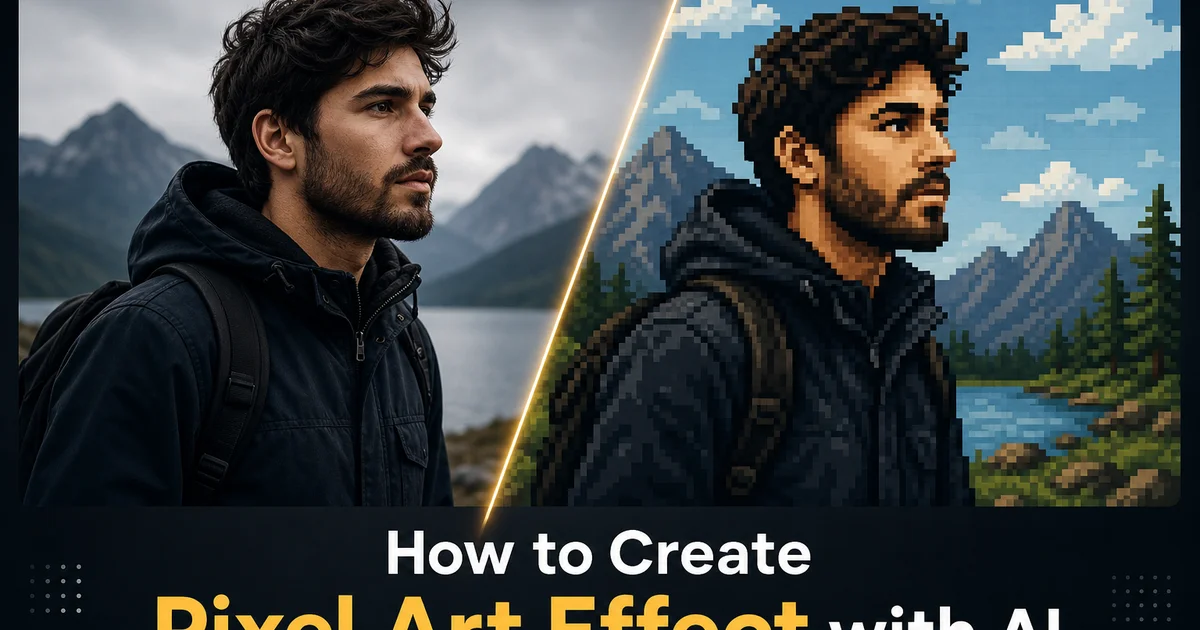
Le pixel art occupe une position unique dans l'histoire des medias visuels car il a commence comme une contrainte technique et a evolue en un choix artistique delibere. Dans les annees 1980 et 1990, les artistes de jeux video etaient forces de travailler dans des grilles de 16x16 ou 32x32 pixels avec des palettes de moins de 256 couleurs car le materiel ne pouvait pas afficher quoi que ce soit de plus complexe. Chaque placement de pixel etait une decision consciente concernant la forme, la couleur et la lisibilite a des resolutions minuscules. Cette discipline a produit une esthetique si distinctive et charmante qu'elle a survecu longtemps apres les limitations materielles qui l'ont creee. Aujourd'hui, le pixel art est une forme d'art florissante utilisee dans les jeux independants, l'illustration numerique, les avatars de reseaux sociaux, le design de marchandises et l'image de marque nostalgique. Et les outils alimentes par l'IA peuvent desormais convertir n'importe quelle photographie en pixel art authentique qui respecte les principes du medium.
Convertir manuellement une photographie en pixel art est l'un des processus les plus chronophages de l'art numerique. Un artiste pixel skill working from a photo reference peut passer des heures sur un seul sprite 64x64, choisissant soigneusement les details a conserver, ceux a simplifier, les bords a anti-aliaser avec des pixels de transition places a la main. Quelle couleur d'une palette limitee represente le mieux chaque region de l'image source. Le defi n'est pas seulement le downsamping. N'importe quel editeur d'image peut redimensionner une photo a 64 pixels de large — mais prendre des decisions intelligentes sur ce qui compte a cette resolution est tout un art. Un redimensionnement naif transforme un visage en une tache illisible. Un artiste pixel experimente le transforme en un portrait distinct avec de la personnalite. Cette intelligence interpretative est exactement ce que l'IA apporte au processus de conversion.
La conversion pixel art par IA analyse le contenu semantique d'une photographie avant d'effectuer toute reduction de resolution, garantissant que les caracteristiques visuelles les plus importantes survivent au sous-echantillonnage agressif qui definit l'esthetique du pixel art. L'IA identifie les visages, les yeux, les formes distinctives, le texte, les contours cles, puis construit la grille de pixels de sorte que ces elements critiques atterrissent sur les limites de pixels plutot que d'etre divises entre elles. La quantification des couleurs mappe les millions de couleurs de la photographie a une palette contrainte en utilisant la distance chromatique perceptuelle plutot qu'un simple appariement RVB voisin, preservant les relations de luminosite et de saturation percues qui rendent l'image lisible. Ce guide couvre le flux de travail complet dans AI Filter : choix des resolutions de grille, application de palettes de couleurs authentiques au materiel, configuration des motifs de tramage, affinage des bords et exportation aux tailles d'echelle entier correctes pour un affichage net sur les ecrans modernes.
- L'IA analyse le contenu semantique avant le sous-echantillonnage, garantissant que les visages, les yeux et les contours cles atterrissent sur les limites de pixels plutot que d'etre divises entre les lignes de grille pour une lisibilite maximale aux basses resolutions.
- Les presets de palettes materielles classiques reproduisent les restrictions de couleurs NES, Game Boy, SNES et CGA, produisant des esthetiques retro authentiques correspondant a l'apparence d'eres de jeu specifiques.
- La quantification intelligente des couleurs utilise la distance chromatique perceptuelle plutot qu'un simple appariement RVB, preservant les relations de luminosite et de saturation qui maintiennent la lisibilite de l'image dans des palettes limitees.
- Les options de tramage incluent les motifs ordonnes pour les textures 8-bit classiques, la diffusion d'erreur pour les degradés lisses et le rendu plat sans tramage pour les compositions graphiques audacieuses.
- La mise a l'echelle entiere par plus proche voisin garantit que chaque bord de pixel reste parfaitement net a n'importe quelle taille d'affichage, evitant les artefacts de flou que le redimensionnement bilineaire standard introduit dans le pixel art.
En quoi la conversion pixel art par IA differe du simple sous-echantillonnage d'image
L'erreur la plus courante que les gens commettent lorsqu'ils tentent de creer du pixel art a partir de photographies est simplement de redimensionner l'image a une basse resolution dans un editeur d'image standard. Un portrait de 3000 pixels de large redimensionne a 64 pixels de large en utilisant l'interpolation bicubique par defaut de Photoshop produit une vignette floue et boueuse qui ne ressemble en rien a du pixel art. Passer a l'interpolation par plus proche voisin supprime le flou mais cree une image ou le placement des pixels est entierement determine par la grille d'echantillonnage mecanique. Si un œil tombe entre deux points d'echantillonnage, il disparait ou devient une tache illisible. Le nez peut fusionner avec la joue, les details des cheveux s'effondrent en une tache uniforme. L'arriere-plan entre en competition avec le sujet car l'algorithme n'a aucun concept d'importance visuelle. Le resultat est techniquement basse resolution mais esthetiquement sans valeur en tant que pixel art.
La conversion pixel art par IA resout ce probleme en effectuant une analyse semantique avant toute reduction de resolution. L'IA identifie les caracteristiques cles de l'image (les points de repere du visage, les contours des objets, les elements de texte, les formes distinctives) puis construit la grille de pixels de sorte que ces caracteristiques soient preservees en tant que formes distinctes. Si un œil occupe trois pixels de largeur dans la resolution cible, l'IA garantit que ces trois pixels sont positionnes pour capturer la forme cle de l'œil plutot qu'une coupe arbitraire a travers son centre. Ceci est analogue a ce que les artistes pixel humains font lorsqu'ils etudient une photo de reference et decident quels details conserver et lesquels sacrifier : ils font des choix eclaires sur la priorite visuelle qu'un algorithme d'echantillonnage mecanique ne peut pas faire.
La difference s'etend egalement au traitement des couleurs. Le sous-echantillonnage standard moyenne les couleurs dans la zone de chaque pixel cible, produisant des couleurs intermediaires qui n'existent nulle part dans l'image originale et qui n'apparaîtraient jamais dans le pixel art reel. La conversion par IA selectionne plutot des couleurs discretes a partir d'une palette definie, effectuant le meme type de choix chromatiques deliberes que les artistes pixel. Une zone de peau devient un teint specifique de la palette plutot qu'une moyenne melangee, une ombre devient une nuance foncee distincte plutot qu'une valeur intermediaire boueuse. Les limites de couleur entre les regions sont placees le long de lignes de contour significatives plutot qu'a des intersections de grille arbitraires. Le resultat se lit comme un pixel art intentionnel plutot qu'une photographie degradee.
- Le redimensionnement standard place les pixels sur une grille mecanique independamment du contenu de l'image, ce qui fait que les caracteristiques importantes comme les yeux et les contours tombent entre les points d'echantillonnage et deviennent illisibles.
- L'IA effectue d'abord une analyse semantique, construisant la grille de pixels pour preserver les formes reconnaissables des caracteristiques cles a la resolution cible.
- Le moyennage des couleurs dans le sous-echantillonnage standard produit des tons intermediaires boueux, tandis que l'IA selectionne des couleurs de palette discretes qui correspondent aux decisions chromatiques du pixel art reel.
- Le placement des bords suit des lignes de contour significatives plutot que des intersections de grille arbitraires, garantissant que les limites entre les regions de couleur s'alignent avec les limites reelles du sujet.
Comprendre les palettes de couleurs et leur impact sur l'authenticite du pixel art
La palette de couleurs est sans doute le facteur le plus important pour determiner si le pixel art semble authentique ou ressemble a une photographie traitee. Chaque ere iconique du pixel art est definie autant par ses limitations de couleurs que par sa resolution. Les quatre nuances de vert du Game Boy original creent une esthetique instantanement distincte, la palette 54 couleurs de la NES produit les tons terreux chaleureux des jeux Nintendo 8-bit. La palette 16 couleurs du Commodore 64 avec ses tons bruns et cyan distinctifs cree une identite visuelle que les passionnes de retro reconnaissent immediatement. Lorsque l'IA convertit une photographie en utilisant l'une de ces palettes precises au materiel, le resultat herite du caractere visuel de cette epoque car les memes contraintes de couleurs qui ont faconne ces jeux faconnent desormais l'image convertie.
La quantification des couleurs — le processus de reduction de millions de couleurs photographiques a une poignee d'entrees de palette — est la ou l'intelligence de la conversion par IA compte le plus. La quantification naive mappe chaque pixel a son voisin RVB le plus proche dans la palette, ce qui peut produire des resultats ou des couleurs perceptuellement similaires sont mappees a des entrees de palette tres differentes car la distance RVB ne correle pas bien avec la difference de couleur percue. La quantification par IA opere dans des espaces chromatiques perceptuels comme CIELAB ou la distance numerique correspond a la difference visuelle reelle que les humains percoivent. Cela signifie qu'un teint de peau pale est mappe a l'entree de palette chaude qui semble correcte plutot qu'a une entree plus froide qui se trouve etre plus proche en valeurs RVB brutes. Un vert foret profond est mappe a la bonne nuance de vert fonce plutot qu'a un bleu fonce voisin qui partage des composants RVB similaires.
La creation de palettes personnalisees vous permet de depasser les contraintes materielles historiques et de definir n'importe quel ensemble de couleurs pour un style de pixel art unique. Une palette pastel avec des tons doux et feutres cree un pixel art reveur et delicat adapte aux esthetiques de jeux independants d'ambiance. Une palette haute saturation avec des couleurs primaires et secondaires pures produit des compositions pixel art pop-art audacieuses. Une palette monochrome utilisant uniquement des nuances d'une seule teinte cree un pixel art monochrome dramatique rappelant les tirages photographiques en chambre noire. L'IA adapte sa strategie de quantification aux traits de chaque palette, ajustant la densite de tramage et le placement des limites de couleur pour maximiser la qualite visuelle achievable avec les couleurs disponibles.
- Les palettes precises au materiel heritent de l'identite visuelle d'eres de jeu specifiques car les memes contraintes de couleurs qui ont faconne les jeux iconiques faconnent desormais l'image convertie.
- La quantification chromatique perceptuelle dans l'espace CIELAB mappe les couleurs basees sur la similarite visuelle plutot que sur la distance RVB, empechant les decalages ou des couleurs d'apparence similaire sont mappees aux mauvaises entrees de palette.
- Les palettes personnalisees permettent des styles de pixel art uniques — pastel pour les esthetiques atmospheriques, haute saturation pour les compositions pop-art, monochrome pour les œuvres d'art a teinte unique dramatiques.
- L'IA adapte la densite de tramage et le placement des limites de couleur aux caracteristiques de chaque palette, maximisant la qualite visuelle quel que soit le nombre de couleurs disponibles.
Techniques de tramage et quand utiliser chaque motif
Le tramage est la technique consistant a alterner des pixels de differentes couleurs selon des motifs qui simulent des tons intermediaires que la palette ne peut pas representer directement. Lorsqu'une palette de pixel art contient du bleu clair et du bleu fonce mais pas de bleu moyen, un motif en damier alternant entre les deux couleurs cree l'illusion optique du bleu moyen lorsqu'il est vu a distance normale. Cette technique etait cle a l'ere des palettes de couleurs limitees par le materiel, et differentes methodes de tramage produisent des resultats visuels distinctement differents. Comprendre quand appliquer chaque type — et quand n'en appliquer aucun — est critique pour produire du pixel art qui semble intentionnel plutot que bruyant.
Le tramage ordonne applique des motifs reguliers repetitifs — souvent des matrices de Bayer de 2x2, 4x4 ou 8x8 pixels — qui creent des transitions structurees entre les couleurs. La regularite du motif donne au tramage ordonne une qualite mecanique distinctive que beaucoup de gens associent aux graphiques de jeux video classiques, principalement les ciels degrades et les surfaces ombrees dans les jeux console 16-bit. AI Filter configure le tramage ordonne avec des matrices de seuil qui distribuent les transitions de couleur uniformement sur la plage de degradation, produisant des progressions tonales d'aspect lisse lorsqu'elles sont vues a distance normale tout en maintenant le motif de grille caracteristique visible a inspection rapprochee. Cette methode est la meilleure pour les arriere-plans, les ciels et les grandes zones de changement tonal graduel ou les transitions lisses importent plus que la precision graphique dure.
Le tramage par diffusion d'erreur distribue les erreurs de quantification aux pixels voisins, creant des motifs organiques qui evitent la regularite visible des methodes ordonnees. Floyd-Steinberg est l'algorithme de diffusion d'erreur le plus courant et produit un tramage lisse, semblable a un grain de film, qui melange les couleurs de maniere convaincante a distance de vision normale. Cependant, la diffusion d'erreur peut produire des resultats chargés et bruyants dans le pixel art car les motifs organiques entrent en conflit avec l'esthetique d'alignement precis sur la grille qui definit le medium. AI Filter offre un mode de diffusion d'erreur modifie qui contraint la diffusion a produire des motifs compatibles avec l'esthetique du pixel art, empechant le mouchetage aleatoire que le Floyd-Steinberg standard genere et creant a la place des motifs semi-reguliers qui semblent places a la main. Pour de nombreux sujets, desactiver completement le tramage et accepter les limites de palettes dures produit le pixel art le plus propre et le plus lisible.
- Le tramage ordonne utilise des motifs de matrice de Bayer reguliers qui creent des transitions de couleur structurees associees aux graphiques console 16-bit classiques, ideal pour les arriere-plans et les degradés.
- La diffusion d'erreur distribue les erreurs de quantification de maniere organique mais peut produire des resultats bruyants qui entrent en conflit avec l'esthetique d'alignement sur grille du pixel art sans contraintes guidees par l'IA.
- La diffusion d'erreur modifiee contraint les motifs a un placement semi-regulier compatible avec l'esthetique du pixel art, evitant le mouchetage aleatoire du Floyd-Steinberg standard.
- Desactiver entierement le tramage produit des regions de couleur planes avec des limites de palette dures — souvent l'option la plus propre et la plus lisible pour les sujets avec des zones de couleur distinctes.
Affinage des bords et anti-aliasing dans le pixel art
Des bords nets sont la marque du pixel art de qualite. La difference entre un travail pixel amateur et expert se resume souvent a la maniere dont les lignes diagonales et les courbes sont rendues au niveau du pixel. Dans le pixel art, une ligne parfaitement diagonale doit avancer d'un pixel horizontalement pour chaque pixel verticalement, creant un escalier a 45 degres lisse. Une ligne quasi-diagonale necessite une gestion soigneuse des longueurs de course — le nombre de pixels dans chaque pas horizontal avant de descendre. Des longueurs de course incoherentes creent un crénelage visible que l'œil detecte immediatement comme brouillon ou non intentionnel. Les artistes pixel experts passent un temps considerable a ajuster les pixels individuels le long des lignes de contour pour garantir des longueurs de course coherentes et des courbes lisses, un processus appele affinage des bords subpixel.
L'algorithme de nettoyage des bords d'AI Filter effectue cet affinage subpixel automatiquement en analysant la direction de contour prevue et en ajustant le placement des pixels pour creer un escalier coherent. Une ligne courbe qui devrait suivre un arc lisse recoit des ajustements de pixel qui garantissent que chaque etape transitionne progressivement plutot que de tanguer entre differentes tailles de pas. L'algorithme identifie et corrige egalement les doublons — les endroits ou deux pixels sont cote a cote sur la meme rangee d'une ligne diagonale, creant une bosse visible dans ce qui devrait etre une pente lisse. Ces doublons sont un artefact courant du sous-echantillonnage mecanique et l'une des premieres choses que les artistes pixel corrigent lors du nettoyage de sprites generes automatiquement. L'IA les detecte en utilisant l'analyse de contour et les supprime en repositionnant le pixel problematique.
L'anti-aliasing dans le pixel art est un sujet controversé car l'anti-aliasing traditionnel utilise des pixels de couleur intermediaire pour lisser les bords crénelés. Ces pixels de transition peuvent sembler boueux ou sales aux echelles du pixel art. L'IA propose trois modes d'anti-aliasing. L'anti-aliasing complet place des pixels de couleur intermediaire le long de tous les bords de contour pour une lissitude maximale. L'anti-aliasing selectif applique des pixels de transition uniquement le long des courbes et des diagonales qui beneficient du lissage tout en laissant les bords horizontaux et verticaux droits parfaitement nets. Pas d'anti-aliasing laisse tous les bords comme des limites de pixels dures, produisant l'aspect le plus net et le plus graphique mais avec un crénelage visible sur toutes les lignes diagonales et courbes. Pour la plupart des conversions photographiques, l'anti-aliasing selectif produit le meilleur equilibre entre lissitude et netteté du pixel art.
- Des longueurs de course coherentes le long des lignes diagonales eliminent le crénelage visible qui distingue le travail pixel amateur de la qualite professionnelle, et l'IA optimise automatiquement les motifs de pas.
- La detection de pixels doubles identifie et corrige les pixels cote a cote sur les lignes diagonales — un artefact courant de sous-echantillonnage mecanique qui cree des bosses visibles dans les contours lisses.
- L'anti-aliasing selectif applique un lissage par couleur intermediaire uniquement sur les courbes et diagonales qui en beneficient, laissant les bords droits parfaitement nets pour le meilleur equilibre entre lissitude et netteté.
- Les ajustements manuels au niveau pixel qui prendraient des heures a un artiste humain sont effectues automatiquement pendant la conversion, atteignant une qualite d'affinage equivalente a celle d'un sprite travaille a la main.
Applications creatives : assets de jeu, avatars sociaux et design de marchandises
La conversion de photographies en pixel art ouvre des applications immediates dans le developpement de jeux independants. Les equipes utilisent des references photographiques pour accelerer la creation de sprites de personnages, de tuiles de decors et d'icones d'objets. Une photographie de foret devient un fond carrelable, un portrait devient une feuille de sprite de personnage, et une photographie de produit devient des icones d'objets dans le jeu. Le tout converti a la resolution et a la palette cibles du jeu en quelques secondes plutot que les heures que le pixel art manuel requerrait. La conversion IA fournit un point de depart solide que les artistes peuvent ensuite affiner a la main, en ajustant les pixels cles pour ameliorer la lisibilite et en ajoutant des details prets pour l'animation que la conversion photo statique ne peut pas anticiper. Ce flux de travail hybride accelere considerablement la production sans sacrifier la qualite artisanale que les fans de pixel art attendent.
Les avatars de reseaux sociaux et les photos de profil rendus dans le style pixel art sont devenus de plus en plus populaires alors que les gens cherchent a se differencier de l'apparence uniforme des photographies de portrait standard. Un avatar pixel art transmet creativite, interet technique et connexion a la culture du jeu d'une maniere qu'un portrait standard ne fait pas. AI Filter convertit les photographies de portrait en avatars pixel art a diverses resolutions : des minuscules icones 16x16 a l'echelle favicon aux photos de profil detaillees 128x128 — chaque niveau de resolution recevant une reduction de details appropriee qui maintient la reconnaissabilite. Les utilisateurs peuvent selectionner des palettes qui correspondent a leurs couleurs de marque personnelles, creant des identites pixel art coherentes sur toutes les plateformes.
Le design de marchandises utilisant du pixel art derive de photographies cree des produits uniques qui combinent des sujets photographiques avec des esthetiques de jeu retro. T-shirts, pins email, autocollants, coques de telephone et impressions d'affiches beneficient tous de la qualite graphique audacieuse du pixel art, qui se reproduit proprement a n'importe quelle echelle physique car les bords de pixels durs restent nets quelle que soit la taille d'impression. Les portraits d'animaux convertis en pixel art sont devenus une categorie de marchandises particulierement populaire, les proprietaires commandant des versions pixel art de leurs animaux pour des produits personnalises. La conversion IA gere les caracteristiques distinctives des differentes especes animales — les oreilles pointues des chats, les formes de museau variees des races de chiens, les motifs de plumes des oiseaux — avec la meme comprehension semantique qu'elle applique aux portraits humains.
- Les developpeurs de jeux independants utilisent la conversion photo-vers-pixel-art pour generer rapidement des sprites de personnages, des tuiles de decors et des icones d'objets comme points de depart pour un affinage manuel.
- Les avatars pixel art sur les reseaux sociaux transmettent creativite et connexion a la culture du jeu, la conversion IA maintenant la reconnaissabilite a des resolutions de 16x16 a 128x128 pixels.
- Les produits de marchandise comme les t-shirts, les pins email et les affiches beneficient de la qualite graphique audacieuse du pixel art qui se reproduit proprement a n'importe quelle echelle d'impression physique.
- Le portrait d'animal en pixel art est devenu une categorie de marchandise populaire, l'IA gerant les caracteristiques distinctives des especes comme les formes d'oreilles, les profils de museau et les motifs de plumes.
How to do it
- 1
Upload your photo and assess its suitability for pixel art conversion
Open your image in AI Filter and evaluate whether the subject has clear shapes, strong color contrast, and well-defined silhouettes. Pixel art thrives on bold, readable forms because the conversion reduces the image to a coarse grid where every pixel must carry visual weight. Portraits with clean backgrounds, objects with distinct outlines, and landscapes with layered depth planes convert most well. Images with excessive fine detail, low contrast, or busy backgrounds tend to lose clarity when downsampled to a pixel grid because the algorithm cannot preserve subtleties that fall below the grid resolution threshold.
- 2
Select a grid resolution and configure the downsampling method
Choose the pixel grid size that determines how many blocks make up the final image. A 64-by-64 grid produces chunky classic game-style sprites where individual pixels are large and prominent. A 256-by-256 grid creates more detailed pixel art that preserves finer features. AI Filter offers intelligent downsampling that analyzes the image semantically before reducing resolution, ensuring that important features like eyes, edges. Distinctive shapes are preserved even at very low grid sizes. The AI focuses on structural clarity over photographic accuracy, placing pixel boundaries along natural contour lines rather than on an arbitrary mechanical grid.
- 3
Apply a color palette constraint to achieve authentic retro aesthetics
Select from curated palette presets that replicate iconic hardware limitations. The NES palette restricts output to 54 colors, the Game Boy palette uses four shades of green, the SNES palette offers 256 simultaneous colors from a 32768-color space. Custom palettes let you define any set of colors for a unique look. Palette restriction is what transforms a merely low-resolution image into genuine pixel art because real pixel artists working within hardware constraints made deliberate color choices that created distinct visual identities. The AI performs intelligent color quantization that maps the photograph's colors to the nearest palette entries while keeping relative luminance relationships and color contrast between adjacent regions.
- 4
Refine edges and apply optional dithering for smoother tonal transitions
Enable or disable dithering patterns to control how the AI handles gradients and tonal transitions within the restricted palette. Ordered dithering creates regular checkerboard patterns that simulate intermediate colors, matching the technique used in classic 8-bit and 16-bit games. Error diffusion dithering distributes quantization errors across neighboring pixels for smoother apparent gradients. No dithering produces flat color regions with hard edges between palette colors, creating a bold graphic look. The AI also offers edge cleanup that adjusts individual pixel placement along contour lines to remove jagged staircasing artifacts, producing the clean diagonal lines and curves that skilled pixel artists spend hours manually refining.
- 5
Export at the correct resolution and scaling for your intended use
Save the pixel art at its native low resolution for editing in dedicated pixel art tools, or export at an integer-scaled size for display on modern screens. Pixel art must be scaled by whole-number multipliers. 2x, 4x, 8x — using nearest-neighbor interpolation to keep each pixel as a crisp square block. Scaling by non-integer values or using bilinear interpolation blurs the pixel boundaries and destroys the trait blocky aesthetic that defines the style. AI Filter automatically applies nearest-neighbor scaling and lets you choose the output multiplier, producing files where every pixel edge remains razor-sharp regardless of the final display resolution.
Sources
- Depixelizing Pixel Art — ACM SIGGRAPH
- Pixel Art: From Sinusoidal to Diamond-Square and Beyond — IEEE Computer Graphics and Applications
- Neural Image Quantization for Pixel Art Generation — arXiv