
Comment creer un effet de decoupage de papier avec l'IA — Magic Eraser
Transformez vos photos en art de papier decoupe en couches avec l'IA, incluant profondeur d'ombre, texture de papier et effets de superposition 3D. Guide etape par etape pour creer des œuvres d'art en papier tridimensionnel.

Product Marketing
Vérifié par Magic Eraser Editorial ·
Sommaire
- Comment l'estimation de profondeur par IA decompose les photographies en couches de papier empilables
- Le rendu de texture de papier et comment la simulation de materiau empeche la platitude numerique
- Le rendu d'ombre et la physique de la perception de profondeur inter-couche
- Applications creatives : illustration enfantine, graphiques animees et shadow boxes physiques
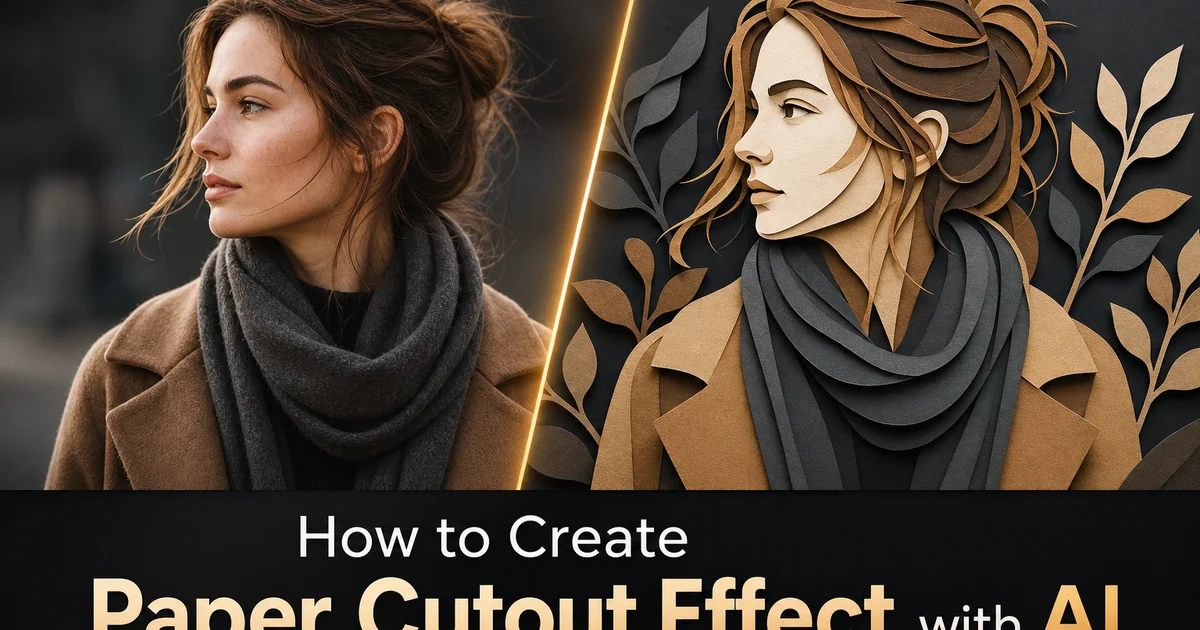
Le decoupage de papier est une forme d'art millenaire pratique dans de nombreuses cultures. Du jianzhi chinois et du kirigami japonais au wycinanki polonais, au scherenschnitte allemand et au papel picado mexicain. Malgre leurs origines culturelles diverses, toutes les traditions de decoupage de papier partagent un principe fondamental : transformer un materiau bidimensionnel plat en art expressif par l'interaction des formes decoupees et des espaces negatifs. La profondeur physique creee lorsque des couches de papier sont empilees a differentes hauteurs. Lorsque plusieurs couches decoupees sont disposees dans une boite shadow box ou montees avec des entretoises, la composition resultante gagne une subtile tridimensionnalite car la lumiere venant du dessus projette des ombres entre les couches, creant des gradients de profondeur qui donnent l'impression que les formes de papier plates flottent a differentes distances du spectateur. Cette esthetique de shadow box multicouche est devenue de plus en plus populaire dans l'illustration, l'animation et le design graphique, les artistes cherchant des alternatives a la fois au realisme photographique et aux graphiques vectoriels plats numeriques.
Creer de l'art de decoupage de papier a partir de photographies necessitait auparavant soit des competences et du materiel de decoupage de papier reels, soit un travail d'illustration numerique meticuleux. L'approche physique consiste a tracer des versions simplifiees de chaque couche de profondeur sur du papier colore ou du carton, a decouper chaque forme avec des ciseaux ou un cutter, et a assembler les couches avec des entretoises en mousse dans un cadre shadow box. L'approche numerique consiste a decomposer manuellement une photographie en couches de profondeur, a simplifier chaque couche en formes plates, a ajouter des textures de papier et des effets d'ombre dans Photoshop ou After Effects, et a composer soigneusement les couches avec une separation de profondeur appropriee. Les deux approches exigent des heures de travail specialise par image et un œil artistique pour determiner quels details photographiques conserver comme formes distinctes et lesquels abstraire dans le vocabulaire simplifie du papier decoupe.
La conversion de decoupage de papier par IA automatise l'ensemble de ce processus de decomposition et de rendu en analysant la structure de profondeur, le contenu semantique et la composition tonale d'une photographie pour generer une interpretation convaincante en papier decoupe multicouche. L'IA estime la profondeur dans toute la scene pour determiner les limites naturelles des couches, identifie les formes distinctes dans chaque zone de profondeur pour creer des silhouettes decoupees significatives, assigne des couleurs et des textures qui referencent la photographie originale tout en respectant la contrainte de remplissage plat des surfaces en papier, et rend des ombres physiquement precises entre les couches qui creent la qualite dimensionnelle cle de l'esthetique du decoupage de papier. Ce guide couvre le flux de travail complet pour transformer des photographies en œuvres d'art de papier decoupe en couches a l'aide de AI Filter, de l'analyse de profondeur et de la configuration des couches a la selection de texture et au rendu d'ombre.
- La decomposition des couches basee sur la profondeur analyse la structure spatiale de la scene pour identifier les limites naturelles ou la photographie peut etre separee en plans de papier distincts a differentes hauteurs.
- Des nombres de couches configurables de trois pour des compositions graphiques audacieuses a huit pour des decoupes complexes et detailees controlent l'equilibre entre la simplification et la fidelite a la scene originale.
- Les simulations de texture de papier, y compris le carton lisse, le papier aquarelle, le papier kraft et le papier metallique, empechent le resultat d'etre percu comme un art numerique plat et ajoutent une qualite materielle tactile.
- Les ombres inter-couches modelisees physiquement avec un decalage, une douceur et une teinte de couleur configurables creent la perception de profondeur dimensionnelle essentielle a une esthetique de decoupage de papier convaincante.
- Les options de traitement des bords vont de la precision de decoupe laser a l'irregularite des ciseaux a main en passant par les bords dechires irreguliers, chacune transmettant differentes esthetiques artisanales, du contemporain a l'art populaire.
Comment l'estimation de profondeur par IA decompose les photographies en couches de papier empilables
Le fondement d'un art de decoupage de papier convaincant est la decomposition d'une scene tridimensionnelle stable en une pile de couches plates discretes. La qualite de cette decomposition determine si l'œuvre finale est percue comme une interpretation intentionnelle de papier artisanal ou un collage grossier de regions d'image separees arbitrairement. Dans le decoupage de papier physique, un artiste etudie la scene et prend des decisions intuitives sur l'emplacement des limites de couches. L'arbre au premier plan devient une couche, la maison derriere lui en devient une autre, et les montagnes au loin deviennent une troisieme. Ces decisions sont guidees par une comprehension de la profondeur spatiale et par un jugement artistique sur les separations qui creent les silhouettes et les interactions d'ombre les plus interessantes visuellement lorsque les couches sont physiquement empilees.
L'estimation de profondeur par IA effectue une version computationnelle de cette analyse en generant une carte de profondeur stable qui assigne une valeur de distance estimee a chaque pixel de la photographie. Les modeles modernes d'estimation de profondeur monoculaire entrainees sur des millions d'images peuvent deduire des relations de profondeur remarquablement precises a partir d'une seule photographie, identifiant quels elements sont proches, lointains, et tout ce qui se trouve entre les deux. L'IA analyse ensuite cette carte de profondeur stable pour identifier des points de regroupement naturels — des valeurs de profondeur ou de nombreux pixels partagent des distances similaires, separees par des ecarts ou peu de pixels existent. Ces groupes deviennent les attributions de couches : tous les pixels a des profondeurs similaires sont regroupes sur la meme couche de papier. Les ecarts entre les groupes definissent les espaces physiques entre les couches ou les ombres tomberont. Le resultat est une decomposition qui suit la structure de profondeur naturelle de la scene plutot que des divisions horizontales ou tonales arbitraires.
La comprehension semantique renforce la decomposition basee sur la profondeur pour garantir que les objets distincts restent intacts sur des couches uniques plutot que d'etre divises a travers les limites de profondeur. Sans conscience semantique, une personne se tenant a une limite de profondeur pourrait avoir son torse sur une couche et sa tete sur une autre, ou un arbre pourrait etre divise verticalement avec son tronc sur une couche et sa cime sur la suivante. L'IA identifie les unites semantiques — personnes, batiments, vehicules, arbres, animaux — et garantit que chaque objet est assigne a une seule couche meme lorsque ses valeurs de profondeur couvrent une plage qui pourrait autrement declencher une division de couche. Cela produit des formes decoupees qui sont perçues comme des silhouettes intentionnelles de sujets distincts plutot que des fragments decoupes par profondeur arbitraires, et est essentiel pour que l'œuvre soit reconnue comme de l'artisanat du papier plutot que comme un traitement algorithmique.
- L'estimation de profondeur continue assigne une valeur de distance a chaque pixel, identifiant les elements proches et lointains a partir d'une seule photographie sans necessiter de paires stereo ou de capteurs de profondeur.
- Le regroupement naturel de profondeur identifie les limites de couches ou des groupes de pixels de profondeur similaire sont separes par des ecarts de profondeur, suivant la structure spatiale de la scene plutot que des divisions arbitraires.
- La detection semantique d'objets maintient les sujets reconnaissables — personnes, batiments, arbres — intacts sur des couches uniques plutot que de les diviser a travers des limites de profondeur qui fragmentent leurs silhouettes.
- La combinaison du regroupement de profondeur et de l'integrite semantique produit des decompositions de couches qui sont perçues comme des decisions artistiques intentionnelles plutot que des separations algorithmiques mecaniques.
Le rendu de texture de papier et comment la simulation de materiau empeche la platitude numerique
Le mode d'echec le plus courant des effets de decoupage de papier numerique est de produire des resultats qui ressemblent a des illustrations vectorielles plates plutot qu'a des œuvres d'art fabriquees a partir de papier physique reel. Cela se produit car les outils numeriques produisent naturellement des remplissages de couleur parfaitement uniformes avec des bords mathematiquement lisses — des qualites qui sont antitheriques aux imperfections inherentes des materiaux papier reels. Le papier reel presente une texture de fibre visible, une variation subtile de couleur sur sa surface, une legere transparence aux zones minces et aux bords, et des irregularites de surface qui accrochent la lumiere differemment sur la feuille. Ces proprietes physiques a micro-echelle sont ce qui donne au papier l'impression d'etre un materiau tangible plutot qu'un plan colore abstrait. Leur absence dans le rendu numerique signale immediatement au spectateur que l'image a ete generee par ordinateur plutot que construite physiquement.
La simulation de texture de papier de AI Filter applique des proprietes materielles modelisees physiquement a chaque couche decoupee, transformant les remplissages numeriques plats en surfaces qui sont perçues comme des types de papier specifiques. La simulation de carton lisse ajoute le tres leger reflet de surface et les subtiles variations d'uniformite de couleur caracteristiques du papier cartonne couche — le genre utilise dans l'ingenierie papier haut de gamme et les livres pop-up. La simulation de papier aquarelle ajoute la texture prononcee et bosselee de pressage a froid qui cree des motifs visibles de lumiere et d'ombre sur la surface, donnant a chaque couche decoupee une qualite picturale meme si les couleurs sont des remplissages plats. La simulation de papier kraft ajoute la texture fibreuse caracteristique tachetee de brun et la surface mate du papier non blanchi, creant une esthetique organique chaleureuse associee a la conscience ecologique et aux traditions artisanales. La simulation de papier metallique ajoute la variation de surface reflective et le changement de couleur qui font que le papier or, argent ou cuivre accroche la lumiere differemment sur la surface de la couche.
La texture n'est pas simplement superposee comme un motif uniforme. Elle interagit avec la qualite des bords et le systeme d'ombres pour creer un comportement materiel coherent. Aux bords de coupe, la texture du papier se termine d'une maniere qui suggere le bord physique d'une feuille coupee, avec une visibilite subtile du noyau blanc le long des bords du papier de couleur foncee — exactement comme le vrai carton colore revele son interieur non colore le long des lignes de ciseaux. La ou les ombres tombent d'une couche superieure vers une couche inferieure, l'ombre interagit avec la texture de la couche inferieure, assombrissant les parties surelevees du papier texture plus que les creux, exactement comme les ombres reelles se comportent sur les surfaces texturees. Ces details d'interaction materielle sont subtils un par un mais creent collectivement la forte physicalite qui fait que l'art de decoupage de papier genere par IA ressemble a une photographie d'une construction en papier reelle plutot qu'a une illustration numerique.
- Les remplissages numeriques parfaitement uniformes signalent une generation par ordinateur ; le papier reel a une texture de fibre, une variation subtile de couleur, une legere transparence aux bords et des irregularites de surface qui accrochent la lumiere.
- Quatre simulations de materiau papier — carton lisse, papier aquarelle, papier kraft et papier metallique — ajoutent chacune des proprietes de surface physiquement precises specifiques a ce type de papier.
- La terminaison des bords montre une visibilite subtile du noyau blanc le long des lignes de coupe, simulant comment le vrai carton colore revele son interieur non colore le long des coupes aux ciseaux ou au couteau.
- L'interaction ombre-texture assombrit les fibres de papier surelevees plus que les creux, reproduisant le comportement physique des ombres reelles tombant sur des surfaces de papier texturees.
Le rendu d'ombre et la physique de la perception de profondeur inter-couche
Les ombres sont le mecanisme par lequel les couches de papier plates acquierent la perception de profondeur tridimensionnelle. La precision du rendu d'ombre est ce qui distingue l'art de decoupage de papier qui semble physiquement plausible des collages plats qui se chevauchent par hasard. Dans une veritable shadow box en papier, la lumiere venant du dessus ou du cote frappe d'abord la couche superieure, et chaque couche projette une ombre sur la couche en dessous d'elle. Les caracteristiques de l'ombre encodent des informations spatiales : son decalage par rapport au bord projetant indique l'angle de la source lumineuse, sa taille indique la distance d'ecart entre les couches, sa douceur indique la taille de la source lumineuse et la distance d'ecart combinees, et son obscurite indique la quantite de lumiere que la couche superieure bloque. Les spectateurs decodent ces proprietes d'ombre inconsciemment pour construire un modele mental de l'agencement tridimensionnel des couches. C'est pourquoi il est essentiel d'avoir des parametres d'ombre corrects pour l'illusion du decoupage de papier.
AI Filter modelise les ombres en utilisant un transport de lumiere physiquement base qui calcule comment la lumiere d'une position de source configurable interagit avec la pile de couches. Pour chaque couche, l'IA trace l'ombre que ses bords coupes projettent sur toutes les couches en dessous, en tenant compte de la distance d'ecart configuree entre les couches, de la position et de la taille de la source lumineuse, et de la douceur de la penombre qui augmente avec la distance du bord projetant. Les couches proches projettent des ombres nettes et denses tandis que les couches eloignees projettent des ombres diffuses et faibles — le meme gradient de douceur dependant de la profondeur qui se produit dans les veritables shadow boxes. La couleur d'ombre par defaut est un gris fonce neutre mais peut etre teintee pour correspondre aux conditions d'eclairage ambiant, creant des ombres dorees chaudes pour les scenes ensoleillees ou des ombres bleues froides pour les compositions nuageuses. Cette approche physiquement basee signifie que la perception spatiale inconsciente des spectateurs interprete correctement l'agencement des couches car les ombres suivent les memes regles optiques qu'ils experimentent dans le monde physique.
Le systeme d'ombre gere egalement le cas complexe des regions d'ombre qui se chevauchent ou plusieurs couches superieures projettent des ombres sur la meme surface inferieure. Dans les shadow boxes physiques, les ombres qui se chevauchent sont plus sombres que les ombres simples car chaque couche bloque de la lumiere supplementaire. La composition d'ombre additive simple produit des regions irrealistement sombres la ou trois ou quatre couches se chevauchent, tandis que le modele de transport de lumiere de l'IA calcule correctement les rendements decroissants de chaque couche d'ombre supplementaire. La premiere ombre bloque le plus de lumiere, la seconde en bloque moins, et les couches subsequentes apportent des effets d'assombrissement progressivement plus faibles. Cette accumulation nuancee d'ombre est plus visible dans les compositions a nombreuses couches ou la couche d'arriere-plan la plus profonde recoit les ombres de toutes les couches au-dessus d'elle. Le rendu correct de ces ombres accumulees est ce qui donne aux compositions complexes de decoupage de papier leur sens convaincant de profondeur physique substantielle.
- Le decalage, la taille, la douceur et l'obscurite de l'ombre encodent des informations spatiales que les spectateurs decodent inconsciemment pour construire un modele mental de l'agencement tridimensionnel des couches.
- Le transport de lumiere physiquement base calcule des caracteristiques d'ombre dependantes de la profondeur ou les couches proches projettent des ombres nettes et denses et les couches eloignees projettent des ombres diffuses et faibles.
- La couleur d'ombre teintable correspond aux conditions d'eclairage ambiant — doree chaude pour les scenes ensoleillees, bleue froide pour les compositions nuageuses — maintenant la coherence visuelle avec la photographie source.
- L'accumulation correcte d'ombre a travers plusieurs couches qui se chevauchent utilise un blocage de lumiere a rendements decroissants plutot qu'un assombrissement additif simple, empechant une densite d'ombre irrealiste dans les compositions profondes.
Applications creatives : illustration enfantine, graphiques animees et shadow boxes physiques
Le style de decoupage de papier est devenu l'une des esthetiques les plus populaires dans l'illustration de livres pour enfants et le contenu educatif car la construction en couches visibles cree un sentiment de chaleur, de tactilite et d'accessibilite que l'illustration numerique pure manque souvent. Les enfants comprennent intuitivement le papier comme un materiau qu'ils ont manipule, coupe et colle eux-memes, donc les images qui semblent construites en papier semblent familières et invitantes plutot qu'intimidantes technologiquement. Les editeurs et createurs de contenu educatif commandent des illustrations en papier decoupe pour les couvertures de livres, les illustrations interieures, les interfaces d'applications et les videos educatives animees car cette esthetique fait le pont entre la livraison numerique et le sentiment artisanal que les parents et educateurs associent a un contenu jeunesse de qualite. La conversion de decoupage de papier par IA permet aux illustrateurs de prototyper rapidement des compositions en convertissant des photographies de reference en œuvres d'art en papier multicouche qui servent de base pour des illustrations finales raffinees.
Les graphiques animees et l'animation tirent parti de la structure en couches de l'art de decoupage de papier car chaque couche peut etre animee independamment pour creer des effets de profondeur de parallaxe, des animations de revelation et un mouvement dimensionnel subtil. Lorsque la camera panoramique sur une scene en papier en couches, les couches de premier plan se deplacent plus rapidement que les couches d'arriere-plan, creant un effet de parallaxe miniature qui renforce la profondeur tridimensionnelle de la composition. Les couches individuelles peuvent etre animees pour glisser en position sequentiellement, construisant la scene piece par piece dans une animation de construction intrinsequement engageante car les spectateurs regardent l'image s'assembler d'elle-meme. Les producteurs video utilisent les decompositions de decoupage de papier generees par IA comme points de depart pour des sequences animees, prenant les separations de couches et les configurations d'ombre comme cadre et ajoutant du mouvement dans After Effects ou un logiciel de composition similaire.
L'application la plus satisfaisante de la conversion de decoupage de papier par IA est peut-etre l'utilisation de la sortie comme plan directeur pour la construction de veritables shadow boxes physiques. La decomposition des couches et les assignments de couleurs de l'IA deviennent des guides de coupe pour du vrai papier ou carton, chaque couche exportee etant imprimee ou tracee sur le materiel approprie, decoupee et montee dans un cadre shadow box avec des entretoises en mousse creant la profondeur physique entre les couches. L'IA gere le travail analytique complexe de determination des limites de couches, de simplification des formes en silhouettes decoupables et de calcul des separations de profondeur appropriees, tandis que l'artisan profite du processus physique meditatif de coupe, d'arrangement et d'assemblage. L'œuvre physique resultante porte a la fois la precision computationnelle de la composition optimisee par IA et la chaleur irremplacable du papier coupe a la main et des ombres reelles projetees par la lumiere reelle tombant sur des materiaux tangibles.
- Les createurs de contenu jeunesse preferent l'esthetique du decoupage de papier car la construction artisanale visible semble chaleureuse et accessible, faisant le pont entre la livraison numerique et la familiarite tactile.
- Les graphiques animees exploitent l'animation de couches independantes pour des effets de profondeur de parallaxe, des animations de revelation sequentielles et des mouvements de camera dimensionnels qui exploitent la structure en couches.
- Les decompositions de couches par IA servent de guides de coupe pour la construction de shadow boxes physiques, gerant la complexite analytique tandis que l'artisan profite du processus meditatif de coupe a la main et d'assemblage.
- Les shadow boxes physiques crees a partir de plans directeurs IA combinent l'optimisation computationnelle de composition avec la chaleur irremplacable des materiaux papier reels et des ombres projetees par la lumiere naturelle.
How to do it
- 1
Upload your photo and evaluate its depth layers for paper cutout decomposition
Open your photograph in AI Filter and examine how the scene naturally divides into distinct depth planes that can become separate paper layers. Paper cutout art works by representing a three-dimensional scene as a stack of flat two-dimensional shapes arranged at different heights, with shadows between layers creating the illusion of depth. Images with clear foreground, midground, and background separation convert most well because each depth zone becomes a distinct paper layer. Landscapes with layered mountain ranges, cityscapes with buildings at varying distances, portraits with distinct subject-background separation. Nature scenes with clear depth progression all produce strong paper cutout results. Flat images without depth variation or scenes where all elements occupy the same focal plane produce less convincing results because there are no natural layer boundaries for the AI to exploit.
- 2
Configure the number of paper layers and assign depth boundaries
Set the total number of paper layers that will comprise the cutout composition, often between four and eight layers for most subjects. Fewer layers produce bold graphic compositions where each paper shape represents a large simplified area of the scene. A three-layer landscape might consist of a foreground silhouette, a mid-distance mountain range, and a sky backdrop. More layers create intricate compositions with finer depth gradation and smaller individual shapes that capture detail within each depth zone. The AI assigns depth boundaries automatically based on its analysis of the scene's spatial structure. You can adjust these boundaries manually to control which elements share a layer and which are separated. Grouping a subject and their immediate surroundings on the same layer creates a unified silhouette. Separating them creates visible depth between the figure and their setting.
- 3
Select paper texture and color treatment for each layer
Choose the paper material simulation for each layer. Smooth cardstock for clean modern cutouts, textured watercolor paper for artistic interpretations, kraft paper for rustic natural aesthetics, or metallic foil paper for decorative accents. Each texture affects how the flat color fills interact with the surface, adding visual richness that prevents the cutout from reading as flat digital vector art. Configure the color treatment: photographic color sampling preserves the original hues of each region mapped onto flat paper shapes, limited palette mode reduces colors to a specified count for a more stylized crafted look. Monochrome mode uses varying shades of a single color family for elegant tonal compositions. The combination of texture and color treatment defines the overall aesthetic character of the cutout. Smooth white cardstock with photographic colors creates modern illustration, while textured kraft paper with limited earth tones creates the warm handcrafted feeling of folk art paper cutting.
- 4
Adjust shadow depth and edge treatment for dimensional realism
Configure the shadow parameters that create the perception of physical depth between paper layers. Shadow offset controls the apparent distance between layers. Larger offsets suggest wider gaps that cast longer shadows, creating dramatic three-dimensional depth, while smaller offsets create subtle layering with gentle shadow gradients. Shadow softness determines whether the shadow edges are crisp and close to the paper edge or diffused and spread widely, mimicking the difference between direct overhead lighting and soft ambient illumination. Shadow color defaults to neutral gray but can be tinted to match the lighting mood of the scene. Warm brown shadows for golden hour scenes, cool blue shadows for overcast or moonlit compositions. Edge treatment adds optional imperfections along the cut lines: perfectly smooth edges for precise laser-cut aesthetics, slightly irregular edges for hand-scissored charm, or rough torn edges for a collage and decoupage look.
- 5
Export the paper cutout artwork and verify the layered depth effect at display size
Save the finished paper cutout image at your target resolution and examine it at actual display size to verify that the layered depth reads convincingly. The shadows between layers should be visible enough to create a clear sense of stacked paper planes without being so dark or wide that they overpower the actual cutout shapes. Each paper layer should be distinguishable from adjacent layers through the combination of depth separation, shadow casting, and color or tonal contrast. Inspect the cut edges to ensure they follow the contours of distinct shapes. Tree silhouettes, building profiles, human figures — rather than producing abstract blobs that do not read as intentional paper forms. Export as PNG to preserve the shadow transparency and crisp edge detail. For print applications requiring actual dimensional paper layering, export each layer as a separate file that can be cut from physical paper or cardstock and assembled into a real three-dimensional shadow box.
Sources
- The Art of Paper Cutting: Contemporary Artists and Timeless Craft — Smithsonian Magazine
- Depth Estimation and Layer Decomposition in Computational Photography — arXiv
- Shadow Rendering Techniques for Layered 2.5D Illustration — ACM Transactions on Graphics