
Comment creer des photos infrarouges noir et blanc avec l'IA : effets de paysage irreels — Magic Eraser
Apprenez a creer l'effet photographie infrarouge noir et blanc avec des outils IA. Transformez des paysages ordinaires en scenes etherees avec un feuillage blanc lumineux et des ciels sombres et dramatiques.

Product Marketing
Vérifié par Magic Eraser Editorial ·
Sommaire
- Comprendre l'apparence de la photographie infrarouge et pourquoi elle fonctionne
- Choisir les bonnes photos pour la conversion infrarouge
- Application du filtre de conversion infrarouge IA
- Reglage fin de l'apparence infrarouge avec les commandes de contraste et de ton
- Amelioration et exportation d'images infrarouges pour l'impression et l'ecran
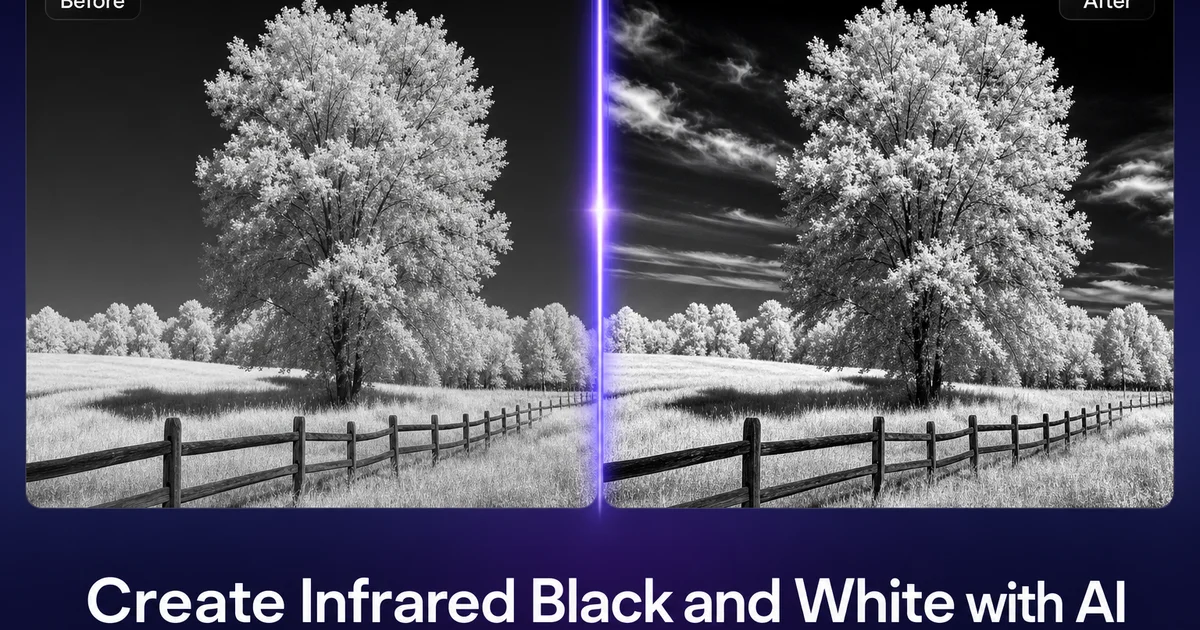
La photographie infrarouge en noir et blanc produit certaines des images de paysage les plus saisissantes et les plus surréelles de toute la photographie. Le rendu caractéristique — des arbres et une végétation qui brillent d'un blanc éclatant sur des ciels presque noirs, l'eau rendue comme un miroir sombre, une qualité éthérée générale qui fait ressembler des paysages familiers à un terrain extraterrestre — vient de la capture de longueurs d'onde lumineuses que l'œil humain ne peut voir. Lorsque la lumière proche infrarouge se réfléchit sur la chlorophylle du feuillage vivant, elle produit un effet connu sous le nom d'effet Wood, du nom du physicien Robert Wood. Les feuilles vertes qui paraissent sombres en photographie normale s'inscrivent en blanc éclatant dans le spectre infrarouge.
Autrefois, créer de véritables photographies infrarouges exigeait soit un film infrarouge spécialisé qui n'est plus largement fabriqué, soit la conversion d'un appareil numérique en retirant physiquement le filtre interne bloquant l'infrarouge du capteur. Une modification matérielle coûteuse et irréversible qui dédiait exclusivement un boîtier au travail infrarouge. Même avec le bon équipement, la photographie infrarouge exigeait de longues expositions et un filtrage minutieux. Un post-traitement poussé pour obtenir la séparation tonale noir et blanc nette qui rend le genre si fort visuellement. La barrière à l'entrée a maintenu la photographie infrarouge comme une niche poursuivie presque exclusivement par des spécialistes du paysage en art photographique.
Les outils de simulation infrarouge propulsés par l'IA permettent désormais à tout photographe de créer des images infrarouges en noir et blanc convaincantes à partir de photographies couleur standard, sans équipement spécialisé ni modification matérielle. L'IA analyse le contenu spectral d'une photographie RVB normale, identifie le feuillage, le ciel, l'eau. Les éléments structurels, et remappe leurs valeurs tonales pour simuler la façon dont un capteur infrarouge rendrait la même scène. Ce guide détaille le flux de travail complet pour créer des images de paysage infrarouge qui capturent la qualité éthérée et surréelle d'une véritable photographie IR en utilisant uniquement des outils d'édition IA et votre photothèque existante.
- Les filtres infrarouges IA simulent l'effet Wood en rendant le feuillage riche en chlorophylle d'un blanc éclatant sur des ciels sombres.
- Les scènes avec des arbres luxuriants, de l'herbe et du ciel produisent les inversions tonales infrarouges les plus spectaculaires.
- Aucun équipement photographique spécialisé, modification de capteur ou film infrarouge n'est requis pour la conversion.
- L'IA distingue le feuillage, le ciel, l'eau et les structures pour appliquer un remappage spectral précis.
- L'ajustement fin du contraste et de la distribution tonale vous permet de contrôler l'intensité, du rêveur au spectaculaire et tranché.
Comprendre l'apparence de la photographie infrarouge et pourquoi elle fonctionne
La puissance visuelle de la photographie infrarouge en noir et blanc vient de son inversion fondamentale de la façon dont nous percevons normalement un paysage. En photographie standard, le feuillage vert apparaît en tons moyens à sombres et le ciel bleu se lit comme plus clair. L'infrarouge inverse entièrement cette relation : la végétation vivante réfléchit fortement dans le spectre proche infrarouge et apparaît d'un blanc éclatant. Un ciel dégagé diffuse très peu de lumière infrarouge et se rend en un ton profond, presque noir. Cette inversion tonale transforme un parc, une forêt ou un jardin familier en quelque chose qui semble véritablement extraterrestre. Net dans la structure mais complètement faux dans la luminance, ce qui crée une tension visuelle puissante qui attire le regard.
L'eau se comporte aussi de manière unique en infrarouge. Tandis qu'un lac ou une rivière apparaît clair et réfléchissant en photographie normale, l'eau absorbe fortement la lumière proche infrarouge et se rend en un ton très sombre, presque noir, dans les images IR. Cela crée un contraste spectaculaire lorsque l'eau apparaît aux côtés du feuillage blanc infrarouge. Une scène d'arbres reflétés dans un lac devient des formes blanches lumineuses flottant au-dessus d'un abîme d'eau sombre. Les structures artificielles comme les bâtiments, les routes et le béton tendent à se rendre en tons gris moyens en infrarouge, offrant un ancrage tonal entre les blancs extrêmes de la végétation et les noirs extrêmes du ciel et de l'eau.
La qualité d'ambiance de la photographie infrarouge ajoute une autre dimension au-delà de l'inversion tonale. Parce que la lumière proche infrarouge pénètre la brume mieux que la lumière visible, les images infrarouges montrent souvent les éléments lointains du paysage avec une netteté inhabituelle. En même temps, la diffusion de la lumière visible qui crée le ciel bleu est absente lors de la capture infrarouge, produisant des ciels allant du gris foncé au noir pur. La combinaison d'une visibilité claire sur de longues distances, de ciels d'un noir profond et d'une végétation d'un blanc lumineux crée cette qualité onirique et surréaliste qui a fait de l'infrarouge une technique d'art photographique convoitée depuis plus d'un siècle.
- La végétation vivante réfléchit fortement dans le proche infrarouge et apparaît d'un blanc éclatant grâce à l'effet Wood.
- L'eau absorbe la lumière infrarouge et se rend en un ton sombre, presque noir — l'inverse de son apparence visible.
- Les structures artificielles se rendent en gris moyen, offrant un ancrage tonal entre les blancs et les noirs extrêmes.
- La lumière infrarouge pénètre la brume, produisant une netteté inhabituelle sur les éléments lointains du paysage, aux côtés de ciels d'un noir profond.
Choisir les bonnes photos pour la conversion infrarouge
Toutes les photographies ne se convertissent pas de façon convaincante au rendu infrarouge. Choisir la bonne image source est le facteur le plus important pour obtenir un résultat crédible. Le candidat idéal est un paysage photographié en plein soleil avec une végétation verte abondante, un ciel dégagé ou partiellement nuageux, et une structure de composition forte. La lumière du soleil est essentielle car l'effet infrarouge dépend de la façon dont les différents matériaux réfléchissent la lumière. Par temps couvert, l'éclairage plat et uniforme réduit le contraste entre le feuillage et le ciel qui rend les images infrarouges spectaculaires. Une photo prise sous un ciel nuageux produira une conversion infrarouge plus plate et moins forte qu'une prise en plein soleil.
La variété de la végétation améliore l'intérêt visuel des conversions infrarouges. Une scène avec un seul type d'arbre produit des tons blancs uniformes qui peuvent paraître monotones, tandis qu'une scène mêlant arbres à feuilles caduques, conifères, herbe et plantes à fleurs en va autrement. La terre nue crée une riche palette tonale dans le rendu infrarouge. Les conifères ont une réflectance infrarouge différente des espèces à feuilles caduques. Les forêts mixtes produisent de subtiles variations tonales au sein du feuillage globalement clair, qui ajoutent de la profondeur photographique. La végétation morte, l'herbe sèche et les feuilles d'automne réfléchissent moins l'infrarouge et apparaissent en tons plus sombres, ajoutant un contraste de composition dans le paysage.
Incluez le ciel dans votre composition chaque fois que possible. Le ciel infrarouge sombre offre le contrepoids tonal spectaculaire au feuillage clair qui définit le genre. Les ciels partiellement nuageux sont particulièrement efficaces. Les nuages réfléchissent la lumière infrarouge et apparaissent d'un blanc éclatant, créant un contraste saisissant avec le ciel sombre et dégagé derrière eux. Une composition avec des arbres blancs, des nuages blancs et un ciel d'un noir profond entre eux produit l'impact visuel maximal. Évitez les photos où le ciel est entièrement masqué par une canopée d'arbres, sauf si vous recherchez spécifiquement un effet de tunnel de lumière où le feuillage blanc remplit tout le cadre.
- Une lumière du soleil vive est essentielle — un temps couvert réduit le contraste feuillage-ciel qui rend l'IR spectaculaire.
- Les types de végétation mixtes produisent des variations tonales plus riches que les scènes uniformes à espèce unique.
- Incluez un ciel dégagé dans les compositions pour l'arrière-plan sombre et spectaculaire qui définit le rendu infrarouge.
- Les ciels partiellement nuageux créent les résultats les plus saisissants, avec des nuages blancs sur un ciel dégagé d'un noir profond.
Application du filtre de conversion infrarouge IA
Le filtre infrarouge IA fonctionne en analysant le contenu de couleur et de texture de votre photographie standard pour estimer comment chaque élément réfléchirait la lumière proche infrarouge. La végétation verte est mappée vers des valeurs de luminosité élevées car la chlorophylle est hautement réfléchissante dans le spectre infrarouge. Le ciel bleu est mappé vers une luminosité très faible car la diffusion de Rayleigh qui rend le ciel bleu en lumière visible ne se produit pas aux longueurs d'onde infrarouges. Les surfaces d'eau sont assombries car l'eau liquide absorbe fortement dans la bande proche infrarouge. Le résultat est une simulation spectralement précise de ce qu'un capteur d'appareil infrarouge capturerait s'il était pointé vers la même scène.
Le processus de conversion est plus sophistiqué qu'une simple permutation de canaux ou désaturation, car l'IA a été entraînée sur de véritables photographies infrarouges pour comprendre la relation entre la couleur visible et la réflectance infrarouge à travers différents matériaux. Un mur peint en vert et une feuille verte paraissent similaires en lumière visible mais se comportent très différemment en infrarouge. La feuille réfléchit fortement en raison de sa structure cellulaire interne, tandis que la peinture absorbe selon la chimie de son pigment. L'IA reconnaît ces distinctions à partir d'indices contextuels et texturaux dans l'image, produisant un mappage de luminosité matériellement précis plutôt qu'un traitement uniforme de couleurs similaires.
Après la conversion initiale, vous verrez la distribution tonale infrarouge caractéristique : feuillage d'un blanc éclatant, ciel sombre, eau assombrie et structures bâties en gris moyen. L'IA produit une conversion de base qui capte la précision spectrale. Le raffinement artistique intervient à l'étape suivante, où vous contrôlez l'aspect plus ou moins spectaculaire ou subtil du résultat final. Pensez à la conversion IA comme l'équivalent du développement du film infrarouge. Elle vous donne le matériau tonal brut — tandis que vos ajustements ultérieurs de contraste et de ton équivalent à réaliser le tirage d'art en chambre noire.
- L'IA mappe la végétation verte vers une luminosité élevée et le ciel bleu vers une faible luminosité selon la réflectance infrarouge.
- L'analyse consciente des matériaux distingue les feuilles vertes de la peinture verte pour un rendu tonal précis.
- Les surfaces d'eau s'assombrissent car l'eau liquide absorbe fortement dans le spectre proche infrarouge.
- La conversion IA de base fournit un matériau spectralement précis ; le raffinement artistique suit à l'étape suivante.
Reglage fin de l'apparence infrarouge avec les commandes de contraste et de ton
La conversion infrarouge IA initiale produit une simulation tonale fidèle. Le caractère artistique de l'image finale dépend de la façon dont vous façonnez le contraste et la distribution tonale. La véritable photographie infrarouge couvre une large gamme esthétique. Des images douces et oniriques aux dégradés tonals délicats jusqu'aux compositions tranchées et très contrastées, avec un feuillage d'un blanc pur sur un ciel d'un noir de jais et aucun ton moyen entre les deux. L'endroit où vous positionnez votre image sur ce spectre est un choix créatif qui affecte grandement le caractère émotionnel de la photographie finale. Les outils IA vous donnent un contrôle total sur cet ajustement.
Pour le rendu infrarouge spectaculaire classique que la plupart des gens associent au genre, poussez le contraste de manière agressive. Assombrissez les tons du ciel vers le noir pur, éclaircissez les tons du feuillage vers le blanc pur, et laissez la plage des tons moyens se comprimer. Cela produit l'inversion tonale la plus tranchée possible avec un impact visuel maximal. Des arbres d'un blanc lumineux sur un vide d'encre de ciel. L'effet est puissant, quelque peu austère, et particulièrement efficace pour les compositions à forte structure géométrique comme des rangées d'arbres, des arbres isolés sur des collines, ou des éléments architecturaux encadrés par la végétation. Cette approche à fort contraste convient le mieux aux tirages d'art et à l'exposition en galerie.
Pour une esthétique infrarouge plus douce et plus atmosphérique, préservez davantage la plage des tons moyens et réduisez les blancs et noirs extrêmes. Laissez le feuillage s'installer dans un gris clair lumineux plutôt que dans un blanc pur. Laissez le ciel conserver un ton visible plutôt que de tomber dans le noir. Cela produit une qualité onirique et éthérée, moins agressive et plus contemplative que la version à fort contraste. Cela fonctionne particulièrement bien pour les scènes ayant de la profondeur atmosphérique. Des montagnes lointaines, des prairies vallonnées et des paysages à plusieurs plans de profondeur, où la gradation tonale crée une sensation d'espace tridimensionnel au sein de l'image monochrome.
- Un fort contraste avec un feuillage d'un blanc pur et un ciel noir crée le rendu d'art infrarouge spectaculaire classique.
- Un contraste plus doux avec des gris lumineux produit une qualité onirique et contemplative adaptée aux paysages atmosphériques.
- Des tons moyens comprimés maximisent l'impact visuel pour les compositions à forte structure géométrique.
- Des tons moyens préservés ajoutent profondeur et dimensionnalité aux scènes à plusieurs plans de paysage et brume atmosphérique.
Amelioration et exportation d'images infrarouges pour l'impression et l'ecran
L'étape finale d'amélioration est cruciale pour les images infrarouges, car la distribution tonale spectaculaire révèle des détails fins qui seraient enfouis dans une photographie normale. Dans un paysage standard, les textures individuelles des feuilles, les motifs d'écorce et les brins d'herbe se perdent dans la masse verte globale. Dans le rendu infrarouge, où le feuillage est d'un blanc éclatant, ces mêmes textures deviennent bien visibles sous forme de subtiles variations tonales au sein des zones claires. Passer l'image dans AI Enhance avec amélioration de la netteté fait ressortir ces détails fins, donnant aux zones de feuillage blanc une riche texture plutôt qu'une platitude vide et surexposée.
Pour la sortie imprimée, les images infrarouges en noir et blanc conviennent exceptionnellement bien au papier d'art et à l'affichage grand format. La distribution tonale à fort contraste, avec des ciels d'un noir riche et un feuillage d'un blanc lumineux, se traduit magnifiquement sur des tirages jet d'encre archivables sur papiers chiffon de coton ou baryté. Exportez à la résolution maximale que votre image source supporte, et tenez compte du point blanc du papier lors de l'ajustement de la luminosité finale. Un papier crème chaud décalera légèrement les blancs vifs vers le chaud, tandis qu'un papier blanc froid maintiendra la tonalité nette et propre du fichier numérique. La qualité surréaliste des images infrarouges en fait des pièces de conversation naturelles en tant qu'art mural.
Pour le partage numérique et sur les réseaux sociaux, les images infrarouges ressortent grandement dans les fils de défilement précisément parce que l'inversion tonale est si inhabituelle. Les arbres d'un blanc éclatant et les ciels noirs sont visuellement saisissants au point d'arrêter les pouces dans leur élan. Exportez à la résolution recommandée par votre plateforme, et envisagez d'ajouter une fine bordure blanche pour encadrer l'image et empêcher les tons sombres du ciel de se fondre dans l'arrière-plan du mode sombre de la plateforme. Incluez une brève légende expliquant l'effet infrarouge. Ce rendu insolite suscite naturellement questions et engagement de la part des spectateurs découvrant l'esthétique pour la première fois.
- Le renforcement de netteté d'AI Enhance révèle les textures fines des feuilles et les motifs d'écorce qui deviennent visibles dans le feuillage infrarouge clair.
- Le papier d'art avec impression jet d'encre archivable est idéal pour la distribution tonale à fort contraste des images infrarouges.
- L'inversion tonale insolite arrête le défilement sur les fils des réseaux sociaux et génère l'engagement des spectateurs.
- Ajoutez une fine bordure blanche pour le partage social afin d'éviter que les tons sombres du ciel ne se fondent dans les interfaces en mode sombre.
How to do it
- 1
Select a landscape photo with strong foliage and sky elements
Choose a landscape photo that includes green vegetation, trees, and open sky. Infrared effects are most dramatic on scenes with lush foliage because the Wood effect renders chlorophyll-rich leaves as bright white, creating the signature ghostly-tree aesthetic that defines infrared photography.
- 2
Clean up the scene with Magic Eraser
Remove any unwanted elements like power lines, trash, parked cars, or signage that would detract from the ethereal landscape mood. Infrared images have a minimalist, otherworldly quality. A cleaner scene before applying the effect produces a more convincing final result.
- 3
Apply the infrared black-and-white filter with AI
Use AI Filter to apply an infrared conversion that mimics how an IR-modified camera sensor renders the scene. The filter maps near-infrared reflectance values to brightness. Foliage turns bright white, skies darken greatly, and water becomes near-black, creating the distinctive tonal inversion of true infrared photography.
- 4
Fine-tune contrast and tonal distribution
Adjust the contrast, highlight intensity, and shadow depth to achieve the specific infrared character you want. Heavier contrast produces the stark, dramatic look of dedicated IR photography, while lighter contrast creates a softer, dreamlike quality. Push sky tones darker and foliage tones brighter for maximum infrared realism.
- 5
Enhance and export the final infrared image
Run the converted image through AI Enhance to sharpen fine details like individual leaf textures and tree bark patterns that become prominent in the high-contrast infrared rendering. Export at full resolution for prints or optimized for web and social media sharing.