
Comment Creer un Effet Cross-Stitch avec l'IA — Magic Eraser
Transformez des photographies en authentiques motifs de cross-stitch grâce a la quantification colorimetrique par IA et au mappage de grille. Guide pas a pas couvrant le nombre de points, les palettes de fil, le choix du tissu et les diagrammes de motif exportables.

Product Marketing
Vérifié par Magic Eraser Editorial ·
Sommaire
- En quoi la conversion IA de cross-stitch differe du sous-echantillonnage de pixels simple
- Strategies de quantification colorimetrique pour les supports a base de fil
- Contours de backstitch et points speciaux pour la preservation des details
- Conception pratique de motifs : dimensionnement, tissu et logistique de broderie
- Applications creatives et vente de motifs de cross-stitch en ligne
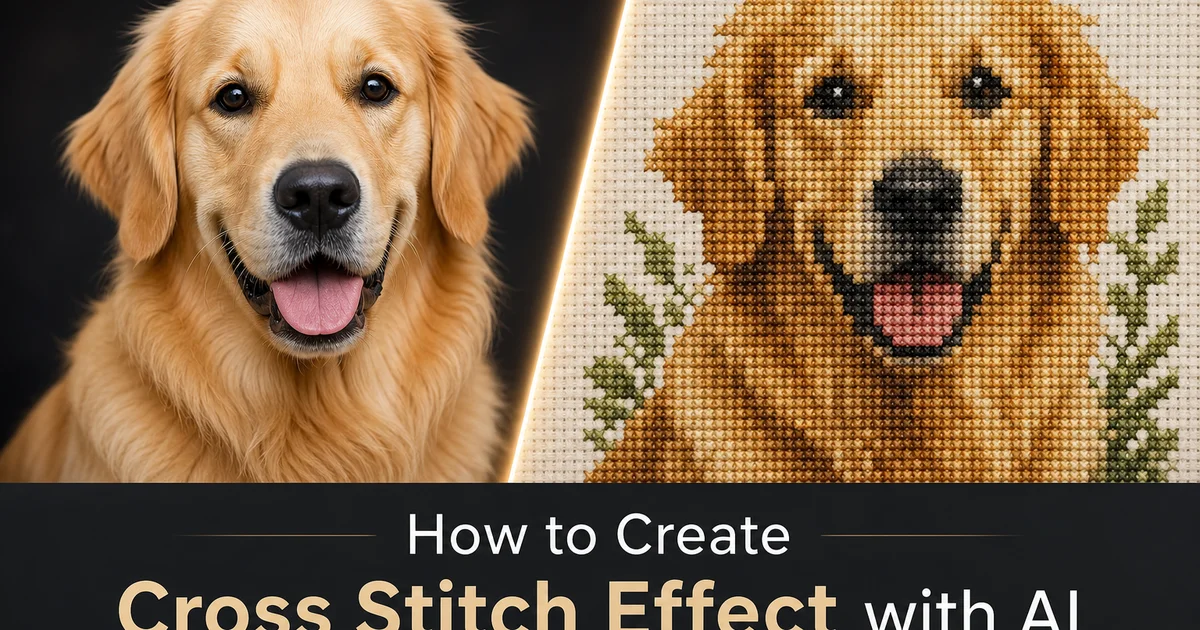
Le cross-stitch est l'une des plus anciennes formes de broderie decorative, avec des exemples remontant au sixieme siecle. Sa structure en grille constitue un pont etonnamment naturel entre les images numeriques et l'art textile physique. Chaque photographie est deja une grille de pixels, et le cross-stitch est une grille de points. La conversion est conceptuellement simple mais techniquement exigeante, car la grille de points est des ordres de grandeur plus grossiere que la grille de pixels d'une photographie. Un motif de cross-stitch en 14-count brode sur un tissu de 10x12 pouces contient environ 140x168 points, soit environ 23 500 points au total, contre des millions de pixels dans une photographie de smartphone typique. Le defi consiste a compresser toutes ces informations photographiques en 23 500 carres colores tout en preservant la reconnaissabilite et l'attrait visuel du sujet.
Les methodes traditionnelles de conversion de photos en motifs de cross-stitch utilisent des algorithmes simples de sous-echantillonnage de pixels et de reduction de couleur qui traitent l'image comme un exercice purement mathematique. Elles reduisent l'image a la resolution de grille cible, puis ajustent chaque pixel a la couleur de fil disponible la plus proche dans la palette du fabricant. Cette approche mecanique ignore les contraintes et opportunites uniques du medium cross-stitch. Elle ne tient pas compte de la maniere dont les couleurs de fil adjacentes se melangent visuellement a distance de vision, comment les contours de backstitch peuvent sauver les details perdus lors de la reduction de la grille, ou comment la texture physique du tissu brode modifie la perception des couleurs par rapport a un ecran plat. Les motifs qui en resultent sont souvent ternes, perdent des details critiques dans les visages et le texte, et necessitent des corrections manuelles approfondies par des brodeurs experimentes avant de produire des pieces finies satisfaisantes.
La generation de motifs de cross-stitch assistee par IA transforme ce processus en comprenant le contenu semantique de la photographie avant d'effectuer la conversion de grille. L'IA identifie les visages, le texte, les objets cles et les points focaux de composition, puis alloue plus de precision colorimetrique et de detail de grille a ces zones importantes tout en simplifiant les regions d'arriere-plan qui n'ont pas besoin de precision photographique. Elle applique une quantification colorimetrique perceptuelle qui tient compte de la maniere dont la vision humaine percoit les differences de couleur dans le fil, predit l'effet de melange visuel des couleurs de points adjacents aux distances de vision typiques, et ajoute automatiquement des contours de backstitch autour des caracteristiques qui se dissoudraient autrement dans la grille. Ce guide vous explique comment utiliser AI Filter pour creer des motifs de cross-stitch qui sont a la fois beaux en tant qu'images numeriques et pratiques en tant que projets de broderie reels.
- L'IA analyse le contenu semantique de votre photographie pour allouer plus de precision colorimetrique et de detail de grille aux visages, au texte et aux points focaux, tout en simplifiant les zones d'arriere-plan moins importantes.
- La quantification colorimetrique perceptuelle mappe les couleurs de la photographie aux codes de fil reels des fabricants (DMC, Anchor) tout en tenant compte de la maniere dont les points adjacents se melangent visuellement aux distances de vision typiques.
- La generation automatique de contours de backstitch preserve la definition des caracteristiques critiques — yeux, texte, marques des animaux et details fins — qui se dissoudraient autrement dans la grille de points grossiere.
- De multiples options de tissu et de nombre de points vous permettent d'equilibrer la fidelite des details par rapport au temps de broderie pratique, des echantillons rapides en 14-count aux reproductions complexes quasi-photorealistes en 28-count.
- Les exportations de motif incluent des diagrammes de symboles imprimables, des listes de courses de fil avec le nombre d'echeveaux, des guides de coupe du tissu et des apercus de simulation de points realistes pour le partage sur les reseaux sociaux ou les annonces sur les places de marche artisanales.
En quoi la conversion IA de cross-stitch differe du sous-echantillonnage de pixels simple
Le sous-echantillonnage de pixels simple traite chaque region de l'image avec une precision mathematique identique. Lorsque vous reduisez une photographie de 4000x3000 pixels a une grille de 140x168 pixels, chaque pixel de sortie represente un bloc rectangulaire d'environ 29x18 pixels d'entree. L'algorithme fait souvent la moyenne des couleurs de ce bloc pour produire une couleur de sortie unique. Cette moyenne fonctionne raisonnablement bien dans les zones de couleur uniforme et lisse — un ciel bleu ou un mur blanc — mais elle detruit les micro-details critiques qui rendent les sujets distincts. Les yeux deviennent des taches de couleur floues, le texte devient un bruit illegible. Les details fins comme les cils, les moustaches sur le visage d'un animal, ou les petales d'une petite fleur se fondent dans la zone environnante et disparaissent completement.
La conversion IA de cross-stitch effectue un sous-echantillonnage contextuel qui se concentre sur l'importance semantique plutot que sur l'uniformite mathematique. Avant de reduire l'image a la resolution de la grille, l'IA execute une detection d'objets et une analyse de saillance pour identifier les regions contenant les informations visuelles les plus importantes. Elle applique ensuite un echantillonnage non uniforme qui preserve plus de details dans les zones de haute importance — allouant une resolution de grille supplementaire a un visage dans un portrait ou aux yeux d'un animal dans une photo animaliere — tout en simplifiant agressivement les zones de faible importance comme les arriere-plans flous ou les surfaces murales uniformes. Ce traitement inegal reflete la maniere dont les createurs de motifs talentueux creent manuellement les motifs de cross-stitch : ils comptent soigneusement les carres de grille autour d'un visage mais esquissent les arriere-plans librement.
L'IA comprend egalement les proprietes physiques du cross-stitch que les algorithmes numeriques purs ignorent. Le vrai cross-stitch a un rapport hauteur/largeur fixe par point qui varie selon le type de tissu. Les points sur la toile Aida standard sont parfaitement carres, mais les points sur le lin sont legerement rectangulaires en raison de la difference de compte de fils entre la chaine et la trame. L'IA ajuste le mappage de la grille pour tenir compte de ce rapport hauteur/largeur afin que la piece brodee finie maintienne des proportions correctes plutot que d'apparaître etiree horizontalement ou verticalement. Elle modelise egalement le melange visuel qui se produit lorsque deux points de couleurs differentes sont cote a cote sur le tissu. Un point rouge a cote d'un point blanc n'apparaît pas comme une limite nette mais cree plutot une zone de transition rose subtile a distance de vision, et l'IA exploite ce melange pour obtenir des degradés de couleur plus lisses que ce que le nombre brut de points suggererait comme possible.
- Le sous-echantillonnage simple moyenne les blocs de pixels uniformement, detruisant les micro-details comme les yeux, le texte et les caracteristiques fines qui rendent les sujets reconnaissables dans la grille de points grossiere.
- L'IA effectue un sous-echantillonnage contextuel qui alloue plus de resolution de grille aux visages, au texte et aux points focaux tout en simplifiant les arriere-plans de faible importance.
- Les rapports hauteur/largeur des points physiques sur differents types de tissu sont modelises pour prevenir les distorsions de proportions dans la piece brodee finie.
- Le melange visuel entre les couleurs de fil adjacentes a distance de vision est predit et exploite pour obtenir des degradés plus lisses que ce que le nombre brut de points permettrait.
Strategies de quantification colorimetrique pour les supports a base de fil
La quantification colorimetrique — la reduction de millions de couleurs photographiques a une palette limitee — est l'etape la plus importante dans la generation de motifs de cross-stitch car les couleurs de fil sont physiquement fixes et ne peuvent pas etre melangees. Un peintre peut melanger deux peintures a l'huile sur la palette pour creer n'importe quelle teinte intermediaire. Un brodeur de cross-stitch doit choisir une couleur de fil par point. La gamme tonale et chromatique entiere de la photographie doit etre representee par des selections de couleurs discretes et non melangeables issues du catalogue du fabricant. DMC propose environ 489 couleurs standard, Anchor environ 444, et d'autres marques offrent des gammes similaires. L'IA doit selectionner le sous-ensemble optimal de ces couleurs de catalogue qui minimise l'erreur perceptuelle totale sur l'ensemble du motif tout en respectant la contrainte de nombre maximal de couleurs de l'utilisateur.
Les algorithmes de quantification colorimetrique naïfs comme le median-cut ou le k-means operent dans l'espace colorimetrique RGB et minimisent la distance mathematique entre les couleurs d'origine et les couleurs quantifiees. Cependant, la distance RGB est un mauvais indicateur de la difference perceptuelle. Deux couleurs dont les valeurs RGB sont eloignees peuvent sembler presque identiques a l'œil humain, tandis que deux couleurs dont les RGB sont proches peuvent paraître frappantes de difference. L'IA utilise des modeles colorimetriques perceptuels comme CIELAB, concus pour correspondre a la perception humaine des couleurs, garantissant que la palette selectionnee minimise les differences que les spectateurs remarqueront reellement. Elle applique egalement une ponderation d'importance afin que la precision colorimetrique des visages et des sujets cles soit priorisee par rapport a la precision des arriere-plans et des elements secondaires, concentrant le budget de palette limite la ou il compte le plus.
Les techniques de tramage avancees etendent la gamme de couleurs effective au-dela de la taille brute de la palette en alternant soigneusement deux couleurs de fil similaires dans des points adjacents. Une alternance en damier de points bleu clair et bleu moyen cree l'impression visuelle d'un bleu intermediaire a distance de vision, similaire a la maniere dont les photographies de journaux utilisent des points de trame de taille variable pour simuler un ton continu a partir d'une seule couleur d'encre. L'IA applique ce tramage ordonne de maniere selective dans les zones ou les degradés lisses sont importants, comme les tons de peau et les regions de ciel, tout en evitant le tramage dans les zones ou les limites de couleur nettes sont cruciales, comme les bords des formes geometriques et le texte. Cette approche selective peut bien doubler ou tripler la gamme de couleurs visuelle tout en maintenant le nombre reel de fils a un niveau gerable.
- Les couleurs de fil sont physiquement fixes et non melangeables, faisant de la selection de palette la decision la plus importante — chaque point s'engage sur un seul code couleur fabricant.
- Les modeles colorimetriques perceptuels comme CIELAB remplacent les calculs naïfs de distance RGB, garantissant que la palette selectionnee minimise les differences que les spectateurs humains remarquent reellement.
- La ponderation d'importance concentre le budget de precision colorimetrique sur les visages et les sujets cles plutot que de le repartir uniformement sur l'ensemble du motif.
- Le tramage ordonne selectif alterne les couleurs de fil similaires dans des points adjacents pour creer des tons intermediaires visuels, multipliant efficacement la portee apparente de la palette dans les zones de degradé.
Contours de backstitch et points speciaux pour la preservation des details
Le backstitch est l'outil le plus puissant du brodeur de cross-stitch pour conserver les details fins que la grille de cross-stitch est trop grossiere pour rendre par la seule couleur. Une ligne de backstitch longe les bords des carres de la grille plutot que de les remplir, creant des lignes fines droites ou diagonales qui definissent les frontieres entre les regions, contournent les formes et ajoutent des details de ligne que les points de cross-stitch individuels ne peuvent pas atteindre. Dans la conception traditionnelle de motifs, un createur talentueux decide manuellement ou le backstitch est necessaire — toujours autour des traits du visage, generalement autour des petits objets, parfois autour du texte — et ce jugement editorial est l'une des differences cles entre la qualite de motif amateur et experte.
L'IA automatise le placement du backstitch en executant une detection de contours sur la photographie originale haute resolution, puis en mappant les contours detectes sur les limites de la grille de points. Les contours qui s'alignent etroitement avec les lignes de la grille deviennent des segments de backstitch uniques. Les contours qui traversent la grille en diagonale sont approximes par des chemins de backstitch en escalier. L'IA n'assigne le backstitch que la ou le remplissage de cross-stitch seul ne parvient pas a preserver une caracteristique importante. Si le contraste de couleur entre les regions brodees adjacentes definit deja clairement une frontiere, aucun backstitch n'est ajoute car le contour supplementaire aurait l'air trop lourd. Ce placement selectif imite le jugement des createurs de motifs experimentes qui savent que le sur-utilisation du backstitch cree un aspect de livre de coloriage tandis que le backstitch strategique donne vie a un motif.
Au-dela du backstitch standard, l'IA peut suggerer des points speciaux pour des effets particuliers. Les French knots — petits points en relief crees en enroulant le fil autour de l'aiguille — sont recommandes pour les yeux dans les portraits a petite echelle, les centres de fleurs et les details decoratifs epars. Les demi-points — simples lignes diagonales plutot que le X complet — creent des valeurs tonales plus claires utiles pour l'ombrage et les effets d'ambiance dans les ciels et les arriere-plans. Les quarts de point permettent une resolution plus fine sur les bords en divisant un seul carre de grille en quatre regions triangulaires, chacune pouvant recevoir une couleur differente. Ces points speciaux elargissent le vocabulaire visuel du motif au-dela de ce que la grille de base du cross-stitch permet. L'IA les inclut dans le diagramme de motif avec une notation standard que tout brodeur peut suivre.
- Les lignes de backstitch longent les bords des carres de la grille pour definir les frontieres et les contours que le remplissage de cross-stitch grossier ne peut pas rendre par la seule couleur.
- L'IA place le backstitch de maniere selective en fonction de la detection de contours, n'ajoutant des contours que la ou le contraste de couleur entre les regions adjacentes est insuffisant pour preserver les caracteristiques importantes.
- Les French knots creent des points en relief, ideaux pour les yeux, les centres de fleurs et les petits accents decoratifs necessitant un detail ponctuel que la grille ne peut pas fournir.
- Les quarts de point divisent les carres de grille en quatre regions triangulaires pour une resolution de bord plus fine, etendant le detail effectif du motif au-dela du nombre de points de base.
Conception pratique de motifs : dimensionnement, tissu et logistique de broderie
Le dimensionnement des motifs implique d'equilibrer trois contraintes concurrentes : les dimensions physiques souhaitees de la piece finie, la quantite de details necessaire pour representer le sujet, et le temps de broderie pratique disponible. Un motif en 14-count qui sera encadre a 8x10 pouces necessite 112x140 points (15 680 au total). Un brodeur experimente peut le terminer en environ 40 a 60 heures. Doubler les dimensions a 16x20 pouces quadruple le nombre de points a environ 62 720, poussant le projet dans la plage de 160 a 240 heures — un engagement qui s'etend sur des mois de sessions de broderie regulieres. L'IA affiche le temps de broderie estime a cote de chaque option de taille afin que les utilisateurs puissent prendre des decisions eclairees avant de s'engager dans un motif qui pourrait se reveler peu pratique.
Le choix du tissu affecte a la fois le caractere visuel et l'experience de broderie. La toile Aida est l'option la plus adaptee aux debutants. Ses trous clairement visibles et sa structure de grille rigide facilitent le comptage des points et le maintien d'une tension uniforme. Les tissus a armure uniforme comme la Lugana et la Jobelan offrent un tombant plus souple et un aspect visuel plus fin, mais necessitent plus de competence pour compter avec precision. Le lin offre l'aspect le plus traditionnel et elegant mais presente un espacement de fils irregulier qui exige une attention particuliere du brodeur. L'IA ajuste la sortie du motif pour chaque type de tissu : les motifs sur Aida utilisent exclusivement des points de croix entiers standard ; les motifs sur lin incluent des demi-points et des quarts de point qui exploitent les divisions de grille plus fines disponibles sur les tissus a compte eleve.
La gestion des fils devient de plus en plus importante a mesure que les motifs augmentent en nombre de couleurs et en taille physique. Un motif de 60 couleurs necessite d'organiser 60 echeveaux differents, chacun apparaissant potentiellement dans des regions dispersees a travers le design. L'IA genere des recommandations d'ordre de broderie optimisees qui minimisent les changements de fil — regroupant toutes les zones d'une seule couleur dans une section avant de passer a la couleur suivante, plutot que de broder rangee par rangee ce qui necessiterait des echanges constants de couleurs. Elle calcule egalement la consommation precise de fil par couleur en fonction du nombre de points, du compte du tissu et du nombre de brins recommande, produisant une liste de courses precise qui empeche a la fois les achats excessifs gaspilleurs et les penuries frustrantes en milieu de projet.
- Le dimensionnement des motifs equilibre les dimensions physiques, les details du sujet et le temps de broderie estime — l'IA affiche les estimations d'heures a cote de chaque option de taille pour une prise de decision eclairee.
- La toile Aida offre une visibilite de grille adaptee aux debutants, l'armure uniforme offre un tombant souple avec un aspect plus fin, et le lin offre une elegance traditionnelle avec des exigences de competence plus elevees.
- L'ordre de broderie optimise par l'IA regroupe les zones de meme couleur pour minimiser les changements de fil, reduisant considerablement la penibilite des motifs multicolores a grande echelle.
- Les calculs precis de consommation de fil bases sur le nombre de points, le compte du tissu et le nombre de brins produisent des listes de courses precises qui empechent les achats excessifs et les penuries en milieu de projet.
Applications creatives et vente de motifs de cross-stitch en ligne
Les portraits d'animaux personnalises sont l'application la plus populaire pour les motifs de cross-stitch generes par IA. Les proprietaires d'animaux commandent ou creent des motifs a partir de leurs photographies preferees, produisant des portraits brodes qui servent a la fois de decoration interieure et de souvenirs personnels significatifs. La valeur emotionnelle de passer 50 heures ou plus a broder a la main le portrait d'un animal bien-aime cree une piece finie qui porte un poids sentimental bien plus grand qu'une photographie imprimee. L'investissement de temps et d'attention transforme un moment capture en un travail d'amour. L'IA gere bien les defis particuliers des portraits d'animaux : la texture de la fourrure se convertit naturellement a la surface texturee du cross-stitch, les marques distinctives sont preservees grace a une allocation minutieuse des couleurs, et les yeux recoivent une attention supplementaire au backstitch pour maintenir la vie et la personnalite qui rendent chaque animal unique.
Le marche des motifs artisanaux est devenu une economie numerique substantielle, avec des plateformes comme Etsy, Craftsy et des boutiques specialisees de motifs de cross-stitch hebergeant des milliers de createurs independants. Les motifs generes par IA peuvent etre vendus sous forme de PDFs telechargeables comprenant le diagramme de symboles, le diagramme de couleurs, la legende des fils et les instructions de broderie. Les vendeurs de motifs qui reussissent differencient leurs offres par la specialisation thematique (portraits d'animaux, illustrations botaniques, references a la culture pop), le choix des niveaux de difficulte (petits designs pour debutants jusqu'aux pieces avancees de couverture integrale) et la qualite de presentation (maquettes expertes montrant le motif brode sur differentes couleurs de tissu et encadre dans divers contextes). L'apercu de simulation de points de l'IA genere automatiquement ces maquettes expertes, offrant aux nouveaux vendeurs des images de produits soignees sans equipement photographique.
Au-dela des pieces encadrees traditionnelles, les motifs de cross-stitch servent des applications artisanales modernes, notamment les patchs pour vestes en jean, les designs ornamentaux pour chaussettes de Noel, les elements decoratifs sur sacs fourre-tout et les petits motifs pour cartes de vœux. L'IA propose des tailles predefinies optimisees pour chaque application : designs de patchs de 3x3 pouces, inserts de cartes de 4x6 pouces, templates d'ornements circulaires et designs rectangulaires aux proportions de marque-page. Ces motifs de petit format utilisent des palettes de couleurs limitees (8 a 15 couleurs) et des compositions simplifiees realisables en un apres-midi, ce qui en fait des points d'entree accessibles pour les artisans intimidés par les grands projets de plusieurs mois. Le temps de realisation rapide les rend egalement pratiques pour le stock des foires artisanales, la fabrication de cadeaux et l'organisation d'ateliers d'enseignement.
- Les portraits d'animaux personnalises sont l'application la plus populaire — l'IA preserve la texture de la fourrure, les marques distinctives et la personnalite des yeux grace a une allocation minutieuse des couleurs et des details de backstitch.
- Les motifs de cross-stitch telechargeables se vendent comme produits numeriques sur Etsy et les places de marche artisanales, les maquettes de simulation de points generees par IA fournissant automatiquement des images de produits professionnelles.
- Les preconfigurations petit format pour patchs, ornements, cartes et marque-pages utilisent 8 a 15 couleurs et des compositions simplifiees realisables en un apres-midi.
- L'economie numerique des motifs artisanaux recompense la specialisation thematique et la curation des niveaux de difficulte, permettant aux vendeurs de construire des audiences fidelees autour de niches specifiques comme les motifs botaniques ou la culture pop.
How to do it
- 1
Upload your photo and assess its suitability for cross-stitch conversion
Open your image in AI Filter and evaluate whether the subject will translate well into a grid-based textile medium. Cross-stitch is at its core a low-resolution art form where each stitch occupies a single square on an even-weave fabric grid. Photographs with bold shapes, strong color contrast, and simple compositions convert most successfully. Portraits with clear facial features against plain backgrounds, pet photos with distinct fur markings, floral arrangements with well-defined petal shapes, and landscape silhouettes all work well. Avoid images with subtle gradients, fine text, intricate patterns smaller than the stitch grid, or subjects that rely on photographic detail to be distinct. These lose critical information when quantized to the cross-stitch grid.
- 2
Select the stitch count and fabric type to define the pattern grid
Choose the stitch count that determines how many crosses fit into your pattern. Common options include 14-count (14 stitches per inch, the most popular for beginners), 18-count (finer detail with smaller stitches), and 28-count (very fine work approaching petit-point territory). Higher counts preserve more photographic detail but produce patterns that take greatly longer to stitch by hand. AI Filter also lets you select the fabric base: white Aida cloth for bright saturated colors, cream or ecru for warmer vintage tones. Black fabric for designs where the background becomes a dramatic dark frame around the stitched subject. The fabric choice affects how the AI renders empty areas and how color threads appear against the base material.
- 3
Configure the color palette and thread matching system
Set the maximum number of thread colors the pattern should use. Typical cross-stitch projects range from 15 colors for simple designs up to 90 or more for photorealistic reproductions. The AI quantizes the photograph's millions of colors down to this restricted palette using perceptual color distance algorithms that focus on the colors most important to the subject's recognizability. Each selected color maps to a real thread manufacturer code from DMC, Anchor, or other major brands. The generated pattern includes a thread shopping list. Fewer colors produce bolder, more graphic patterns that are faster to stitch. More colors create smoother gradients and more photorealistic results at the cost of complexity.
- 4
Preview the pattern with stitch simulation and refine problem areas
AI Filter renders a realistic simulation showing how the finished cross-stitch will look on fabric, complete with the trait X-shaped texture of each stitch and the slight dimensional quality that real thread creates. Examine this preview carefully for areas where the color quantization lost important detail. Faces where eye color merged with skin tone, text that became illegible, or small features that disappeared into surrounding colors. Use the selective refinement tool to manually adjust colors in specific grid squares, add backstitch outlines around critical features for definition. Increase the local color count in areas that need more nuance while keeping the overall palette manageable.
- 5
Export the pattern as a printable chart with thread legend and stitching guide
Generate the final cross-stitch pattern in multiple formats: a symbol chart where each grid square contains a unique symbol mapped to a thread color (the traditional format stitchers prefer for counting), a color-block chart for quick visual reference. A combined chart that overlays symbols on colored squares. The export includes a complete thread legend listing every color's manufacturer code, the number of skeins needed based on pattern dimensions, a fabric cutting guide with margins for framing. Stitching order recommendations that minimize thread changes. Save the stitch-simulation preview image separately for social media sharing or for selling the pattern in online craft marketplaces.
Sources
- Automatic Generation of Cross-Stitch Patterns from Images — ACM SIGGRAPH
- Color Quantization and Dithering Techniques for Display Optimization — IEEE Transactions on Image Processing
- Non-Photorealistic Rendering with Pixel Art and Craft Aesthetics — arXiv — Computer Graphics and Vision