
Retouche photo IA pour piscinistes : portfolio, couleur de l'eau et marketing
Découvrez comment les constructeurs de piscines utilisent la retouche photo IA pour corriger la couleur de l'eau, créer des comparaisons avant-après de projets et supprimer l'encombrement du chantier. Construisez un marketing de portfolio qui gagne de nouveaux clients.
SEO & Growth
Vérifié par Magic Eraser Editorial ·
Sommaire
- Pourquoi les photos de piscine échouent et comment l'IA corrige la couleur de l'eau et la plage dynamique
- Supprimer la réalité du chantier des photos de projets terminés
- Comparaisons avant-après qui génèrent des demandes de consultation
- Construire un portfolio qui gagne des contrats sur tous les canaux marketing
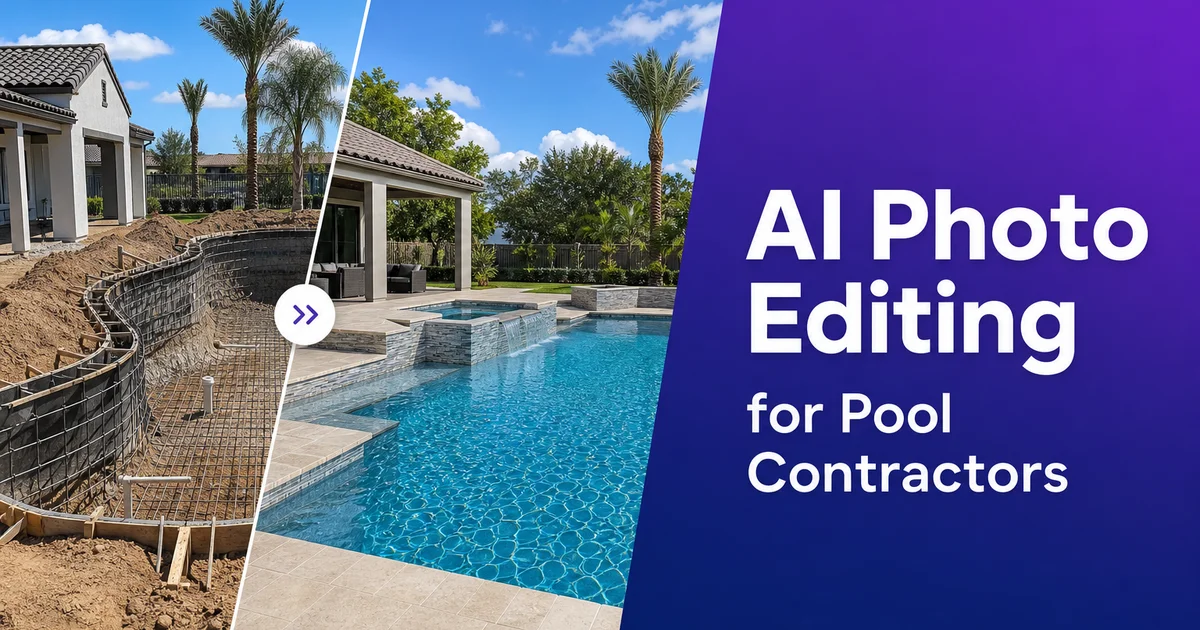
La construction de piscines est une activité visuelle. Les propriétaires qui décident d'investir entre trente mille et cent cinquante mille dollars dans une piscine de jardin veulent voir ce qu'ils achètent. Le portfolio de l'entrepreneur est souvent là où cette décision commence. Une photo saisissante d'une piscine achevée à l'eau turquoise éclatante, à l'aménagement minéral soigné. Une végétation luxuriante alentour indique au prospect exactement ce que cet entrepreneur peut livrer. Une photo médiocre de la même piscine. Eau grisâtre, débris de chantier visibles dans un coin, lumière de midi délavée — pousse le prospect à continuer de faire défiler vers l'entrepreneur suivant de la liste.
L'écart entre l'aspect d'une piscine achevée vue en personne et son apparence sur une photographie non retouchée est plus grand que dans presque toute autre catégorie de rénovation domiciliaire. L'eau est l'un des sujets les plus difficiles à photographier avec précision, car elle reflète à la fois le ciel, transmet la lumière dans sa profondeur et réfracte tout ce qui se trouve sous la surface. Les capteurs des appareils peinent avec la plage dynamique entre les reflets lumineux du ciel en surface et les ombres profondes sous la ligne d'eau. Le résultat, ce sont des photos où l'eau. Le point central même du projet — ne ressemble en rien à la couleur vive et accueillante que le propriétaire voit en se tenant au bord du bassin.
La retouche photo par IA comble cet écart de manière assez efficace pour que chaque entrepreneur de piscines puisse maintenir un portfolio professionnel sans engager un photographe pour chaque projet. AI Enhance corrige la couleur de l'eau et équilibre la plage dynamique extrême des scènes de piscine. Magic Eraser supprime la réalité du chantier qui persiste dans les photos de projets. Les AI Filters appliquent un style visuel cohérent à tout votre portfolio afin que chaque projet semble appartenir à la même marque haut de gamme. Ce guide explique comment les constructeurs et entrepreneurs de piscines utilisent ces outils pour transformer les photos de chantier en atouts marketing qui remportent le prochain contrat.
- AI Enhance corrige la couleur de l'eau que les appareils rendent à tort en gris ou en vert boueux pour la ramener à un turquoise éclatant ou un bleu profond.
- Magic Eraser supprime les débris de chantier, les clôtures de sécurité, les bennes et les intrusions des voisins des photos de projets achevés.
- Les paires avant-après avec un traitement chromatique cohérent créent des comparaisons de transformation honnêtes et convaincantes.
- Les photos de piscine prises à l'heure dorée et améliorées par l'IA produisent des images de portfolio rivalisant avec la photographie professionnelle.
- Des photos de projets cohérentes et professionnelles sur votre site web, votre Google Business Profile et les réseaux sociaux bâtissent la crédibilité qui convertit les prospects en consultations.
Pourquoi les photos de piscine échouent et comment l'IA corrige la couleur de l'eau et la plage dynamique
L'eau compte parmi les sujets photographiques les plus exigeants car elle se comporte optiquement à la différence de toute surface solide. La surface reflète à la fois le ciel au-dessus et transmet la lumière dans le volume coloré en dessous. L'équilibre entre réflexion et transmission varie selon l'angle de vue, l'heure de la journée et la profondeur de l'eau. La couleur d'une piscine provient de l'interaction de la lumière solaire avec le revêtement du bassin. Plâtre, galet, carrelage ou vinyle — filtrée à travers la colonne d'eau au-dessus. L'appareil voit un composite du reflet du ciel, de l'éblouissement de surface. De la couleur transmise depuis le fond du bassin, et il parvient rarement à résoudre cela en la couleur vive et uniforme que l'œil humain perçoit, car notre système visuel traite l'apparence de l'eau à travers l'expérience et l'attente d'une manière qu'un capteur d'appareil ne peut égaler.
Le résultat concret est que l'eau de piscine sur les photos brutes paraît délavée, grise, verdâtre ou de couleur irrégulière sur toute la surface. La marche peu profonde affiche une couleur totalement différente de celle du grand bain. Les reflets d'arbres ou de bâtiments créent des taches sombres qui fragmentent la surface de l'eau. La balance des blancs automatique de l'appareil s'ajuste à la couleur dominante du ciel et éloigne l'eau de son apparence réelle. Ce ne sont pas des problèmes de mauvaise photographie. Ce sont des limites inhérentes à la façon dont les appareils captent l'eau, et même les photographes d'architecture professionnels consacrent un temps considérable à corriger la couleur de l'eau en post-production.
AI Enhance traite la correction de la couleur de l'eau en comprenant que l'eau de piscine possède une gamme de couleurs attendue, déterminée par le type de revêtement et les conditions d'éclairage. Il restaure une couleur d'eau vive et cohérente sur toute la surface du bassin, depuis la plage immergée peu profonde jusqu'au point le plus profond en passant par le corps principal. Il équilibre l'exposition entre la terrasse environnante lumineuse et le volume d'eau plus sombre afin que les deux soient visibles et détaillés sur la même image. Il réduit l'éblouissement de surface qui crée des zones trop lumineuses indésirables tout en conservant assez de réflexion pour préserver la qualité lumineuse naturelle de l'eau. Une seule passe d'amélioration produit la couleur d'eau que le propriétaire voit en personne et dont l'entrepreneur a besoin dans son portfolio.
- La réflexion et la transmission simultanées de l'eau de piscine créent un composite que les appareils rendent rarement avec précision.
- La balance des blancs automatique éloigne la couleur de l'eau de son apparence réelle, produisant des tons gris ou verdâtres sur les prises brutes.
- AI Enhance restaure une couleur d'eau vive et cohérente, de la marche peu profonde au grand bain, en une seule passe.
- L'équilibrage de l'exposition garantit que la terrasse environnante lumineuse et le volume d'eau plus sombre sont tous deux visibles et détaillés.
Supprimer la réalité du chantier des photos de projets terminés
Chaque construction de piscine est un chantier majeur. Les traces visuelles de ce chantier persistent sur les photos prises pendant et peu après l'achèvement. Clôture de sécurité orange autour du périmètre d'excavation. Palettes empilées de pavés ou de margelles en attente de pose. Une toilette portable au fond du jardin. Les traces de chenilles de la pelleteuse dans la pelouse pas encore renivelée. Des bouts de tuyau en PVC en attente des raccordements de plomberie finaux. Des gaines électriques pas encore enterrées. Clôtures temporaires, bennes et remorques à outils garées dans l'allée qui apparaissent à l'arrière-plan des prises de vue de jardin.
Magic Eraser supprime proprement ces éléments, comblant l'espace avec un environnement contextuellement approprié. De l'herbe là où se trouvait la benne, une surface de terrasse propre là où était posé le chariot à outils, une ligne de clôture ininterrompue là où la toilette portable bloquait la vue. Pour les photos de suivi en cours de chantier que vous souhaitez réutiliser pour le marketing, l'outil supprime le contexte de construction tout en conservant la piscine elle-même dans son état d'achèvement actuel. Cela vous permet de montrer le détail du carrelage pendant la pose, la coque de la piscine avant le remplissage, ou le motif du platelage pendant l'agencement, sans le bruit visuel d'un chantier en activité.
La maison du voisin, une aire de stationnement adjacente, ou une servitude de services publics visible derrière la clôture est un autre problème courant de la photographie de piscine de jardin. Ces intrusions brisent l'illusion que la piscine existe dans son propre paradis privé. C'est exactement l'aspiration que votre marketing devrait évoquer. Magic Eraser peut supprimer les lignes de toit, véhicules et bâtiments visibles au-dessus ou à travers la clôture, les remplaçant par du ciel, des arbres ou un prolongement de clôture qui préserve le sentiment d'oasis privée. Le résultat est une image de portfolio qui vend le rêve de la vie au jardin plutôt que de documenter la réalité des limites de parcelle de banlieue.
- Les débris de chantier — clôtures de sécurité, palettes, toilettes portables, bennes — sont proprement supprimés et comblés par un contexte approprié.
- Les photos de documentation en cours de chantier peuvent être réutilisées pour le marketing en supprimant le contexte de construction tout en préservant la piscine.
- Les structures voisines et intrusions de services publics visibles au-dessus des clôtures sont remplacées par du ciel ou de la végétation pour préserver le sentiment d'oasis privée.
- L'objectif est une image de portfolio qui vend l'aspiration à la vie au jardin, et non une prise de vue documentaire d'un chantier de construction.
Comparaisons avant-après qui génèrent des demandes de consultation
Les photos avant-après sont le format de contenu le plus puissant pour les entrepreneurs de piscines car elles montrent l'impact transformateur du travail d'une manière que les photos du seul résultat fini ne peuvent égaler. Un jardin nu et plat à l'herbe clairsemée à côté du même espace doté d'une piscine saisissante, d'une terrasse en pierre, d'un foyer. Un aménagement paysager mature indique au prospect que son propre jardin banal pourrait devenir quelque chose d'extraordinaire. Les projets de rénovation de piscine — re-plâtrage, remplacement de margelle, resurfaçage de terrasse. Les mises à niveau d'équipement — dépendent encore plus des comparaisons avant-après car l'amélioration est relative à l'état existant plutôt qu'à une toile vierge.
Le défi des paires avant-après est la cohérence visuelle. La photo « avant » a souvent été prise des mois plus tôt, peut-être avec un autre téléphone, à un autre moment de la journée, dans d'autres conditions météo. Sans traitement, la comparaison ressemble à deux photographies sans rapport plutôt qu'à une histoire de transformation. AI Enhance appliqué aux deux images avec les mêmes réglages normalise la balance des blancs, l'exposition. La saturation des couleurs aussi, afin que la paire se lise comme le même lieu à deux moments dans le temps. La photo « avant » doit paraître nette et fidèle. Pas artificiellement assombrie ou dégradée — afin que le changement paraisse honnête et que la qualité du travail achevé parle d'elle-même.
Composez des paires avant-après pour chaque projet et organisez-les par type de projet sur votre site web : construction neuve, rénovation, commercial. Des caractéristiques spéciales comme les débordements à l'infini, les bars immergés et les cascades de grotte. Chaque paire devrait inclure une brève description de l'étendue et du calendrier du projet. Ce portfolio organisé devient votre atout de génération de prospects le plus efficace, car les prospects s'auto-sélectionnent en trouvant des projets similaires à ce qu'ils souhaitent et en voyant le changement que votre entreprise a livré. La qualité photographique de ces paires. Eau éclatante, environnement propre, éclairage cohérent — détermine si le prospect demande une consultation ou passe à un concurrent dont le portfolio paraît plus professionnel.
- Les paires avant-après démontrent un impact transformateur que les photos du seul résultat fini ne peuvent communiquer.
- Appliquer les mêmes réglages AI Enhance aux deux photos normalise l'éclairage et la couleur pour une comparaison cohérente.
- Organiser les paires par type de projet permet aux prospects de s'auto-sélectionner en trouvant des projets similaires à leur vision.
- Des photos « avant » honnêtes et nettes associées à des photos « après » éclatantes bâtissent la confiance et stimulent les demandes de consultation.
Construire un portfolio qui gagne des contrats sur tous les canaux marketing
Les entrepreneurs de piscines rivalisent sur un marché où la valeur moyenne des projets est assez élevée pour que les propriétaires se renseignent abondamment avant de contacter qui que ce soit. Ils consultent les fiches Google Business Profile, parcourent les sites des entrepreneurs, font défiler Instagram et Pinterest pour s'inspirer en matière de design. Lisent les avis sur Houzz et Yelp. À chaque point de contact, les photos déterminent si votre entreprise figure sur la liste restreinte. Un entrepreneur avec vingt photos de projets saisissantes sur ces plateformes l'emporte sur un entrepreneur deux fois plus expérimenté mais au marketing visuel médiocre, car le propriétaire ne peut évaluer le savoir-faire à partir d'une description textuelle. Il a besoin de voir le travail.
Construisez votre portfolio de manière systématique en photographiant chaque projet achevé selon un flux de travail cohérent. Capturez la piscine à l'heure dorée pour les images phares et à midi pour les plans de détail montrant les motifs de carrelage, les profils de margelle et la texture de finition. Traitez chaque série avec AI Enhance pour la correction de la couleur de l'eau et de l'éclairage, Magic Eraser pour le nettoyage du site. Votre AI Filter choisi pour un étalonnage chromatique fidèle à la marque. Cela produit huit à douze images soignées par projet qui alimentent la galerie de votre site, votre Google Business Profile, votre grille Instagram, vos tableaux Pinterest et vos présentations de devis.
Épinglez vos meilleures images sur Pinterest avec des descriptions riches en mots-clés. Pinterest fonctionne comme un moteur de recherche visuel où les propriétaires cherchant activement des idées de design de piscine découvrent des entrepreneurs grâce à leurs photos de projets. Publiez des photos de projets en cours et achevés sur Instagram avec des hashtags locaux et des géotags qui touchent les propriétaires de votre zone de service. Mettez à jour les photos de votre Google Business Profile chaque mois avec des projets récents. Google récompense les profils actifs par une meilleure visibilité dans les résultats de recherche locale. Chaque canal renforce les autres, et la qualité visuelle cohérente rendue possible par la retouche IA distingue votre marque sur l'ensemble d'entre eux.
- Les propriétaires se renseignent abondamment sur plusieurs plateformes avant de contacter des entrepreneurs de piscines — les photos guident chaque décision de présélection.
- Un flux de travail photographique cohérent par projet produit huit à douze images soignées pour tous les canaux marketing.
- Pinterest fonctionne comme un moteur de recherche visuel où les propriétaires découvrent des entrepreneurs grâce à des photos de projets riches en mots-clés.
- Les mises à jour mensuelles des photos du Google Business Profile améliorent la visibilité en recherche locale et signalent une entreprise active et à jour.
How to do it
- 1
Photograph the pool project at optimal lighting conditions
Capture pool photos during the golden hour. The first and last hour of sunlight — when warm directional light produces rich color and long shadows that emphasize the pool's depth and surface texture. Shoot from multiple angles including an elevated perspective that shows the full pool shape and surrounding hardscape in relation to the home. For in-progress construction records, photograph at midday when even overhead light reveals every detail of tile work, coping. Finish texture without harsh shadows obscuring craftsmanship.
- 2
Correct water color and surface reflections with AI Enhance
Upload pool photos and apply AI Enhance to correct the water color, which cameras frequently misrender. Pool water appears turquoise, deep blue, or emerald in person but photographs as washed-out gray or muddy green because the camera's white balance and exposure cannot handle the simultaneous brightness of sky reflections and the depth of the water body. AI Enhance restores the vivid water color that homeowners fell in love with during the design consultation while balancing the exposure across the surrounding deck, landscaping, and structure.
- 3
Remove construction debris and site clutter from project photos
Use Magic Eraser to remove the visual evidence of an active construction site. Orange safety fencing, stacked pallets of materials, portable toilets, dumpsters, hoses, pumps, and tool carts that are present during every pool build but belong nowhere in a portfolio image. Remove temporary utility lines, surveyor stakes, and the neighbor's fence or roofline that intrudes into the frame. The goal is to isolate the finished pool and its immediate setting as if the construction process never happened.
- 4
Create consistent before-and-after comparisons
Process the before photo — the bare backyard or old pool — with the same AI Enhance color profile as the after photo so the comparison reads as a change of the space rather than two photos taken with different cameras on different days. Ensure consistent white balance, saturation, and contrast between the pair. The before photo should look accurate and clear, not artificially degraded. The change feels honest and the craftsmanship speaks for itself.
- 5
Export for portfolio, social media, and lead generation landing pages
Save the final images at full resolution for your website portfolio and print proposals. Export square-crop versions for Instagram and Pinterest where pool photos generate high engagement. Create wide-format hero images for your Google Business Profile and Facebook cover photos. Consistent, expert pool photography across every digital touchpoint builds the credibility that converts browsing homeowners into consultation requests.