
Arte para canal de YouTube
Diseña banners de canal de YouTube que se vean nítidos en cualquier pantalla, desde monitores de escritorio de 2560px hasta recortes en teléfonos móviles. Esta plantilla resuelve los complicados cálculos de la zona segura para que tu marca, tu texto y tu foto de creador se muestren correctamente en TV, escritorio, tableta y móvil sin que se recorten.
Prueba esta plantilla gratisSocial Media template preview
Qué hace esta plantilla
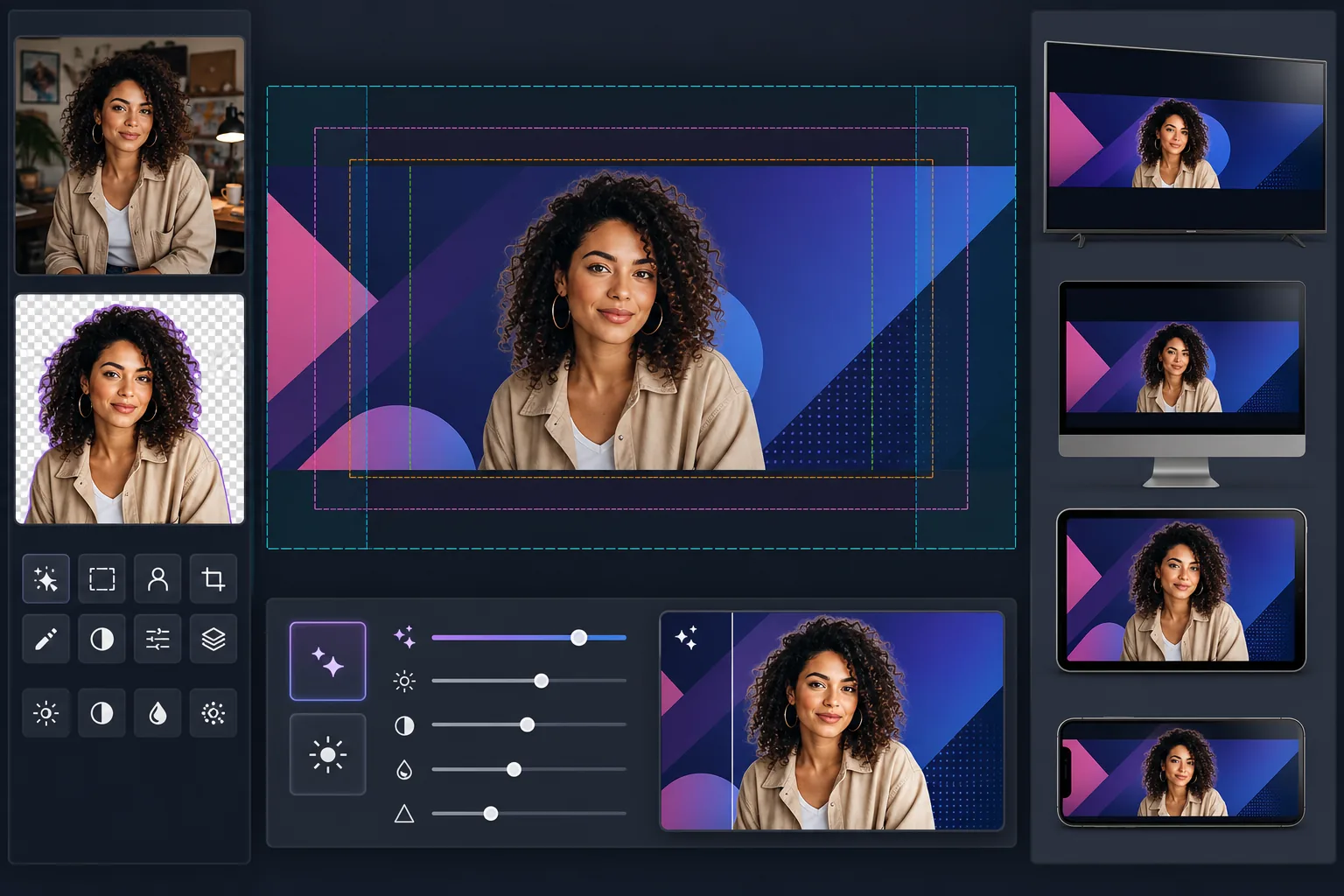
Crea arte para canal de YouTube con el tamaño de lienzo completo de 2560×1440px y el contenido ubicado dentro de las zonas seguras de YouTube. Background Eraser extrae limpiamente los retratos de los creadores para componerlos sobre fondos de marca, y AI Enhance garantiza que el banner final se mantenga nítido en el tamaño de visualización de alta resolución de YouTube. La plantilla tiene en cuenta las cuatro zonas de recorte diferentes que YouTube aplica en TV, escritorio, tableta y dispositivos móviles.
Configuración de la plantilla
| Tamaño del lienzo | 2560×1440px (tamaño de carga requerido por YouTube) |
| Zona segura (todos los dispositivos) | Área central de 1546×423px (siempre visible) |
| Área visible en escritorio | 2560×423px (ancho completo, franja central) |
| Espacio de color | sRGB (estándar web para una visualización coherente en YouTube) |
| Formato de archivo | PNG para gráficos/texto, JPEG 95% para banners fotográficos |
| Tamaño máximo de archivo | 6MB (límite de carga de YouTube) |
Cómo usar esta plantilla
Sube tu foto de creador o tus recursos de marca
Sube una foto de retrato, un logotipo o imágenes de marca. Para los canales centrados en el creador, lo que mejor funciona es un primer plano nítido o una foto de medio cuerpo. Background Eraser te separará de cualquier fondo para un posicionamiento flexible.
Extrae y posiciona tu sujeto
Background Eraser elimina el fondo original y te da un recorte limpio. Coloca tu foto de creador o logotipo dentro de la zona segura de 1546×423px: el área central que tiene garantizada su visibilidad en todos los dispositivos, desde teléfonos hasta televisores inteligentes.
Mejora la resolución y la claridad
AI Enhance amplía y enfoca la composición final para que se vea nítida con un ancho de 2560px. Los bordes del texto se mantienen nítidos, los degradados quedan suaves y los elementos fotográficos conservan su detalle natural a la resolución de visualización completa de YouTube.
Previsualiza y exporta
Previsualiza cómo aparecerá el banner en móvil (recorte de 1546×423px), escritorio (recorte de 2560×423px) y TV (visualización completa de 2560×1440px). Exporta como PNG para diseños con mucho texto o como JPEG para banners fotográficos, manteniéndote por debajo del límite de tamaño de archivo de 6MB de YouTube.
Consejos profesionales para obtener los mejores resultados
- ✓Mantén todos los elementos esenciales (tu rostro, el nombre del canal y el eslogan) dentro de la zona segura central de 1546×423px. Esta es la única área cuya visibilidad está garantizada en todos los dispositivos. Cualquier cosa fuera de ella se recortará en móvil.
- ✓Evita colocar texto o logotipos en la esquina inferior derecha del banner. YouTube superpone tu foto de perfil y el botón de suscripción en esa área en escritorio, lo que puede ocultar tu contenido.
- ✓Usa colores de alto contraste y fuentes grandes y en negrita para cualquier texto de tu banner. YouTube comprime el arte del canal de forma agresiva, y el texto fino o de bajo contraste se vuelve ilegible, especialmente en dispositivos móviles.
- ✓Diseña las áreas exteriores (más allá de la zona segura) como una extensión de tu fondo: los colores sólidos, los degradados o las versiones desenfocadas de tu imagen principal funcionan bien. Estas áreas aparecen en TV y en monitores de escritorio anchos, pero no deben contener información esencial.
Herramientas
Preguntas frecuentes
¿Por qué YouTube necesita una imagen tan grande para un banner tan estrecho?
+
YouTube usa una sola imagen en dispositivos muy diferentes. Los televisores muestran el lienzo completo de 2560×1440px. El escritorio muestra una franja horizontal de 2560×423px. Las tabletas muestran un poco menos, y el móvil recorta solo el área central de 1546×423px. El lienzo grande garantiza que tu arte se vea nítido en cualquier pantalla sin necesidad de cargas separadas.
¿Se recortará el nombre de mi canal en móvil?
+
No si lo mantienes dentro de la zona segura. La plantilla marca el área central de 1546×423px que es visible en todos los dispositivos. Coloca el nombre de tu canal, el eslogan y cualquier elemento de marca importante dentro de esta zona, y se mostrará correctamente en todas partes.
¿Puedo actualizar el arte de mi canal para campañas estacionales?
+
Sí. Mantén una plantilla base con los colores de tu marca y la ubicación del logotipo, y luego cambia las imágenes de fondo o los colores de acento para actualizaciones estacionales, lanzamientos de videos o hitos. El posicionamiento de la zona segura se mantiene coherente entre versiones.
Crea un banner de YouTube que funcione en cualquier pantalla
Sube tu foto o tus recursos de marca y crea arte de canal optimizado para dispositivos en minutos. No se necesita software de diseño.
Pruébalo gratisRelated templates
More social media templates for your workflow.
Plantilla de recorte cuadrado optimizada para Instagram a 1080×1080px. Fondos limpios, colores vibrantes y detalles nítidos que destacan en el feed.
Plantilla de foto de portada de Facebook de 820×312px para escritorio y recorte de 640×360px para dispositivos móviles. Limpie las imágenes de marca con zonas seguras adecuadas para la superposición de imágenes de perfil y la ubicación de botones de CTA.
Cree imágenes de encabezado profesionales de Twitter/X con la dimensión exacta de 1500×500px. Tiene en cuenta la superposición de imágenes de perfil, funciona tanto en modo oscuro como en modo claro.
Mejore las fotos de perfil de citas con suavizado natural de la piel, limpieza de fondo, corrección de iluminación y gradación de color sutil que parece auténtica, sin filtrar.
Cree imágenes de pin de Pinterest que detengan el desplazamiento con fondos limpios, dimensiones verticales óptimas de 2:3, realce de colores vibrantes y composición lista para pin.
Cree llamativas fotografías de portada de vídeo de TikTok con fondos limpios, marcos de sujetos llamativos y dimensiones verticales optimizadas de 9:16 para lograr coherencia en la cuadrícula del perfil.