
Foto de encabezado de Twitter/X
Diseñe una imagen de encabezado que luzca pulida en cada dispositivo y en cada modo. Esta plantilla gestiona las dimensiones exactas de 1500×500px que requiere Twitter, tiene en cuenta la zona de superposición de la foto de perfil para que el contenido esencial nunca quede oculto y garantiza que su banner se vea genial tanto en modo oscuro como en modo claro.
Probar esta plantilla gratisSocial Media template preview
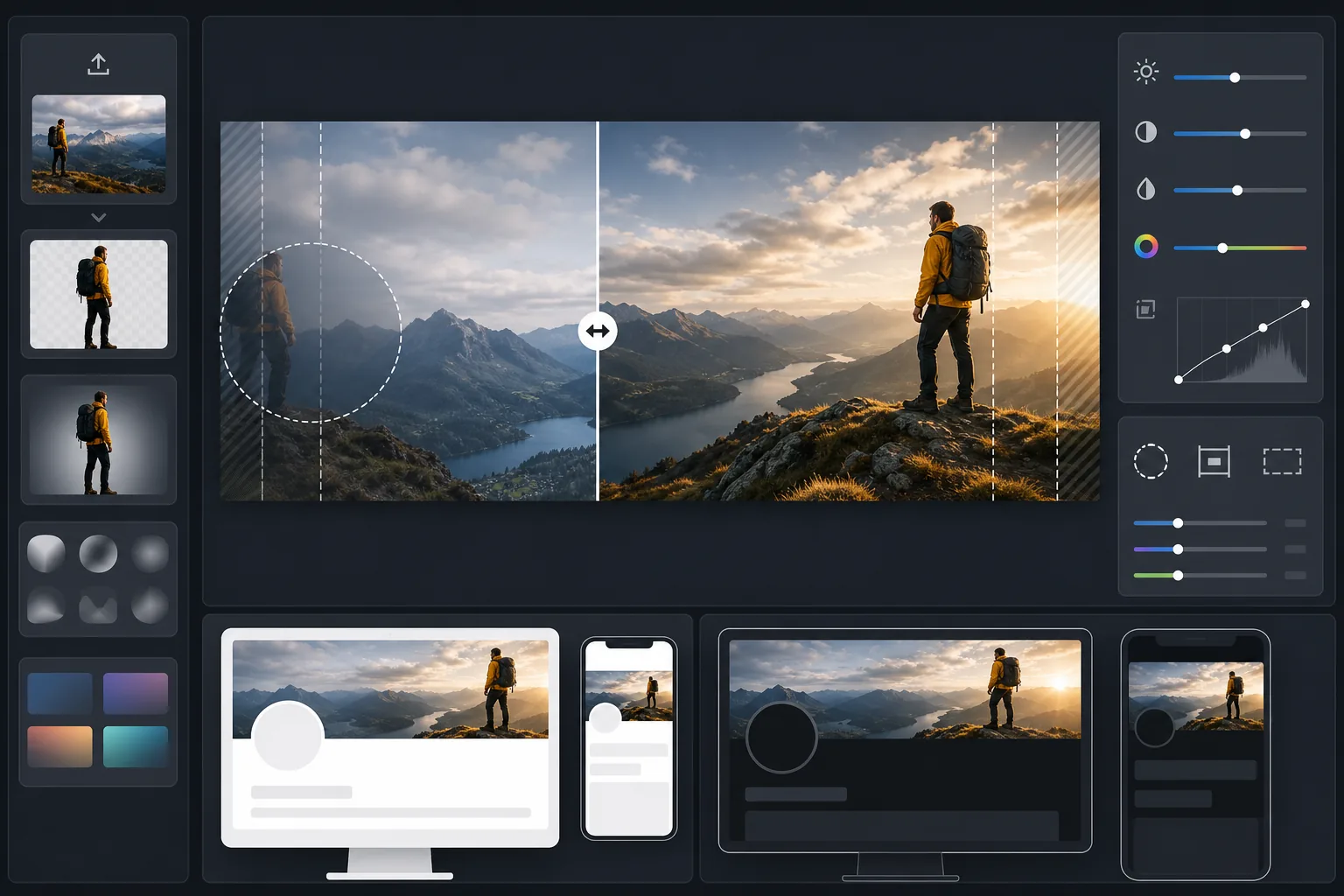
Qué hace esta plantilla
Procesa tu foto al tamaño de banner exacto de 1500×500px que requiere Twitter/X, con un recorte inteligente que mantiene los rostros y el contenido clave dentro de la zona segura visible. Background Eraser puede aislar sujetos para composiciones limpias, mientras que AI Enhance optimiza el contraste y el color para los fondos en modo oscuro y claro que verán tus seguidores.
Ajustes de la plantilla
| Tamaño de salida | 1500×500px (relación 3:1 del encabezado de Twitter/X) |
| Zona segura | 25% izquierdo reservado — evita la superposición de la foto de perfil en escritorio y móvil |
| Fundido de bordes | Desvanecido suave hacia oscuro o claro (se adapta al modo) |
| Optimización del color | Contraste probado por partida doble para modo oscuro (#15202B) y modo claro (#FFFFFF) |
| Formato de archivo | JPEG al 92% de calidad (por debajo del límite de subida de 5MB de Twitter) |
| Área segura para texto | Banda horizontal central del 50% — evita el recorte superior/inferior en móvil |
Cómo usar esta plantilla
Sube tu imagen de origen
Usa una foto o gráfico con orientación horizontal. Las tomas panorámicas amplias, los paisajes urbanos y las composiciones horizontales funcionan mejor. La plantilla recortará a la relación de aspecto extrema de 3:1, así que evita sujetos altos o contenido centrado verticalmente.
Coloca el contenido clave en la zona segura
La plantilla marca el 25% izquierdo como área de superposición de la foto de perfil y los bordes exteriores como zonas de recorte en móvil. Tu contenido visual más importante debe situarse en la zona centro-derecha del banner.
Optimiza para modo oscuro y claro
AI Enhance ajusta el contraste para que el banner evite bordes duros tanto frente al fondo casi negro del modo oscuro como frente al fondo blanco del modo claro. El fundido de bordes crea una transición suave en lugar de un corte abrupto.
Exporta y sube
Descarga el JPEG optimizado de 1500×500px y súbelo directamente a Twitter/X. El archivo tiene un tamaño que se mantiene muy por debajo del límite de 5MB conservando un detalle nítido en pantallas retina.
Consejos profesionales para obtener los mejores resultados
- ✓Previsualiza tu encabezado tanto en el teléfono como en el escritorio antes de finalizar — Twitter recorta los bordes superior e inferior de forma más agresiva en móvil, cortando alrededor del 10% de cada borde.
- ✓Evita colocar texto o rostros en el cuadrante inferior izquierdo, donde se superponen tu foto de perfil, nombre y biografía en el escritorio.
- ✓Usa colores que contrasten tanto con #15202B (modo oscuro) como con #FFFFFF (modo claro) a lo largo de los bordes del banner — los azules, verdes de tono medio y grises cálidos funcionan bien en ambos contextos.
- ✓Si usas una foto con una persona, colócala en el tercio derecho del encuadre para que siga siendo visible junto a tu foto de perfil a la izquierda.
Herramientas
Preguntas frecuentes
¿Dónde se superpone exactamente la foto de perfil?
+
En el escritorio, tu foto de perfil circular se superpone a la esquina inferior izquierda del encabezado, cubriendo aproximadamente el 60% inferior del 20% más a la izquierda del banner. En móvil, la superposición es similar pero ligeramente desplazada. La zona segura de la plantilla tiene en cuenta ambos diseños.
¿Se verá bien mi encabezado en modo oscuro?
+
Sí. La plantilla prueba tu banner tanto contra el fondo del modo oscuro (#15202B) como contra el del modo claro (#FFFFFF). El fundido de bordes garantiza transiciones suaves en ambos modos, de modo que evitas el efecto de borde duro y discordante que muestran los encabezados sin optimizar.
¿Qué pasa si Twitter cambia las dimensiones del encabezado?
+
La especificación de 1500×500px ha sido estable desde 2017 y a lo largo del cambio de marca a X. Si las dimensiones cambian, actualizaremos la plantilla. El resultado actual también se reduce limpiamente a cualquier tamaño de banner más pequeño.
Destaca en cada visita a tu perfil de Twitter
Sube tu imagen y obtén en segundos un encabezado de Twitter con el tamaño perfecto y listo para el modo oscuro. Sin Photoshop, sin adivinar dimensiones.
Pruébalo gratisRelated templates
More social media templates for your workflow.
Plantilla de recorte cuadrado optimizada para Instagram a 1080×1080px. Fondos limpios, colores vibrantes y detalles nítidos que destacan en el feed.
Plantilla de banner de YouTube a 2560×1440px con guías de zonas seguras. Eliminación limpia del fondo de las fotos de los creadores, diseño compatible con el dispositivo y arte del canal coherente con la marca.
Plantilla de foto de portada de Facebook de 820×312px para escritorio y recorte de 640×360px para dispositivos móviles. Limpie las imágenes de marca con zonas seguras adecuadas para la superposición de imágenes de perfil y la ubicación de botones de CTA.
Mejore las fotos de perfil de citas con suavizado natural de la piel, limpieza de fondo, corrección de iluminación y gradación de color sutil que parece auténtica, sin filtrar.
Cree imágenes de pin de Pinterest que detengan el desplazamiento con fondos limpios, dimensiones verticales óptimas de 2:3, realce de colores vibrantes y composición lista para pin.
Cree llamativas fotografías de portada de vídeo de TikTok con fondos limpios, marcos de sujetos llamativos y dimensiones verticales optimizadas de 9:16 para lograr coherencia en la cuadrícula del perfil.