
Imagen de pin de Pinterest
Cree imágenes de pin que detengan el desplazamiento y generen guardados. Esta plantilla da formato a las fotos en la relación vertical 2:3 óptima de Pinterest, elimina fondos recargados para lograr composiciones limpias centradas en el producto, realza la viveza del color para el feed de Pinterest y produce imágenes listas para pin que se ven nítidas tanto en móvil como en escritorio.
Probar esta plantilla gratisSocial Media template preview
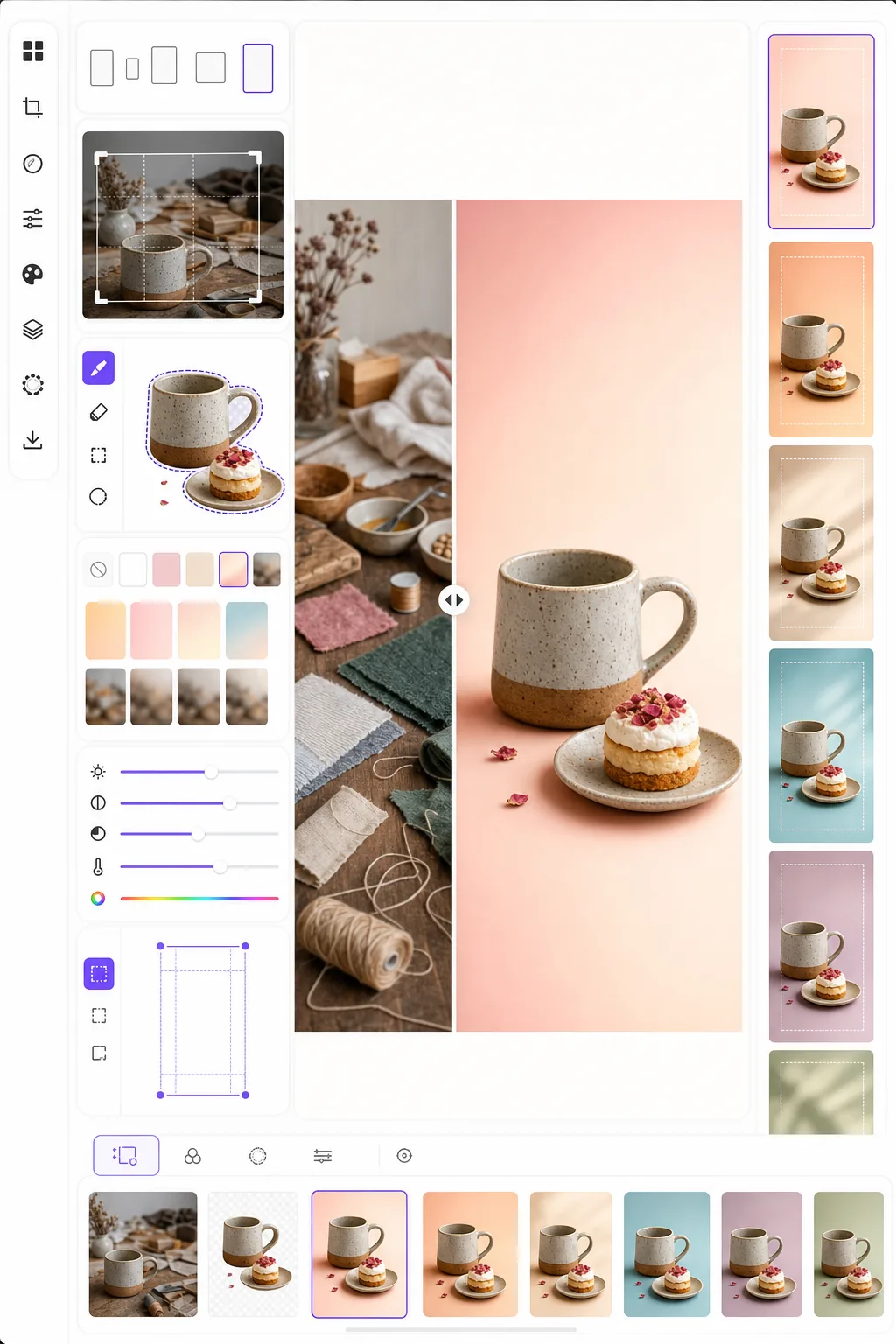
Qué hace esta plantilla
Optimiza las imágenes para lograr la máxima interacción en Pinterest, donde los pines altos y visualmente llamativos superan a las fotos horizontales estándar de tres a cinco veces en tasa de guardado. Background Eraser aísla tu sujeto — producto, plato de receta, atuendo o manualidad — y lo coloca sobre un fondo limpio, de color o degradado que hace que el sujeto resalte en un feed abarrotado. La viveza del color se realza para coincidir con la tendencia del algoritmo de Pinterest a favorecer el contenido brillante y saturado. La plantilla genera imágenes en 1000 × 1500 px, las dimensiones exactas que Pinterest recomienda para pines estándar.
Configuración de la plantilla
| Relación de aspecto | 2:3 vertical (1000 × 1500 px — estándar de Pinterest) |
| Opciones de fondo | Blanco limpio, color sólido, degradado suave u original desenfocado |
| Realce de color | +20% de saturación para visibilidad en el feed (ajustable) |
| Encuadre del sujeto | Centrado automático con 10% de margen para el espacio de superposición de texto |
| Formato de salida | PNG (para superposición de texto) o JPEG (para carga directa) |
Cómo usar esta plantilla
Sube tu imagen de origen
Sube una foto de producto, una foto de plato, una foto de atuendo o cualquier imagen que quieras convertir en un pin de Pinterest. La plantilla acepta imágenes horizontales, cuadradas o verticales y las reencuadra a la relación vertical 2:3 óptima con un recorte inteligente que mantiene el sujeto centrado.
Fondo y composición
Background Eraser aísla tu sujeto y lo coloca sobre un fondo limpio. Elige entre blanco puro, un color de marca sólido, un degradado suave o una versión desenfocada del fondo original. El sujeto se posiciona automáticamente para dejar espacio arriba y abajo para las superposiciones de texto.
Optimización de color y nitidez
Los colores se realzan en un 20% de saturación para destacar en el feed de Pinterest, donde las imágenes apagadas tienden a pasarse de largo. La nitidez se mejora en el sujeto mientras el fondo permanece suave, creando una profundidad visual que atrae la mirada hacia el sujeto principal.
Exporta tu pin
Descarga en 1000 × 1500 px como PNG (si planeas añadir superposiciones de texto en Canva u otro editor) o JPEG (para carga directa a Pinterest). El perfil de color está configurado en sRGB para una visualización precisa en todos los dispositivos y navegadores.
Consejos profesionales para mejores resultados
- ✓Deja el 20% superior y el 15% inferior del pin relativamente limpios para las superposiciones de texto. La plantilla posiciona tu sujeto para dejar este espacio, pero elegir un fondo sólido o degradado en estas áreas hace que el texto sea más legible que un fondo fotográfico recargado.
- ✓Usa fondos de tonos cálidos (rosa empolvado, terracota, crema) para pines de estilo de vida y comida, y neutros fríos (blanco, gris claro, azul pálido) para pines de producto y tecnología. Los datos de interacción de Pinterest muestran de forma consistente que los pines con paletas de color intencionadas superan a los de fondos aleatorios.
- ✓Crea múltiples versiones de pin para el mismo contenido — mismo sujeto con diferentes colores de fondo y recortes. Pinterest premia la variedad de contenido, y probar dos o tres diseños de pin por pieza de contenido ayuda a identificar qué estilo visual resuena con tu audiencia.
Herramientas
Preguntas frecuentes
¿Puedo añadir texto al pin?
+
La plantilla produce una imagen limpia optimizada para la superposición de texto, pero no añade texto directamente. Exporta como PNG y añade texto en Canva, Photoshop o cualquier herramienta de diseño. El sujeto se posiciona para dejar espacio para titulares arriba y llamadas a la acción abajo.
¿Qué pasa con los Idea Pins (video)?
+
Esta plantilla es para pines estáticos estándar. Los Idea Pins (antes Story Pins) usan formatos de video y de varias páginas que requieren herramientas diferentes. Las salidas de la plantilla funcionan bien como fotogramas de portada para Idea Pins si necesitas una miniatura estática.
¿Funciona esto para pines de estilo infografía?
+
Para pines de infografía, la plantilla se usa mejor para preparar imágenes individuales o fotos de producto que luego dispones en un diseño de infografía más alto (1000 × 2100 px o más). Cada elemento puede procesarse por separado y luego combinarse en una herramienta de diseño.
Crea pines de Pinterest que detienen el desplazamiento
Sube cualquier imagen y obtén una composición vertical lista para pin con fondos limpios y colores optimizados para el máximo de guardados y clics.
Pruébalo gratisRelated templates
More social media templates for your workflow.
Plantilla de recorte cuadrado optimizada para Instagram a 1080×1080px. Fondos limpios, colores vibrantes y detalles nítidos que destacan en el feed.
Plantilla de banner de YouTube a 2560×1440px con guías de zonas seguras. Eliminación limpia del fondo de las fotos de los creadores, diseño compatible con el dispositivo y arte del canal coherente con la marca.
Plantilla de foto de portada de Facebook de 820×312px para escritorio y recorte de 640×360px para dispositivos móviles. Limpie las imágenes de marca con zonas seguras adecuadas para la superposición de imágenes de perfil y la ubicación de botones de CTA.
Cree imágenes de encabezado profesionales de Twitter/X con la dimensión exacta de 1500×500px. Tiene en cuenta la superposición de imágenes de perfil, funciona tanto en modo oscuro como en modo claro.
Mejore las fotos de perfil de citas con suavizado natural de la piel, limpieza de fondo, corrección de iluminación y gradación de color sutil que parece auténtica, sin filtrar.
Cree llamativas fotografías de portada de vídeo de TikTok con fondos limpios, marcos de sujetos llamativos y dimensiones verticales optimizadas de 9:16 para lograr coherencia en la cuadrícula del perfil.