
Foto de perfil de Tinder
Haz que tus fotos de perfil de citas luzcan naturalmente atractivas sin parecer sobreeditadas. Esta plantilla mejora la iluminación y el tono de piel, elimina fondos que distraen, corrige los ojos rojos y las sombras duras del flash, y aplica una gradación de color sutil que favorece sin parecer filtrada.
Probar esta plantilla gratisSocial Media template preview
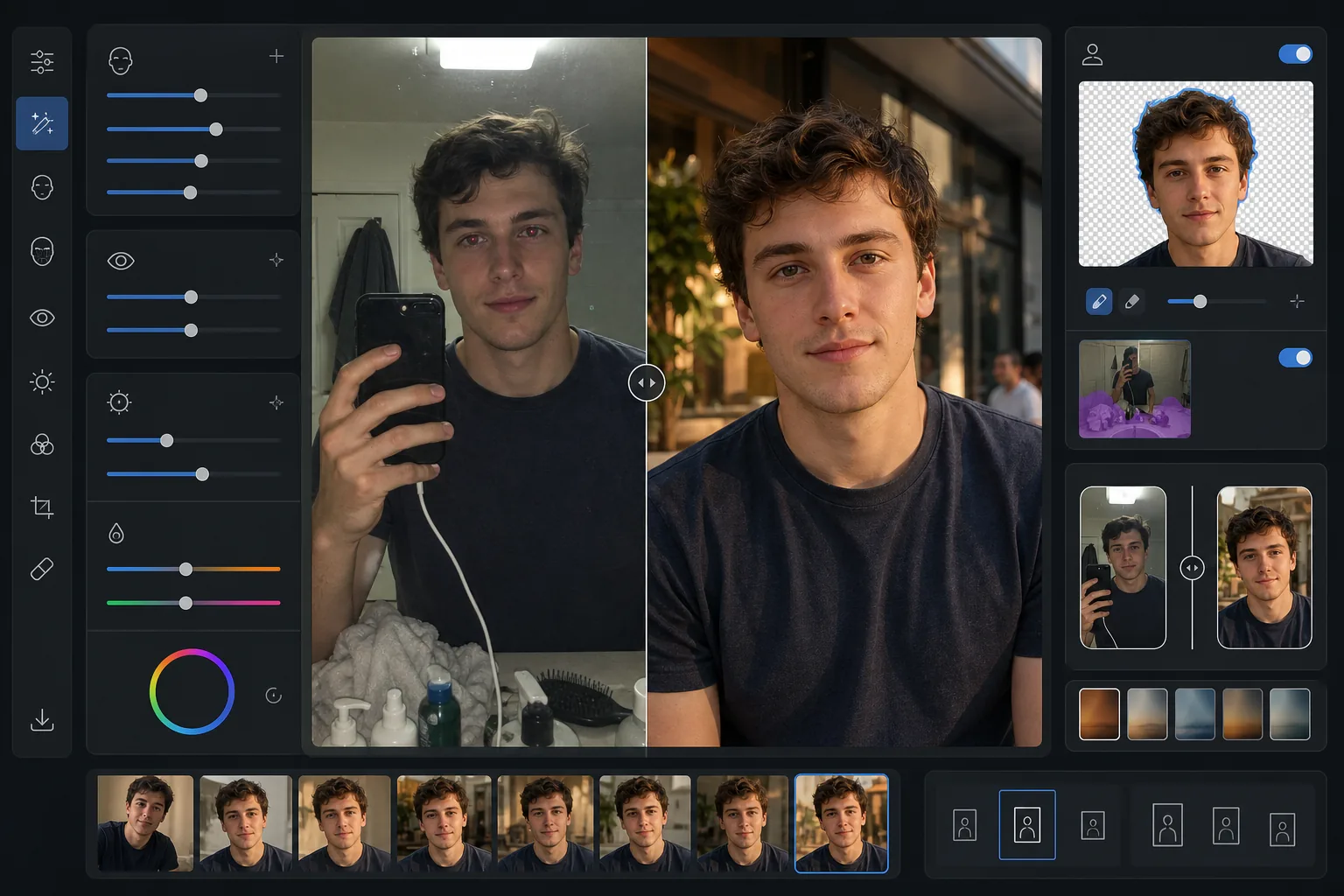
Qué hace esta plantilla
Optimiza las fotos específicamente para aplicaciones de citas como Tinder, Bumble y Hinge, donde la primera impresión se produce en menos de dos segundos. La plantilla aplica mejoras de aspecto natural que te muestran en tu mejor versión sin el evidente aspecto filtrado que delata falta de autenticidad. AI Enhance ilumina las ojeras, uniforma el tono de piel y corrige la luz dura del flash o de los fluorescentes del techo. Background Eraser puede cambiar el fondo desordenado de un selfie en el espejo del baño por un entorno limpio y neutro que mantiene el foco en ti. El resultado parece una excelente foto espontánea tomada con una luz natural favorecedora.
Ajustes de la plantilla
| Mejora de la piel | Suavizado natural (conserva poros y textura, reduce imperfecciones) |
| Mejora de los ojos | Iluminación sutil + corrección de ojos rojos |
| Corrección de iluminación | Luz de relleno simulada de la hora dorada (calidez suave y direccional) |
| Opción de fondo | Limpiar o cambiar a un entorno exterior/urbano/neutro |
| Dimensiones de salida | 1080 × 1350 px (retrato 4:5, óptimo para apps de citas) |
| Gradación de color | Cálido natural (sutil: sin aspecto filtrado visible) |
Cómo usar esta plantilla
Sube tu foto
Sube un selfie, un retrato o una foto de cuerpo entero. La plantilla funciona mejor con fotos en las que tu rostro se ve claramente y está enfocado. Se pueden usar fotos de grupo: selecciónate a ti mismo y la plantilla te aislará del grupo y mejorará la imagen.
Mejora natural
AI Enhance uniforma el tono de piel, reduce imperfecciones temporales, ilumina sutilmente los ojos y corrige la luz poco favorecedora del flash o de los focos del techo. La mejora conserva la textura natural de la piel, incluidos los poros y las líneas finas: el objetivo es que luzcas como tú mismo en tu mejor día, no como otra persona.
Limpieza o cambio de fondo
Elige limpiar tu fondo actual (eliminar desorden, otras personas, caos) o reemplazarlo por completo con un entorno exterior, de cafetería o urbano limpio. Background Eraser crea transiciones de bordes de aspecto natural en los contornos del cabello y la ropa para que el cambio se vea perfecto.
Exporta para tu perfil
Descarga en 1080 × 1350 px con la proporción de retrato 4:5 que las apps de citas muestran mejor. La imagen está optimizada para pantallas móviles, donde se realiza la mayoría de los deslizamientos, con el detalle conservado tanto en las luces como en las sombras para cualquier nivel de brillo de pantalla.
Consejos profesionales para mejores resultados
- ✓Usa una foto tomada con luz natural del día cerca de una ventana para el punto de partida más favorecedor. La plantilla puede corregir la luz artificial dura, pero las fotos con luz natural requieren menos corrección y producen el resultado final de aspecto más auténtico.
- ✓Evita las gafas de sol grandes en tu foto de perfil principal. La plantilla puede realzar el brillo de la zona de los ojos, pero esto solo funciona cuando los ojos son visibles. Las gafas de sol también dificultan que las posibles coincidencias sientan una conexión personal.
- ✓Sube al menos una foto de cuerpo entero junto con los retratos. La investigación sobre apps de citas muestra que los perfiles con una combinación de fotos de rostro y de cuerpo entero reciben muchos más deslizamientos a la derecha que los que solo tienen selfies de primer plano.
- ✓Evita la foto de grupo como primera foto. Aunque la plantilla puede aislarte de un grupo, el recorte necesario para un encuadre individual puede reducir la calidad de la imagen en comparación con empezar con una foto en solitario.
Herramientas
Preguntas frecuentes
¿La mejora se notará?
+
No. La plantilla está calibrada específicamente para la sutileza. Conserva la textura natural de la piel, los poros y las líneas finas, reduciendo solo las imperfecciones temporales y uniformando la iluminación desigual. El resultado parece una foto genuinamente buena, no una retocada.
¿Puedo usar un selfie en el espejo del baño?
+
Sí. La plantilla puede reemplazar el fondo del baño por un entorno más limpio. Sin embargo, la pose del selfie en el espejo y el teléfono en tu mano permanecerán: para obtener el mejor resultado, recorta de cerca o usa una foto tomada por otra persona o con temporizador.
¿Funciona con todos los tonos de piel?
+
El modelo de mejora con IA está entrenado en diversos tonos de piel y funciona con precisión en todo el espectro. La corrección de color y el suavizado de la piel se adaptan al tono específico de tu foto en lugar de aplicar un filtro único para todos.
Luce tu mejor versión natural en todas las apps de citas
Sube tus fotos y obtén imágenes de perfil mejoradas de forma natural y con el fondo optimizado que atraen más coincidencias.
Pruébalo gratisRelated templates
More social media templates for your workflow.
Plantilla de recorte cuadrado optimizada para Instagram a 1080×1080px. Fondos limpios, colores vibrantes y detalles nítidos que destacan en el feed.
Plantilla de banner de YouTube a 2560×1440px con guías de zonas seguras. Eliminación limpia del fondo de las fotos de los creadores, diseño compatible con el dispositivo y arte del canal coherente con la marca.
Plantilla de foto de portada de Facebook de 820×312px para escritorio y recorte de 640×360px para dispositivos móviles. Limpie las imágenes de marca con zonas seguras adecuadas para la superposición de imágenes de perfil y la ubicación de botones de CTA.
Cree imágenes de encabezado profesionales de Twitter/X con la dimensión exacta de 1500×500px. Tiene en cuenta la superposición de imágenes de perfil, funciona tanto en modo oscuro como en modo claro.
Cree imágenes de pin de Pinterest que detengan el desplazamiento con fondos limpios, dimensiones verticales óptimas de 2:3, realce de colores vibrantes y composición lista para pin.
Cree llamativas fotografías de portada de vídeo de TikTok con fondos limpios, marcos de sujetos llamativos y dimensiones verticales optimizadas de 9:16 para lograr coherencia en la cuadrícula del perfil.