
Foto de portada de TikTok
Diseña portadas coherentes y llamativas para la cuadrícula de vídeos de tu perfil de TikTok. Esta plantilla elimina los fondos recargados de los fotogramas de tus vídeos, optimiza el encuadre para la visualización de portada en 9:16, aumenta el contraste y el color para que se vea bien en miniatura y crea una identidad visual coherente en todo tu perfil.
Prueba esta plantilla gratisSocial Media template preview
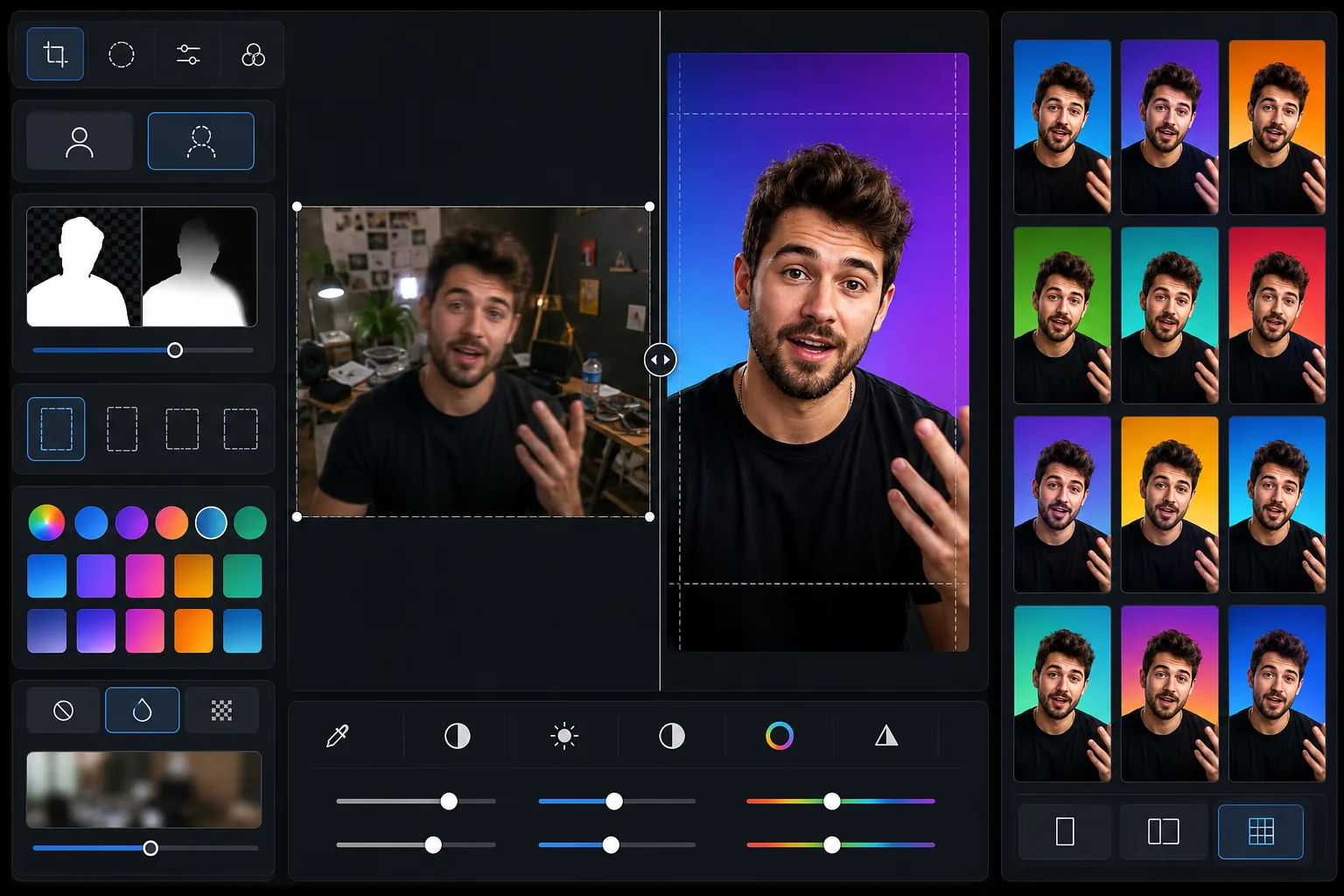
Qué hace esta plantilla
Crea imágenes de portada cuidadas para tus vídeos de TikTok que hacen que la cuadrícula de tu perfil luzca profesional y coherente. La mayoría de los creadores dejan las portadas generadas automáticamente, lo que produce una cuadrícula de perfil caótica y poco profesional que desanima a seguirte. Esta plantilla te permite tomar un fotograma de tu vídeo o subir una foto aparte, eliminar el fondo, colocarte sobre un fondo limpio o con la identidad de tu marca y ajustar el encuadre para que tu rostro y los elementos visuales clave se vean incluso en tamaño miniatura. El aumento de contraste y saturación garantiza que tus portadas destaquen entre las miniaturas vecinas en la página Para ti y en la cuadrícula de tu perfil.
Ajustes de la plantilla
| Relación de aspecto | 9:16 vertical (1080 × 1920 px — nativo de TikTok) |
| Opción de fondo | Color sólido, degradado o versión difuminada del original |
| Optimización de miniatura | Contraste +15 %, saturación +10 % para visibilidad en tamaño pequeño |
| Encuadre del sujeto | Rostro centrado en el tercio superior (visible en tamaño miniatura de la cuadrícula) |
| Formato de salida | JPEG con 95 % de calidad (optimizado para subir a TikTok) |
Cómo usar esta plantilla
Sube un fotograma del vídeo o una foto
Haz una captura de pantalla de tu vídeo de TikTok en el momento visualmente más impactante, o sube una foto aparte que represente el contenido del vídeo. La plantilla funciona con cualquier relación de aspecto de entrada y reencuadrará a 9:16 con recorte inteligente.
Limpia el fondo
Background Eraser elimina el fondo original y lo sustituye por un color sólido, un degradado o una versión ligeramente difuminada de la escena original. Elige un color de fondo coherente para todas tus portadas y crea una cuadrícula de perfil con identidad de marca que los espectadores reconozcan al instante.
Optimiza la visibilidad en miniatura
La plantilla encuadra tu rostro en el tercio superior de la imagen, donde sigue siendo visible en la pequeña miniatura de la cuadrícula. El contraste y la saturación del color se aumentan para que los elementos visuales clave se distingan incluso a 150 px de ancho en una cuadrícula de perfil móvil.
Exporta y sube a TikTok
Descarga en 1080 × 1920 px en formato JPEG. En TikTok, edita el vídeo publicado y selecciona 'Editar portada' para subir la imagen de portada personalizada. Las dimensiones coinciden con la resolución nativa de TikTok para una visualización nítida en todos los dispositivos.
Consejos profesionales para mejores resultados
- ✓Elige un único color de fondo o un degradado de dos colores y úsalo de forma coherente en todas tus portadas. Esto crea una cuadrícula de marca reconocible que anima a quienes visitan tu perfil a desplazarse por tu contenido y seguirte.
- ✓Incluye tu rostro en la portada siempre que sea posible. Tanto el algoritmo de TikTok como la psicología humana favorecen los rostros: las portadas con rostros visibles obtienen mayores tasas de clic que las que solo tienen texto u objetos.
- ✓Mantén el tercio inferior de la portada relativamente sencillo, ya que TikTok superpone allí el texto de la descripción del vídeo. Los elementos visuales importantes (rostro, producto clave, texto superpuesto) deben colocarse en los dos tercios superiores.
- ✓Procesa las portadas en lotes de 10 a 20 vídeos a la vez para renovar tu perfil rápidamente. Una renovación coherente de la cuadrícula puede aumentar la tasa de conversión a seguidores de tu perfil en un 30 % o más en comparación con las portadas generadas automáticamente al azar.
Herramientas
Preguntas frecuentes
¿Puedo añadir texto a la portada?
+
La plantilla se centra en la composición de la imagen y la optimización del fondo. Para superponer texto, exporta la imagen y añade el texto en una herramienta de diseño como Canva o directamente en el editor de portadas integrado de TikTok. La plantilla deja un espacio limpio en el centro para el texto.
¿Permite TikTok portadas personalizadas?
+
Sí. Después de publicar un vídeo, toca los tres puntos, selecciona 'Editar portada' y podrás subir una imagen personalizada desde tu carrete. La salida de 1080 × 1920 px de esta plantilla es exactamente la resolución nativa que espera TikTok.
¿Debo usar el mismo estilo de portada en todos los vídeos?
+
Para marcas personales y empresas, sí: un estilo de portada coherente crea una cuadrícula profesional que fomenta los seguimientos. Para cuentas de entretenimiento, algo de variedad está bien, pero mantener un esquema de color o un patrón de diseño coherente sigue ayudando a la cohesión visual.
Crea una cuadrícula de perfil de TikTok que consiga seguidores
Sube fotogramas de tus vídeos y obtén portadas cuidadas y coherentes que hacen que tu perfil luzca profesional y digno de explorar.
Pruébalo gratisRelated templates
More social media templates for your workflow.
Plantilla de recorte cuadrado optimizada para Instagram a 1080×1080px. Fondos limpios, colores vibrantes y detalles nítidos que destacan en el feed.
Plantilla de banner de YouTube a 2560×1440px con guías de zonas seguras. Eliminación limpia del fondo de las fotos de los creadores, diseño compatible con el dispositivo y arte del canal coherente con la marca.
Plantilla de foto de portada de Facebook de 820×312px para escritorio y recorte de 640×360px para dispositivos móviles. Limpie las imágenes de marca con zonas seguras adecuadas para la superposición de imágenes de perfil y la ubicación de botones de CTA.
Cree imágenes de encabezado profesionales de Twitter/X con la dimensión exacta de 1500×500px. Tiene en cuenta la superposición de imágenes de perfil, funciona tanto en modo oscuro como en modo claro.
Mejore las fotos de perfil de citas con suavizado natural de la piel, limpieza de fondo, corrección de iluminación y gradación de color sutil que parece auténtica, sin filtrar.
Cree imágenes de pin de Pinterest que detengan el desplazamiento con fondos limpios, dimensiones verticales óptimas de 2:3, realce de colores vibrantes y composición lista para pin.