
Foto de banner de Twitch
Diseña un banner de canal de Twitch profesional que haga que tu stream parezca consolidado desde la primera visita. Esta plantilla aísla tu retrato de cualquier fondo, lo coloca sobre fondos con temática de videojuegos o con los colores de tu marca, y lo exporta con las dimensiones exactas de banner de Twitch, con zonas seguras para la superposición de la foto de perfil y los elementos de navegación del canal.
Prueba esta plantilla gratisSocial Media template preview
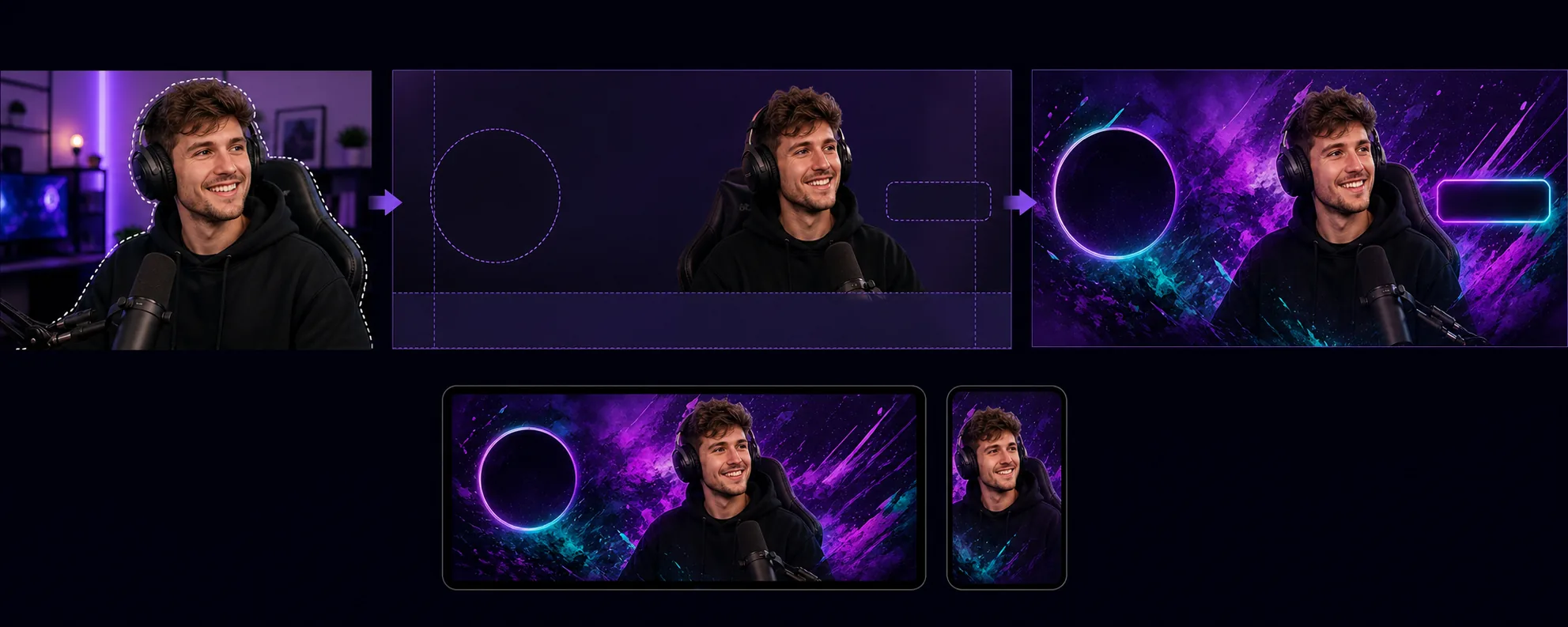
Qué hace esta plantilla
Crea banners de canal optimizados para los requisitos de diseño únicos de Twitch, donde la foto de perfil, el botón de seguir y la navegación del canal se superponen a áreas específicas del banner. Background Eraser aísla tu retrato de transmisor o la foto de tu equipo de cualquier entorno y lo coloca sobre un fondo que coincide con la identidad visual de tu canal: colores de marca sólidos, degradados, temas de videojuegos abstractos o patrones sutiles. La plantilla respeta las zonas seguras de Twitch para que el contenido visual importante nunca quede oculto detrás del círculo de la foto de perfil (lado izquierdo) o de los botones de puntos del canal/suscripción (lado derecho). La salida tiene un tamaño de 1200×480px (la dimensión de banner recomendada) y está ajustada para verse bien tanto en las vistas del navegador de escritorio como en los encabezados de la aplicación móvil, donde el banner se recorta de forma diferente.
Configuración de la plantilla
| Tamaño del banner | 1200×480px (banner de perfil recomendado por Twitch) |
| Zonas seguras | Izquierda 250px (superposición del perfil), derecha 200px (botones), abajo 80px (barra de navegación) |
| Fondo | Color sólido, degradado, patrón de videojuegos abstracto o imagen personalizada |
| Colocación del retrato | Centro-derecha o centro, evitando la zona de superposición de la foto de perfil |
| Intensidad del color | Realzada para verse bien sobre la interfaz púrpura oscuro de Twitch |
Cómo usar esta plantilla
Sube tu foto de transmisor
Sube una foto de ti mismo, de tu configuración de streaming o de tu equipo. Las tomas de medio cuerpo con poses expresivas funcionan mejor para los banners. La plantilla admite capturas de webcam, selfis de teléfono y fotos profesionales.
Aísla y posiciona
Background Eraser elimina el fondo original y coloca tu retrato dentro de las zonas seguras del banner. Los 250 píxeles de la izquierda se mantienen despejados para la superposición del círculo de la foto de perfil, y los 80 píxeles inferiores evitan la barra de navegación. Tu imagen se coloca donde tendrá el máximo impacto visual tanto en escritorio como en móvil.
Aplica fondo y marca
Elige un fondo que coincida con la identidad de tu canal. Los degradados llamativos y los patrones con temática de videojuegos se ven bien sobre el cromo púrpura oscuro de Twitch. Si tu canal tiene colores de marca consolidados, úsalos para reforzar el reconocimiento cuando los espectadores lleguen a la página de tu canal.
Exporta y sube
Descarga en 1200×480px optimizado para Twitch. El archivo pesa menos de 10MB (el límite de Twitch) y está comprimido para cargar rápido en espectadores con conexiones más lentas. Previsualiza cómo se ve el banner con la foto de perfil y la navegación superpuestas antes de subirlo a tu canal.
Consejos profesionales para mejores resultados
- ✓Usa una foto con una pose expresiva o enérgica: señalando a la cámara, celebrando o inclinándote hacia adelante. Las poses estáticas desaparecen en el formato estrecho del banner, mientras que las poses dinámicas crean energía visual que hace que los espectadores quieran quedarse.
- ✓Prueba tu banner tanto en escritorio como en móvil. Twitch recorta el banner de forma diferente en móvil, mostrando principalmente la parte central. Coloca tu contenido visual más importante en los 700 píxeles centrales para que sea compatible entre dispositivos.
- ✓Haz coincidir los colores de tu banner con la configuración de color de acento de Twitch. Cuando el degradado del banner pasa al mismo color de acento usado para el botón de suscripción y el texto destacado de tu canal, toda la página se siente cohesionada y con una marca profesional.
Herramientas
Preguntas frecuentes
¿Qué dimensiones requiere Twitch para los banners?
+
Twitch recomienda 1200×480 píxeles para los banners de perfil. El tamaño máximo de archivo es de 10MB. La plantilla genera exactamente estas dimensiones con la compresión adecuada.
¿Puedo incluir texto en el banner?
+
La plantilla produce el diseño visual sin superposición de texto. Puedes añadir el nombre de tu canal, tu horario o tus perfiles de redes sociales con cualquier editor de imágenes después. Las guías de zonas seguras muestran exactamente dónde el texto permanecerá visible y no quedará cubierto por los elementos de la interfaz de Twitch.
¿Funciona también para las pantallas sin conexión de Twitch?
+
La plantilla tiene el tamaño del banner de perfil. Las imágenes de pantalla sin conexión de Twitch usan una relación de aspecto 16:9 (1920×1080). Puedes usar un flujo de trabajo similar (aislar el retrato, aplicar el fondo), pero debes seleccionar por separado las dimensiones de la pantalla sin conexión.
Haz que tu canal de Twitch parezca consolidado desde el primer día
Sube una foto y obtén un banner de canal profesional que respeta el diseño de Twitch y hace que tu stream destaque.
Pruébalo gratisRelated templates
More social media templates for your workflow.
Plantilla de recorte cuadrado optimizada para Instagram a 1080×1080px. Fondos limpios, colores vibrantes y detalles nítidos que destacan en el feed.
Plantilla de banner de YouTube a 2560×1440px con guías de zonas seguras. Eliminación limpia del fondo de las fotos de los creadores, diseño compatible con el dispositivo y arte del canal coherente con la marca.
Plantilla de foto de portada de Facebook de 820×312px para escritorio y recorte de 640×360px para dispositivos móviles. Limpie las imágenes de marca con zonas seguras adecuadas para la superposición de imágenes de perfil y la ubicación de botones de CTA.
Cree imágenes de encabezado profesionales de Twitter/X con la dimensión exacta de 1500×500px. Tiene en cuenta la superposición de imágenes de perfil, funciona tanto en modo oscuro como en modo claro.
Mejore las fotos de perfil de citas con suavizado natural de la piel, limpieza de fondo, corrección de iluminación y gradación de color sutil que parece auténtica, sin filtrar.
Cree imágenes de pin de Pinterest que detengan el desplazamiento con fondos limpios, dimensiones verticales óptimas de 2:3, realce de colores vibrantes y composición lista para pin.