
Foto de blog de viajes
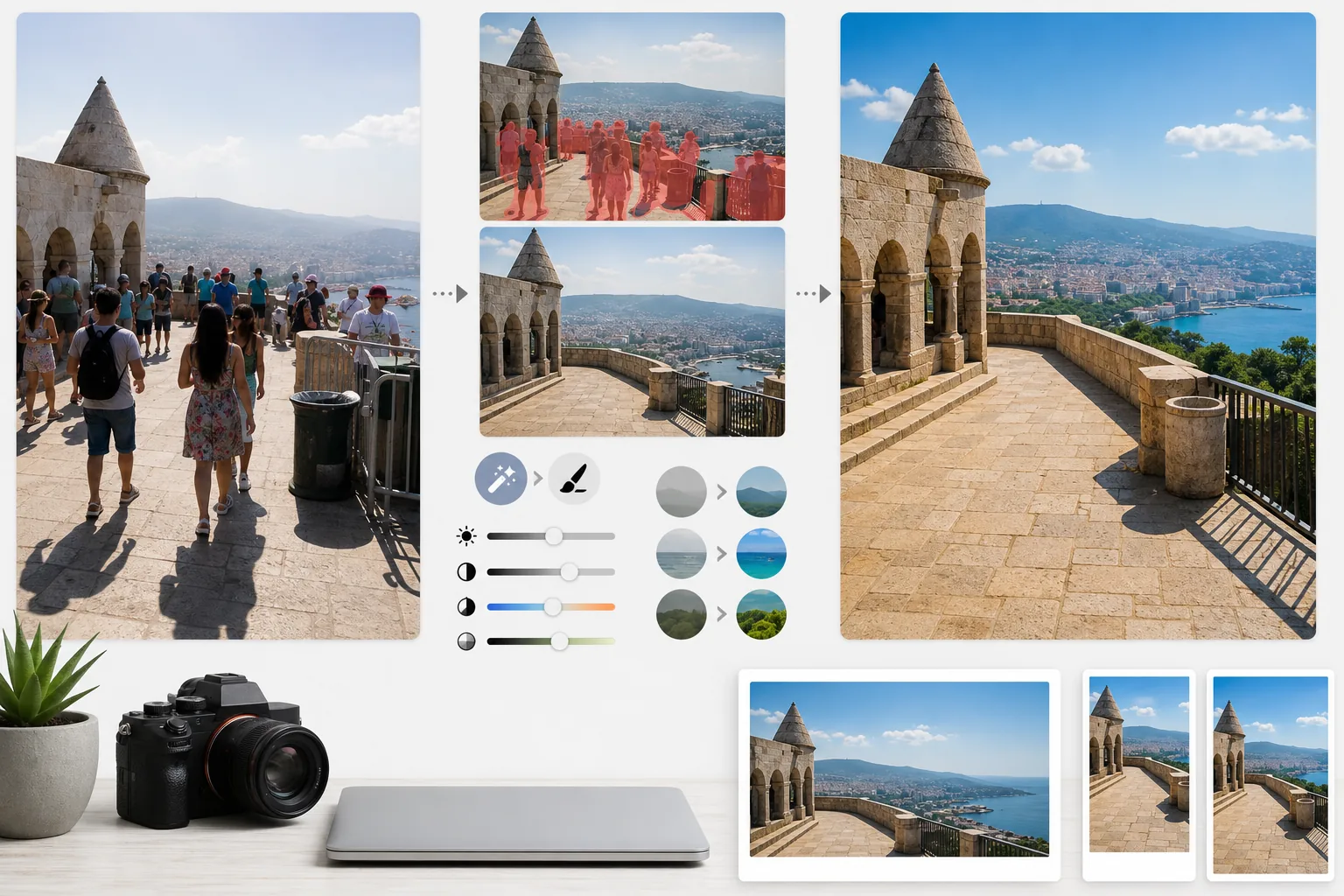
Transforme instantáneas de viaje abarrotadas en fotografías de destino con calidad de publicación. Esta plantilla elimina turistas, intrusos y desorden visual de las tomas de monumentos y paisajes con Magic Eraser, y luego aplica AI Enhance para corregir las difíciles condiciones de exposición habituales en la fotografía de viajes —sol fuerte del mediodía, interiores oscuros de templos, atardeceres a contraluz— y realza los colores naturales para conseguir imágenes que hagan que los lectores quieran reservar el viaje.
Probar esta plantilla gratisPersonal template preview
Qué hace esta plantilla
Resuelve los dos mayores problemas de la fotografía de viajes: las multitudes y la mala luz. Magic Eraser elimina a los turistas que se plantan frente a los monumentos, a los intrusos que cruzan tu encuadre y el desorden visual como papeleras, vallas de obra y señalización temporal que arruinan la sensación del lugar. La IA reconstruye la arquitectura, el pavimento y el paisaje que quedan detrás de las personas y los objetos eliminados a partir del contexto circundante. AI Enhance aborda después los retos de exposición propios de los viajes: interiores de catedrales y templos donde las ventanas quedan quemadas y las sombras negras, el sol fuerte del mediodía que aplana los colores en destinos tropicales y las escenas de atardecer a contraluz donde el primer plano queda en silueta. Los colores se realzan para reflejar cómo se ve realmente el destino para el ojo humano, algo que las cámaras representan de forma insuficiente en su rango dinámico.
Ajustes de la plantilla
| Eliminación de turistas | Detecta y elimina automáticamente personas de las tomas de monumentos y paisajes |
| Corrección de exposición | Recuperación tipo HDR de luces y sombras para luz difícil |
| Mejora del color | Realza la saturación natural (cielo, agua, vegetación) sin aspecto artificial |
| Eliminación de neblina | Atraviesa la neblina atmosférica para paisajes lejanos más nítidos |
| Resolución de salida | 4000px en el lado largo (imágenes de cabecera de blog con calidad Retina) |
Cómo usar esta plantilla
Sube tu foto de viaje
Sube cualquier foto de viaje: monumentos abarrotados, panorámicas de paisajes, escenas de calle, arquitectura de interiores. La plantilla admite archivos JPEG de smartphones, cámaras sin espejo y cámaras de acción. También se aceptan archivos RAW para una máxima flexibilidad de edición.
Elimina multitudes y desorden
Magic Eraser detecta a las personas del encuadre y las elimina. Puedes elegir eliminar a todas las personas, conservar a algunas concretas (a ti mismo o a tus compañeros de viaje) o eliminar de forma selectiva solo a quienes tapan elementos arquitectónicos o paisajísticos clave. La IA rellena las zonas que faltan con suelo, muros y paisaje reconstruidos.
Mejora la luz y el color
AI Enhance aplica un procesamiento de tipo HDR que recupera los cielos quemados y aclara las sombras profundas, algo habitual en interiores de templos y calles estrechas europeas. Los colores se realzan para coincidir con lo que vieron tus ojos en el destino, sobre todo los azules del cielo, los turquesas del mar y los verdes de la vegetación. La neblina atmosférica se reduce para conseguir panorámicas de montañas y ciudades más nítidas.
Exporta para blog y redes sociales
Descarga a 4000px en el lado largo para imágenes de cabecera de blog con calidad Retina, o en tamaños específicos para Instagram, Pinterest y Facebook. El archivo conserva datos EXIF optimizados para fotógrafos que geoetiquetan su trabajo.
Consejos profesionales para mejores resultados
- ✓Haz varias tomas de la misma escena con unos segundos de diferencia. Cuando los turistas se mueven entre fotogramas, la IA dispone de información de referencia sobre el suelo y los muros que hay detrás de ellos, lo que produce reconstrucciones más limpias que con un solo fotograma.
- ✓En interiores de iglesias, templos y museos, sobreexpón ligeramente la foto al disparar. Para la IA es más fácil recuperar luces brillantes que aclarar sombras extremadamente oscuras, y las tomas de interior suelen quedar subexpuestas por defecto.
- ✓Fotografía los paisajes durante la hora dorada o la hora azul siempre que puedas. AI Enhance puede realzar los colores con la luz plana del mediodía, pero la luz cálida y direccional de la hora dorada crea en los paisajes sombras y profundidad que ningún ajuste de color puede reproducir.
Herramientas
Preguntas frecuentes
¿Puedo quedarme yo en la foto pero eliminar a los demás turistas?
+
Sí. Puedes marcarte a ti mismo o a tus compañeros de viaje como sujetos protegidos. La IA elimina al resto de personas de la escena y mantiene a los sujetos protegidos en su lugar, con su posición, iluminación y sombra originales intactas.
¿Qué tan bien funciona con escenas muy concurridas?
+
Funciona mejor cuando las multitudes cubren menos de un 40 % del encuadre aproximadamente. Las escenas extremadamente concurridas —como una plaza abarrotada en la que no se ve el suelo entre la gente— ofrecen muy poca referencia de fondo para una reconstrucción limpia. En esos casos, eliminar parcialmente las primeras filas suele dar un resultado convincente.
¿La eliminación de neblina hará que la foto parezca poco natural?
+
La reducción de neblina está calibrada para lograr resultados de aspecto natural. Elimina la dispersión atmosférica gris azulada que oculta montañas y edificios lejanos, pero conserva la sutil perspectiva aérea que da profundidad a las fotos de paisaje. El resultado parece una toma de un día nítido y despejado, no una imagen filtrada o sobreprocesada.
Muestra cada destino en su mejor versión, sin multitudes
Sube fotos de viaje y obtén imágenes sin turistas y con colores realzados que harán que tus lectores quieran hacer las maletas.
Pruébalo gratisRelated templates
More personal templates for your workflow.
Cree fotografías de identificación compatibles para visas, licencias de conducir e identificaciones nacionales con los requisitos adecuados de color de fondo, tamaño de cabeza y expresión facial.
Mejore las fotografías de graduación con limpieza de fondo, toga y birrete Color correction, eliminación de imperfecciones y enfoque listo para imprimir para marcos y anuncios.
Mejore las fotografías de conciertos y eventos con reducción de ruido en condiciones de poca luz, iluminación del escenario corrección de color, eliminación de distracciones de la multitud y recuperación de detalles de tomas de lugares oscuros.
Cree hermosas fotografías de tarjetas de anuncio de recién nacidos con fondos suaves, gradación de color suave, eliminación del desorden del hospital y dimensiones listas para imprimir para enviar por correo.
Prepare fotografías familiares y de retratos para tarjetas de felicitación navideñas con fondos festivos, gradación de colores cálidos, efectos de nieve y dimensiones de tarjeta estándar para imprimir.
Restaure y mejore fotografías de tributos conmemorativos con retoques suaves, simplificación de fondos, gradación de colores cálida y respetuosa y dimensiones de servicios listas para imprimir.