
Fotografía de tributo conmemorativo
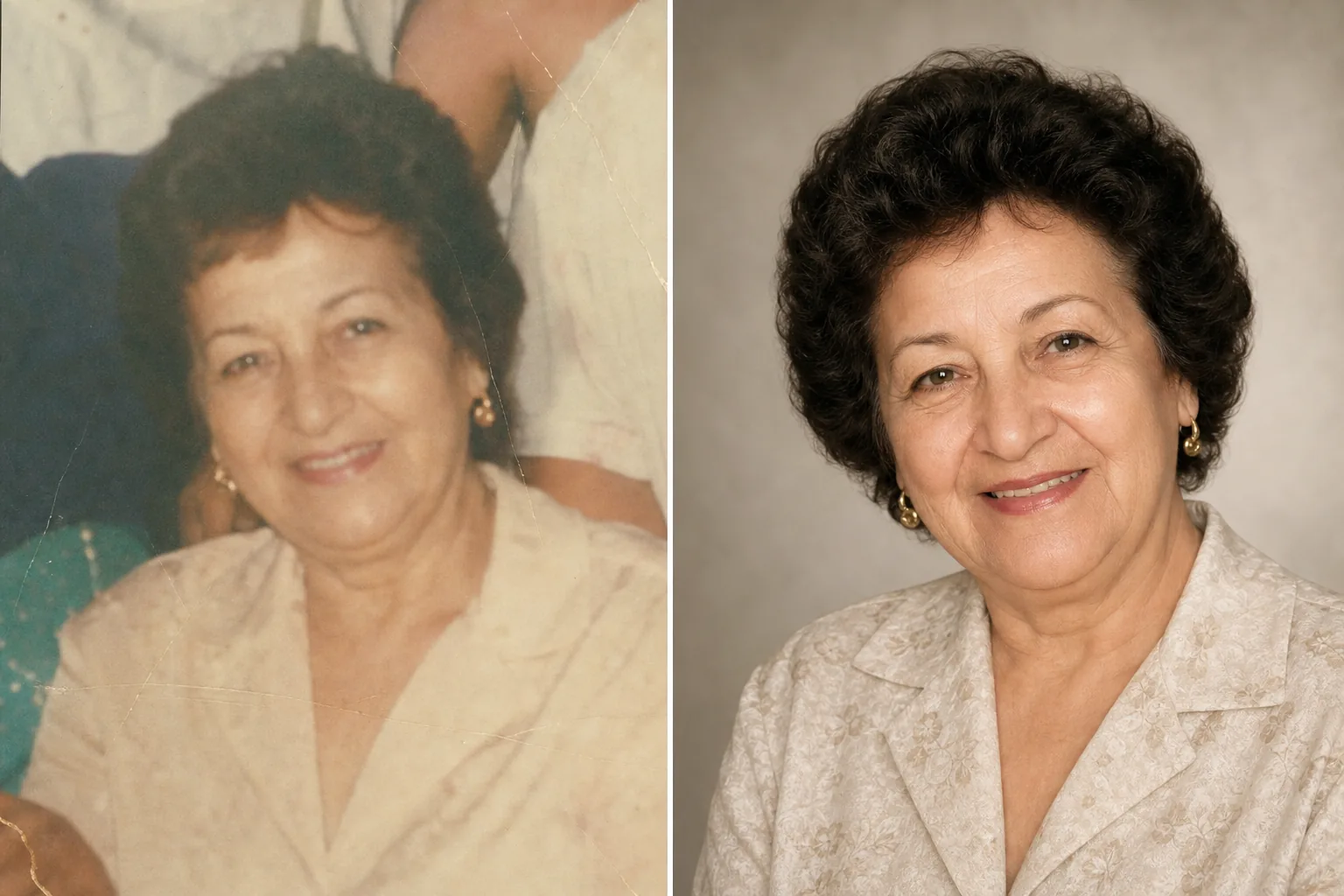
Honre a sus seres queridos con una fotografía de tributo bellamente mejorada. Esta plantilla restaura con delicadeza las fotos antiguas, realza la nitidez y el color de los originales desvaídos, elimina los fondos que distraen y genera un retrato digno y listo para imprimir, ideal para servicios conmemorativos, esquelas y exhibiciones de recuerdo duraderas.
Prueba esta plantilla gratisPersonal template preview
Qué hace esta plantilla
Prepara retratos para servicios conmemorativos, esquelas, programas de funerales, exhibiciones de recuerdo y montajes de tributo con el cuidado y el respeto que la ocasión exige. A menudo, la mejor fotografía disponible de un ser querido se tomó hace años: puede ser una instantánea casual, una foto de grupo de la que hay que aislarlo o una copia desvaída que se ha escaneado. AI Enhance restaura el color y la nitidez de las fotos antiguas o desvaídas, aclara las imágenes subexpuestas y suaviza con delicadeza pequeñas imperfecciones, conservando la semejanza auténtica de la persona. Magic Eraser elimina las distracciones del fondo y puede aislar a una persona de una foto de grupo. El tono general es cálido, digno y respetuoso, nunca sobreprocesado.
Configuración de la plantilla
| Restauración de fotos | Recuperar color y detalle de fotos desvaídas o envejecidas |
| Fondo | Degradado neutro suave, color sólido u original simplificado |
| Gradación de color | Cálida y digna (tonos de piel naturales, calidez suave) |
| Nivel de mejora | Sutil y respetuoso (conserva la semejanza auténtica) |
| Dimensiones de salida | 8×10 in a 300 DPI (retrato conmemorativo estándar) o personalizado |
Cómo usar esta plantilla
Sube el retrato
Sube la mejor fotografía disponible de la persona: un retrato dedicado, un recorte de una foto de grupo o el escaneo de una fotografía impresa. La plantilla gestiona fotos de cualquier época y estado, incluidas copias antiguas con desvanecimiento de color, dobleces y daños menores.
Restaurar y mejorar
AI Enhance recupera los colores desvaídos, da nitidez al detalle suavizado y corrige el tinte amarillo o azul que aparece en las fotografías envejecidas. En las fotos escaneadas a partir de copias, se reducen los artefactos del escaneo y la textura del papel. La mejora es deliberadamente sutil: el objetivo es presentar a la persona tal como era, con nitidez y calidez, sin alterar su aspecto.
Fondo y encuadre
El fondo se reemplaza por una opción suave y neutra: un degradado delicado, un color sólido apagado o una versión suavizada del entorno original. Si la foto es de un grupo, se aísla a la persona y se encuadra como un retrato independiente. La composición se ajusta a las proporciones estándar de un retrato conmemorativo.
Exportar para servicios y exhibición
Descarga en 8×10 pulgadas a 300 DPI para la impresión en funerarias y servicios conmemorativos, o en dimensiones personalizadas para publicaciones de esquelas, tarjetas de recuerdo y exhibiciones de tributo digitales. El resultado es apto tanto para impresión en color como en blanco y negro.
Consejos profesionales para obtener los mejores resultados
- ✓Elige una foto en la que la expresión y la personalidad de la persona resalten, aunque la calidad técnica no sea perfecta. La plantilla puede mejorar notablemente la calidad de la imagen, pero la conexión emocional con la foto importa más que la resolución.
- ✓Al escanear fotos impresas, usa el DPI más alto que admita tu escáner (600 DPI como mínimo) y escanea sobre una superficie limpia y plana. Los escaneos de mayor resolución le dan a la plantilla más datos con los que trabajar al restaurar el detalle y corregir el desvanecimiento.
- ✓Si no existe un retrato individual, la plantilla puede aislar a una persona de una foto de grupo. Elige una foto de grupo en la que el rostro de la persona sea claramente visible, esté despejado y orientado hacia la cámara para obtener el mejor resultado de aislamiento.
- ✓Considera crear tanto una versión en color como una en blanco y negro. Los retratos conmemorativos en blanco y negro tienen una cualidad atemporal y digna, y funcionan bien cuando la foto en color original presenta un desvanecimiento importante o daños de color que no pueden restaurarse por completo.
Herramientas
Preguntas frecuentes
¿Puede restaurar fotos muy dañadas?
+
La plantilla gestiona daños moderados: desvanecimiento, cambios de color, dobleces leves y falta de nitidez por la edad. Los daños graves, como rasgaduras grandes, manchas de agua intensas o partes faltantes considerables, requieren una restauración manual a cargo de un retocador profesional. La plantilla es más eficaz cuando el rostro y los rasgos principales están visibles e intactos en el original.
¿La foto mejorada se verá natural?
+
Sí. La mejora está calibrada para ser sutil y respetuosa. La persona se verá como ella misma: ni más joven, ni más mayor, ni diferente. El objetivo es presentar la foto como si se hubiera tomado con mejor iluminación, una mejor cámara y en un mejor día, conservando cada aspecto de quién era la persona.
¿Puedo usar esto para una presentación de diapositivas de tributo en vídeo?
+
Sí. Procesa cada foto con la plantilla usando ajustes de fondo y color uniformes para lograr una presentación cohesionada. El tratamiento uniforme une fotos de distintas épocas y fuentes en un tributo visual unificado.
Una foto de tributo tan hermosa como los recuerdos
Sube cualquier foto de un ser querido y recibe un retrato restaurado con delicadeza y mejorado con calidez, listo para servicios conmemorativos y un recuerdo duradero.
Pruébalo gratisRelated templates
More personal templates for your workflow.
Cree fotografías de identificación compatibles para visas, licencias de conducir e identificaciones nacionales con los requisitos adecuados de color de fondo, tamaño de cabeza y expresión facial.
Mejore las fotografías de graduación con limpieza de fondo, toga y birrete Color correction, eliminación de imperfecciones y enfoque listo para imprimir para marcos y anuncios.
Mejore las fotografías de conciertos y eventos con reducción de ruido en condiciones de poca luz, iluminación del escenario corrección de color, eliminación de distracciones de la multitud y recuperación de detalles de tomas de lugares oscuros.
Cree hermosas fotografías de tarjetas de anuncio de recién nacidos con fondos suaves, gradación de color suave, eliminación del desorden del hospital y dimensiones listas para imprimir para enviar por correo.
Prepare fotografías familiares y de retratos para tarjetas de felicitación navideñas con fondos festivos, gradación de colores cálidos, efectos de nieve y dimensiones de tarjeta estándar para imprimir.
Transforme las fotografías de mascotas de refugio y rescate con reemplazo de fondo, corrección de iluminación y mejora de detalles del pelaje para ayudar a los animales a encontrar un hogar más rápido.