
Tarjeta de anuncio de recién nacido
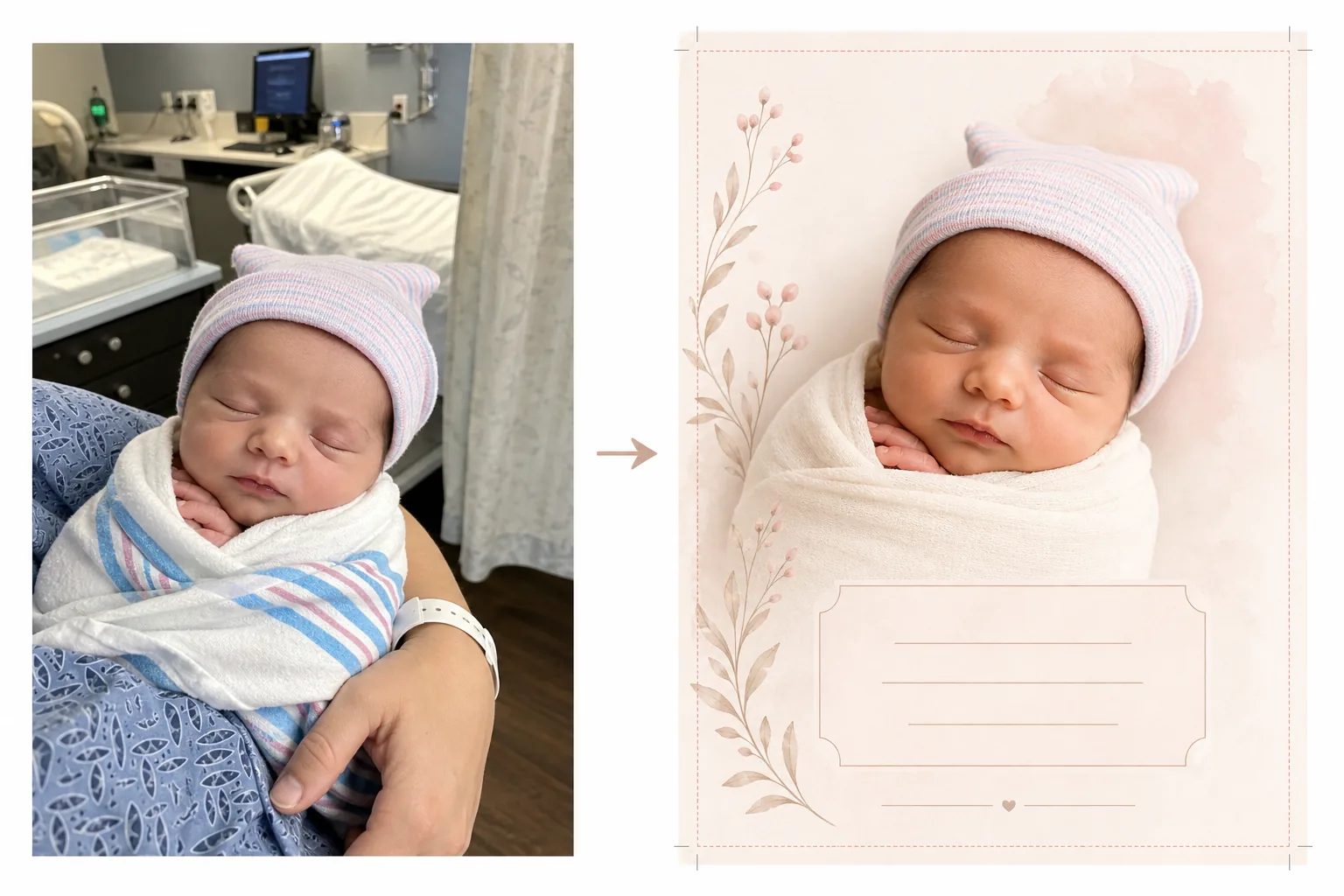
Convierta las fotos del hospital y del primer día en hermosas imágenes para tarjetas de anuncio. Esta plantilla elimina el desorden del fondo del hospital, aplica una gradación de color cálida y suave, aísla al recién nacido sobre fondos limpios o pastel, y produce imágenes listas para imprimir en las dimensiones estándar de tarjeta para el envío físico y el uso compartido digital.
Probar esta plantilla gratisPersonal template preview
Qué hace esta plantilla
Prepara las fotos del recién nacido para tarjetas de anuncio de nacimiento transformando las instantáneas de la habitación del hospital en imágenes limpias y tiernas, adecuadas tanto para tarjetas impresas como para anuncios digitales. Las habitaciones de hospital tienen equipo médico, iluminación fluorescente y fondos institucionales que restan intimidad a una foto de recién nacido. Background Eraser aísla al bebé y reemplaza el entorno hospitalario por un fondo suave y limpio en tonos blancos, crema o pastel. AI Enhance corrige la fría iluminación fluorescente del hospital con tonos cálidos y suaves que hacen que la piel se vea sana y natural. El resultado es una foto digna de un anuncio que se centra por completo en el nuevo integrante, sin ningún contexto médico visible.
Configuración de la plantilla
| Fondo | Blanco suave, crema, rosa empolvado o verde salvia (adecuado para tarjetas de anuncio) |
| Gradación de color | Tonos cálidos y suaves (corrige el fluorescente del hospital a una calidez natural) |
| Tono de piel | Realce natural de la piel del recién nacido (suave, cálida, sana) |
| Dimensiones de la tarjeta | 5×7 in, 4×6 in o A6 (tamaños estándar de tarjeta de anuncio) |
| Resolución de salida | 300 DPI al tamaño de la tarjeta (lista para imprenta e impresora doméstica) |
Cómo usar esta plantilla
Suba la foto del recién nacido
Suba una foto del recién nacido — en la cuna del hospital, en brazos de un progenitor o envuelto en una manta. La plantilla maneja diversas composiciones, incluidos primeros planos del rostro, poses envueltas de cuerpo entero y retratos de padre/madre con el bebé. Las batas de hospital, los monitores y las pulseras visibles en el progenitor se limpian automáticamente.
Transformación del fondo y del color
Background Eraser elimina la habitación del hospital y la reemplaza por un fondo suave y limpio del color que elija. La fría iluminación fluorescente se corrige a tonos cálidos y naturales. La piel se realza suavemente para que se vea sana y natural, con el cálido y suave resplandor asociado a la fotografía de recién nacidos.
Formato de la tarjeta
La imagen se formatea según las dimensiones de tarjeta que elija, con los márgenes de sangrado adecuados para una impresión profesional. Se reserva espacio para superposiciones de texto — nombre, fecha, peso y longitud — colocadas según los diseños estándar de tarjetas de anuncio, con la foto del bebé como pieza visual central.
Exporte para imprimir y compartir
Descargue a 300 DPI en el tamaño de tarjeta que elija para imprimir en una imprenta profesional, un servicio de tarjetas en línea o una impresora doméstica. También se proporciona una versión optimizada para web para anuncios por correo electrónico y para compartir en redes sociales.
Consejos profesionales para obtener los mejores resultados
- ✓Para la foto de tarjeta de anuncio más aprovechable, capture un primer plano del rostro del recién nacido mientras duerme. Los bebés dormidos tienen expresiones relajadas y serenas que se fotografían maravillosamente y funcionan bien como punto focal del diseño de una tarjeta.
- ✓Envuelva al bebé en una manta blanca o de color claro antes de fotografiarlo. Esto crea un límite visual nítido entre el bebé y el fondo que ayuda a Background Eraser a producir el borde más limpio posible, especialmente alrededor de los diminutos dedos y el cabello fino.
- ✓Si las manos o los brazos de un progenitor son visibles sosteniendo al bebé, no hay problema — la plantilla también realza el tono de piel del progenitor. Las pulseras de hospital en la muñeca del progenitor se eliminan automáticamente para lograr un aspecto más limpio.
- ✓Tome varias fotos y elija la que tenga la mejor expresión y posición de las manos. Los recién nacidos se mueven de forma impredecible — capturar varias opciones garantiza que tenga una toma donde los diminutos dedos, la boca y los ojos se vean lo más fotogénicos posible.
Herramientas
Preguntas frecuentes
¿Esto puede eliminar el equipo hospitalario del fondo?
+
Sí. La plantilla está diseñada específicamente para este propósito — elimina cunas de hospital, monitores, soportes de suero, cortinas y luces fluorescentes de techo, reemplazándolos por un fondo limpio y adecuado para un anuncio. El bebé y cualquier progenitor que lo sostenga quedan aislados del entorno médico.
¿Qué tamaños de tarjeta están disponibles?
+
Se admiten los tamaños estándar de tarjeta de anuncio: 5×7 pulgadas (el más popular para anuncios enviados por correo), 4×6 pulgadas (estilo postal) y A6 (estándar internacional). La salida incluye los márgenes de sangrado adecuados para una impresión profesional.
¿Puedo añadir texto a la tarjeta?
+
La plantilla prepara la foto con espacio reservado para superposiciones de texto, pero no añade texto directamente. Use la imagen exportada en Canva, Shutterfly, Minted o cualquier servicio de diseño de tarjetas para añadir el nombre del bebé, la fecha de nacimiento, el peso, la longitud y un mensaje personal.
Anuncie a su nuevo integrante con una hermosa foto
Suba las fotos del hospital o del primer día y obtenga imágenes suaves, cálidas y listas para imprimir, perfectas para tarjetas de anuncio de nacimiento.
Pruébelo gratisRelated templates
More personal templates for your workflow.
Cree fotografías de identificación compatibles para visas, licencias de conducir e identificaciones nacionales con los requisitos adecuados de color de fondo, tamaño de cabeza y expresión facial.
Mejore las fotografías de graduación con limpieza de fondo, toga y birrete Color correction, eliminación de imperfecciones y enfoque listo para imprimir para marcos y anuncios.
Mejore las fotografías de conciertos y eventos con reducción de ruido en condiciones de poca luz, iluminación del escenario corrección de color, eliminación de distracciones de la multitud y recuperación de detalles de tomas de lugares oscuros.
Prepare fotografías familiares y de retratos para tarjetas de felicitación navideñas con fondos festivos, gradación de colores cálidos, efectos de nieve y dimensiones de tarjeta estándar para imprimir.
Restaure y mejore fotografías de tributos conmemorativos con retoques suaves, simplificación de fondos, gradación de colores cálida y respetuosa y dimensiones de servicios listas para imprimir.
Transforme las fotografías de mascotas de refugio y rescate con reemplazo de fondo, corrección de iluminación y mejora de detalles del pelaje para ayudar a los animales a encontrar un hogar más rápido.