
Plantilla de foto de identificación
Genere fotos de identificación compatibles para visas, licencias de conducir, documentos de identidad nacionales y credenciales de empleado a partir de cualquier selfie o retrato. Esta plantilla reemplaza el fondo por el color sólido requerido, ajusta el tamaño y la posición de la cabeza para cumplir con las especificaciones oficiales, corrige la iluminación para iluminar el rostro de manera uniforme y exporta exactamente en las dimensiones de impresión requeridas.
Probar esta plantilla gratisPersonal template preview
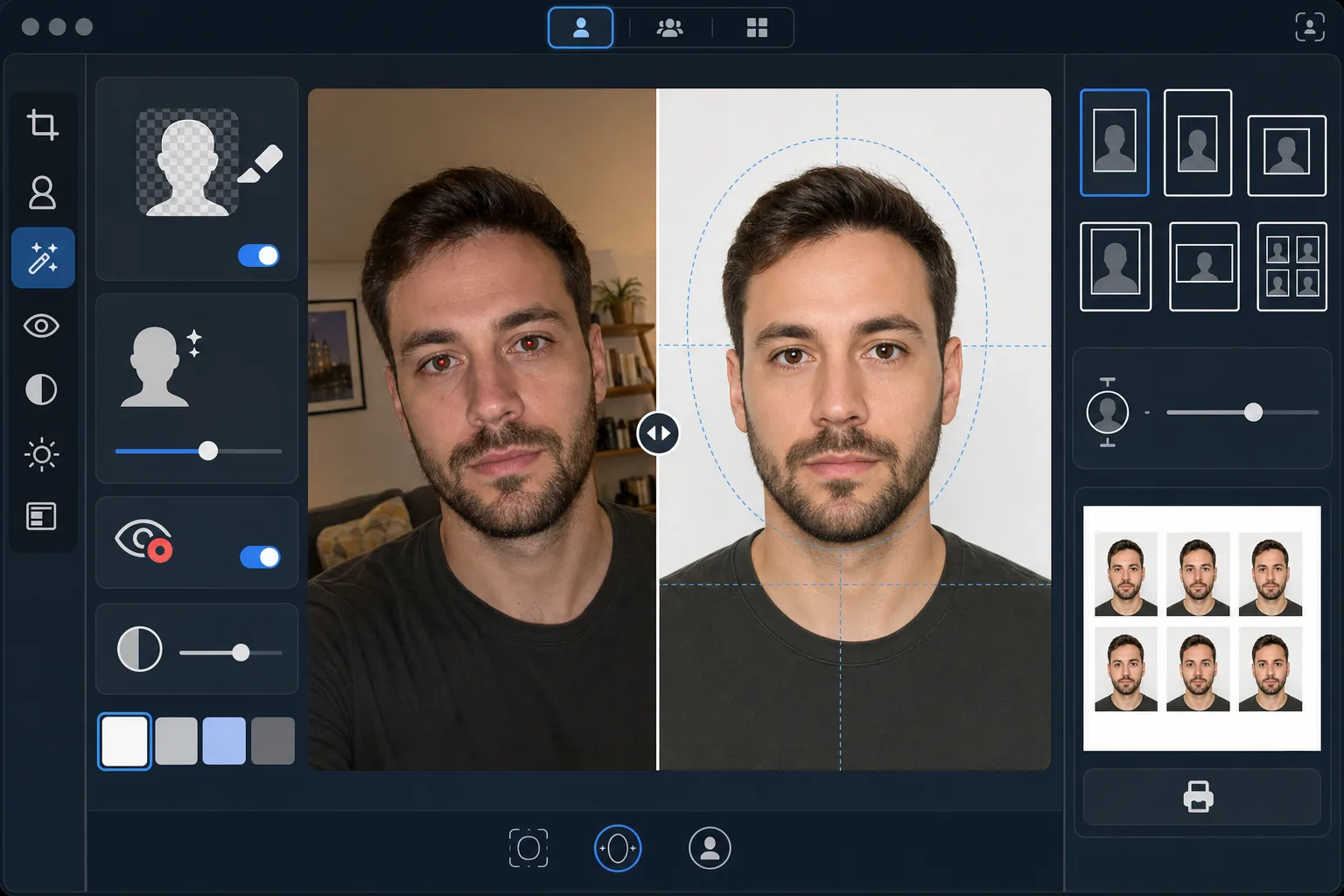
Qué hace esta plantilla
Convierte cualquier foto de retrato en una foto de identificación que cumple con los requisitos gubernamentales. Cada documento exige especificaciones distintas: los pasaportes de EE. UU. requieren un fondo blanco con una altura de cabeza de entre 25 y 35 mm en una impresión de 2×2 pulgadas, mientras que las visas Schengen exigen un fondo gris claro o blanco de 35×45 mm. Esta plantilla gestiona automáticamente los estándares de foto de identificación más comunes. Background Eraser elimina el fondo original y lo reemplaza por el color sólido requerido. AI Enhance corrige la iluminación desigual, elimina los ojos rojos del flash y garantiza que el rostro quede iluminado de forma uniforme, sin sombras marcadas en un lado, un motivo de rechazo frecuente en las oficinas gubernamentales.
Configuración de la plantilla
| Color de fondo | Blanco (#FFFFFF) o gris claro (#E5E5E5) — seleccionable según el tipo de identificación |
| Tamaño de la cabeza | Ajuste automático de la altura de la cabeza al 70–80 % del encuadre (ajustable según el estándar) |
| Dimensiones de impresión | 2×2 in (EE. UU.), 35×45 mm (UE/Schengen), 33×48 mm (Reino Unido) — seleccionable |
| Corrección de la iluminación | Iluminación facial uniforme — sin sombras a ninguno de los lados |
| Resolución de salida | 600 DPI para impresión fotográfica (compatible con quioscos e impresoras domésticas) |
Cómo usar esta plantilla
Suba una foto de frente
Suba un retrato nítido, de frente, tomado a la altura de los ojos. La foto debe mostrar todo el rostro y la parte superior de los hombros, con expresión neutra y ambos ojos abiertos. Quítese gafas, sombreros y prendas para la cabeza (salvo que se usen por motivos religiosos) antes de fotografiarse.
Seleccione su tipo de identificación
Elija el tipo de documento: pasaporte de EE. UU., visa UE/Schengen, pasaporte del Reino Unido, licencia de conducir o documento de identidad nacional. La plantilla ajusta automáticamente el color de fondo, el tamaño de la cabeza, las dimensiones de impresión y la relación de aspecto para cumplir con los requisitos oficiales del documento seleccionado.
Corrección de fondo e iluminación
Background Eraser elimina el fondo original y lo reemplaza por el color sólido requerido. AI Enhance corrige la iluminación desigual para que ambos lados del rostro queden iluminados de forma uniforme y elimina cualquier dominante de color de la luz artificial. Los ojos rojos del flash se corrigen automáticamente.
Exporte para imprimir
Descargue a 600 DPI en las dimensiones de impresión exactas requeridas para su tipo de documento. La salida está formateada para papel fotográfico estándar de 4×6 pulgadas, con varias fotos de identificación dispuestas en una sola hoja, para imprimir en casa, en un quiosco fotográfico de farmacia o en una imprenta profesional.
Consejos de expertos para mejores resultados
- ✓Tome la foto frente a una pared lisa en una habitación bien iluminada, de cara a una ventana. Aunque la plantilla reemplaza el fondo, partir de una luz natural uniforme sobre el rostro produce un mejor resultado que corregir sombras marcadas de la luz artificial.
- ✓Mantenga una expresión neutra, con la boca cerrada y ambos ojos abiertos. Los requisitos gubernamentales de fotos de identificación rechazan sistemáticamente las fotos con sonrisas, ojos entrecerrados o boca abierta; estas reglas las aplican sistemas automáticos de verificación de fotos en muchas oficinas gubernamentales.
- ✓Asegúrese de que ningún cabello caiga sobre el rostro ni cubra las cejas. La cara debe verse por completo, desde la parte inferior del mentón hasta la parte superior de la frente. Recoja cualquier cabello que cruce el rostro antes de tomar la foto.
- ✓Use una prenda superior que contraste con el color del fondo. Si el fondo es blanco, evite la ropa blanca: una prenda oscura o de color asegura una separación nítida de los bordes y evita que sus hombros se fundan con el fondo.
Herramientas
Preguntas frecuentes
¿Será aceptada en las oficinas gubernamentales?
+
La plantilla sigue las especificaciones oficiales de cada tipo de documento (ICAO 9303 para documentos de viaje internacionales y requisitos nacionales específicos para identificaciones locales). Sin embargo, la aceptación depende en última instancia del funcionario que la revise. La plantilla garantiza que las dimensiones, el color de fondo, el tamaño de la cabeza y la iluminación cumplan con los requisitos publicados.
¿Puedo usar gafas en la foto?
+
La mayoría de los países (incluido EE. UU. desde 2016) exige ahora que las gafas se retiren para las fotos de pasaporte y visa. La plantilla no elimina las gafas digitalmente: quíteselas antes de tomar la foto original. Las prendas religiosas para la cabeza están permitidas en la mayoría de las jurisdicciones.
¿Cómo imprimo el resultado?
+
La plantilla genera una hoja de 4×6 pulgadas con varias fotos de identificación dispuestas en el tamaño correcto. Imprima en cualquier quiosco fotográfico de farmacia (CVS, Walgreens, Boots), en casa sobre papel fotográfico a 600 DPI o en una imprenta profesional. Use papel fotográfico brillante o mate, no papel de impresora común.
Obtenga fotos de identificación compatibles sin salir de casa
Suba un selfie y obtenga fotos de identificación que cumplen con los requisitos gubernamentales, listas para imprimir: para pasaportes, visas, licencias de conducir y más.
Pruébelo gratisRelated templates
More personal templates for your workflow.
Mejore las fotografías de graduación con limpieza de fondo, toga y birrete Color correction, eliminación de imperfecciones y enfoque listo para imprimir para marcos y anuncios.
Mejore las fotografías de conciertos y eventos con reducción de ruido en condiciones de poca luz, iluminación del escenario corrección de color, eliminación de distracciones de la multitud y recuperación de detalles de tomas de lugares oscuros.
Cree hermosas fotografías de tarjetas de anuncio de recién nacidos con fondos suaves, gradación de color suave, eliminación del desorden del hospital y dimensiones listas para imprimir para enviar por correo.
Prepare fotografías familiares y de retratos para tarjetas de felicitación navideñas con fondos festivos, gradación de colores cálidos, efectos de nieve y dimensiones de tarjeta estándar para imprimir.
Restaure y mejore fotografías de tributos conmemorativos con retoques suaves, simplificación de fondos, gradación de colores cálida y respetuosa y dimensiones de servicios listas para imprimir.
Transforme las fotografías de mascotas de refugio y rescate con reemplazo de fondo, corrección de iluminación y mejora de detalles del pelaje para ayudar a los animales a encontrar un hogar más rápido.