
Foto de concierto y evento
Rescata fotos de conciertos y eventos oscuras y con ruido para convertirlas en recuerdos que puedas compartir. Esta plantilla reduce drásticamente el ruido en condiciones de poca luz, recupera detalles de tomas subexpuestas, corrige las dominantes de color agresivas de la iluminación del escenario, elimina los brazos y teléfonos que bloquean tu vista y enfoca al artista o al sujeto del evento.
Prueba esta plantilla gratisPersonal template preview
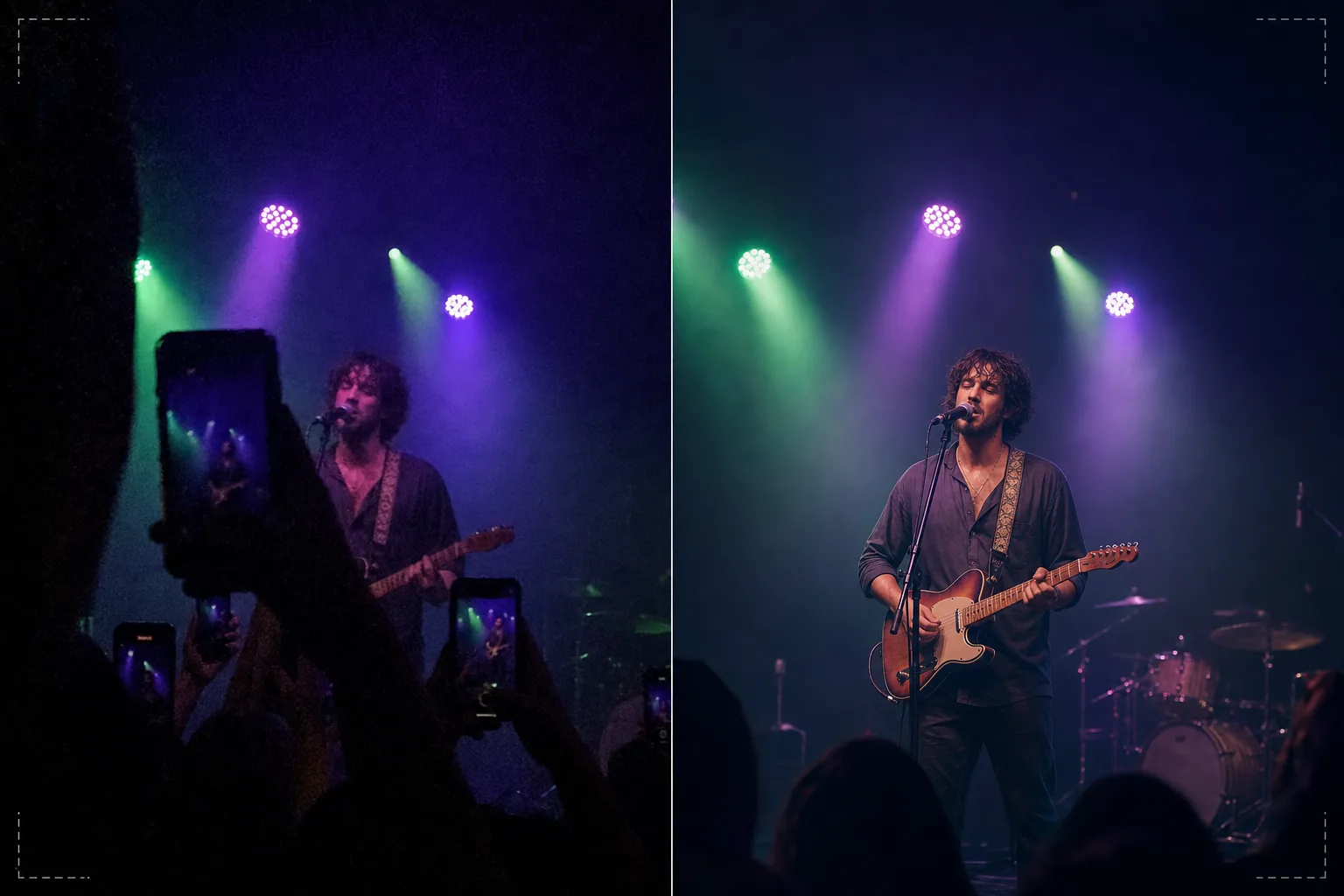
Qué hace esta plantilla
Rescata las fotos difíciles tomadas en conciertos, festivales, eventos deportivos y actuaciones en interiores donde las condiciones de iluminación superan a las cámaras de los smartphones. Las fotos de conciertos son las tomas técnicamente más difíciles que la gente hace habitualmente: la luz extremadamente baja fuerza un ruido ISO alto, la iluminación de escenario de colores mezclados crea extrañas dominantes de color y la distancia al escenario hace que las caras y los detalles sean pequeños y poco nítidos. AI Enhance aplica una reducción de ruido inteligente que elimina el patrón de grano mientras recupera el detalle subyacente, corrige las dominantes moradas, verdes y rojas de la iluminación del escenario para revelar tonos de piel e instrumentos naturales, y enfoca al artista para resaltar las expresiones faciales y los detalles de los instrumentos. Magic Eraser elimina los brazos levantados, los teléfonos y las cabezas de otros espectadores que bloquean tu vista.
Configuración de la plantilla
| Reducción de ruido | Reducción de ruido por IA (recupera detalle del grano de ISO alto hasta ISO 12800) |
| Corrección de color | Eliminación de dominantes de la iluminación del escenario (morado, verde, rojo y azul neutralizados) |
| Recuperación de sombras | Levantar las zonas subexpuestas hasta 3 pasos |
| Eliminación de multitudes | Eliminar brazos levantados, teléfonos y cabezas que obstruyen |
| Enfoque del sujeto | Enfoque selectivo del artista/escenario (preserva la atmósfera del bokeh) |
Cómo usar esta plantilla
Sube tu foto del concierto
Sube fotos de teléfono o cámara de conciertos, festivales, obras de teatro, espectáculos de comedia o eventos deportivos. La plantilla maneja las condiciones extremas que presentan estos recintos: exposiciones casi oscuras, luces de escenario muy coloreadas, desenfoque de movimiento de artistas en movimiento y vistas obstruidas por el público.
Reducción de ruido y recuperación de detalle
AI Enhance elimina el grano de ruido de ISO alto mientras conserva el detalle subyacente de la imagen. Las sombras subexpuestas se levantan para revelar caras, instrumentos y elementos del escenario que eran casi invisibles en la toma original. La reducción de ruido está calibrada para mantener la calidad atmosférica del recinto en lugar de hacer que la imagen parezca artificialmente suave.
Corrección de color e iluminación
Las dominantes de color agresivas de la iluminación del escenario se corrigen para que los tonos de piel, la ropa y los instrumentos aparezcan en colores reconocibles. Puedes optar por neutralizar por completo la iluminación del escenario para un aspecto natural, o corregir parcialmente para conservar parte de la iluminación de color atmosférica mientras reduces las dominantes más extremas.
Exporta tus recuerdos mejorados
Descarga la foto mejorada para compartirla en redes sociales, archivarla personalmente o imprimirla. El resultado conserva la calidad atmosférica del evento en directo a la vez que hace la imagen lo bastante clara para que las caras, las expresiones y los momentos sean visibles y significativos como recuerdos.
Consejos de experto para mejores resultados
- ✓Dispara durante los momentos de iluminación de escenario intensa —focos, pirotecnia, transiciones de pantalla— en lugar de durante los segmentos oscuros y atmosféricos. La plantilla puede recuperar un detalle de sombras considerable, pero las fotos capturadas en los momentos más brillantes tienen la mayor cantidad de datos subyacentes con los que trabajar.
- ✓Usa el modo ráfaga al fotografiar artistas en movimiento. El desenfoque de movimiento del gesto de la mano de un cantante o del brazo de un guitarrista rasgueando no se puede eliminar después, pero un fotograma de una ráfaga de diez puede captar un momento nítido que la plantilla puede luego mejorar.
- ✓Sujeta el teléfono con ambas manos y apoya los codos contra el cuerpo para minimizar la trepidación. La trepidación de la cámara agrava la dificultad de la fotografía de conciertos con poca luz. Una foto de origen más estable da al algoritmo de reducción de ruido datos más limpios y produce una imagen final más nítida.
Herramientas
Preguntas frecuentes
¿Puede arreglar fotos que están casi completamente oscuras?
+
La plantilla puede recuperar detalle de tomas subexpuestas de 2 a 3 pasos: imágenes en las que apenas puedes ver el sujeto. Más allá de 3 pasos por debajo, los datos del sensor son principalmente ruido y la imagen recuperada mostrará artefactos importantes. Cuanto más brillante sea la captura original, mejor será el resultado.
¿Y las grabaciones de vídeo de conciertos?
+
Extrae los mejores fotogramas fijos de tu vídeo del concierto y procésalos individualmente. Los fotogramas de vídeo tienen menor resolución que las fotos fijas, pero se benefician notablemente de la reducción de ruido y la corrección de color, produciendo imágenes que puedes compartir a partir de grabaciones que eran demasiado ruidosas como vídeo.
¿La eliminación de obstrucciones del público se verá natural?
+
Eliminar teléfonos levantados, brazos y cabezas del público frente a ti funciona bien cuando la obstrucción cubre una pequeña porción del encuadre. La IA reconstruye el escenario y el fondo detrás de los elementos eliminados. Eliminar obstrucciones grandes que cubren la mayor parte del sujeto es menos eficaz.
Convierte las tomas oscuras de conciertos en recuerdos vívidos
Sube tus fotos del evento y recupera los momentos que tu cámara tuvo dificultades para capturar con la complicada iluminación del recinto.
Pruébalo gratisRelated templates
More personal templates for your workflow.
Cree fotografías de identificación compatibles para visas, licencias de conducir e identificaciones nacionales con los requisitos adecuados de color de fondo, tamaño de cabeza y expresión facial.
Mejore las fotografías de graduación con limpieza de fondo, toga y birrete Color correction, eliminación de imperfecciones y enfoque listo para imprimir para marcos y anuncios.
Cree hermosas fotografías de tarjetas de anuncio de recién nacidos con fondos suaves, gradación de color suave, eliminación del desorden del hospital y dimensiones listas para imprimir para enviar por correo.
Prepare fotografías familiares y de retratos para tarjetas de felicitación navideñas con fondos festivos, gradación de colores cálidos, efectos de nieve y dimensiones de tarjeta estándar para imprimir.
Restaure y mejore fotografías de tributos conmemorativos con retoques suaves, simplificación de fondos, gradación de colores cálida y respetuosa y dimensiones de servicios listas para imprimir.
Transforme las fotografías de mascotas de refugio y rescate con reemplazo de fondo, corrección de iluminación y mejora de detalles del pelaje para ayudar a los animales a encontrar un hogar más rápido.