
Plantilla de historia para redes sociales
Diseña historias verticales 9:16 optimizadas para Instagram, TikTok, Snapchat y YouTube Shorts. Esta plantilla recorta y reposiciona las fotos para el formato vertical alargado, elimina o reemplaza los fondos para lograr impacto visual y garantiza que tu sujeto quede ubicado dentro de las zonas seguras para texto, de modo que las superposiciones, los stickers y los pies de foto nunca tapen el punto focal.
Prueba esta plantilla gratisSocial Media template preview
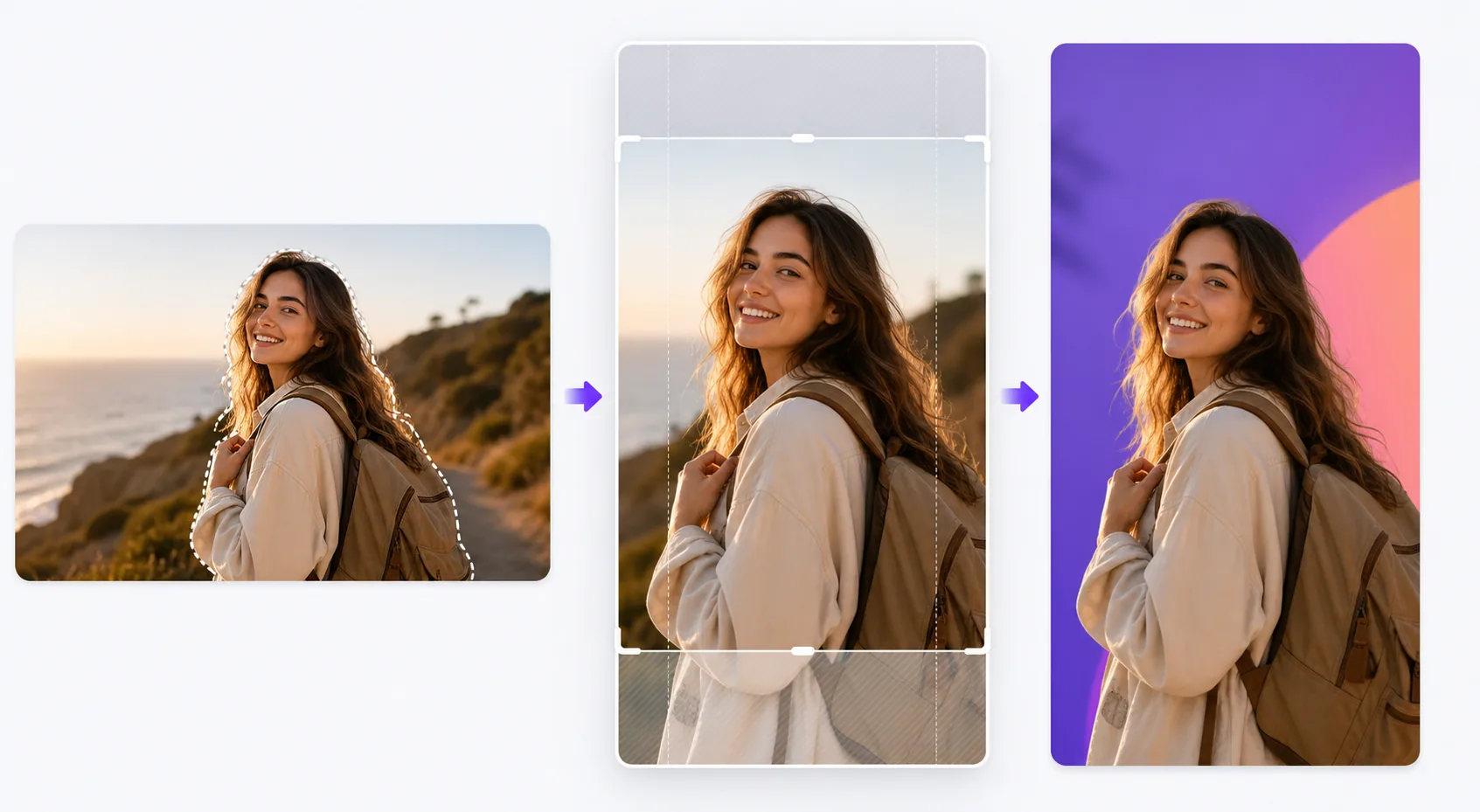
Qué hace esta plantilla
Resuelve el desafío de formato que arruina la interacción en las plataformas de historias: fotos horizontales apretadas en marcos verticales con barras negras, sujetos cortados en puntos incómodos y detalles visuales importantes ocultos detrás de los elementos de la interfaz. La plantilla recorta de forma inteligente tu foto a 9:16, centra el sujeto y aplica un reencuadre con tecnología de IA cuando la composición original no se adapta bien al formato vertical. Background Eraser te permite colocar tu sujeto sobre colores sólidos llamativos, degradados o fondos de entorno desenfocados que hacen que la historia destaque en el feed. Las guías de zona segura garantizan que el 15 % superior (donde se ubican los iconos de perfil y las marcas de tiempo) y el 20 % inferior (donde aparecen los avisos de deslizar hacia arriba y los pies de foto) permanezcan libres de contenido visual esencial.
Ajustes de la plantilla
| Relación de aspecto | 9:16 (1080×1920px) — nativa para las historias de Instagram, TikTok y Snapchat |
| Estilo de fondo | Color sólido, degradado, original desenfocado o imagen personalizada |
| Posicionamiento del sujeto | Reencuadre con IA para centrar el sujeto en la zona segura vertical |
| Zonas seguras | El 15 % superior y el 20 % inferior se mantienen libres para los elementos de la interfaz de la plataforma |
| Formato de salida | JPEG con calidad del 95 % o PNG con transparencia para seguir editando |
Cómo usar esta plantilla
Sube tu foto
Sube cualquier foto: horizontal, vertical o cuadrada. La IA detecta el sujeto principal (persona, producto, punto focal de la escena) y determina el mejor recorte vertical que mantiene el sujeto destacado y la composición equilibrada en el marco 9:16.
Elige el tratamiento del fondo
Conserva el fondo original (recortado para que encaje), reemplázalo por un color sólido o un degradado para lograr impacto gráfico, o desenfoca el fondo para crear separación de profundidad. Background Eraser ofrece un recorte limpio si quieres componer el sujeto sobre un fondo completamente nuevo.
Coloca dentro de las zonas seguras
La plantilla te muestra dónde se superpondrán los elementos de la interfaz de la plataforma sobre la imagen: marcas de tiempo, iconos de perfil en la parte superior y avisos de deslizar hacia arriba o áreas de pie de foto en la parte inferior. Tu sujeto se coloca automáticamente en la zona segura central y puedes ajustar la posición si lo necesitas.
Exporta para publicar
Descarga en 1080×1920px, la resolución nativa para los formatos de historia. El archivo está optimizado para minimizar los artefactos de compresión cuando las plataformas recodifican la subida. La exportación en PNG está disponible si quieres añadir texto, stickers u otras ediciones en otra aplicación antes de publicar.
Consejos de expertos para obtener los mejores resultados
- ✓Usa colores de fondo llamativos y contrastantes detrás de los sujetos recortados. Un fondo coral brillante o azul eléctrico hace que un producto o una persona destaquen visualmente frente a los feeds neutros que la mayoría de los usuarios recorren, aumentando la probabilidad de que se detengan en tu historia.
- ✓Mantén el 20 % inferior del marco visualmente sencillo. En Instagram, la barra de respuesta y el texto del pie de foto se ubican en esta zona. Colocar contenido visual importante allí garantiza que quedará tapado cuando los espectadores vean la historia.
- ✓Para las historias en carrusel, mantén el mismo color de fondo y la misma posición del sujeto en todos los marcos. La coherencia visual hace que la serie se sienta intencional y pulida, lo que aumenta la tasa de deslizamiento.
Herramientas
Preguntas frecuentes
¿Puedo usar fotos horizontales de paisaje?
+
Sí. La IA reencuadra la composición identificando el sujeto clave y recortando a una franja vertical que mantiene el impacto visual. En las tomas panorámicas muy anchas, el reencuadre puede recortar de forma significativa, por lo que las imágenes con un sujeto centrado funcionan mejor.
¿Funciona también para miniaturas de video?
+
La plantilla procesa imágenes fijas. Sin embargo, puedes usar la imagen exportada como fotograma de portada para una historia en video, que las plataformas muestran antes de que se reproduzca el video y en las cuadrículas de historias destacadas.
¿Qué plataformas usan el formato 9:16?
+
Instagram Stories y Reels, TikTok, Snapchat, YouTube Shorts, Facebook Stories, Pinterest Idea Pins y LinkedIn Stories usan el formato vertical 9:16. La salida de 1080×1920px es la resolución estándar aceptada por todas ellas.
Haz que cada historia detenga el dedo
Sube cualquier foto y obtén en segundos una imagen de historia vertical perfectamente formateada y optimizada para las plataformas.
Pruébalo gratisRelated templates
More social media templates for your workflow.
Plantilla de recorte cuadrado optimizada para Instagram a 1080×1080px. Fondos limpios, colores vibrantes y detalles nítidos que destacan en el feed.
Plantilla de banner de YouTube a 2560×1440px con guías de zonas seguras. Eliminación limpia del fondo de las fotos de los creadores, diseño compatible con el dispositivo y arte del canal coherente con la marca.
Plantilla de foto de portada de Facebook de 820×312px para escritorio y recorte de 640×360px para dispositivos móviles. Limpie las imágenes de marca con zonas seguras adecuadas para la superposición de imágenes de perfil y la ubicación de botones de CTA.
Cree imágenes de encabezado profesionales de Twitter/X con la dimensión exacta de 1500×500px. Tiene en cuenta la superposición de imágenes de perfil, funciona tanto en modo oscuro como en modo claro.
Mejore las fotos de perfil de citas con suavizado natural de la piel, limpieza de fondo, corrección de iluminación y gradación de color sutil que parece auténtica, sin filtrar.
Cree imágenes de pin de Pinterest que detengan el desplazamiento con fondos limpios, dimensiones verticales óptimas de 2:3, realce de colores vibrantes y composición lista para pin.