
Foto de adopción de mascotas
Ayude a los animales de refugio a encontrar un hogar para siempre con fotos que muestren su personalidad en lugar de una jaula de concreto. Esta plantilla elimina los barrotes de las jaulas, los suelos de las perreras y los fondos de refugio, y los reemplaza por entornos cálidos y hogareños o fondos limpios de color uniforme. La corrección de iluminación aclara las fotos oscuras de refugio, y la mejora de los detalles del pelaje muestra el color y la textura reales del manto de cada animal.
Prueba esta plantilla gratisPersonal template preview
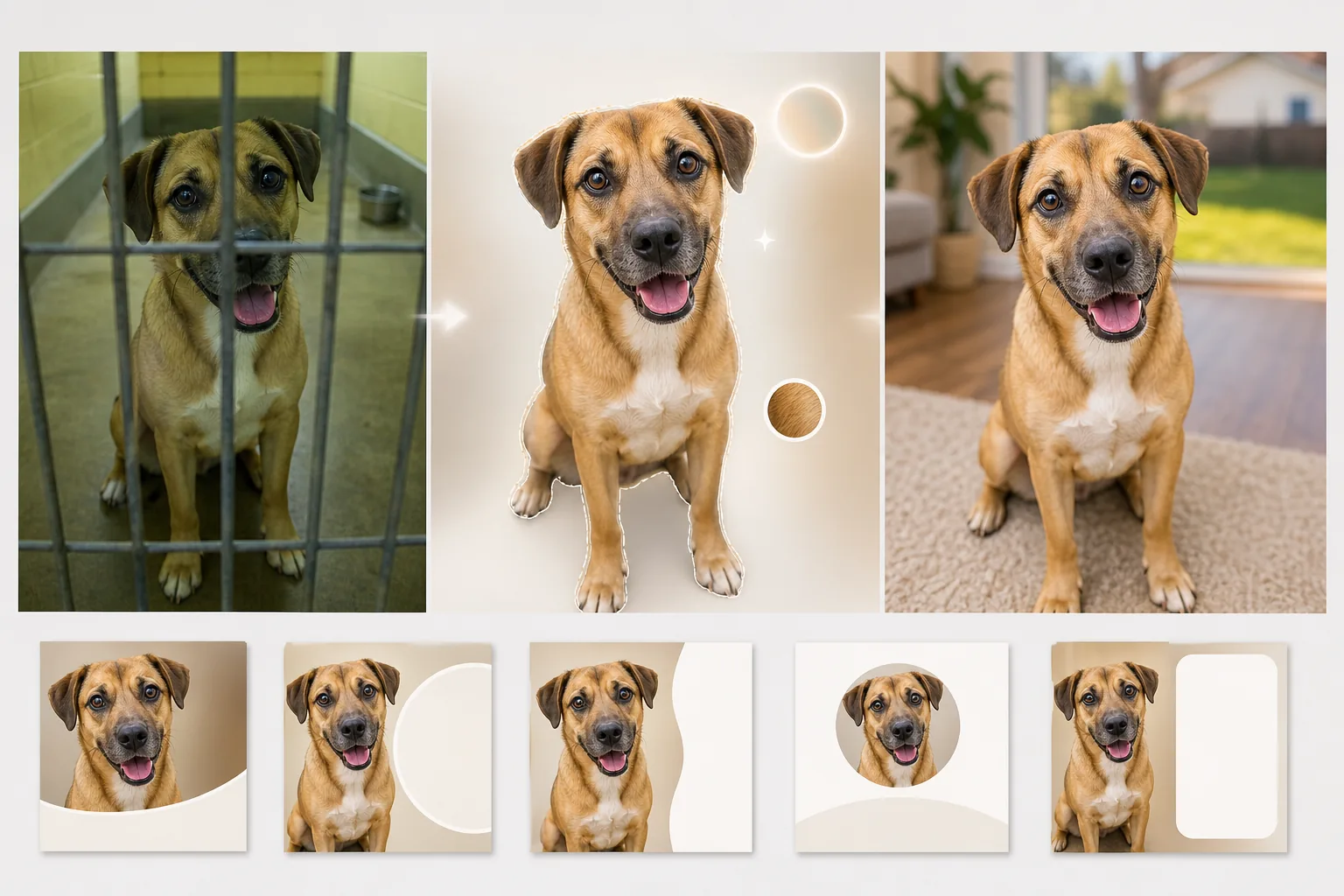
Qué hace esta plantilla
Aborda los desafíos específicos de la fotografía en refugios, donde la iluminación es deficiente, los fondos son institucionales y los animales suelen fotografiarse a través de los barrotes de las jaulas o en estrechos corredores de concreto. Background Eraser elimina los barrotes de las perreras, las vallas de tela metálica y los entornos de refugio, y los reemplaza por fondos cálidos y acogedores: un jardín con césped, el suelo acogedor de una sala de estar o un color uniforme y limpio que centra toda la atención en el animal. AI Enhance corrige la subexposición común en la fotografía de refugio (luces fluorescentes de techo, sin ventanas), ilumina los ojos que a menudo se pierden en la sombra y resalta el color y la textura reales del pelaje, las plumas o las escamas para que los posibles adoptantes puedan ver cómo se ve realmente el animal con luz natural.
Configuración de la plantilla
| Fondo | Jardín con césped, suelo de sala de estar, pastel uniforme o transparente |
| Eliminación de barrotes de jaula | Detectar y eliminar automáticamente barrotes de perrera, tela metálica y vallas de alambre |
| Corrección de iluminación | Aclarar las fotos de refugio subexpuestas hasta el equivalente de la luz natural del día |
| Mejora de los ojos | Aclarar y enfocar los ojos para mostrar personalidad y atención |
| Detalle del pelaje | Mejorar la textura del manto y corregir la dominante de color de la iluminación fluorescente |
| Resolución de salida | 2000×2000px (cuadrada para Petfinder, Adopt-a-Pet y redes sociales) |
Cómo usar esta plantilla
Sube la foto del refugio
Sube una foto del animal tomada en el refugio, el hogar de acogida o un evento al aire libre. Las fotos tomadas a través de los barrotes de las jaulas, en perreras oscuras y sobre suelos de concreto se procesan todas. La plantilla funciona para perros, gatos, conejos, aves y otros animales de refugio.
Elimina el entorno del refugio
Background Eraser elimina la perrera, los barrotes de la jaula, los suelos de concreto y el fondo institucional del refugio. El animal se aísla con una detección de bordes que preserva el contorno natural del pelaje, los bigotes y las orejas, incluidos los bordes vaporosos de las razas de pelo largo.
Mejora la iluminación y el detalle
AI Enhance aclara la imagen para simular la luz natural del día, corrige la dominante verde-amarilla de las luces fluorescentes del refugio y enfoca la textura del pelaje y el detalle de los ojos. El color y el patrón reales del manto del animal se vuelven visibles, y sus ojos adquieren la mirada brillante y atenta que atrae a los adoptantes.
Exporta para los anuncios de adopción
Descarga en 2000×2000px en formato cuadrado optimizado para Petfinder, Adopt-a-Pet y los sitios web de organizaciones de rescate. El formato también funciona directamente para publicaciones de adopción en Instagram y Facebook sin recortes adicionales.
Consejos profesionales para los mejores resultados
- ✓Agáchate hasta la altura de los ojos del animal al fotografiarlo. Las tomas desde arriba hacen que los animales parezcan más pequeños y menos atractivos. Las fotos a la altura de los ojos crean una conexión entre el espectador y el animal que impulsa las consultas de adopción.
- ✓Usa una golosina o un juguete sostenido justo encima de la cámara para captar una expresión atenta, con las orejas hacia adelante. La IA puede aclarar ojos apagados y mejorar el pelaje, pero no puede convertir una expresión de desinterés en una de interés.
- ✓Para perros y gatos negros, cuyos rasgos suelen desaparecer en las fotos de refugio, asegúrate de que llegue algo de luz a la cara desde el frente. Incluso la linterna de un teléfono sostenida de lado crea suficiente dimensión para que la IA recupere los detalles faciales y la definición de los ojos.
Herramientas
Preguntas frecuentes
¿Puede esto eliminar los barrotes de la jaula que están delante del animal?
+
Sí. La IA detecta el patrón regular de los barrotes de la perrera y las vallas de tela metálica que cubren al animal y los elimina, reconstruyendo el patrón del pelaje y los rasgos faciales detrás de los barrotes. Los barrotes gruesos que cubren una gran parte de la cara pueden dejar ligeros artefactos que requieren un pequeño retoque manual.
¿La foto resultará engañosa sobre la apariencia del animal?
+
No. La plantilla corrige la mala iluminación del refugio y elimina el entorno institucional, pero no altera las características físicas del animal, el patrón del pelaje, el tamaño ni la coloración. El objetivo es mostrar cómo se ve realmente el animal con buena luz y en un entorno normal.
¿Pueden los refugios usar esto gratis?
+
El nivel gratuito incluye suficiente procesamiento para voluntarios de acogida individuales y pequeños rescates. Los refugios con alto volumen pueden contactarnos para obtener precios sin fines de lucro en el procesamiento por lotes.
Ayuda a cada animal de refugio a dar lo mejor de sí
Sube fotos de refugio y obtén imágenes de adopción cálidas y acogedoras que muestren la verdadera personalidad de cada animal.
Pruébalo gratisRelated templates
More personal templates for your workflow.
Cree fotografías de identificación compatibles para visas, licencias de conducir e identificaciones nacionales con los requisitos adecuados de color de fondo, tamaño de cabeza y expresión facial.
Mejore las fotografías de graduación con limpieza de fondo, toga y birrete Color correction, eliminación de imperfecciones y enfoque listo para imprimir para marcos y anuncios.
Mejore las fotografías de conciertos y eventos con reducción de ruido en condiciones de poca luz, iluminación del escenario corrección de color, eliminación de distracciones de la multitud y recuperación de detalles de tomas de lugares oscuros.
Cree hermosas fotografías de tarjetas de anuncio de recién nacidos con fondos suaves, gradación de color suave, eliminación del desorden del hospital y dimensiones listas para imprimir para enviar por correo.
Prepare fotografías familiares y de retratos para tarjetas de felicitación navideñas con fondos festivos, gradación de colores cálidos, efectos de nieve y dimensiones de tarjeta estándar para imprimir.
Restaure y mejore fotografías de tributos conmemorativos con retoques suaves, simplificación de fondos, gradación de colores cálida y respetuosa y dimensiones de servicios listas para imprimir.