
Wedding Photo Enhancement
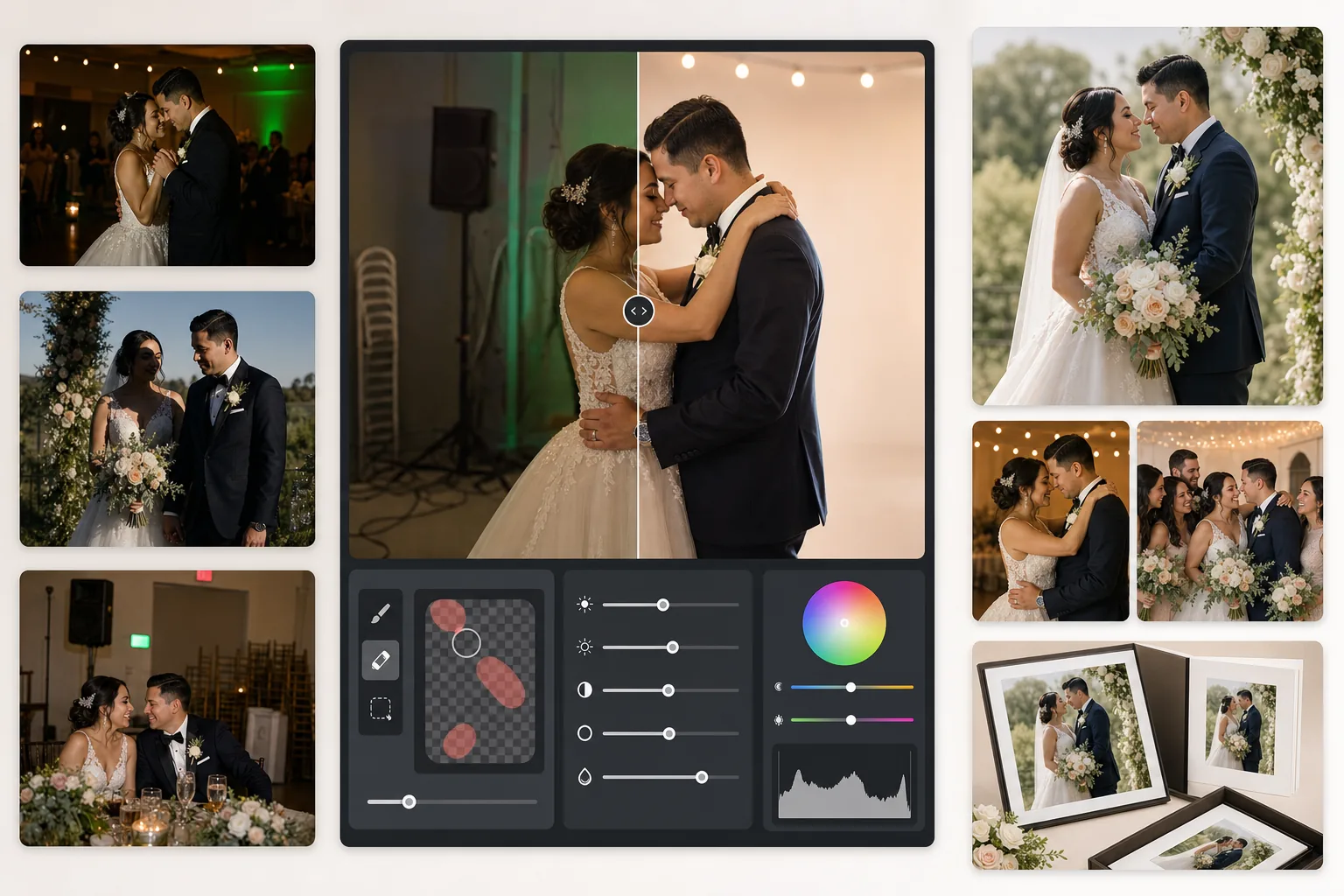
Rescue underlit reception photos, remove distracting backgrounds, and refine skin tones for album-worthy wedding images. This template is designed for the challenging lighting conditions of ceremonies and receptions — dim venues, mixed color casts from DJ lights, and cluttered backgrounds that take attention away from the couple.
Try this template freeEvents template preview
What this template does
Corrects the most common problems in wedding photography: underexposed reception shots, orange tungsten or green fluorescent color casts, harsh flash shadows, and distracting background elements like exit signs, stacked chairs, and catering equipment. AI Enhance recovers detail from dark dance-floor photos and balances mixed lighting, while Magic Eraser removes unwanted objects without leaving traces. Skin tones are refined to look natural and warm without over-smoothing.
Template settings
| Exposure recovery | +1.5 EV shadow lift with highlight preservation |
| White balance | Auto mixed-light correction (tungsten/fluorescent/daylight) |
| Skin tone mode | Natural warmth (+5 warmth, +3 smoothing, detail preserved) |
| Output resolution | 4000px long edge (print-ready at 300 DPI up to 13×19) |
| Color profile | Adobe RGB (wider gamut for professional printing) |
| Noise reduction | High-ISO adaptive (preserves detail in lifted shadows) |
How to use this template
Upload your wedding photos
Upload reception shots, ceremony images, or guest-taken smartphone photos. The template handles everything from professional DSLR RAW-exported JPEGs to compressed phone photos — the AI adapts its enhancement strength based on the source quality.
Correct lighting and color
AI Enhance lifts dark reception scenes, neutralizes the orange-green color casts from venue mixed lighting, and balances flash-lit foregrounds with ambient-lit backgrounds. Skin tones are shifted toward natural warmth without affecting dress whites or décor colors.
Remove distractions
Magic Eraser removes exit signs, fire extinguishers, stacked chairs, catering carts, power cables on the floor, and photo-bombing guests in the background. The AI reconstructs the background pattern naturally behind removed objects.
Export for albums and prints
Download at 4000px long edge in Adobe RGB for professional photo lab printing, or in sRGB for digital sharing and online galleries. The output is sized for prints up to 13×19 inches at 300 DPI.
Pro tips for best results
- ✓For dark reception dance-floor shots, the template can recover approximately 1.5 stops of shadow detail. If the original photo is almost completely black, the enhancement may introduce noise — start with photos where you can at least faintly see the subjects.
- ✓The skin-tone correction is calibrated for wedding photography warmth — slightly warmer than neutral, which flatters most skin tones under mixed lighting. For outdoor ceremony photos that already have good natural light, the correction is subtle.
- ✓When removing background objects, work on one area at a time for the most natural results. Exit signs, fire sprinklers, and wall outlets are small enough for clean single-pass removal. Larger objects like stacked chairs may benefit from removing in sections.
- ✓Process the couple's portraits first, then group shots, then candids. This lets you establish a consistent color-grading baseline across the most important photos before moving to secondary images.
Common questions
Can this fix blurry reception photos?
+
AI Enhance can sharpen mild softness from slow shutter speeds and recover significant shadow detail, but it cannot fix severe motion blur where the subjects are visibly streaked. Photos with slight hand-shake blur or mild focus softness will improve substantially.
Will the bride's white dress lose detail?
+
The tone-mapping algorithm specifically protects highlight detail in whites. Dress texture, lace patterns, and fabric folds are preserved even when lifting shadows in the same image. The result maintains a full range from bright whites to deep shadows.
Is this good enough for print albums?
+
Yes. The 4000px output at 300 DPI supports prints up to 13×19 inches. The Adobe RGB color profile preserves the wider color gamut that professional photo labs use. For standard 8×10 album pages, the resolution far exceeds what is needed for sharp prints.
Turn every wedding photo into an album-worthy image
Upload reception and ceremony photos and get professionally enhanced, print-ready images in seconds. Works on both professional camera and smartphone photos.
Try it freeRelated templates
More events templates for your workflow.