
Food Photography Styling
Make dishes look as appetizing in photos as they do on the plate. This template enhances color vibrancy for sauces, greens, and proteins, removes stray utensils, fingerprints on plates, and visible hands, sharpens textures in crust and garnish, and grades the image for warm, inviting tones that perform well on Instagram and menu boards.
Try this template freeFood & Beverage template preview
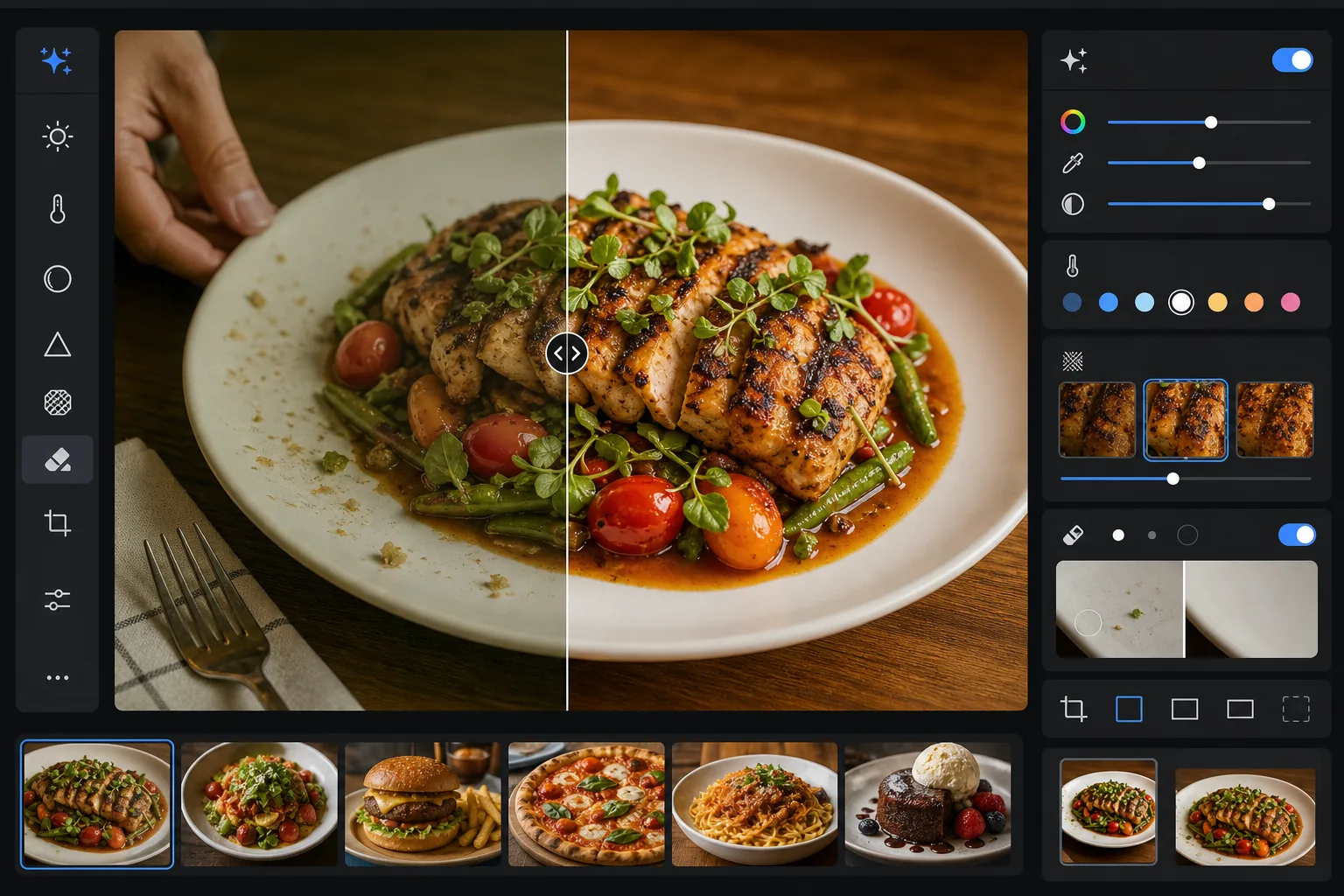
What this template does
Solves the gap between how food looks in person and how it photographs. Restaurant and overhead lighting often casts yellow or green tints that make fresh ingredients look dull. AI Enhance corrects white balance to make greens vibrant, reds rich, and whites clean without over-saturating to the point of looking artificial. Magic Eraser removes distracting elements — a fork left in frame, a server's hand at the edge, water spots on the plate rim, crumbs on the table surface. Selective sharpening brings out the texture of grilled surfaces, crispy crusts, and fresh herbs that make food photos feel tactile.
Template settings
| Color vibrance | +15 vibrance, +8 saturation (selective on reds, greens, yellows) |
| White balance | Food-optimized neutral (removes yellow cast, preserves warm tones) |
| Texture sharpening | Detail-aware (enhances crust, grill marks, herb detail) |
| Plate cleanup | Auto-detect smudges, drips, and fingerprints on plate rim |
| Warmth grade | +5 warmth with golden-hour style tone curve |
| Output | 1080×1080px (Instagram), 2400×1600px (menu/website) dual export |
How to use this template
Upload your food photo
Upload a photo of the plated dish taken from overhead, 45-degree angle, or straight on. Natural window light produces the best starting point, but the template also handles fluorescent restaurant lighting and warm tungsten table lamps.
Enhance color and texture
AI Enhance corrects the color cast, boosts vibrance selectively so that greens, reds, and golden tones pop without looking neon, and sharpens surface textures like grill char, sugar glaze, and fresh herb leaves. The warmth grade adds an inviting golden-hour feel.
Clean up the frame
Magic Eraser removes stray utensils, napkin corners, visible hands, fingerprints and sauce drips on the plate rim, crumbs on the table, and any props that clutter the composition. The AI fills the cleaned areas with the surrounding table or plate surface.
Export for your platform
Download in one or both formats: 1080x1080px square for Instagram and social media, or 2400x1600px landscape for restaurant websites, digital menu boards, and delivery app listings. Both are color-optimized for screen display in sRGB.
Pro tips for best results
- ✓Shoot within the first 90 seconds after plating. Lettuce wilts, sauces skin over, ice melts, and steam stops rising quickly. If you missed the window, the template can enhance color and texture but cannot restore a wilted salad or melted ice cream.
- ✓For overhead flat lay shots, make sure your light source is to one side rather than directly above. Side light creates the micro-shadows on food textures that the sharpening algorithm amplifies — direct overhead light flattens those shadows and makes food look less dimensional.
- ✓When removing a fork or utensil that overlaps the food, the AI reconstructs the food texture behind it. For the cleanest results, ensure the utensil is resting on a simple area like the plate rim or tablecloth rather than buried in the dish itself.
- ✓For restaurant menus, process all dish photos in a single batch to ensure consistent color grading and warmth across the full menu. Inconsistent color temperature between photos makes a menu look unprofessional even when each individual photo looks good.
Common questions
Will this make my food look artificially saturated?
+
The color enhancement is calibrated for food photography specifically — it targets the saturation ranges where food naturally falls (greens of herbs, reds of tomatoes and meats, golden tones of bread and fried foods) while leaving other colors less affected. The result looks appetizing and vibrant without crossing into neon or plastic-looking territory.
Can I use this for delivery app listings?
+
Yes. The 2400x1600px output exceeds the image requirements for DoorDash, Uber Eats, Grubhub, and other delivery platforms. The color grading and sharpening are optimized for small-screen viewing where food photos need to be immediately eye-catching at thumbnail size.
Does this work for beverages and cocktails?
+
Yes. The template handles liquids, glassware, and garnishes well. Color vibrance enhancement works particularly well on cocktails with fruit garnishes and layered colors. The cleanup removes fingerprints on glass surfaces, water rings, and bar tools left in frame.
Make every dish photo look professionally styled
Upload food photos from your phone or camera and get vibrant, clean, Instagram-ready images that make viewers hungry.
Try it freeRelated templates
More food & beverage templates for your workflow.