
Remove a smudge from photos
Clear the soft, milky haze a fingerprint or greasy lens leaves on a shot. Magic Eraser targets the blurred patch, sharpens the smeared area, and reconstructs the texture underneath so the photo reads as if the lens had been clean. Free on web, iOS, and Android.
Last updated
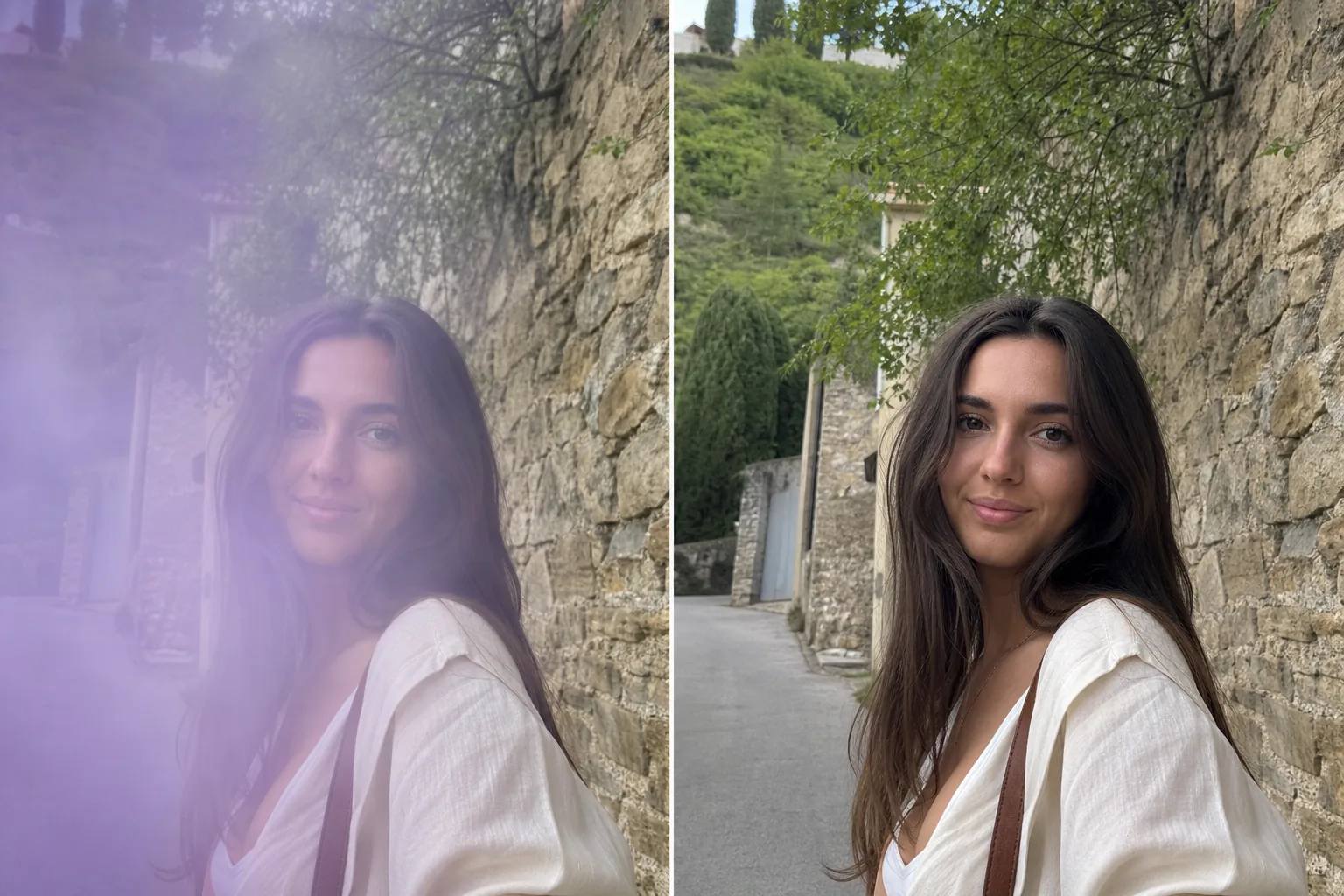
What a lens smudge does to a photo
A smudge is the soft, hazy patch a fingerprint or a film of grease on the front of your phone lens leaves behind. Unlike glare, which is a hard burst of bright light, or dust, which shows up as dark specks, a smudge spreads contrast into a milky, low-detail blur — often in just one corner where your finger touched the glass. You usually don't notice it until you zoom in: faces go soft, edges smear, and a hazy bloom sits over part of the frame. Wiping the lens fixes the next shot, but it can't save the one you already took. Magic Eraser works on that already-captured photo. You mark the smeared region and the AI lifts the haze, restores local contrast, and rebuilds the detail the smudge softened, so the rest of the image and the repaired patch match.
Clear a smudge in three steps
- 1
Upload the hazy photo
Open Magic Eraser on the web, iOS, or Android and upload the shot with the soft blur spot. It works whether the smudge sits in a corner or drifts across the middle of the frame.
- 2
Brush over the smeared area
Paint across the milky, low-contrast patch — including the soft falloff at its edges where the haze fades into the sharp part of the photo. Covering that transition helps the AI blend the repair seamlessly.
- 3
Erase and compare
Tap Erase and the AI restores contrast and reconstructs the detail under the smudge. Compare against the original, refine the brush if a soft halo remains, and export the cleaned-up image.
Best for
- Fixing a fingerprint smudge in one corner of a phone photo
- Lifting the milky haze from a greasy or oily lens
- Sharpening a soft blur spot over a face or subject
- Rescuing the only shot you got before wiping the lens
- Cleaning up smeared low-contrast patches in travel snaps
- Recovering detail in landscapes hazed by a dirty lens
- Tidying screen-grabbed or scanned photos with smear marks
- Quick repairs that match the unaffected part of the frame
What to expect from smudge removal
Be realistic about what a smudge actually destroyed. Local contrast, color, and broad shapes reconstruct well, because the AI has the sharp, unsmudged areas of the same photo to learn tone and structure from. A smudge over a textured but predictable surface — sky, skin, foliage, a plain wall — fills in convincingly. Fine detail that the haze fully erased, however, is genuinely gone from the file: text, small faces, fabric weave, or distant signage in the smeared zone are AI-estimated, not recovered, so the tool reconstructs a plausible version rather than the exact pixels. The cleaner the boundary between smudged and sharp regions, the better the blend. Heavy, opaque smears that wash out most of the patch leave the AI less to anchor on, so expect a softer result there. Treat smudge removal as detail reconstruction, not a guarantee of true-to-life recovery — for anything where accuracy matters, the original sharp areas are your reference.
Frequently asked questions
- How is a smudge different from glare or dust?
- A smudge is a soft, hazy, low-contrast patch left by a fingerprint or greasy lens — it spreads blur rather than adding light or specks. Glare is a bright blown-out burst, and dust shows as small dark spots. Magic Eraser handles all three, but smudge removal focuses on restoring the contrast and detail the haze softened.
- Can it bring back detail the smudge erased?
- Partly. Contrast, color, and broad shapes reconstruct well from the sharp areas of the same photo. But fine detail the haze fully washed out — small text, distant faces, fabric texture — is AI-estimated, not truly recovered. The result is a plausible reconstruction, not the exact original pixels.
- What if the smudge covers most of the photo?
- Smaller, well-defined smudges clean up best because the AI has surrounding sharp pixels to anchor on. A heavy haze over most of the frame leaves less reference, so expect a softer, more approximate result. Brushing the soft edges of the patch, not just the center, gives the cleanest blend.
- Is smudge removal free?
- Yes. Magic Eraser's free tier handles smudge and haze cleanup on web, iOS, and Android. Upload the photo, brush the smeared patch, and export the repaired image at no cost.