
Publish-Ready Images Without the Wait
Deadlines don't wait for retouching. Magic Eraser helps publishers, editors, and book designers clean up cover photos, fix editorial images, and prepare print-ready visuals in seconds — no Photoshop expertise required.
Last updated
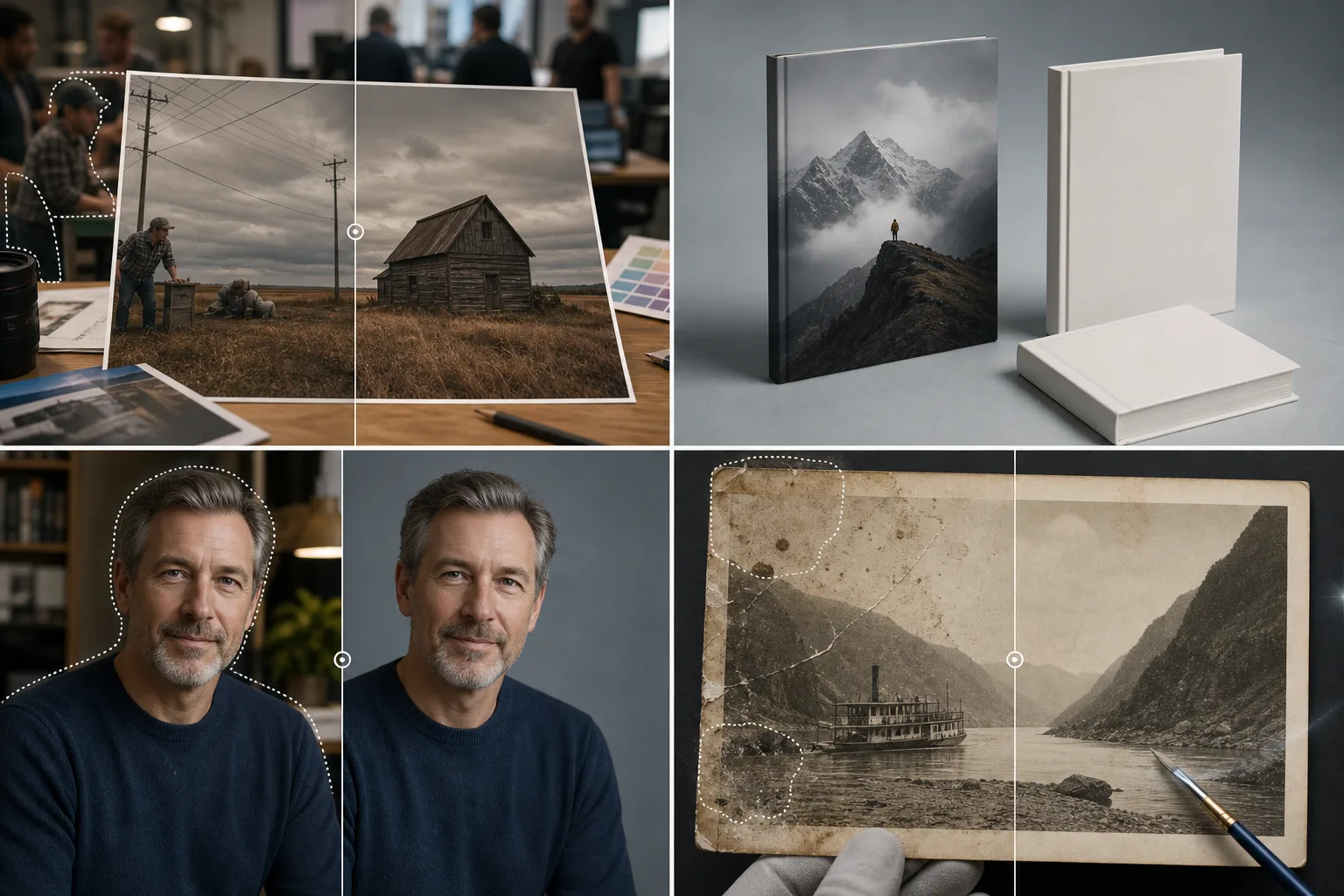
Why Publishing Professionals Choose Magic Eraser
From book covers to magazine spreads, publishing depends on striking imagery delivered on deadline. Magic Eraser lets editors and designers remove distracting elements, swap backgrounds, and enhance photo quality without waiting for a retoucher. Keep production moving and your visual standards high. In publishing, image quality directly impacts reader perception of content credibility. Whether sourcing stock photography, processing author submissions, or enhancing archival materials, editorial teams need fast, reliable tools that bring images up to publication standards without disrupting production schedules.
Key Benefits for Print & Publishing
Produce publication-ready images that meet professional editorial standards.
Editorial Image Cleanup
Remove watermarks, artifacts, and distracting elements from editorial photos to meet print quality standards without starting over with a new shoot.
Author and Contributor Portraits
Enhance author headshots and contributor photos with clean backgrounds and improved lighting for consistent byline and bio presentations.
Cover and Layout Photography
Prepare clean base images for book covers, magazine layouts, and catalog designs by removing backgrounds and isolating subjects.
Archival Image Restoration
Clean up scanned historical photos and archival materials by removing damage marks, stains, and aging artifacts for republication.
Ad Creative Production
Produce clean product and lifestyle images for print advertisements, inserts, and promotional materials without dedicated photo shoots for every campaign.
Multi-Title Brand Consistency
Maintain consistent image quality standards across multiple publications, imprints, or catalog lines for a unified professional presentation.
Common Use Cases
Book Cover Design
Isolate subjects from stock or commissioned photos to create compelling cover compositions. Remove unwanted elements that conflict with title placement and typography.
Magazine Layout Preparation
Clean up editorial photos by removing brand logos, bystanders, and background clutter so images integrate seamlessly into page layouts and spreads.
Newspaper & Digital News Images
Quickly remove sensitive or irrelevant background details from news photos while maintaining editorial integrity and the core subject matter.
Author & Contributor Portraits
Standardize headshots for contributor pages and author bios by removing inconsistent backgrounds and replacing them with a uniform, on-brand backdrop.
Digital Edition and E-Book Graphics
Optimize images for digital publications by enhancing resolution, cleaning up artifacts, and ensuring consistent quality across all platforms and reading devices.
Magic Eraser Tools for Publishing
| Tool | How It Helps |
|---|---|
| Object Removal | Erase watermarks, brand logos, power lines, and background people from editorial and stock images. |
| Background Eraser | Isolate subjects for book covers, magazine features, and author headshots on transparent or solid-color backgrounds. |
| AI Fill | Extend image edges or fill removed areas with realistic textures for full-bleed layouts and cover wraps. |
| Image Enhancer | Improve low-resolution editorial and archival images, then verify dimensions and PPI in your layout application before print production. |
How It Works
Upload
Upload editorial photos, stock images, or author headshots in any standard format.
Edit
Brush over logos, distracting backgrounds, or unwanted objects. AI removes them and reconstructs the scene.
Export
Download high-resolution files ready for InDesign, print production, or digital publishing platforms.
Frequently Asked Questions
Is the output quality sufficient for offset printing?
+
Yes. Magic Eraser preserves your source resolution and produces clean results suitable for 300 DPI offset and digital press output.
Can it extend an image for a full-bleed book cover?
+
AI Fill can intelligently extend edges — sky, textures, and gradients — to add the bleed area needed for cover wraps and full-spread layouts.
Does it handle CMYK color space images?
+
Magic Eraser works in RGB. For CMYK workflows, convert after editing — the color fidelity is maintained and industry-standard color conversion tools handle the rest.
Can Magic Eraser process scanned images?
+
Yes. Clean up scanned photos and illustrations by removing scan artifacts, dust marks, and color degradation before importing into your layout software.
Does it maintain CMYK color accuracy?
+
Magic Eraser works in RGB color space. For print output, perform your color conversion in your layout application after editing. The enhanced image provides a clean, accurate starting point.
Can I edit images for both print and digital simultaneously?
+
Yes. Edit once and export at different resolutions — high-resolution for print and web-optimized for digital publishing — from the same polished source image.
Meet Every Deadline with Better Images
Join publishers and editors who use Magic Eraser to deliver polished book covers, editorial photos, and print layouts without production delays.
Try Magic Eraser freeMore Industries
See how Magic Eraser helps professionals in other industries.
Photographers spend hours in post-production removing distractions, retouching portraits, and perfecting backgrounds. Magic Eraser accelerates your editing workflow so you can deliver polished images to clients faster without sacrificing quality.
Magic Eraser helps real estate agents and photographers remove distracting objects, tidy visual clutter, and refine property photos. Review every edit and follow your local listing platform's disclosure rules so images remain an accurate representation of the property.
Online shoppers judge products by their images. Magic Eraser removes messy backgrounds, erases distracting elements, and creates marketplace-ready product photos that help build buyer trust and support stronger listings.
Prepare social media visuals without a complicated editing workflow. Magic Eraser helps creators, marketers, and brands remove distractions, replace backgrounds, and polish images for Instagram, TikTok, Facebook, LinkedIn, Pinterest, and X.
Appetizing images drive orders and foot traffic. Magic Eraser helps restaurants, cafes, and food brands clean up food photography, remove table clutter, and enhance dish presentation for menus, delivery apps, and social media marketing.
From lookbooks to product pages, fashion brands need flawless visuals at scale. Magic Eraser helps designers, stylists, and fashion marketers remove backgrounds, retouch model shots, and create polished flat lays that showcase every garment at its best.
Travel marketing lives and dies by imagery. Magic Eraser helps hotels, tour operators, and destination marketers remove crowds from landmarks, clean up property photos, and enhance scenic shots that turn browsers into bookers.
From yearbook portraits to campus marketing, educational institutions need clean, professional images. Magic Eraser helps schools, colleges, and e-learning platforms remove distractions from photos, enhance campus imagery, and create polished visuals for every audience.