
Professional Photo Editing Made Effortless
Photographers spend hours in post-production removing distractions, retouching portraits, and perfecting backgrounds. Magic Eraser accelerates your editing workflow so you can deliver polished images to clients faster without sacrificing quality.
Last updated
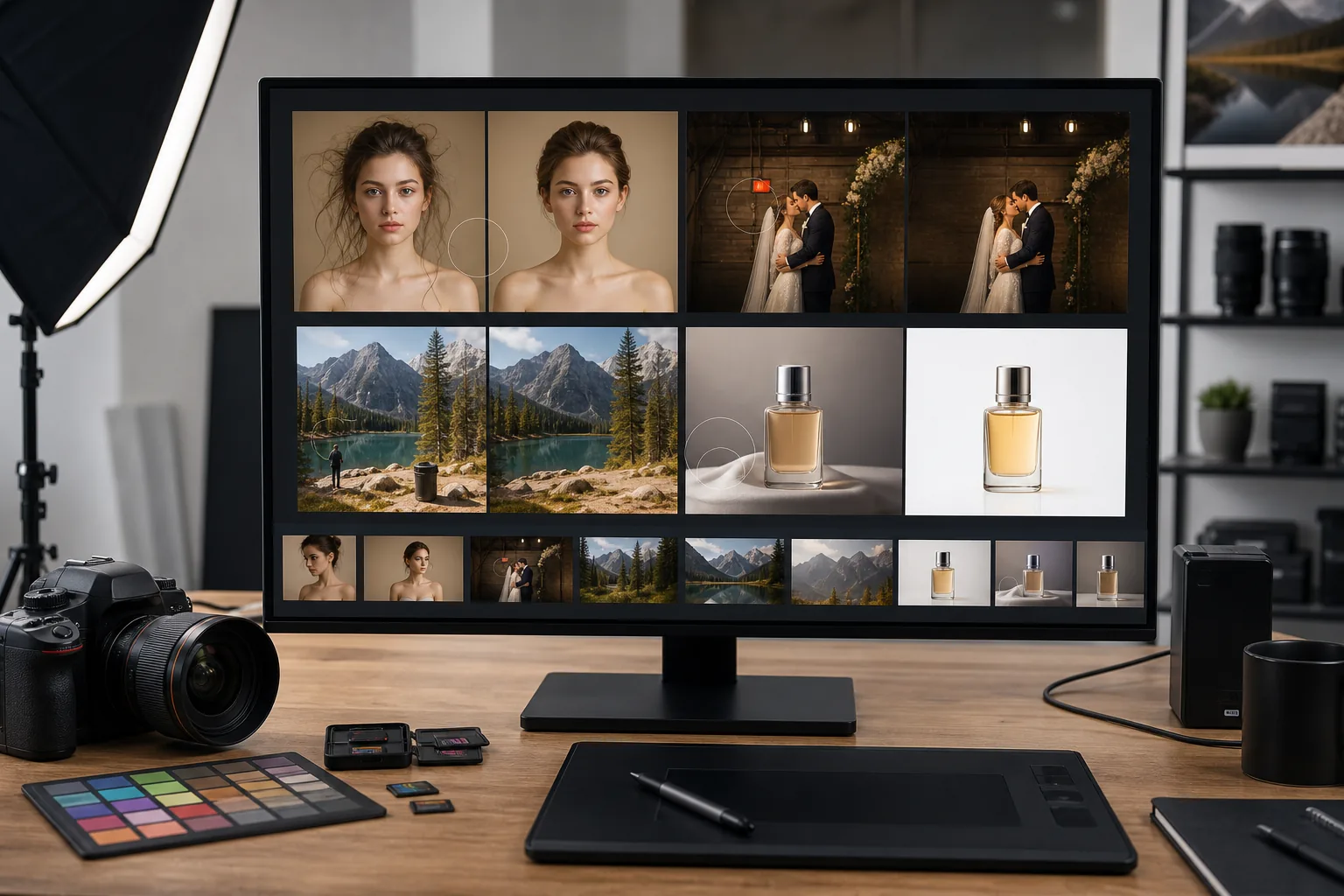
Why Photography Professionals Choose Magic Eraser
Magic Eraser gives photographers a fast, precise way to remove unwanted elements from any shot. Whether you are cleaning up a portrait backdrop, erasing photobombers from a landscape, or batch-processing a wedding gallery, the AI-powered tools handle tedious edits in seconds so you can focus on your creative vision. From portrait studios to outdoor adventure shoots, Magic Eraser fills the gap between full-featured desktop applications and the quick, targeted fixes that dominate daily post-production workloads. The result is a cleaner, faster pipeline that frees you to spend time on creative decisions rather than repetitive cleanup.
Key Benefits for Photographers
Accelerate your post-production workflow without compromising creative quality.
Dramatically Faster Retouching
Cut post-production time by removing distractions in seconds instead of minutes per image. For high-volume shoots like weddings or events, this translates to hours saved across a single gallery delivery.
Non-Destructive Precision
AI-powered removal reconstructs backgrounds naturally without leaving visible artifacts. The result looks hand-edited by a retouching specialist, preserving the integrity of your original composition.
Batch Processing at Scale
Process hundreds of images from a single event or session in one workflow. Apply consistent edits across an entire gallery so every delivered image meets the same quality standard.
Expanded Creative Options
Experiment with compositions you could not achieve on set. Remove distracting elements you noticed only after the shoot, extend backgrounds, or isolate subjects for composite work.
Client-Ready Turnaround
Deliver polished galleries to clients days sooner by eliminating the most time-consuming retouching tasks. Faster delivery means happier clients and more referrals.
No Additional Software Needed
Skip expensive desktop retouching subscriptions for quick cleanup tasks. Magic Eraser handles the most common removal and enhancement jobs directly in the browser.
Common Use Cases
Portrait Retouching
Remove blemishes, stray hairs, and background clutter from headshots and portrait sessions without manually masking every detail.
Background Cleanup
Erase power lines, trash cans, parked cars, and other distracting elements that pull attention away from your subject.
Batch Wedding & Event Editing
Process hundreds of event photos quickly by removing exit signs, cables, and unwanted guests from ceremony and reception shots.
Product & Still Life Photography
Isolate products on clean backgrounds, remove reflections from glass surfaces, and eliminate dust spots from studio shots.
Headshot & Corporate Photography
Clean up office and conference room backgrounds for corporate headshots, LinkedIn profiles, and company directories without needing a portable studio setup at every location.
Magic Eraser Tools for Photography
| Tool | How It Helps |
|---|---|
| Object Removal | Erase photobombers, lens flare, and stray objects from any scene while the AI reconstructs a natural-looking background. |
| Background Eraser | Instantly isolate subjects from busy backgrounds for composites, client proofs, or white-background portfolio shots. |
| AI Fill | Replace removed elements with contextually accurate fills — perfect for extending skies, rebuilding edges, or filling gaps after object removal. |
| Image Enhancer | Sharpen fine details, correct exposure, and upscale images so every print and digital delivery meets professional standards. |
How It Works
Upload
Drag and drop your RAW export, JPEG, or PNG into Magic Eraser — sign-in required to use free edits.
Edit
Brush over unwanted objects, remove backgrounds, or enhance image quality with one-click AI tools.
Export
Download your edited photo in high resolution, ready to deliver to clients or publish to your portfolio.
Frequently Asked Questions
Does Magic Eraser preserve original image resolution?
+
Yes. Magic Eraser processes your photos at full resolution, so exported images retain the same pixel dimensions and quality as your originals.
Can I use Magic Eraser on RAW files?
+
Magic Eraser works with JPEG, PNG, and WebP files. Export your RAW files from Lightroom or Capture One first, then upload the resulting JPEG or PNG for editing.
Is Magic Eraser suitable for high-volume event photography?
+
Absolutely. The batch processing capability lets you apply edits across hundreds of images, which is ideal for weddings, conferences, and sporting events.
Does Magic Eraser work with batch exports from Lightroom?
+
Yes. Export your edited images from Lightroom as JPEG or PNG, then upload the batch to Magic Eraser for object removal and background cleanup. The workflow integrates into your existing pipeline.
Can I remove complex objects like fences or tree branches?
+
Yes. The AI handles both simple and complex removals. Overlapping elements, repetitive patterns, and objects that cross multiple textures are all reconstructed naturally.
Is there a file size limit for uploads?
+
Magic Eraser handles images up to 25 MB. For very high-resolution studio files, export at standard web resolution first, or use the built-in compression on export.
Deliver flawless photos faster
Try Magic Eraser free to remove distractions, clean up backgrounds, and enhance every shot in your photography workflow.
Try Magic Eraser freeMore Industries
See how Magic Eraser helps professionals in other industries.
Magic Eraser helps real estate agents and photographers remove distracting objects, tidy visual clutter, and refine property photos. Review every edit and follow your local listing platform's disclosure rules so images remain an accurate representation of the property.
Online shoppers judge products by their images. Magic Eraser removes messy backgrounds, erases distracting elements, and creates marketplace-ready product photos that help build buyer trust and support stronger listings.
Prepare social media visuals without a complicated editing workflow. Magic Eraser helps creators, marketers, and brands remove distractions, replace backgrounds, and polish images for Instagram, TikTok, Facebook, LinkedIn, Pinterest, and X.
Appetizing images drive orders and foot traffic. Magic Eraser helps restaurants, cafes, and food brands clean up food photography, remove table clutter, and enhance dish presentation for menus, delivery apps, and social media marketing.
From lookbooks to product pages, fashion brands need flawless visuals at scale. Magic Eraser helps designers, stylists, and fashion marketers remove backgrounds, retouch model shots, and create polished flat lays that showcase every garment at its best.
Travel marketing lives and dies by imagery. Magic Eraser helps hotels, tour operators, and destination marketers remove crowds from landmarks, clean up property photos, and enhance scenic shots that turn browsers into bookers.
From yearbook portraits to campus marketing, educational institutions need clean, professional images. Magic Eraser helps schools, colleges, and e-learning platforms remove distractions from photos, enhance campus imagery, and create polished visuals for every audience.
Car buyers start online, and listing photos are your showroom. Magic Eraser helps dealerships and private sellers remove reflections, clean up lot backgrounds, and enhance vehicle images so every listing looks showroom-ready and drives test drives.