
Create Cleaner Furniture Product Photos
Remove showroom clutter, warehouse backdrops, price tags, and nearby inventory. Magic Eraser helps furniture retailers, makers, and resellers prepare clear images for catalogs, marketplaces, and room scenes.
Last updated
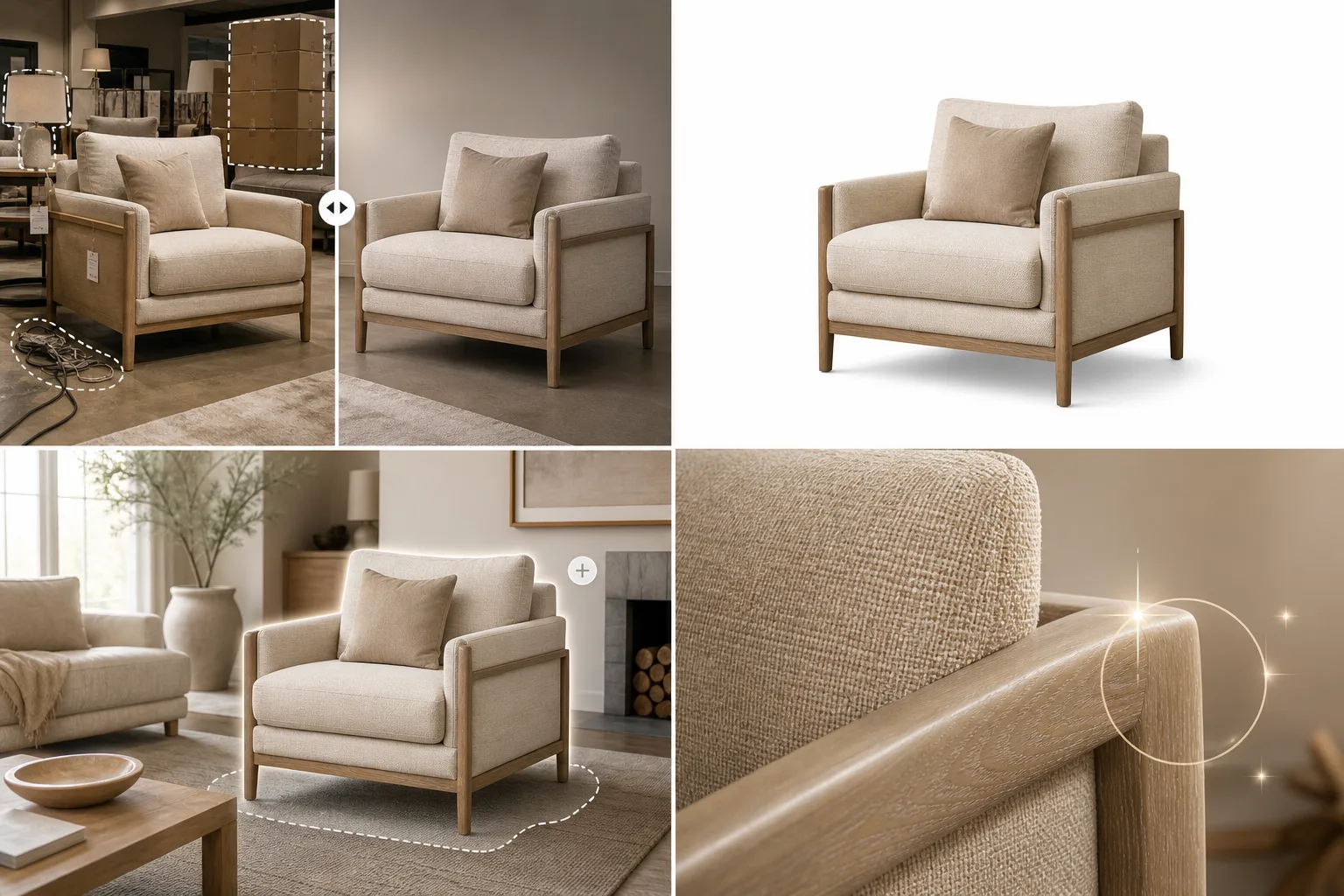
Why Furniture Professionals Choose Magic Eraser
Furniture photos need to show the piece clearly without hiding its materials, finish, or proportions. Magic Eraser removes visual clutter and isolates products for consistent marketplace, catalog, and direct-to-consumer imagery. Review every AI edit before publishing, especially around legs, open frames, reflective surfaces, and fine upholstery details, and keep dimensions and product colors accurate in the listing copy.
Key Benefits for Furniture & Home Decor
Present your pieces in clean, aspirational settings that inspire purchase decisions.
Room-Ready Product Shots
Remove showroom tags, warehouse backgrounds, and surrounding inventory from furniture photos so each piece is presented in a clean, focused context.
Virtual Room Placement
Remove the original background and place furniture in aspirational interior settings using AI Fill, helping customers visualize pieces in their own homes.
Consistent Catalog Standards
Ensure every product in your catalog — from sofas to accent tables — has the same clean presentation, building a premium brand impression across hundreds of SKUs.
Marketplace Listing Optimization
Create clean product images that meet the standards of Wayfair, Overstock, Amazon, and other furniture marketplaces where image quality drives click-through and conversion.
Showroom and Space Marketing
Clean up showroom photos by removing customers, staff, price tags, and temporary displays to create polished images for your website and marketing materials.
Faster Product Launch Imagery
Photograph new arrivals on the showroom floor and transform them into professional listing images within minutes, getting products online faster.
Common Use Cases
Marketplace Listing Photos
Remove warehouse shelving, price stickers, and surrounding inventory from furniture photos for clean Facebook Marketplace, Craigslist, and OfferUp listings.
Showroom Photo Cleanup
Eliminate sale signs, power cords, and adjacent display pieces from showroom shots so each furniture item stands alone in marketing materials.
Virtual Staging Preparation
Isolate furniture pieces from their current environment so they can be composited into staged room scenes for real estate or interior design presentations.
E-Commerce Catalog Images
Create consistent white-background product photos across your entire furniture catalog without renting studio space or hiring a photographer for every SKU.
Trade Show and Showroom Events
Capture furniture displays at trade shows and market events, then remove surrounding booths and distractions for clean product images suitable for post-event marketing.
Magic Eraser Tools for Furniture
| Tool | How It Helps |
|---|---|
| Object Removal | Erase price tags, power cords, surrounding inventory, and showroom signage from furniture photos in a single stroke. |
| Background Eraser | Isolate sofas, tables, and chairs from busy showrooms onto clean white or transparent backgrounds for catalog consistency. |
| AI Fill | Replace removed showroom elements with realistic flooring, walls, or room contexts so furniture appears naturally staged. |
| Image Enhancer | Correct uneven showroom lighting and boost wood grain, fabric texture, and color accuracy in furniture detail shots. |
How It Works
Upload
Upload your furniture photo from a showroom, warehouse, or customer's home directly into Magic Eraser.
Edit
Brush over clutter — price tags, adjacent pieces, power cords — and Magic Eraser removes them with AI-powered precision.
Export
Download your clean furniture image in high resolution for your online store, marketplace listing, or print catalog.
Frequently Asked Questions
Can Magic Eraser remove the background behind large furniture pieces?
+
Yes. The Background Eraser handles furniture of any size, cleanly separating sofas, dining tables, and bed frames from their surroundings for white-background or transparent exports.
Will the edits look natural on wood and fabric textures?
+
Magic Eraser's AI is trained to reconstruct natural textures. When removing objects from wooden tables or fabric upholstery, the fill blends seamlessly with surrounding materials.
Can I use Magic Eraser for virtual staging?
+
Magic Eraser is ideal for the first step of virtual staging — isolating furniture from its current background. You can then composite the clean cutout into any room scene.
Can Magic Eraser handle large furniture pieces in small spaces?
+
Yes. Remove surrounding clutter, walls, and other furniture to isolate individual pieces, even when photographed in tight showroom conditions.
Does it work with fabric and upholstery textures?
+
Absolutely. The AI preserves fabric weave patterns, cushion textures, and stitching details during background removal and image enhancement.
Can I create room mockups with my furniture?
+
The AI Fill feature lets you place furniture on new backgrounds, which is useful for creating aspirational room settings in your product listings.
Better Photos, Better Sales
Furniture shoppers buy what looks good. Give every piece in your inventory the professional presentation it deserves with Magic Eraser.
Try Magic Eraser freeMore Industries
See how Magic Eraser helps professionals in other industries.
Photographers spend hours in post-production removing distractions, retouching portraits, and perfecting backgrounds. Magic Eraser accelerates your editing workflow so you can deliver polished images to clients faster without sacrificing quality.
Magic Eraser helps real estate agents and photographers remove distracting objects, tidy visual clutter, and refine property photos. Review every edit and follow your local listing platform's disclosure rules so images remain an accurate representation of the property.
Online shoppers judge products by their images. Magic Eraser removes messy backgrounds, erases distracting elements, and creates marketplace-ready product photos that help build buyer trust and support stronger listings.
Prepare social media visuals without a complicated editing workflow. Magic Eraser helps creators, marketers, and brands remove distractions, replace backgrounds, and polish images for Instagram, TikTok, Facebook, LinkedIn, Pinterest, and X.
Appetizing images drive orders and foot traffic. Magic Eraser helps restaurants, cafes, and food brands clean up food photography, remove table clutter, and enhance dish presentation for menus, delivery apps, and social media marketing.
From lookbooks to product pages, fashion brands need flawless visuals at scale. Magic Eraser helps designers, stylists, and fashion marketers remove backgrounds, retouch model shots, and create polished flat lays that showcase every garment at its best.
Travel marketing lives and dies by imagery. Magic Eraser helps hotels, tour operators, and destination marketers remove crowds from landmarks, clean up property photos, and enhance scenic shots that turn browsers into bookers.
From yearbook portraits to campus marketing, educational institutions need clean, professional images. Magic Eraser helps schools, colleges, and e-learning platforms remove distractions from photos, enhance campus imagery, and create polished visuals for every audience.