
Showcase Smile Transformations with Professional Photos
Before-and-after smile photos are your most powerful marketing tool, but clinical settings rarely photograph well. Magic Eraser helps dental and orthodontic practices present treatment results and office imagery that attract new patients.
Last updated
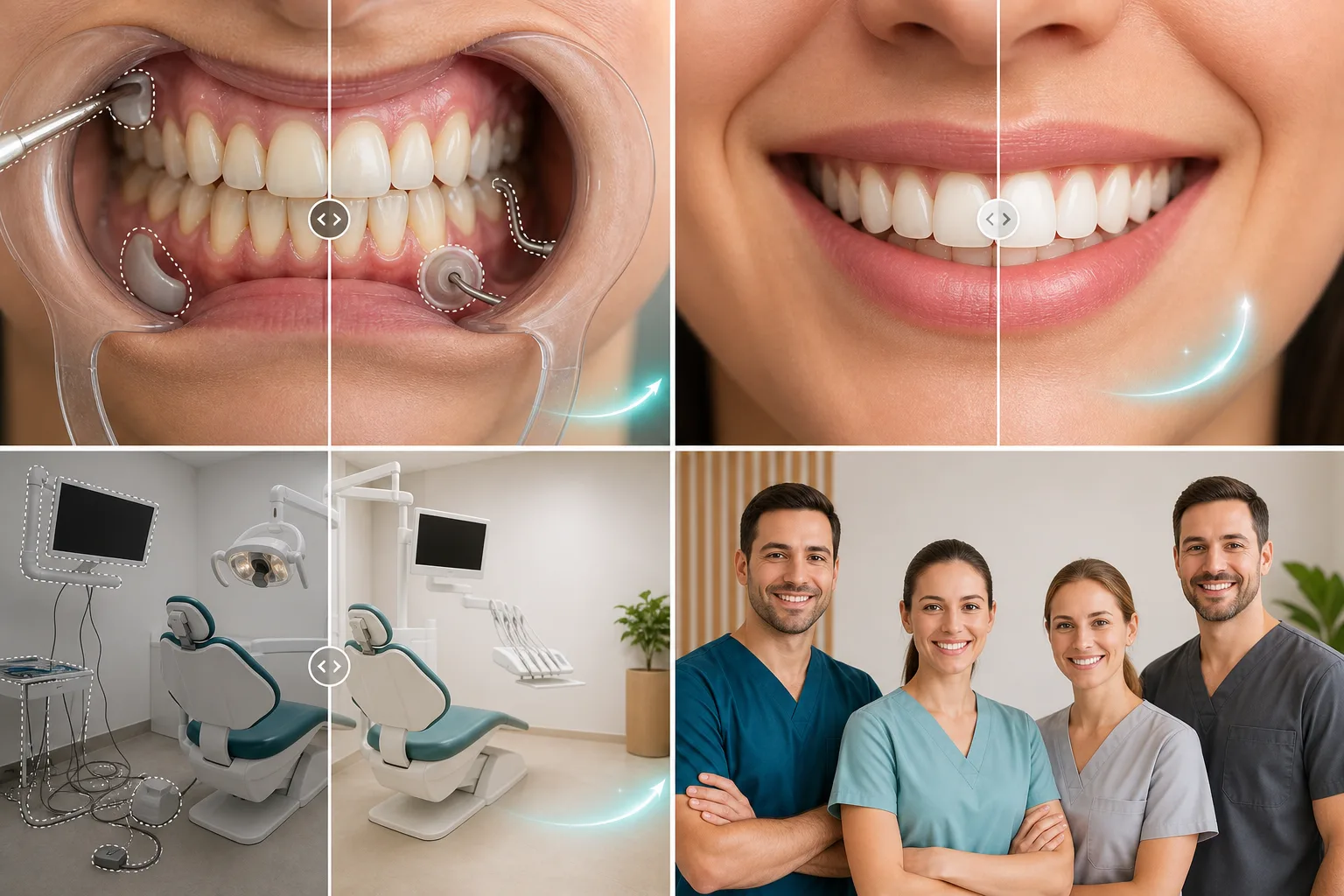
Why Dental Professionals Choose Magic Eraser
Patients searching for a dentist or orthodontist look at photos first — treatment results, office environment, and team portraits. Magic Eraser turns clinical photos into marketing-ready images by removing distracting equipment, cleaning backgrounds, and enhancing overall image quality. Patients increasingly research dental and orthodontic providers online before booking appointments. Modern facility photos, friendly team portraits, and clear treatment result imagery directly influence which practices receive the most new patient inquiries. Visual quality signals clinical quality in prospective patients' minds.
Key Benefits for Dental & Orthodontic Practices
Showcase your practice, results, and team with professional-quality imagery.
Treatment Result Photography
Clean up before-and-after treatment photos by removing background clutter and enhancing lighting so the clinical results are clearly visible to prospective patients.
Welcoming Office Imagery
Remove visible cables, outdated signage, and clutter from operatory and waiting room photos to present a modern, clean practice environment on your website.
Team Headshot Enhancement
Create polished staff portraits with clean backgrounds for your website, Google Business Profile, and patient-facing materials without a professional photo session.
Patient Education Materials
Clean up clinical images for use in treatment presentations, consent forms, and educational content that helps patients understand procedures and expected outcomes.
Review and Referral Content
Polish photos submitted by patients for reviews and testimonials, making them suitable for your website and social media while maintaining authenticity.
Multi-Practice Brand Standards
Dental groups and orthodontic chains can maintain consistent image quality across all locations, reinforcing the brand from website to each individual office.
Common Use Cases
Smile Makeover Galleries
Polish before-and-after smile photos by removing cheek retractors, saliva, and clinical background elements so the focus stays entirely on the transformation.
Treatment Result Documentation
Enhance orthodontic progress photos and veneer cases by improving lighting, removing reflections from dental mirrors, and cleaning up intraoral image backgrounds.
Practice Marketing and Social Media
Create professional images of your office, treatment rooms, and team for Instagram, Google Business Profile, and your practice website without hiring a photographer.
Patient Education Materials
Prepare clean clinical images for treatment plan presentations, consent forms, and educational brochures by removing distracting equipment and background clutter.
Patient Communication Materials
Create polished visuals for treatment brochures, post-operative care guides, and new patient welcome materials that communicate your practice's professionalism.
Magic Eraser Tools for Dental Practices
| Tool | How It Helps |
|---|---|
| Object Removal | Remove cheek retractors, suction tips, dental mirrors, and clinical instruments from smile photos to create patient-friendly marketing images. |
| Background Eraser | Isolate smile close-ups and staff headshots from clinical backgrounds for consistent, professional website and directory photos. |
| AI Fill | Replace removed clinical equipment with clean, neutral backgrounds so before-and-after images look polished and approachable. |
| Image Enhancer | Correct the harsh overhead lighting typical of dental operatories and improve tooth color accuracy in smile photography. |
How It Works
Upload
Upload smile photos, intraoral images, or practice environment shots from your dental camera or smartphone.
Edit
Brush over clinical instruments, background equipment, and distractions — Magic Eraser removes them while preserving dental detail.
Export
Download polished images for your website smile gallery, social media, patient education materials, or Google Business profile.
Frequently Asked Questions
Can Magic Eraser remove dental instruments from smile photos?
+
Yes. Brush over cheek retractors, mirrors, or suction tips and Magic Eraser removes them, filling in the area with natural-looking lip and face detail for a patient-friendly result.
Are edited smile photos accurate enough for case presentations?
+
Magic Eraser preserves tooth color, alignment, and detail with high fidelity. For clinical documentation, always retain original photos and use edited versions for marketing and patient-facing materials.
Can our front office staff handle the editing?
+
Absolutely. Magic Eraser requires no design or technical skills. Any team member can produce polished images in under a minute, making it easy to keep your smile gallery and social media up to date.
Can I use Magic Eraser for clinical case presentations?
+
Yes. Clean up case documentation photos for continuing education presentations, study group discussions, and professional publication submissions.
Does it preserve dental detail accuracy?
+
The AI enhances clarity without altering clinical details. Tooth structure, alignment, and treatment results remain accurate while background distractions are removed.
Can front desk staff use Magic Eraser?
+
Absolutely. The interface requires no design or technical skills. Any team member can clean up office photos, enhance headshots, and prepare images for your website and social media.
Your Best Smiles Deserve Better Photos
Turn clinical photos into patient-attracting marketing assets. Magic Eraser makes professional dental photo editing accessible to every practice.
Try Magic Eraser freeMore Industries
See how Magic Eraser helps professionals in other industries.
Photographers spend hours in post-production removing distractions, retouching portraits, and perfecting backgrounds. Magic Eraser accelerates your editing workflow so you can deliver polished images to clients faster without sacrificing quality.
Magic Eraser helps real estate agents and photographers remove distracting objects, tidy visual clutter, and refine property photos. Review every edit and follow your local listing platform's disclosure rules so images remain an accurate representation of the property.
Online shoppers judge products by their images. Magic Eraser removes messy backgrounds, erases distracting elements, and creates marketplace-ready product photos that help build buyer trust and support stronger listings.
Prepare social media visuals without a complicated editing workflow. Magic Eraser helps creators, marketers, and brands remove distractions, replace backgrounds, and polish images for Instagram, TikTok, Facebook, LinkedIn, Pinterest, and X.
Appetizing images drive orders and foot traffic. Magic Eraser helps restaurants, cafes, and food brands clean up food photography, remove table clutter, and enhance dish presentation for menus, delivery apps, and social media marketing.
From lookbooks to product pages, fashion brands need flawless visuals at scale. Magic Eraser helps designers, stylists, and fashion marketers remove backgrounds, retouch model shots, and create polished flat lays that showcase every garment at its best.
Travel marketing lives and dies by imagery. Magic Eraser helps hotels, tour operators, and destination marketers remove crowds from landmarks, clean up property photos, and enhance scenic shots that turn browsers into bookers.
From yearbook portraits to campus marketing, educational institutions need clean, professional images. Magic Eraser helps schools, colleges, and e-learning platforms remove distractions from photos, enhance campus imagery, and create polished visuals for every audience.