
Present Your Creative Work Flawlessly
Artists and designers spend hours on their craft — presentation should not be an afterthought. Magic Eraser cleans up artwork photography, removes studio reflections, and prepares pristine portfolio images for galleries, clients, and print.
Last updated
Why Art & Design Professionals Choose Magic Eraser
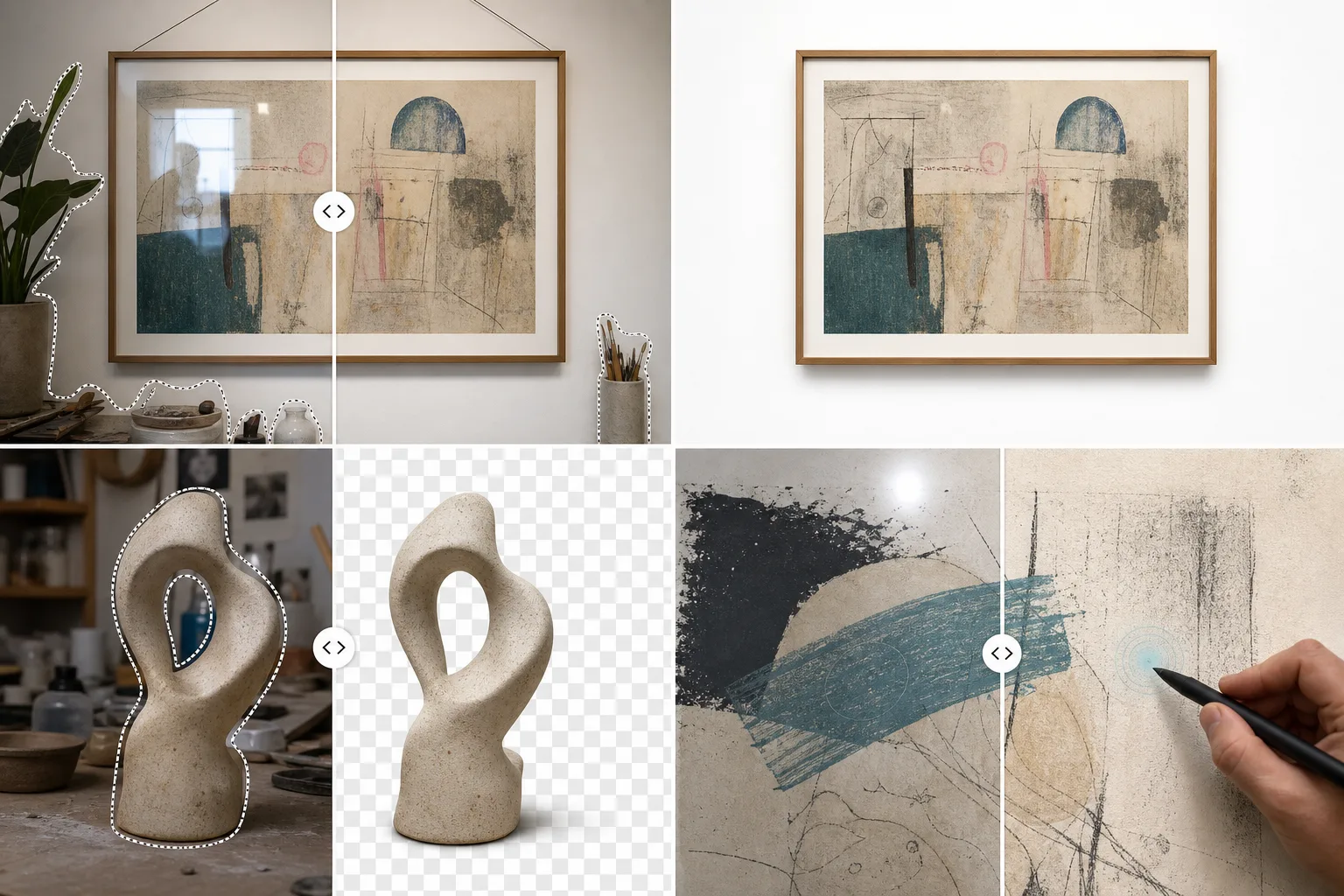
Photographing artwork introduces unwanted shadows, reflections, hanging hardware, and background textures. Magic Eraser removes these distractions so your paintings, sculptures, and designs are shown exactly as intended. Perfect for portfolio websites, gallery submissions, and print catalogs. For artists and designers, the quality of portfolio documentation directly impacts career opportunities. Gallery submissions, online sales, and client acquisitions all depend on imagery that accurately represents your work. Professional documentation turns physical artwork into digital assets that work across every platform and medium.
Key Benefits for Artists & Designers
Document and present your work with gallery-quality digital imagery.
Clean Portfolio Documentation
Remove gallery lighting hardware, hanging wires, and surrounding artworks from installation photos so each piece is presented in isolation.
Print and Reproduction Prep
Clean up high-resolution photos of artwork by removing dust, frame edges, and reflections to prepare accurate digital files for print reproduction and merchandise.
Exhibition and Show Marketing
Produce polished images for exhibition announcements, gallery websites, and art fair applications by removing venue distractions from installation views.
Online Gallery and Marketplace Listings
Create clean, consistent product images for Saatchi Art, Etsy, your personal website, and social media with removed backgrounds and enhanced color accuracy.
Client Presentation Materials
Prepare clean mockups and documentation images for client proposals, commission discussions, and project retrospectives.
Social Media Studio Content
Transform messy studio snapshots into polished process and behind-the-scenes content by removing background clutter while preserving the creative atmosphere.
Common Use Cases
Portfolio Presentation
Remove wall textures, hanging wires, and framing hardware from artwork photos. Present each piece on a clean, gallery-white background that lets the work speak for itself.
Artwork Photography Cleanup
Eliminate glass reflections, studio light glare, and camera shadows that appear when photographing paintings, prints, and mixed-media pieces.
Gallery & Competition Submissions
Meet strict submission guidelines by delivering distraction-free images with consistent backgrounds, proper cropping, and no visible mounting hardware.
Print & Reproduction Preparation
Clean up high-resolution scans and photographs of original artwork for giclée prints, postcards, and merchandise — removing dust, edge artifacts, and scanning imperfections.
Workshop and Class Marketing
Create clean promotional images for art workshops, classes, and creative retreats by polishing studio photos and removing background clutter.
Magic Eraser Tools for Art & Design
| Tool | How It Helps |
|---|---|
| Object Removal | Erase hanging hardware, gallery labels, mounting clips, and studio equipment from artwork photographs. |
| Background Eraser | Isolate artwork on pure white or transparent backgrounds for portfolio sites, catalogs, and print-on-demand mockups. |
| AI Fill | Seamlessly reconstruct canvas texture or paper grain where reflections or hardware were removed. |
| Image Enhancer | Restore true color fidelity and sharpen fine brushwork detail in artwork photographs taken under imperfect lighting. |
How It Works
Upload
Upload your artwork photo, scan, or studio shot in any common image format.
Edit
Brush over reflections, hanging wires, or background clutter. AI removes them while preserving artwork detail.
Export
Download gallery-ready images for portfolio sites, submission forms, or high-resolution print reproduction.
Frequently Asked Questions
Can it remove glass reflections from framed artwork photos?
+
Yes. Brush over the glare and the AI reconstructs the underlying artwork detail, producing a reflection-free image that shows the piece as intended.
Will it affect the color accuracy of my artwork?
+
Magic Eraser is designed to keep artwork colors stable during object removal and background cleanup. For color-critical prints, compare the export with your calibrated source file before production.
Is the resolution sufficient for giclée printing?
+
The tool preserves your source resolution. Upload a high-DPI scan or photo and the output retains full detail for large-format reproduction.
Can Magic Eraser accurately capture artwork colors?
+
The image enhancer corrects white balance and color temperature so photographed artwork more closely matches the original piece, which is critical for online sales and reproductions.
Does it work for sculpture and 3D artwork?
+
Yes. Remove pedestals, gallery hardware, and background distractions from sculpture photos while preserving depth, shadows, and three-dimensional detail.
Can I prepare images for juried show submissions?
+
Absolutely. Most juried shows require clean, consistent documentation images. Magic Eraser helps you achieve gallery-standard presentation from photos taken in your studio.
Showcase Your Art Beautifully
Join artists and designers who use Magic Eraser to create flawless portfolio images, gallery submissions, and print-ready artwork photography.
Try Magic Eraser freeMore Industries
See how Magic Eraser helps professionals in other industries.
Photographers spend hours in post-production removing distractions, retouching portraits, and perfecting backgrounds. Magic Eraser accelerates your editing workflow so you can deliver polished images to clients faster without sacrificing quality.
Magic Eraser helps real estate agents and photographers remove distracting objects, tidy visual clutter, and refine property photos. Review every edit and follow your local listing platform's disclosure rules so images remain an accurate representation of the property.
Online shoppers judge products by their images. Magic Eraser removes messy backgrounds, erases distracting elements, and creates marketplace-ready product photos that help build buyer trust and support stronger listings.
Prepare social media visuals without a complicated editing workflow. Magic Eraser helps creators, marketers, and brands remove distractions, replace backgrounds, and polish images for Instagram, TikTok, Facebook, LinkedIn, Pinterest, and X.
Appetizing images drive orders and foot traffic. Magic Eraser helps restaurants, cafes, and food brands clean up food photography, remove table clutter, and enhance dish presentation for menus, delivery apps, and social media marketing.
From lookbooks to product pages, fashion brands need flawless visuals at scale. Magic Eraser helps designers, stylists, and fashion marketers remove backgrounds, retouch model shots, and create polished flat lays that showcase every garment at its best.
Travel marketing lives and dies by imagery. Magic Eraser helps hotels, tour operators, and destination marketers remove crowds from landmarks, clean up property photos, and enhance scenic shots that turn browsers into bookers.
From yearbook portraits to campus marketing, educational institutions need clean, professional images. Magic Eraser helps schools, colleges, and e-learning platforms remove distractions from photos, enhance campus imagery, and create polished visuals for every audience.