
Jahrbuch-Fotobearbeitung mit KI-Tools
Jahrbuchfotos benötigen einheitliche Hintergründe, gleichmäßige Beleuchtung und saubere Porträts. Magic Eraser hilft Schulen, Studios und Eltern, professionell aussehende Ergebnisse ohne teure Retusche-Workflows zu erzielen.
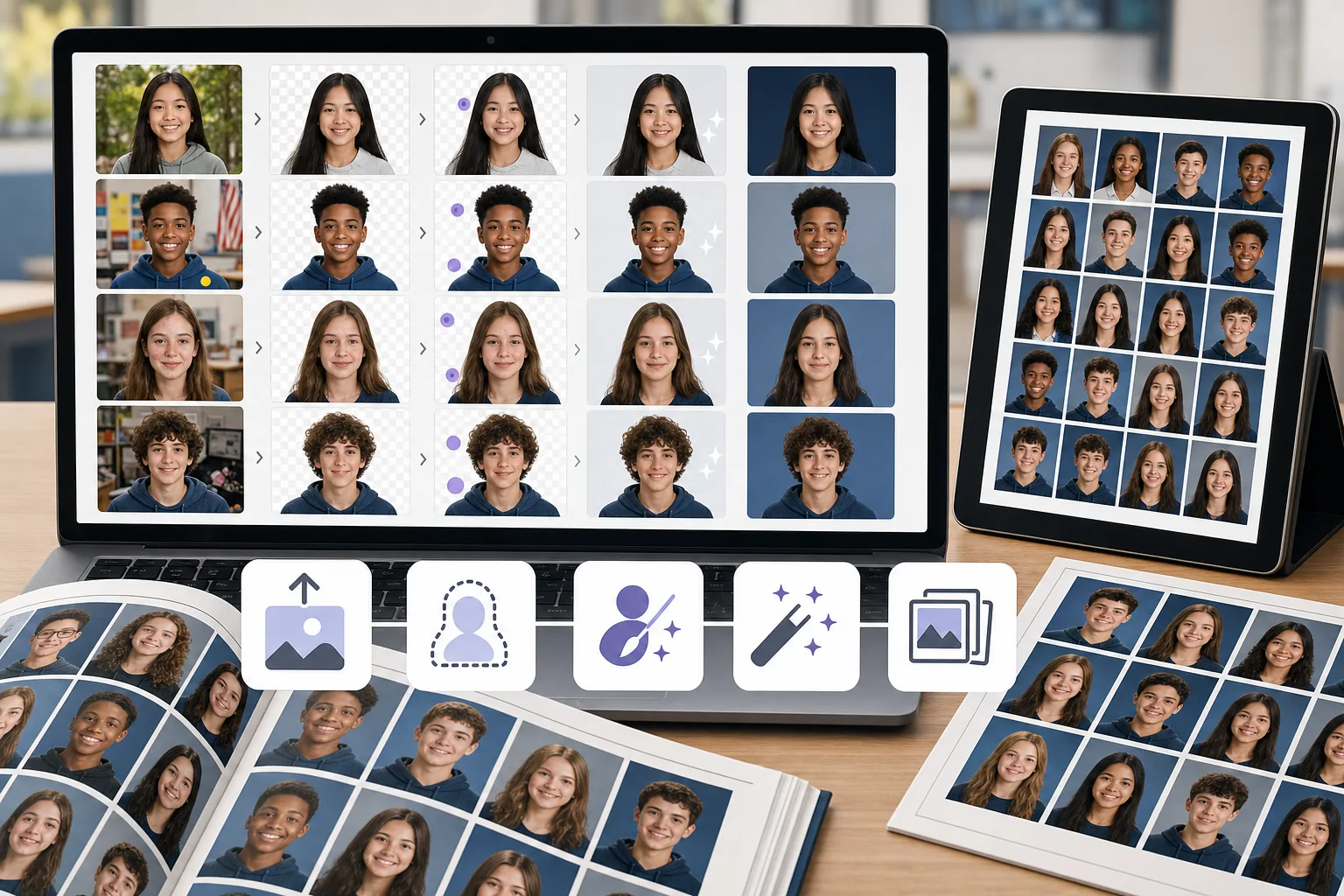
Inkonsistente Hintergründe auf den Fotos
Verschiedene Schüler wurden an unterschiedlichen Orten oder an unterschiedlichen Tagen fotografiert, was bedeutet, dass die Hintergründe in Farbe, Textur und Beleuchtung variieren. Ihre manuelle Standardisierung ist zeitaufwändig.
Schönheitsfehler und Ablenkungen in Porträts
Streunende Haare, Hautunreinheiten, Aufkleber auf der Kleidung und Hintergrundobjekte müssen alle entfernt werden, um polierte Jahrbuchporträts zu erstellen.
Große Losgrößen mit engen Fristen
Jahrbuchteams bearbeiten innerhalb einer Frist Hunderte von Porträts. Jeder Engpass bei der Bildbearbeitung vervielfacht sich auf die gesamte Klassenliste.
Wie Magic Eraser bei Jahrbuchfotos hilft
Laden Sie das Porträt hoch
Öffnen Sie Magic Eraser und laden Sie ein Studentenporträt oder einen Stapel Fotos hoch, die bereinigt werden müssen.
Entfernen oder ersetzen Sie den Hintergrund
Verwenden Sie die Hintergrundentfernung, um das Motiv zu isolieren, und platzieren Sie es dann auf einem sauberen, einheitlichen Jahrbuchhintergrund.
Beseitigen Sie Ablenkungen
Löschen Sie Schönheitsfehler, vereinzelte Objekte oder ungleichmäßige Beleuchtungsartefakte mit dem KI-Radiergummi-Werkzeug.
Erweitern und exportieren
Wenden Sie AI Enhancement an, um das Porträt zu schärfen und die Belichtung auszugleichen, und exportieren Sie es dann in Druckauflösung.
Häufig gestellte Fragen
Kann Magic Eraser Jahrbuch-Fotohintergründe ersetzen?
+
Ja. Verwenden Sie die Hintergrundentfernung, um den Schüler zu isolieren, und platzieren Sie das Porträt dann auf einem festen oder mit einem Markenzeichen versehenen Hintergrund, um ein einheitliches Jahrbuch-Erscheinungsbild zu erzielen.
Ist das für Schuljahrbuchteams geeignet?
+
Ja. Magic Eraser ist auch für Mitglieder des Jahrbuchausschusses und ehrenamtliche Eltern leicht zu verwenden, auch wenn sie keine Erfahrung als Redakteur haben.
Kann ich Schönheitsfehler aus Studentenporträts entfernen?
+
Ja. Das Radiergummi-Werkzeug eignet sich gut zum Entfernen von Hautunreinheiten, Aufklebern und kleinen Ablenkungen von Porträtaufnahmen.
Funktioniert Magic Eraser auch für Gruppenfotos?
+
Ja. Sie können Gruppenfotos bereinigen, indem Sie Hintergrundablenkungen entfernen, die Beleuchtung verbessern und Kompositionsprobleme beheben.
Mit welcher Auflösung kann ich Jahrbuchfotos exportieren?
+
Die verfügbare Exportgröße hängt von den gewählten Verbesserungs- und Kontooptionen ab. Prüfen Sie vor der Abgabe, ob die Pixelmaße der heruntergeladenen Datei den Größen- und DPI-Vorgaben Ihrer Jahrbuchdruckerei entsprechen.
Erhalten Sie Jahrbuchporträts, die optimal aussehen
Probieren Sie Magic Eraser kostenlose und saubere Hintergründe aus, beseitigen Sie Ablenkungen und verbessern Sie Schülerporträts ohne teure Software.
Testen Sie Magic Eraser kostenlosVerwandte Anwendungsfälle
Erfahren Sie, wie Profis diese Tools in realen Workflows einsetzen.
Exposé-Fotos voller persönlicher Gegenstände, geparkter Autos oder Baustellenmaterial schrecken Käufer ab. Magic Eraser räumt Ihre Immobilienfotos per KI blitzschnell auf — ganz ohne Photoshop-Kenntnisse.
Unscharfe Hintergründe und unaufgeräumte Produktbilder kosten Sie jeden Tag Umsatz. Magic Eraser erstellt professionelle Produktbilder in Sekunden — ganz ohne Photoshop-Kenntnisse. Hochladen, Störendes entfernen, mit Vertrauen einstellen.
Behörden lehnen täglich tausende Passfotos wegen falscher Hintergründe ab. Magic Eraser entfernt jeden Hintergrund und ersetzt ihn in Sekunden durch die exakt benötigte Farbe — Weiß, Hellgrau oder Blau.
Verwandte Vergleiche
Sehen Sie, wie Magic Eraser im Vergleich zu ähnlichen Tools abschneidet.
TouchRetouch ist eine beliebte kostenpflichtige mobile App zur Entfernung von Objekten und Makeln. Magic Eraser bietet kostenlose KI-Bearbeitung auf jedem Gerät ohne Installation. Vergleichen Sie Funktionen, Preise und Benutzerfreundlichkeit.
Cleanup.pictures ist ein kostenloses Web-Tool zur schnellen Objektentfernung. Magic Eraser bietet 8 KI-Bearbeitungstools, mobile Apps und erweiterte Verarbeitung. Sehen Sie den Vergleich.
remove.bg ist Marktführer für Hintergrundentfernung mit leistungsstarker API und Photoshop-/Figma-Plugins. Magic Eraser bietet acht KI-Werkzeuge — von Objektentfernung und generativer Füllung bis hin zu KI-Verbesserung und Design — alles in einem Editor.
Zwei leistungsstarke KI-Fotoeditoren mit unterschiedlichen Stärken. Magic Eraser bietet ein breiteres Set generativer KI-Tools, während Photoroom bei E-Commerce-Produktfotografie und Stapelverarbeitung glänzt. Finden Sie heraus, was zu Ihrem Workflow passt.
Verwandte Anleitungen
Entdecke weitere Anleitungen und Inhalte zu diesem Workflow.
Lerne, wie du mit Magic Eraser Objekte, Personen, Text und störende Details aus Fotos entfernst und sauberere KI-Ergebnisse erzielst.
Person aus Foto entfernen mit KI in Sekunden. Anleitung für Reisefotos, Immobilienbilder und Produktfotos.
Anleitung zum Entfernen von Wasserzeichen aus eigenen Fotos mit KI. Wann es angemessen ist, Techniken und Tipps.