
Professionelle Headshot-Bearbeitung leicht gemacht
Für LinkedIn-Profile, Teamseiten und Unternehmensverzeichnisse ist ein sauberes, professionelles Headshot wichtig. Magic Eraser hilft Einzelpersonen und Unternehmen, ausgefeilte Porträts zu erstellen, ohne dass ein Studio erneut gedreht werden muss.
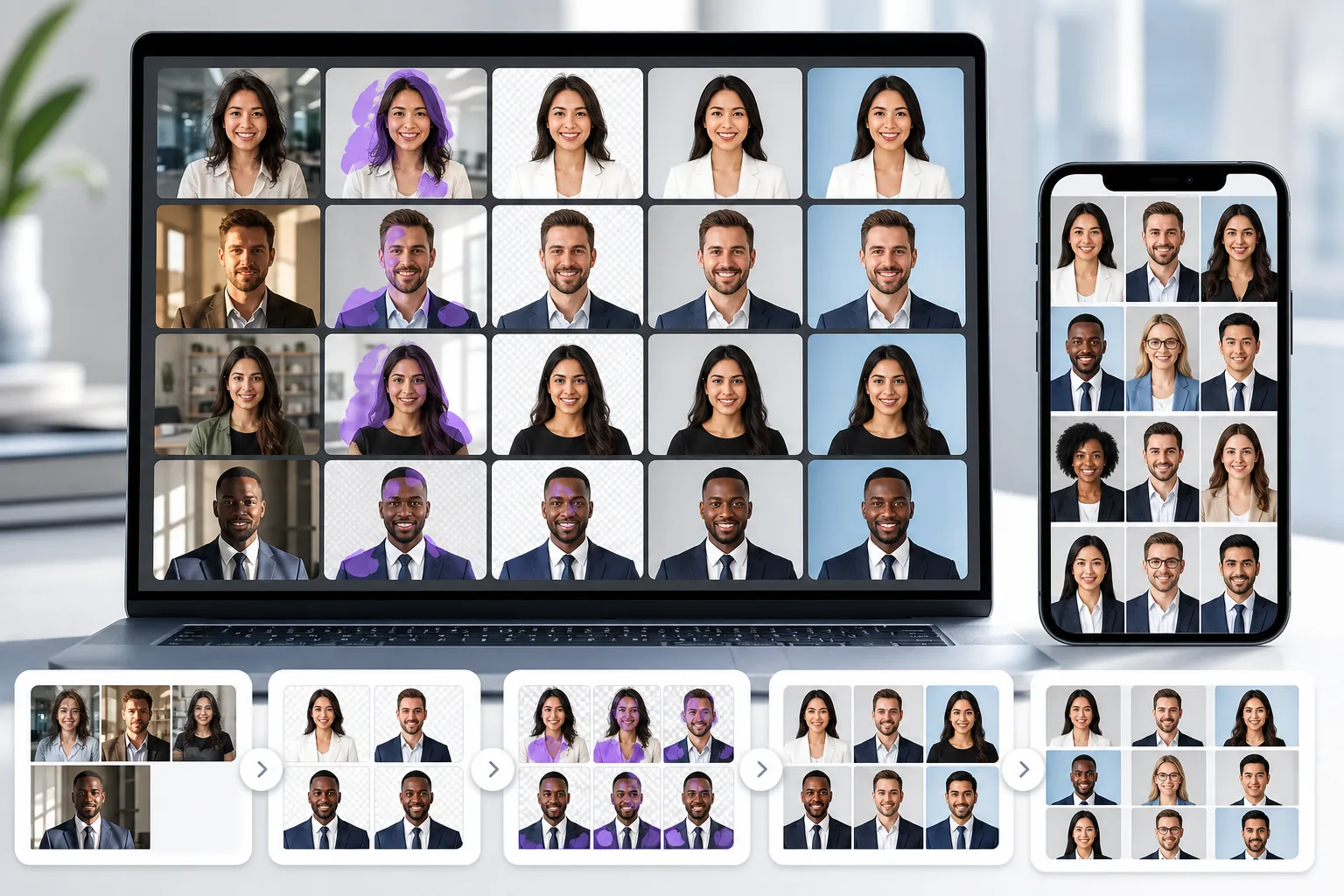
Ablenkender oder unprofessioneller Hintergrund
Porträtfotos, die am Schreibtisch, im Flur oder zu Hause aufgenommen werden, haben oft einen unübersichtlichen Hintergrund, der den professionellen Look untergräbt.
Probleme mit ungleichmäßiger Beleuchtung und Hautdetails
Bürobeleuchtung erzeugt harte Schatten, ungleichmäßige Hauttöne und weiche Details, die Porträtaufnahmen im Vergleich zu Studioporträts amateurhaft wirken lassen.
Inkonsistente Teamfotos im gesamten Unternehmen
Wenn Teammitglieder Porträtfotos einreichen, die zu unterschiedlichen Zeiten und an unterschiedlichen Orten aufgenommen wurden, sieht die Unternehmensseite inkonsistent und weniger ausgefeilt aus.
Wie Magic Eraser bei professionellen Porträtaufnahmen hilft
Laden Sie das Porträt hoch
Öffnen Sie Magic Eraser und laden Sie das Porträt hoch, das einer professionellen Politur bedarf.
Entfernen oder ersetzen Sie den Hintergrund
Mithilfe der Hintergrundentfernung können Sie das Motiv auf einem sauberen weißen, grauen oder gebrandeten Hintergrund platzieren, der einheitlich und professionell aussieht.
Beseitigen Sie Ablenkungen
Entfernen Sie vereinzelte Haare, Kleidungsfalten oder Hautunreinheiten mit dem Radiergummi, um ein saubereres endgültiges Porträt zu erhalten.
Erweitern und herunterladen
Wenden Sie AI Enhancement an, um Details zu schärfen und die Beleuchtung auszugleichen, und exportieren Sie dann den polierten Kopfschuss in der von Ihnen benötigten Auflösung.
Removal tools for this workflow
Häufig gestellte Fragen
Kann Magic Eraser einen professionellen Headshot-Hintergrund erstellen?
+
Ja. Entfernen Sie den vorhandenen Hintergrund und ersetzen Sie ihn durch eine Volltonfarbe oder einen Farbverlauf, der den professionellen Porträtstandards für LinkedIn, Teamseiten und Unternehmenszwecke entspricht.
Ist dies für HR- und Teamseitenfotos nützlich?
+
Ja. Unternehmen verwenden Magic Eraser, um Teamfotos mit einheitlichem Hintergrund und einheitlicher Beleuchtung zu standardisieren, selbst wenn die Fotos zu unterschiedlichen Zeiten und an unterschiedlichen Orten aufgenommen wurden.
Kann ich Beleuchtungsprobleme bei Kopfschüssen beheben?
+
AI Enhancement kann die Belichtung ausgleichen, harte Schatten reduzieren und Hautdetails verbessern, damit Porträtaufnahmen professioneller aussehen.
Funktioniert Magic Eraser für LinkedIn-Profilfotos?
+
Ja. Die Bereinigung des Hintergrunds und die Verbesserung der Detailqualität sind die beiden häufigsten Verbesserungen für LinkedIn-Headshots, und Magic Eraser übernimmt beides.
Kann ich Porträtaufnahmen auf meinem Telefon bearbeiten?
+
Ja. Magic Eraser funktioniert sowohl im Web als auch auf Mobilgeräten, sodass Sie ein Portraitfoto von jedem Gerät aus bereinigen und verbessern können.
Erhalten Sie ein professionelles Porträtfoto ohne erneute Aufnahme im Studio
Testen Sie Magic Eraser kostenlos und erstellen Sie klare, elegante Porträts mit konsistenten Hintergründen und verbesserten Details.
Testen Sie Magic Eraser kostenlosVerwandte Anwendungsfälle
Erfahren Sie, wie Profis diese Tools in realen Workflows einsetzen.
Exposé-Fotos voller persönlicher Gegenstände, geparkter Autos oder Baustellenmaterial schrecken Käufer ab. Magic Eraser räumt Ihre Immobilienfotos per KI blitzschnell auf — ganz ohne Photoshop-Kenntnisse.
Unscharfe Hintergründe und unaufgeräumte Produktbilder kosten Sie jeden Tag Umsatz. Magic Eraser erstellt professionelle Produktbilder in Sekunden — ganz ohne Photoshop-Kenntnisse. Hochladen, Störendes entfernen, mit Vertrauen einstellen.
Behörden lehnen täglich tausende Passfotos wegen falscher Hintergründe ab. Magic Eraser entfernt jeden Hintergrund und ersetzt ihn in Sekunden durch die exakt benötigte Farbe — Weiß, Hellgrau oder Blau.
Verwandte Vergleiche
Sehen Sie, wie Magic Eraser im Vergleich zu ähnlichen Tools abschneidet.
TouchRetouch ist eine beliebte kostenpflichtige mobile App zur Entfernung von Objekten und Makeln. Magic Eraser bietet kostenlose KI-Bearbeitung auf jedem Gerät ohne Installation. Vergleichen Sie Funktionen, Preise und Benutzerfreundlichkeit.
Cleanup.pictures ist ein kostenloses Web-Tool zur schnellen Objektentfernung. Magic Eraser bietet 8 KI-Bearbeitungstools, mobile Apps und erweiterte Verarbeitung. Sehen Sie den Vergleich.
remove.bg ist Marktführer für Hintergrundentfernung mit leistungsstarker API und Photoshop-/Figma-Plugins. Magic Eraser bietet acht KI-Werkzeuge — von Objektentfernung und generativer Füllung bis hin zu KI-Verbesserung und Design — alles in einem Editor.
Zwei leistungsstarke KI-Fotoeditoren mit unterschiedlichen Stärken. Magic Eraser bietet ein breiteres Set generativer KI-Tools, während Photoroom bei E-Commerce-Produktfotografie und Stapelverarbeitung glänzt. Finden Sie heraus, was zu Ihrem Workflow passt.
Verwandte Anleitungen
Entdecke weitere Anleitungen und Inhalte zu diesem Workflow.
Erfahre, wie KI Geschäftsabläufe verändert, von Automatisierung über Datenanalyse bis hin zu stärker personalisierten Kundenerlebnissen.
Lerne, wie du mit Magic Eraser Objekte, Personen, Text und störende Details aus Fotos entfernst und sauberere KI-Ergebnisse erzielst.
Person aus Foto entfernen mit KI in Sekunden. Anleitung für Reisefotos, Immobilienbilder und Produktfotos.