
Verbesserung von Hochzeitsfotos
Retten Sie unterbelichtete Empfangsfotos, entfernen Sie ablenkende Hintergründe und verfeinern Sie Hauttöne für albumwürdige Hochzeitsbilder. Diese Vorlage ist für die schwierigen Lichtverhältnisse von Zeremonien und Empfängen ausgelegt: schummrige Locations, gemischte Farbstiche durch DJ-Licht und überladene Hintergründe, die die Aufmerksamkeit vom Brautpaar ablenken.
Diese Vorlage kostenlos testenEvents template preview
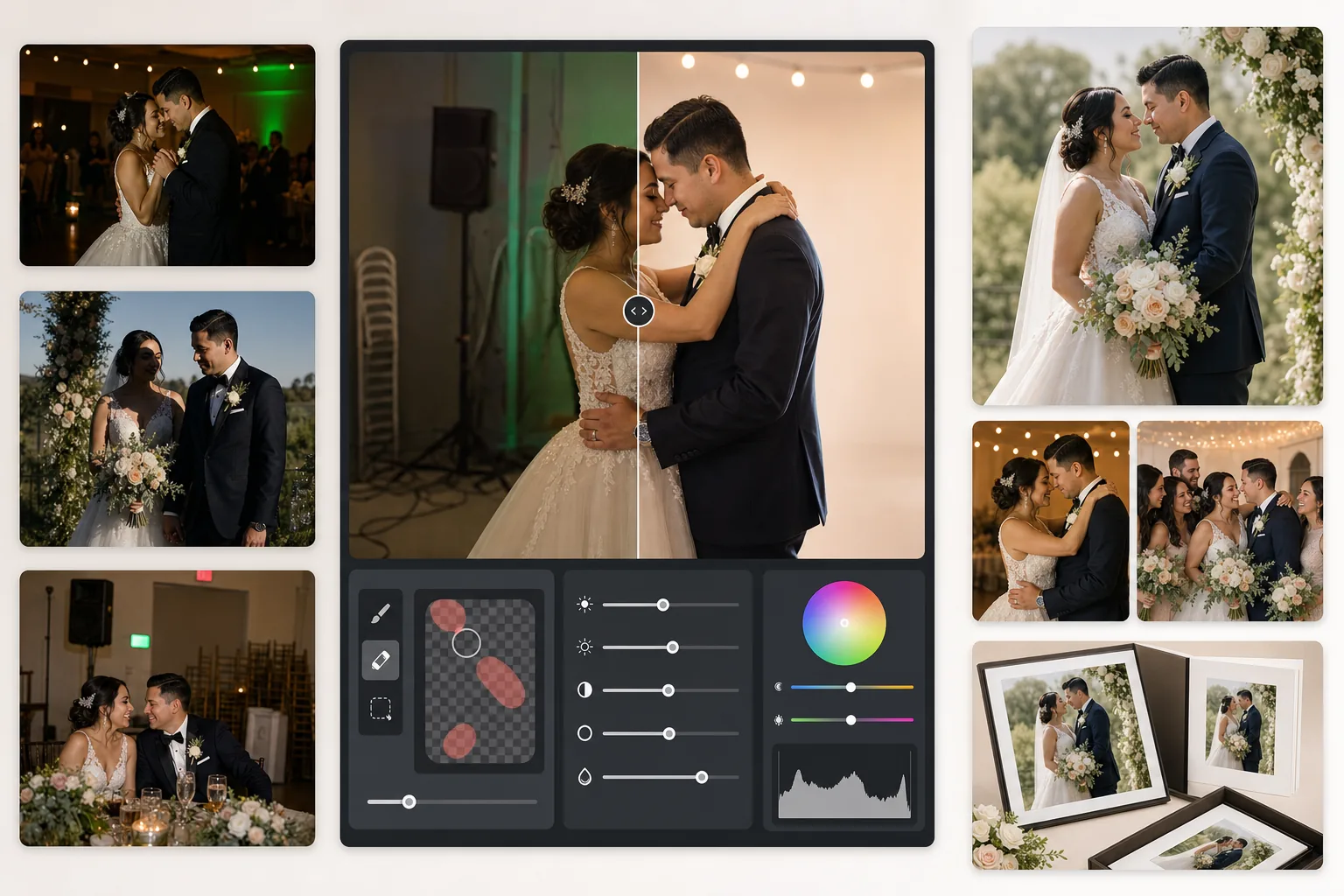
Was diese Vorlage leistet
Korrigiert die häufigsten Probleme der Hochzeitsfotografie: unterbelichtete Empfangsaufnahmen, orangefarbene Glühlampen- oder grüne Leuchtstoffröhren-Farbstiche, harte Blitzschatten und ablenkende Hintergrundelemente wie Notausgangsschilder, gestapelte Stühle und Catering-Equipment. AI Enhance stellt Details aus dunklen Tanzflächenfotos wieder her und gleicht gemischtes Licht aus, während Magic Eraser unerwünschte Objekte spurlos entfernt. Hauttöne werden so verfeinert, dass sie natürlich und warm wirken, ohne überglättet zu sein.
Vorlageneinstellungen
| Belichtungswiederherstellung | +1,5 EV Schattenaufhellung mit Erhalt der Lichter |
| Weißabgleich | Automatische Mischlichtkorrektur (Glühlampe/Leuchtstoff/Tageslicht) |
| Hautton-Modus | Natürliche Wärme (+5 Wärme, +3 Glättung, Details erhalten) |
| Ausgabeauflösung | 4000px lange Kante (druckfertig bei 300 DPI bis 13×19) |
| Farbprofil | Adobe RGB (größerer Farbraum für professionellen Druck) |
| Rauschreduzierung | Hoch-ISO-adaptiv (erhält Details in aufgehellten Schatten) |
So verwenden Sie diese Vorlage
Laden Sie Ihre Hochzeitsfotos hoch
Laden Sie Empfangsaufnahmen, Zeremoniebilder oder von Gästen mit dem Smartphone aufgenommene Fotos hoch. Die Vorlage bewältigt alles, von aus RAW exportierten JPEGs einer professionellen DSLR bis zu komprimierten Handyfotos — die KI passt die Stärke der Verbesserung an die Qualität der Quelle an.
Licht und Farbe korrigieren
AI Enhance hellt dunkle Empfangsszenen auf, neutralisiert die orange-grünen Farbstiche durch das Mischlicht der Location und gleicht blitzbeleuchtete Vordergründe mit umgebungsbeleuchteten Hintergründen ab. Hauttöne werden zu natürlicher Wärme verschoben, ohne das Weiß des Kleides oder die Dekofarben zu beeinträchtigen.
Ablenkungen entfernen
Magic Eraser entfernt Notausgangsschilder, Feuerlöscher, gestapelte Stühle, Catering-Wagen, Stromkabel am Boden und Gäste, die im Hintergrund ins Bild geraten. Die KI rekonstruiert das Hintergrundmuster hinter den entfernten Objekten auf natürliche Weise.
Für Alben und Drucke exportieren
Laden Sie mit 4000px langer Kante in Adobe RGB für den professionellen Fotolabordruck herunter oder in sRGB für die digitale Weitergabe und Online-Galerien. Die Ausgabe ist für Drucke bis 13×19 Zoll bei 300 DPI dimensioniert.
Profi-Tipps für beste Ergebnisse
- ✓Bei dunklen Aufnahmen auf der Tanzfläche kann die Vorlage etwa 1,5 Blendenstufen an Schattendetails wiederherstellen. Ist das Originalfoto nahezu vollständig schwarz, kann die Verbesserung Rauschen erzeugen — beginnen Sie mit Fotos, auf denen Sie die Motive zumindest schwach erkennen können.
- ✓Die Hautton-Korrektur ist auf die Wärme der Hochzeitsfotografie abgestimmt — etwas wärmer als neutral, was die meisten Hauttöne bei Mischlicht vorteilhaft zur Geltung bringt. Bei Fotos einer Zeremonie im Freien mit bereits gutem natürlichem Licht fällt die Korrektur dezent aus.
- ✓Wenn Sie Hintergrundobjekte entfernen, bearbeiten Sie für möglichst natürliche Ergebnisse jeweils einen Bereich. Notausgangsschilder, Sprinklerköpfe und Steckdosen sind klein genug für eine saubere Entfernung in einem Durchgang. Bei größeren Objekten wie gestapelten Stühlen ist es vorteilhaft, sie in Abschnitten zu entfernen.
- ✓Bearbeiten Sie zuerst die Porträts des Brautpaars, dann die Gruppenaufnahmen und schließlich die Schnappschüsse. So können Sie eine einheitliche Farbabstimmung über die wichtigsten Fotos hinweg festlegen, bevor Sie zu den Nebenbildern übergehen.
Häufige Fragen
Kann das verschwommene Empfangsfotos retten?
+
AI Enhance kann leichte Unschärfe durch lange Verschlusszeiten nachschärfen und erhebliche Schattendetails wiederherstellen, aber es kann keine starke Bewegungsunschärfe beheben, bei der die Motive sichtbar verwischt sind. Fotos mit leichter Verwacklungsunschärfe oder leichter Fokusunschärfe verbessern sich deutlich.
Verliert das weiße Brautkleid an Details?
+
Der Tone-Mapping-Algorithmus schützt gezielt die Lichterdetails in Weißtönen. Kleidstruktur, Spitzenmuster und Stofffalten bleiben erhalten, selbst wenn im selben Bild die Schatten aufgehellt werden. Das Ergebnis bewahrt den vollen Umfang von strahlendem Weiß bis zu tiefen Schatten.
Ist das gut genug für gedruckte Alben?
+
Ja. Die Ausgabe mit 4000px bei 300 DPI unterstützt Drucke bis 13×19 Zoll. Das Adobe-RGB-Farbprofil bewahrt den größeren Farbraum, den professionelle Fotolabore verwenden. Für Standard-Albumseiten im Format 8×10 übertrifft die Auflösung das für scharfe Drucke Erforderliche bei Weitem.
Verwandeln Sie jedes Hochzeitsfoto in ein albumwürdiges Bild
Laden Sie Empfangs- und Zeremoniefotos hoch und erhalten Sie in Sekunden professionell verbesserte, druckfertige Bilder. Funktioniert sowohl mit Fotos professioneller Kameras als auch mit Smartphone-Fotos.
Kostenlos testen