
Aufhellung von Eventfotos
Stellen Sie Details aus dunklen Veranstaltungsfotos wieder her, die bei Konzerten, Galas, Geburtstagsfeiern und Firmenevents aufgenommen wurden. Diese Vorlage hebt die Belichtung um bis zu +2 EV an, korrigiert harte Blitzschatten, entfernt rote Augen und verstärkt die Atmosphäre der ursprünglichen Szene, damit Ihre Eventfotos so lebendig wirken wie der Moment selbst.
Diese Vorlage kostenlos testenEvents template preview
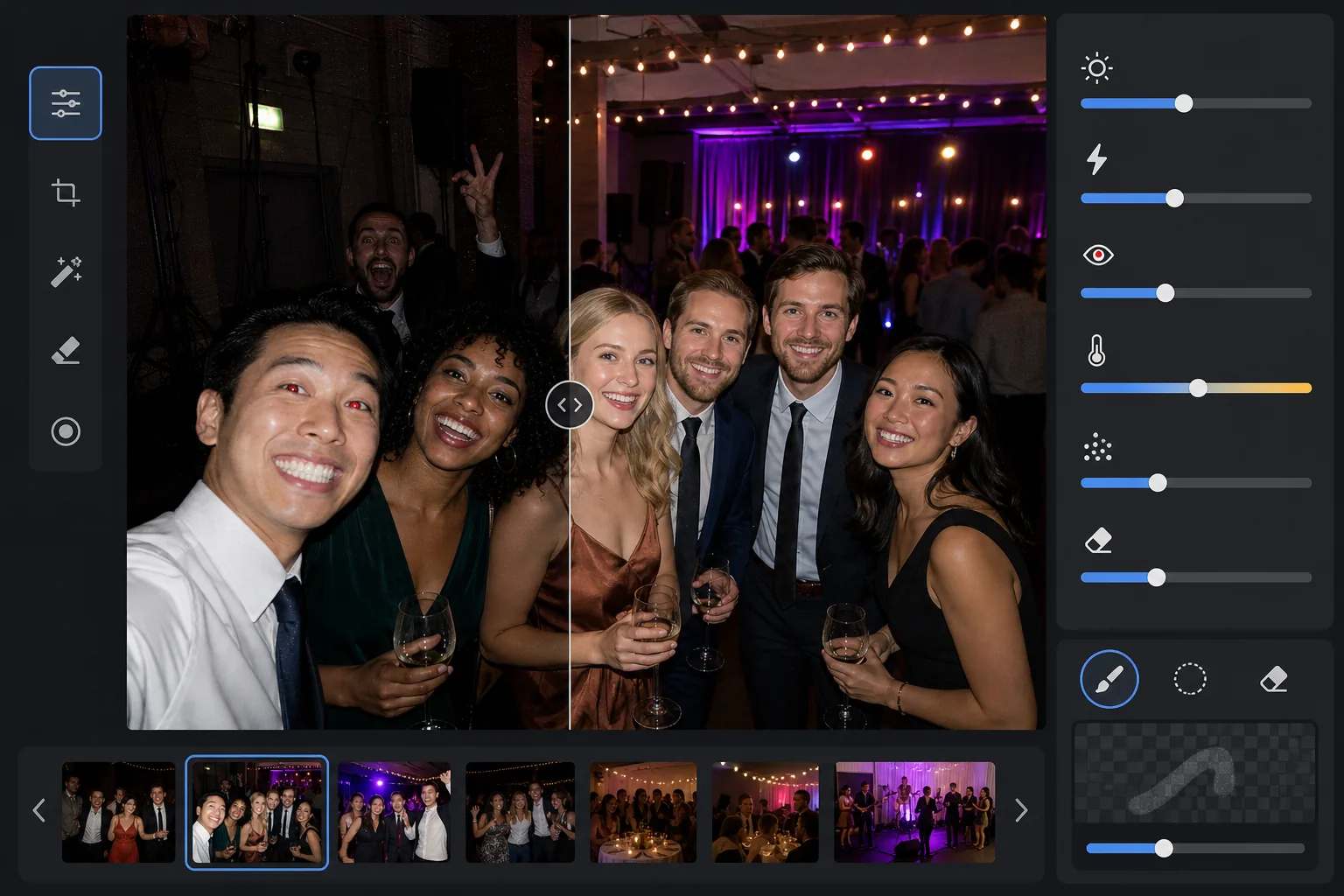
Was diese Vorlage macht
Rettet Eventfotos, die in schwierigen Umgebungen mit wenig Licht aufgenommen wurden — schummrig beleuchtete Festsäle, Konzertorte mit farbiger Bühnenbeleuchtung, abendliche Partys im Freien und Hobbyräume im Keller. AI Enhance stellt bis zu zwei Blendenstufen an Schattendetails wieder her und bewahrt dabei die Stimmung der farbigen Beleuchtung und Dekorationen. Blitzartefakte wie harte Schatten im Vordergrund, rote Augen und überstrahlte Gesichter werden automatisch korrigiert. Magic Eraser entfernt Personen, die ins Bild geraten sind, Notausgangsschilder, gestapeltes Equipment und andere bei Veranstaltungen häufige Störungen.
Vorlageneinstellungen
| Belichtungsanhebung | Adaptive Schattenwiederherstellung mit +2,0 EV bei Erhalt der Atmosphäre |
| Blitzkorrektur | Aufweichen der Vordergrundschatten, Abmildern der Lichter auf blitzbeleuchteter Haut |
| Rote-Augen-Entfernung | Automatische Erkennung und Rekonstruktion der Irisfarbe |
| Weißabgleich | Adaptiv für gemischte Quellen (DJ-Lichter, Glühlampe, Leuchtstoff, Kerzen) |
| Atmosphärenmodus | Warme Stimmungsverstärkung (+8 Wärme, +5 Lebendigkeit im Hintergrund) |
So verwenden Sie diese Vorlage
Eventfotos hochladen
Laden Sie Fotos von jeder Veranstaltung hoch — Konzerte, Hochzeiten, Geburtstagsfeiern, Firmengalas oder Treffen im Garten. Die Vorlage erkennt die Lichtumgebung automatisch und passt die Intensität der Verbesserung daran an, wie stark das Original unterbelichtet ist.
Belichtung wiederherstellen und Blitz korrigieren
AI Enhance hebt Schattenbereiche um bis zu +2 EV an und legt Gesichter und Details frei, die in der Dunkelheit verloren waren. Vom Blitz überstrahlte Lichter auf Motiven im Vordergrund werden abgemildert, um die Hauttextur wiederherzustellen, und harte Schlagschatten hinter blitzbeleuchteten Motiven werden weichgezeichnet, damit sie sich natürlich einfügen.
Rote Augen und Störungen entfernen
Rote Augen durch direkten Blitz werden automatisch erkannt und durch eine natürliche Irisfarbe ersetzt. Magic Eraser entfernt fremde Personen, die ins Bild geraten sind, sichtbares Equipment wie Lautsprecherstapel und Kabelstränge, Notausgangsschilder und anderes Durcheinander, das vom Moment ablenkt.
Verbesserte Fotos exportieren
Laden Sie aufgehellte Eventfotos in der Originalauflösung zum Teilen in sozialen Netzwerken, zum Drucken oder Archivieren herunter. Das Ergebnis bewahrt die Atmosphäre der ursprünglichen Szene — warmes Kerzenlicht, bunte Bühnenlichter oder funkelnde Lichterketten — und macht gleichzeitig Gesichter und Details klar sichtbar.
Profi-Tipps für beste Ergebnisse
- ✓Die +2-EV-Wiederherstellung funktioniert am besten bei Fotos, auf denen die Motive im Original zumindest schwach erkennbar sind. Ist das Foto bis auf wenige Lichtquellen völlig schwarz, enthalten die wiederhergestellten Schatten erhebliches Rauschen. Beginnen Sie mit Fotos, auf denen Sie Silhouetten ausmachen können.
- ✓Bei Konzertfotos mit dramatischer farbiger Bühnenbeleuchtung bewahrt die Weißabgleichkorrektur den künstlerischen Farbstich, anstatt ihn zu neutralisieren. Blaue und magentafarbene Bühnenlichter bleiben erhalten, während die Hauttöne der Motive in Bühnennähe dennoch korrigiert werden.
- ✓Wenn Sie eine Reihe von Fotos derselben Veranstaltung verarbeiten, testen Sie zuerst an einem repräsentativen dunklen Foto und einem Blitzfoto. So können Sie prüfen, ob Helligkeit und Wärme passen, bevor Sie die gesamte Reihe bearbeiten.
- ✓Die Rote-Augen-Korrektur funktioniert sowohl bei menschlichen als auch bei Tieraugen. Bei Tierfotos auf Veranstaltungen verarbeitet die KI das grüne oder gelbe Augenleuchten, das Tiere durch den Kamerablitz erzeugen, und ersetzt es durch eine natürliche dunkle Pupille.
Häufige Fragen
Kann dies völlig schwarze Fotos korrigieren?
+
Die Vorlage stellt bis zu +2 EV an Schattendetails wieder her, was in etwa dem Vervierfachen der Helligkeit eines Fotos entspricht. Wenn das Originalfoto zumindest schwache Umrisse Ihrer Motive zeigt, liefert die Wiederherstellung brauchbare Ergebnisse. Völlig schwarze Bilder, in denen nur punktförmige Lichtquellen sichtbar sind, enthalten in der Regel nicht genügend Sensordaten, um sinnvolle Details wiederherzustellen.
Wirken die Fotos durch das Aufhellen körnig?
+
Etwas Rauschen ist beim Anheben tiefer Schatten unvermeidlich, doch die adaptive Rauschreduzierung zielt gezielt auf die angehobenen Bereiche. Feine Details in gut belichteten Bildteilen bleiben erhalten, während das Rauschen in den wiederhergestellten Schatten geglättet wird. Das Ergebnis ist deutlich besser, als die Helligkeit einfach in einem einfachen Fotoeditor zu erhöhen.
Funktioniert das bei Konzertfotos mit Bühnenbeleuchtung?
+
Ja. Die Vorlage ist darauf ausgelegt, gemischte und farbige Beleuchtung zu verarbeiten. Bühnenlichter in Blau, Rot, Magenta und Grün bleiben als künstlerische Elemente der Szene erhalten, statt als zu korrigierende Farbstiche behandelt zu werden. Gesichter von Motiven in Bühnennähe erhalten einen selektiven Weißabgleich, während die Lichtstimmung des Hintergrunds erhalten bleibt.
Machen Sie jedes Eventfoto teilenswert
Laden Sie dunkle, vom Blitz überstrahlte oder von roten Augen betroffene Eventfotos hoch und erhalten Sie helle, natürlich wirkende Ergebnisse, die die Energie des Moments einfangen.
Kostenlos testenRelated templates
More events templates for your workflow.