
Restaurant-Menüfoto
Verwandeln Sie Handyfotos Ihrer Gerichte in Bilder, die für Menütafeln und Liefer-Apps bereit sind. Diese Vorlage verstärkt die Farbbrillanz der Speisen, säubert unordentliche Anrichte-Hintergründe, isoliert Gerichte für App-Vorschaubilder und gibt sie in genau den Abmessungen aus, die DoorDash, UberEats und Grubhub verlangen – ganz ohne Foodfotografen.
Diese Vorlage kostenlos testenFood & Beverage template preview
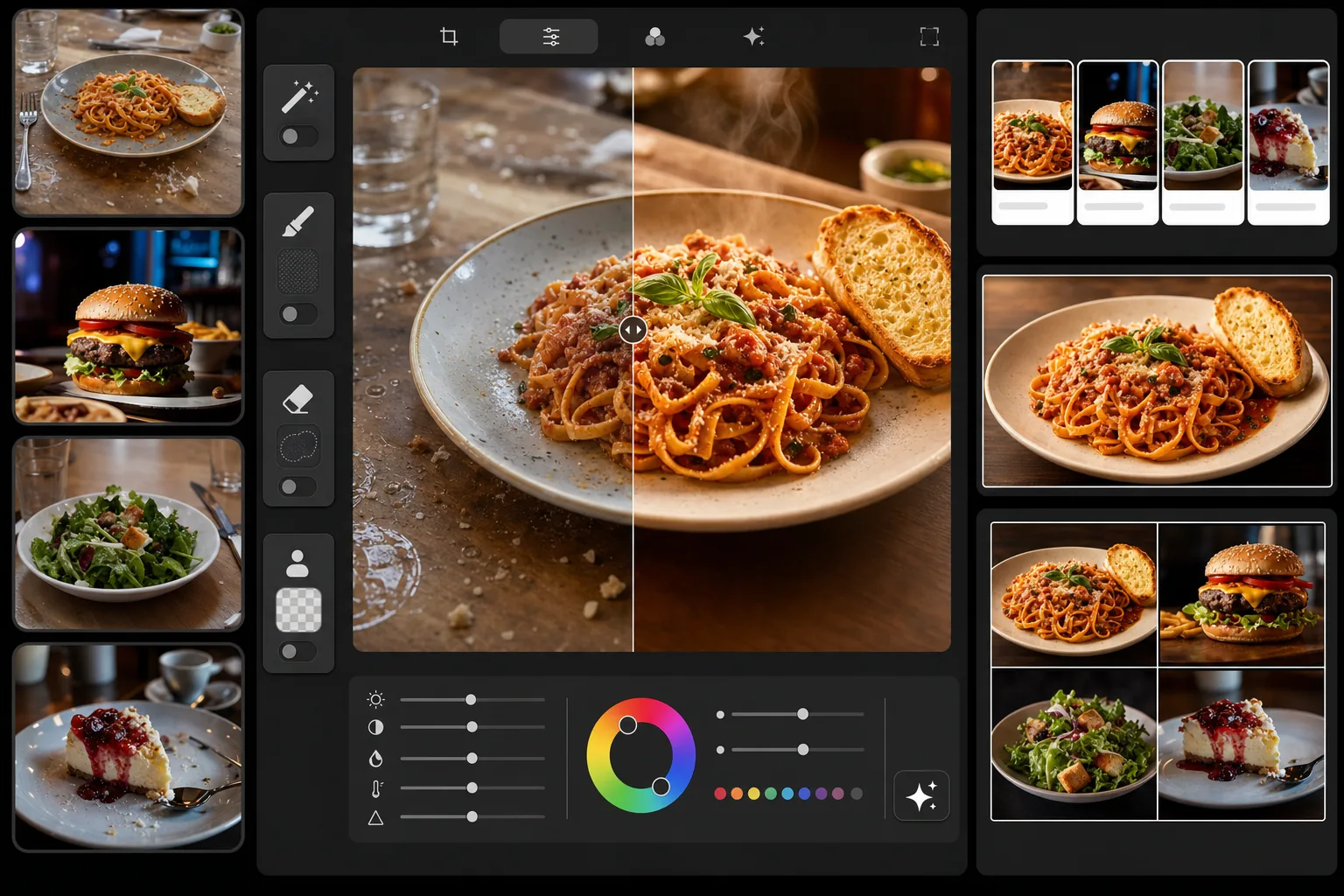
Was diese Vorlage macht
Verwandelt beiläufige Speisefotos in professionelle Bilder in Menüqualität. Die Vorlage verstärkt die warmen, appetitlichen Farbtöne, die Food-Fotografie wirkungsvoll machen – sie vertieft das Rot in Saucen, lässt Brotkrusten goldbraun erscheinen und Grünes frisch wirken. Magic Eraser entfernt unordentliche Elemente auf dem Tisch, Fingerabdrücke auf Tellern und herumliegende Krümel. Background Eraser isoliert Gerichte für saubere Vorschaubilder in Liefer-Apps. Das Ergebnis ist für digitale Menütafeln, gedruckte Speisekarten und jede große Lieferplattform passend dimensioniert.
Vorlageneinstellungen
| Farbbrillanz | Für Speisen optimiert (+15 % warme Sättigung, Rot-/Gelb-/Grüntöne) |
| Ausgabegröße (Liefer-Apps) | 1200×800px (Querformat 3:2, DoorDash/UberEats-Standard) |
| Ausgabegröße (Menütafel) | 1920×1080px (digitale Menüanzeige 16:9) |
| Weißabgleich | 5200K warmes Tageslicht (gleicht kühles LED-Licht im Restaurant aus) |
| Hintergrundoption | Saubere Freistellung oder dunkle Fläche (#2C2C2C) für dramatisches Anrichten |
| Dateiformat | JPEG 88 % Qualität (schnelles Laden in Liefer-Apps) |
So verwenden Sie diese Vorlage
Fotografieren Sie Ihr Gericht
Nehmen Sie ein Foto in einem 45-Grad-Winkel oder direkt von oben auf. Nutzen Sie das hellste verfügbare Licht – nahe einem Fenster bei Tageslicht ist ideal. Schalten Sie nach Möglichkeit die warmen Deckenleuchten des Restaurants aus, da sie starke Orangestiche erzeugen, die schwerer zu korrigieren sind als natürliches Licht.
Räumen Sie die Szene auf
Magic Eraser entfernt Unordnung auf dem Tisch, herumliegende Krümel, Fingerabdrücke auf Tellern, Kondensationsringe und alle im Hintergrund sichtbaren Küchengeräte. Für Vorschaubilder in Liefer-Apps löst Background Eraser das Gericht vollständig von der Tischfläche.
Verbessern Sie die Speisefarben
AI Enhance wendet ein speisenspezifisches Color-Grading an: Saucen wirken vollmundiger, Brot- und Gebäckkrusten erhalten einen warmen Goldton, Grünes erscheint frisch und kräftig und Käse bekommt einen appetitlichen Schmelzglanz. Die Verbesserung ist so abgestimmt, dass sie appetitlich aussieht, ohne künstlich übersättigt zu wirken.
Exportieren Sie für Ihre Plattform
Wählen Sie die Voreinstellung für Liefer-Apps (1200×800px für DoorDash, UberEats, Grubhub), die Voreinstellung für die digitale Menütafel (1920×1080px) oder eine eigene Größe für Ihre gedruckte Speisekarte. Jeder Export wird für schnelles Laden auf der Zielplattform komprimiert.
Profi-Tipps für beste Ergebnisse
- ✓Fotografieren Sie Gerichte innerhalb von 90 Sekunden nach dem Anrichten. Dampf, Saucenglanz und die Beschaffenheit von Eis verschlechtern sich schnell. Die Vorlage kann Farben verstärken, aber geschmolzenes Eis oder aufgesogene Sauce nicht wiederherstellen.
- ✓Wischen Sie den Tellerrand vor der Aufnahme mit einem leicht feuchten Papiertuch sauber. Magic Eraser kann Saucenschlieren entfernen, aber ein sauberer Rand im Originalfoto liefert das gepflegteste Ergebnis.
- ✓Für Vorschaubilder in Liefer-Apps eignet sich der Blick von oben (Flat-Lay) am besten, da der quadratische oder querformatige Ausschnitt das ganze Gericht zeigt. Der 45-Grad-Winkel ist besser für Menütafeln und gedruckte Speisekarten, wenn Sie Höhe und Schichten zeigen möchten.
- ✓Fotografieren Sie mehrere Menügerichte auf derselben Fläche mit demselben Licht, damit Ihre gesamte Speisekarte einheitlich aussieht. Liefer-Apps zeigen alle Ihre Gerichte in einem Raster an, und visuelle Einheitlichkeit signalisiert Kunden Professionalität.
Häufige Fragen
Welche Abmessungen verlangen Liefer-Apps?
+
DoorDash empfiehlt mindestens 1200×800px im Querformat (Verhältnis 3:2). UberEats verlangt mindestens 320×320px, empfiehlt aber 1200×800px für die beste Darstellungsqualität. Grubhub verwendet ein ähnliches Querformat. Die Liefer-App-Voreinstellung der Vorlage gibt 1200×800px aus und erfüllt oder übertrifft damit die Anforderungen aller drei Plattformen.
Sehen die Speisen unrealistisch aufgehübscht aus?
+
Das Color-Grading ist speziell auf Food-Fotografie abgestimmt – es hebt die natürlichen, appetitlichen Eigenschaften der Gerichte hervor, ohne sie künstlich übersättigt oder grell wirken zu lassen. Das Ergebnis sieht aus wie ein gut ausgeleuchtetes Speisefoto, nicht wie ein gefilterter Instagram-Beitrag.
Kann ich dasselbe Foto für meine Menütafel und Liefer-Apps verwenden?
+
Die Vorlage unterstützt mehrere Export-Voreinstellungen aus einem einzigen hochgeladenen Bild. Exportieren Sie mit 1920×1080px für Ihre digitale Menütafel und mit 1200×800px für Liefer-Apps. Der Zuschnitt passt sich jedem Format an und hält das Gericht dabei zentriert und gut im Bild.
Bringen Sie jedes Gericht auf Ihrer Speisekarte bestmöglich zur Geltung
Laden Sie Ihre Speisefotos hoch und erhalten Sie in Sekunden Bilder, die für Liefer-Apps und Menütafeln bereit sind. Kein Foodfotograf und keine Styling-Kenntnisse erforderlich.
Kostenlos testenRelated templates
More food & beverage templates for your workflow.