
Styling für Food-Fotografie
Lassen Sie Gerichte auf Fotos so appetitlich aussehen wie auf dem Teller. Diese Vorlage steigert die Farbbrillanz von Saucen, Grünzeug und Proteinen, entfernt verstreute Utensilien, Fingerabdrücke auf Tellern und sichtbare Hände, schärft die Texturen von Kruste und Garnitur und gradiert das Bild mit warmen, einladenden Tönen, die auf Instagram und Menütafeln gut wirken.
Diese Vorlage kostenlos testenFood & Beverage template preview
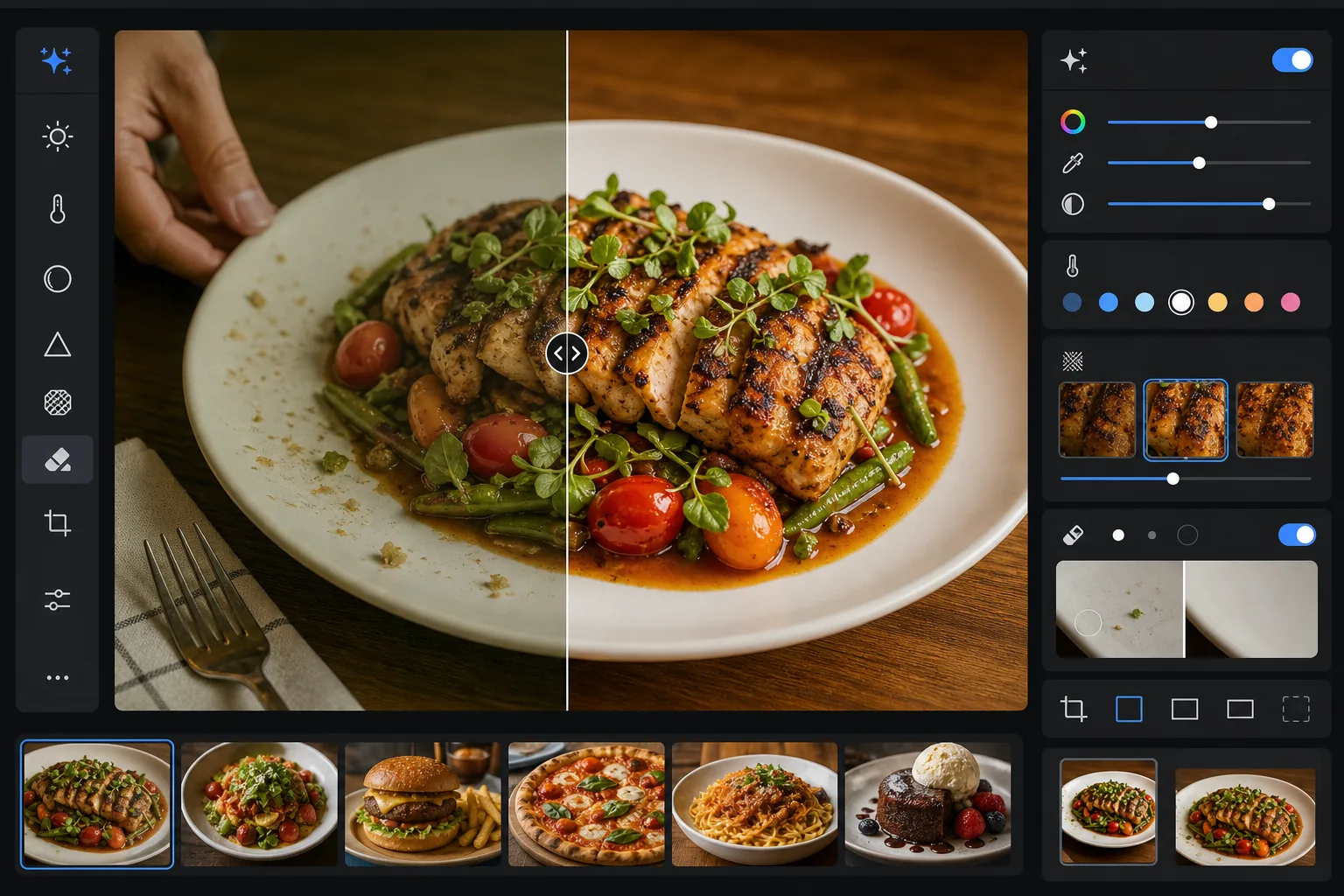
Was diese Vorlage macht
Schließt die Lücke zwischen dem, wie Essen in echt aussieht, und wie es auf Fotos wirkt. Restaurant- und Deckenbeleuchtung erzeugt oft gelbe oder grüne Farbstiche, die frische Zutaten matt erscheinen lassen. AI Enhance korrigiert den Weißabgleich, sodass Grüntöne lebendig, Rottöne satt und Weißtöne klar werden, ohne so stark zu übersättigen, dass es künstlich aussieht. Magic Eraser entfernt ablenkende Elemente – eine im Bild liegen gebliebene Gabel, die Hand eines Kellners am Rand, Wasserflecken am Tellerrand, Krümel auf der Tischfläche. Die selektive Schärfung bringt die Textur von gegrillten Oberflächen, knusprigen Krusten und frischen Kräutern hervor, die Food-Fotos greifbar wirken lassen.
Vorlageneinstellungen
| Farbbrillanz | +15 Brillanz, +8 Sättigung (selektiv bei Rot, Grün, Gelb) |
| Weißabgleich | Food-optimiert neutral (entfernt Gelbstich, erhält warme Töne) |
| Texturschärfung | Detailbewusst (verstärkt Kruste, Grillstreifen, Kräuterdetails) |
| Tellerreinigung | Automatische Erkennung von Schlieren, Tropfen und Fingerabdrücken am Tellerrand |
| Wärmegrad | +5 Wärme mit Tonwertkurve im Stil der goldenen Stunde |
| Ausgabe | 1080×1080px (Instagram), 2400×1600px (Menü/Website) Dual-Export |
So verwenden Sie diese Vorlage
Laden Sie Ihr Food-Foto hoch
Laden Sie ein Foto des angerichteten Gerichts hoch, aufgenommen von oben, im 45-Grad-Winkel oder frontal. Natürliches Fensterlicht bildet den besten Ausgangspunkt, aber die Vorlage bewältigt auch fluoreszierende Restaurantbeleuchtung und warme Tischlampen mit Wolframfaden.
Farbe und Textur verbessern
AI Enhance korrigiert den Farbstich, steigert die Brillanz selektiv, sodass Grün-, Rot- und Goldtöne hervortreten, ohne grell zu wirken, und schärft Oberflächentexturen wie Grillröstung, Zuckerglasur und frische Kräuterblätter. Der Wärmegrad verleiht eine einladende Stimmung der goldenen Stunde.
Bildausschnitt aufräumen
Magic Eraser entfernt verstreute Utensilien, Serviettenecken, sichtbare Hände, Fingerabdrücke und Saucentropfen am Tellerrand, Krümel auf dem Tisch und alle Requisiten, die die Komposition stören. Die KI füllt die bereinigten Bereiche mit der umgebenden Tisch- oder Telleroberfläche auf.
Für Ihre Plattform exportieren
Laden Sie in einem oder beiden Formaten herunter: 1080x1080px quadratisch für Instagram und soziale Medien oder 2400x1600px im Querformat für Restaurant-Websites, digitale Menütafeln und Einträge in Lieferdienst-Apps. Beide sind farboptimiert für die Bildschirmdarstellung in sRGB.
Profi-Tipps für beste Ergebnisse
- ✓Fotografieren Sie innerhalb der ersten 90 Sekunden nach dem Anrichten. Salat welkt, Saucen bilden eine Haut, Eis schmilzt und Dampf hört schnell auf aufzusteigen. Wenn Sie den Moment verpasst haben, kann die Vorlage Farbe und Textur verbessern, aber keinen welken Salat oder geschmolzenes Eis wiederherstellen.
- ✓Achten Sie bei Aufsicht-Flatlay-Aufnahmen darauf, dass Ihre Lichtquelle seitlich statt direkt von oben kommt. Seitenlicht erzeugt die Mikroschatten auf den Food-Texturen, die der Schärfungsalgorithmus verstärkt – direktes Licht von oben flacht diese Schatten ab und lässt das Essen weniger plastisch erscheinen.
- ✓Beim Entfernen einer Gabel oder eines Utensils, das das Essen überlappt, rekonstruiert die KI die Food-Textur dahinter. Für die saubersten Ergebnisse stellen Sie sicher, dass das Utensil auf einer schlichten Fläche wie dem Tellerrand oder der Tischdecke liegt und nicht im Gericht selbst vergraben ist.
- ✓Verarbeiten Sie bei Restaurantmenüs alle Gerichtsfotos in einem einzigen Stapel, um eine einheitliche Farbgradierung und Wärme über das gesamte Menü hinweg zu gewährleisten. Eine uneinheitliche Farbtemperatur zwischen den Fotos lässt ein Menü unprofessionell wirken, selbst wenn jedes einzelne Foto für sich gut aussieht.
Häufige Fragen
Lässt das mein Essen künstlich übersättigt aussehen?
+
Die Farbverbesserung ist speziell für die Food-Fotografie kalibriert – sie zielt auf die Sättigungsbereiche, in denen Essen von Natur aus liegt (das Grün von Kräutern, das Rot von Tomaten und Fleisch, die Goldtöne von Brot und frittierten Speisen), während andere Farben weniger beeinflusst werden. Das Ergebnis sieht appetitlich und lebendig aus, ohne ins Grelle oder Plastikhafte abzudriften.
Kann ich das für Einträge in Lieferdienst-Apps verwenden?
+
Ja. Die Ausgabe in 2400x1600px übertrifft die Bildanforderungen von DoorDash, Uber Eats, Grubhub und anderen Lieferplattformen. Farbgradierung und Schärfung sind für die Ansicht auf kleinen Bildschirmen optimiert, wo Food-Fotos schon in Miniaturgröße sofort ins Auge fallen müssen.
Funktioniert das für Getränke und Cocktails?
+
Ja. Die Vorlage geht gut mit Flüssigkeiten, Glaswaren und Garnituren um. Die Steigerung der Farbbrillanz funktioniert besonders gut bei Cocktails mit Fruchtgarnituren und geschichteten Farben. Die Reinigung entfernt Fingerabdrücke auf Glasoberflächen, Wasserringe und im Bild zurückgelassene Barwerkzeuge.
Lassen Sie jedes Gerichtsfoto professionell gestylt aussehen
Laden Sie Food-Fotos von Ihrem Smartphone oder Ihrer Kamera hoch und erhalten Sie lebendige, saubere, Instagram-fertige Bilder, die den Betrachtern Appetit machen.
Kostenlos testenRelated templates
More food & beverage templates for your workflow.