
Passfoto-Vorlage
Sparen Sie sich die Fotokabine in der Drogerie. Diese Vorlage erstellt aus jedem gut ausgeleuchteten Selfie regierungskonforme Passfotos — weißer Hintergrund, korrektes Verhältnis von Kopf zu Bildausschnitt (1 bis 1-3/8 Zoll vom Kinn bis zum Scheitel) und eine 2×2-Zoll-Ausgabe bei 600 DPI, die den Anforderungen des US-Außenministeriums, des britischen HMPO, der EU und der Schengen-Visa entspricht.
Diese Vorlage kostenlos testenProfessional template preview
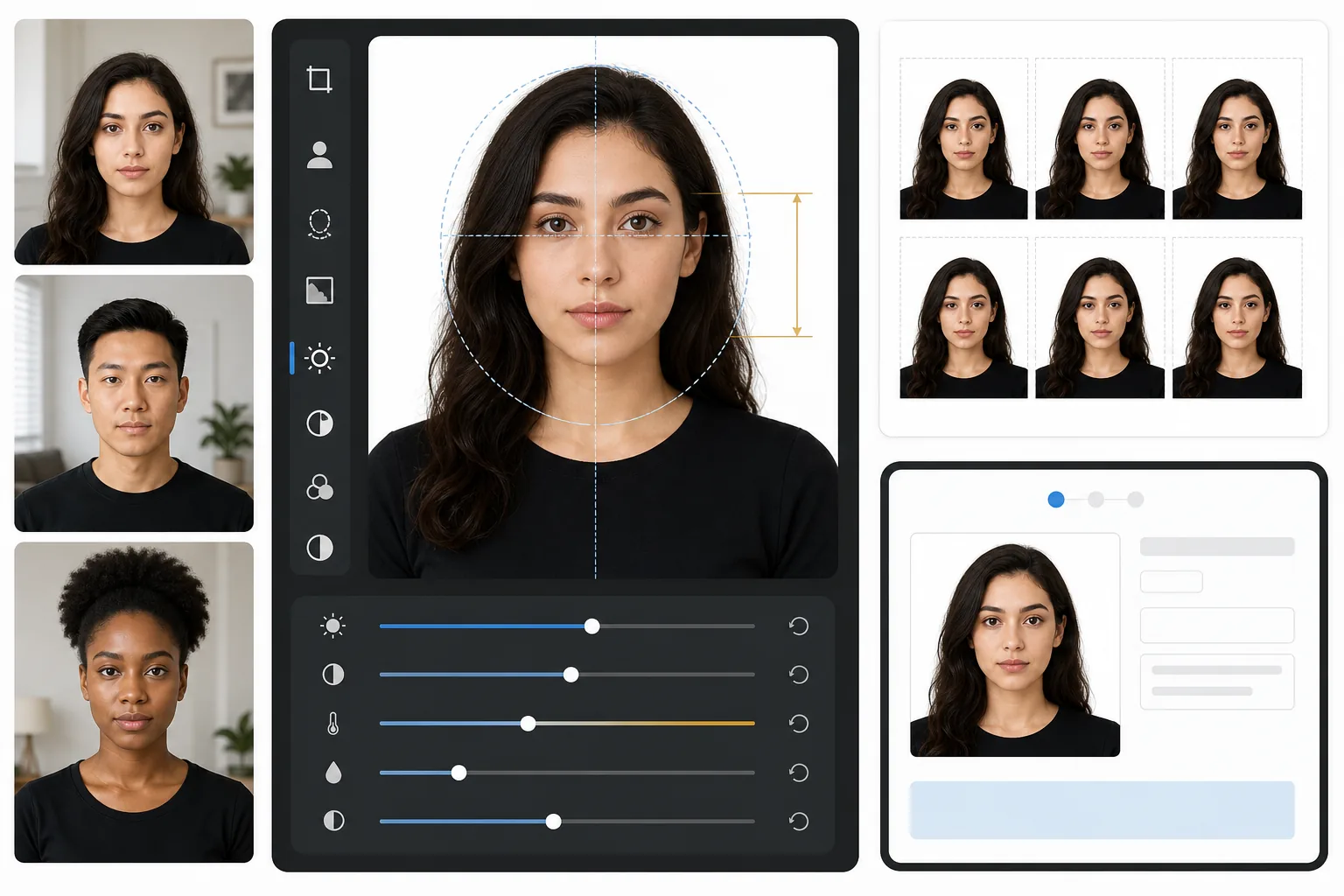
Was diese Vorlage macht
Wandelt ein normales Porträtfoto in ein regierungskonformes Pass- oder Visafoto um. Die Vorlage entfernt jeden Hintergrund und ersetzt ihn durch reines Weiß, schneidet auf die genauen vom US-Außenministerium geforderten Maße von 2×2 Zoll (51×51mm) zu, positioniert den Kopf innerhalb des erforderlichen Größenbereichs und sorgt für gleichmäßige Beleuchtung ohne harte Schatten. Die Ausgabe ist bei 600 DPI druckfertig für den Druck auf Fotopapier oder die direkte digitale Einreichung.
Vorlageneinstellungen
| Ausgabemaße | 2×2 Zoll (51×51mm) bei 600 DPI (1200×1200px) |
| Hintergrund | Reines Weiß (#FFFFFF), keine Verläufe oder Texturen |
| Kopfgröße | 1 Zoll bis 1-3/8 Zoll (25–35mm) vom Kinn bis zum Scheitel |
| Augenposition | Augen zentriert zwischen 1-1/8 und 1-3/8 Zoll von unten |
| Farbprofil | sRGB (kompatibel mit Fotolaboren) |
| Dateiformat | JPEG mit 100% Qualität oder PNG (für digitale Einreichungsportale) |
So verwenden Sie diese Vorlage
Machen Sie ein Porträt von vorne
Stellen Sie sich mit gleichmäßiger Beleuchtung im Gesicht vor eine schlichte Wand. Nutzen Sie natürliches Tageslicht oder zwei Lampen im gleichen Abstand auf jeder Seite. Schauen Sie mit neutralem Gesichtsausdruck direkt in die Kamera, beide Ohren sichtbar.
Hintergrund entfernen und ersetzen
Background Eraser entfernt jeden Hintergrund — Tapetenmuster, Schatten, Möbelkanten — und ersetzt ihn durch das erforderliche reine Weiß. Das Werkzeug bewahrt natürliche Haarkonturen und Brillengestelle, ohne Halo-Artefakte zu erzeugen.
Automatisch konform zuschneiden
Die Vorlage erkennt Ihr Gesicht und positioniert es innerhalb des von der Regierung vorgegebenen Kopfgrößenbereichs. Die Augen werden auf der richtigen Höhe platziert und das Maß vom Kinn bis zum Scheitel liegt innerhalb der Anforderung von 1 bis 1-3/8 Zoll.
Drucken oder digital einreichen
Laden Sie die 600-DPI-Datei zum Drucken auf 4×6-Hochglanzfotopapier herunter (vier 2×2-Fotos pro Bogen) oder reichen Sie die digitale Datei direkt bei Online-Portalen zur Passverlängerung und Visumbeantragung ein.
Profi-Tipps für die besten Ergebnisse
- ✓Nutzen Sie natürliches Tageslicht von vorne durch ein Fenster — es erzeugt die weiche, gleichmäßige Ausleuchtung, die Passbehörden bevorzugen, und beseitigt die harten Schatten von Blitzaufnahmen.
- ✓Nehmen Sie nach Möglichkeit vor der Aufnahme die Brille ab. Viele Länder verlangen inzwischen Fotos ohne Brille, und selbst wo sie erlaubt ist, sind Reflexionen und Gestellschatten der häufigste Ablehnungsgrund.
- ✓Tragen Sie ein einfarbiges Oberteil, das sich vom Weiß abhebt — Dunkelblau, Schwarz oder Dunkelgrün eignen sich am besten. Weiße Kleidung verschmilzt mit dem Hintergrund und kann zur Ablehnung führen.
- ✓Lassen Sie das Foto lieber von jemand anderem aus Armlänge aufnehmen, statt ein Selfie zu machen. Selfies mit der Frontkamera erzeugen eine leichte Weitwinkelverzerrung, die die Gesichtsproportionen unnatürlich wirken lassen und eine manuelle Prüfung auslösen kann.
Häufige Fragen
Wird dieses Foto vom US-Außenministerium akzeptiert?
+
Die Vorlage folgt den genauen Spezifikationen, die in den Passfoto-Anforderungen des US-Außenministeriums veröffentlicht sind: 2×2 Zoll, weißer Hintergrund, Kopfgröße zwischen 1 und 1-3/8 Zoll und korrekte Augenpositionierung. Die Annahme hängt jedoch auch von Ihrem Gesichtsausdruck, dem Kopfwinkel und der Beleuchtung ab — die Vorlage übernimmt Hintergrund, Größenanpassung und Zuschnitt, kann aber geschlossene Augen oder einen gedrehten Kopf nicht korrigieren.
Funktioniert das auch für Passfotos außerhalb der USA?
+
Die Standardeinstellung gilt für US-Pässe (2×2 Zoll), aber die Maße von Passfotos variieren je nach Land — das Vereinigte Königreich verlangt zum Beispiel 35×45mm und Indien 2×2 Zoll mit anderen Kopfgrößenverhältnissen. Die zentrale Hintergrundentfernung und Gesichtspositionierung funktionieren für jedes Land; passen Sie die Zuschnittmaße an Ihre spezifische Anforderung an.
Kann ich das zu Hause drucken?
+
Ja. Die 600-DPI-Ausgabe druckt auf jedem Fotodrucker exakt in 2×2 Zoll. Für die besten Ergebnisse verwenden Sie Hochglanz- oder Mattfotopapier und drucken Sie vier Kopien auf einem einzigen 4×6-Bogen. Die meisten Fotokioske in Drogerien akzeptieren auch die digitale Datei für hochwertige Ausdrucke.
Erhalten Sie konforme Passfotos, ohne das Haus zu verlassen
Laden Sie ein Porträt von vorne hoch und erhalten Sie in Sekunden ein Passfoto nach Regierungsvorgaben. Drucken Sie zu Hause oder reichen Sie es digital ein.
Kostenlos testenRelated templates
More professional templates for your workflow.
Professionelle LinkedIn-Headshot-Vorlage. Sauberer Hintergrund, natürliche Hautverschönerung und der polierte Look, der 14x mehr Profilaufrufe ermöglicht.
Professionelle Headshot-Vorlage für Schauspieler und Models. Erfüllen Sie die Standards von Casting-Direktoren mit druckfertiger 8×10-Ausgabe, natürlicher Retusche und sauberen Hintergründen für Agentureinreichungen.
Verbessern Sie zahnmedizinische Marketingfotos mit natürlicher Zahnaufhellung, konsistenten Porträthintergründen und Vorher-Nachher-Vergleichsbildern für Praxis-Websites und soziale Medien.